
If a witness statement misses the basics, the whole incident record gets weaker. I’d narrow the field to five template types: a company form, a workers’ comp form, a one-page paper form, a digital incident form, and an OSHA-focused form.
Here’s the short version: each one should ask the same core questions – who, what, when, where, and how – then add jobsite details like PPE, equipment, weather, and a signed statement. That matters because OSHA’s Focus Four hazards – falls, struck-by, caught-in/between, and electrocution – make up more than 60% of construction deaths mentioned in the article.
If I were picking fast, I’d use this rule:
- Company template for day-to-day incident records
- Workers’ comp template for injury claims
- Paper template for immediate use on-site
- Digital template for multi-site reporting and file routing
- OSHA-aligned template for high-risk incidents and legal review
Quick Comparison
| Template Type | Best For | Main Format | Detail Level | Main User |
|---|---|---|---|---|
| Company template | Internal reviews | PDF or digital | Medium | Supervisor or safety staff |
| Workers’ comp template | Injury claims | PDF or digital | High | HR or claims staff |
| Field-ready paper template | Immediate on-site statements | Paper | Low to medium | Foreman or crew lead |
| Digital incident template | Multi-site tracking | Mobile or cloud form | High | Safety or project manager |
| OSHA-aligned template | Serious incidents, reporting, legal review | Paper, PDF, or digital | Very high | Safety director or legal team |
What I like about this list is that it makes the choice simple: some forms are built for speed, others for deeper records. For most crews, one digital form plus one paper backup is enough.
How To Write Employee Incident Report with Sample and Explanation | Writing Tutorials
sbb-itb-aa28329
What a Good Construction Witness Statement Template Should Include
Every template below should collect the same core details, even if the layout looks different.
Start with the witness’s identity fields: full name, contact information, employer or subcontractor, and job title or trade. This tells you who the person is and what role they had on the site.
Then log the incident’s time and location. Use exact fields for project name, site location, date, time, and supervisor on duty. In construction, small details matter. A vague time or half-written site name can cause headaches later.
After that, add context. Include what task the witness was performing, where they were standing or working in relation to the event, any equipment or machinery involved, and site conditions like weather or lighting. These details help show what the witness was actually in a position to notice.
Leave room for a chronological, first-person account of what they saw, heard, and did. Keep it in order. Keep it in the witness’s own words. And keep it limited to facts, not guesses or blame. Open-ended prompts work best here because they let the witness describe the event without being pushed in a certain direction.
It’s also smart to include a sketch box or photo upload field. Site conditions can change fast, and a sketch or image can help preserve what the area looked like at that moment.
End with a signature, date, and truth statement. That final section helps confirm the statement was reviewed and signed by the witness.
These fields are the baseline for every template in this list.
1. Construction Company Witness Statement Template
A company-branded witness statement template gives your team one clear starting point across jobs and crews. Instead of scrambling after an incident, supervisors and investigators can use the same fields and prompts every time. This option works best when you need a steady company record that supervisors, safety staff, and claims teams can use as-is, without extra cleanup or reformatting.
Witness and Incident Identification Fields
The template should capture the witness’s full name, phone number, job title or trade, and employer or subcontractor name. For the incident itself, include the report or case number, exact date and time, project name, full site address, and the specific on-site location, such as “3rd floor scaffolding” or “excavation trench B”.
Construction-Specific Observation Prompts
A good template should do more than act like a generic form. It should prompt for weather conditions, equipment or machinery involved, and a PPE compliance checklist covering hard hat, safety glasses, fall protection, hi-vis vest, boots, and respirator.
It should also guide the witness record around OSHA’s Focus Four hazards: falls, struck-by, caught-in/between, and electrocution. Those four hazards account for more than 60% of construction deaths each year. That kind of prompt helps people record what matters while the details are still clear.
Compliance and Claims Documentation Support
A strong company template should include:
- An OSHA recordability toggle based on 29 CFR 1904.7
- A statement of truth
- Signature fields for both the witness and the investigator
Using one form across projects keeps witness prompts consistent and can reduce evidence gaps. On multi-employer sites, the template should also identify each employer’s role: controlling, creating, exposing, or correcting. That helps sort out liability under OSHA’s multi-employer citation policy. For internal investigations and claim files, that makes this template a solid default.
Format Fit for Field, Office, or Digital Workflows
Use the same template in paper, PDF, or mobile form, with fields for photos, video, CCTV, GPS tags, and digital signatures. One form that works in the field, in the office, and inside a digital system cuts out the need to rework records later.
When an incident starts moving toward a claim, the next template tightens the record even more.
2. Workers’ Compensation Witness Statement Template
Use this template when an incident may turn into a workers’ compensation claim.
Witness and Incident Identification Fields
Add the injured worker’s name, job title or trade, employer, years in the role, and injury details, including the body part involved and the severity.
Construction-Specific Observation Prompts
Include prompts for weather, equipment, PPE use, the task in progress, and whether standard safety procedures were followed. That kind of detail can help speed up claims review and cut down on back-and-forth later.
Compliance and Claims Documentation Support
Include an OSHA recordable toggle and a Statement of Truth to support OSHA 300 Log review and claim documentation. In practice, this gives teams a cleaner paper trail when a claim moves from the jobsite to HR, safety, or insurance.
Format Fit for Field, Office, or Digital Workflows
Make the form usable in the field and in the office with mobile entry, photo and video uploads, digital signatures, and PDF export. Some teams handle everything on a phone or tablet. Others still need a printed form they can fill out on the spot. For crews that still need a paper option, the next template works without a device.
3. Field-Ready Paper Witness Statement Template
When a crew needs a statement before anyone leaves the jobsite, a one-page paper form does the job. Keep copies in the site trailer or on a clipboard so the form is there the moment an incident happens – before people scatter, memories blur, or site conditions shift.
Witness and Incident Identification Fields
The form should collect the witness’s full name, phone number, trade, employer, and years in role. On the incident side, include the report or case number, the exact date and time, the project name, the full site address, and the exact on-site location, such as "3rd floor scaffolding" or "excavation trench B".
Construction-Specific Observation Prompts
Use prompts that are easy to fill out by hand and push people toward clear details. For paper forms, that usually means checkbox-style fields for weather, equipment, task, and permit status, plus a PPE checklist covering hard hats, safety glasses, high-visibility vests, fall harnesses, and respirators. The form should also leave open lines for a short handwritten narrative.
Record whether required PPE was worn. That one detail can matter a lot later.
Compliance and Claims Documentation Support
Add a structured narrative section where the witness explains the sequence of events in their own words – what they saw, heard, and did right after the incident. A small OSHA reporting reminder box also helps keep the form tied to compliance needs without making it harder to use in the field.
Format Fit for Field, Office, or Digital Workflows
The big draw of paper is simple: it works on-site, right away. After the form is completed, scan it into the company’s digital record system, or move to the next template if your team wants a mobile-first workflow.
4. Digital Incident Management Witness Statement Template
For crews that need faster routing and fewer transcription mistakes, digital forms keep the same witness facts inside one workflow. When paper forms drag out reporting, digital incident management templates pull witness details, photos, timestamps, and follow-up into a single record.
Witness and Incident Identification Fields
Digital forms can use required fields and validation rules to cut down on missing information. They should collect the witness’s full name, contact details, job title or trade, employer or subcontractor name, and years of experience in the role, along with a case number, date and time of the incident, project name or number, and the full site address.
An exact location field matters even more on multi-employer sites. It lets a witness note a spot like "excavation trench B" or "3rd floor scaffolding". Many digital templates also include a witness involvement category, such as:
- Witness
- Supervisor
- Coworker
- First responder
This setup fits multi-site projects well because supervisors can see new reports right away.
Construction-Specific Observation Prompts
Dropdowns and toggles can replace open-ended blanks, which makes it easier to log weather conditions, equipment involved, and PPE worn. Many templates also line up prompts with OSHA’s Focus Four hazards – falls, struck-by, caught-in/between, and electrocution – which account for more than 60% of construction deaths each year.
That structure helps standardize root cause analysis. It also makes job site patterns easier to spot.
Compliance and Claims Documentation Support
One important feature in digital templates is the OSHA recordable toggle. A recordability field can flag required reporting windows under 29 CFR 1904.39. Digital templates can also support corrective action tracking by assigning follow-up tasks with target dates and documenting preventive measures.
Format Fit for Field, Office, or Digital Workflows
Digital forms can support offline entry that syncs once service returns, auto-timestamping, digital signatures, and photo or video attachments, all without manual transcription. Submitted statements should also export to PDF for sharing with safety, insurance, or legal teams.
If the incident also has to meet strict reporting and documentation rules, the next template is the most compliance-heavy option.
5. OSHA– and Compliance-Aligned Witness Statement Template
For incidents with the highest compliance risk, use a stricter form that keeps the legal record clean. A basic form can miss details needed for OSHA, insurance, or legal review. This template is meant to collect facts in a clear way and create an audit-ready record.
Witness and Incident Identification Fields
Start with the employer’s OSHA role and the date the statement was taken. That helps preserve the record for an inspection or claim review. On multi-contractor jobs, note whether the witness’s employer is the controlling, creating, exposing, or correcting employer under OSHA’s multi-employer citation policy. Also include the incident date and time, exact location, and project reference.
After that basic incident data is in place, the form should pin down the witness’s firsthand observations.
Construction-Specific Observation Prompts
Use neutral, open-ended prompts that document the sequence of events, hazard exposure, and immediate response without steering the witness. Leave room for a chronological firsthand account.
Compliance and Claims Documentation Support
A compliance-focused template should include:
- An OSHA recordability field tied to 29 CFR 1904.7
- A PPE checklist referencing 29 CFR 1926.100-107
- A corrective action section to document abatement steps
- A formal Statement of Truth signed by the witness and a supervisor
Fatalities must be reported to OSHA within 8 hours. In-patient hospitalizations, amputations, or eye losses must be reported within 24 hours.
Format Fit for Field, Office, or Digital Workflows
This template should work as a paper form, PDF, or mobile digital form. That makes it easier to support real-time entry, photo attachments, and instant sharing with safety, legal, or insurance teams. One more thing: state-plan requirements may be stricter than federal OSHA.
Use the comparison below to match this template to your reporting and compliance needs.
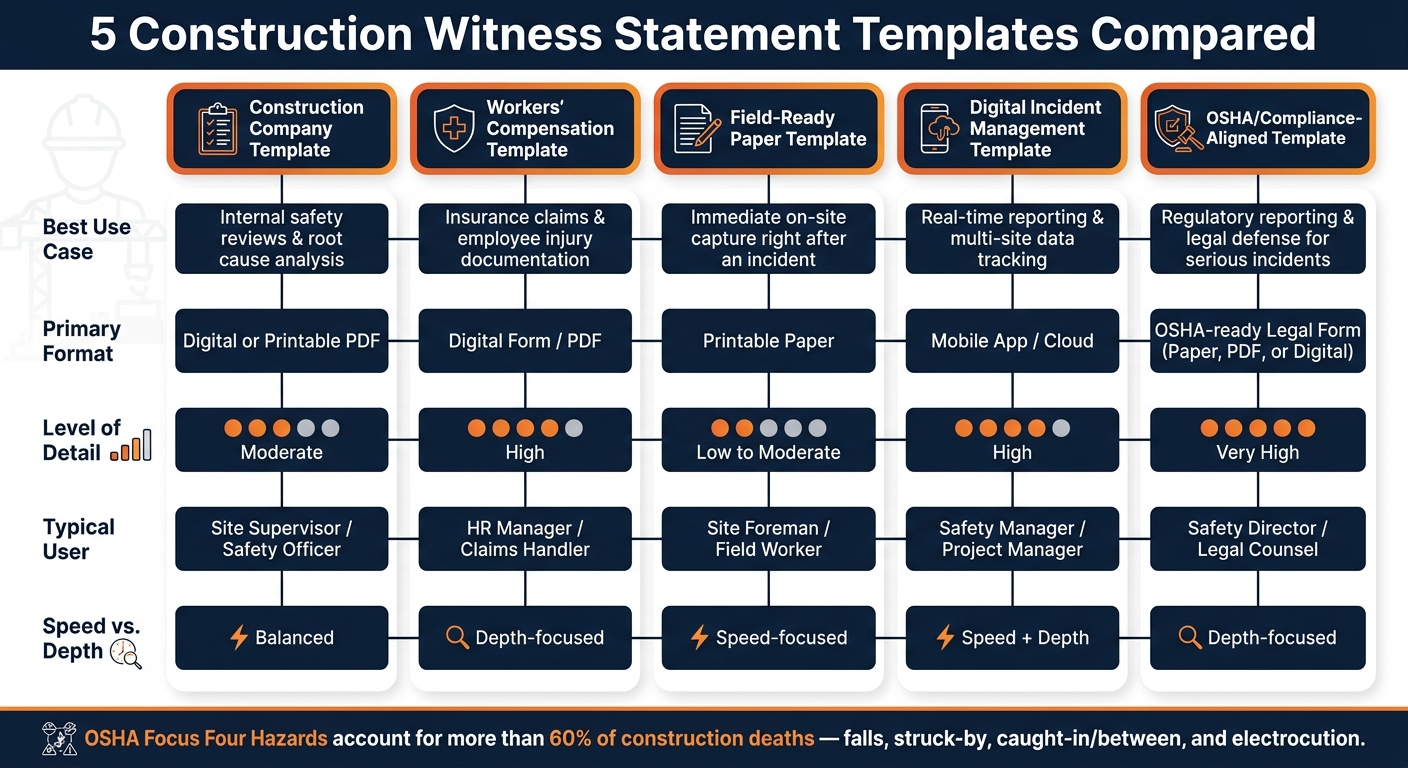
Quick Comparison of the 5 Template Types
5 Construction Witness Statement Templates Compared
Each template in this article does a different job. The table below shows the main differences so you can pick the right form for the situation fast.
| Template Type | Best Use Case | Primary Format | Level of Detail | Typical User |
|---|---|---|---|---|
| 1. Construction Company | Internal safety reviews and root cause analysis | Digital or Printable PDF | Moderate – who, what, where, when, signatures | Site Supervisor / Safety Officer |
| 2. Workers’ Compensation | Insurance claims and documenting employee injuries | Digital Form / PDF | High – medical treatment, body parts affected, return-to-work status | HR Manager / Claims Handler |
| 3. Field-Ready Paper | Immediate, on-site capture right after an incident | Printable Paper | Low to Moderate – quick narrative and witness contact info | Site Foreman / Field Worker |
| 4. Digital Incident Management | Real-time reporting and multi-site data tracking | Mobile App / Cloud | High – photos, GPS tagging, automated timestamps | Safety Manager / Project Manager |
| 5. OSHA/Compliance-Aligned | Regulatory reporting and legal defense for serious incidents | OSHA-ready legal form | Very High – PPE compliance, 29 CFR 1904/1926 references, OSHA recordability toggle | Safety Director / Legal Counsel |
A simple way to think about it: some forms are built for speed, and some are built for depth. Paper forms help when something just happened and the main goal is to get the facts down right away. OSHA-aligned forms, on the other hand, are built for full documentation when reporting duties or legal exposure are in play.
It also helps to match the format to the person filling it out. A site foreman in the field may need a quick paper form or mobile option. An HR manager or Safety Director will often need a form with more fields, more structure, and stronger documentation support. If the form fits the user, it’s far more likely to get finished on time and with fewer gaps.
The level of detail should also match the seriousness of the incident. For minor incidents and near-misses, the field-ready or internal company template is usually enough. For incidents that may trigger reporting duties or legal review, the OSHA-aligned template is the better fit.
Next, use these differences to choose the template that matches your jobsite, reporting risk, and workflow.
How to Choose the Right Template for Your Jobsite
Pick your template based on how urgent the incident is and how much reporting risk is involved.
Right after an incident, a field-ready paper form or a quick-entry digital template usually makes the most sense. The goal is simple: get the facts down while the event is still fresh in the witness’s mind. Digital forms also make it easy to attach photos and share the report right away. If the incident looks like it could turn into more than a basic internal record, switch to a more structured form.
For incidents that may lead to workers’ compensation claims or OSHA reporting, use a template with more detail built in. That should include:
- Witness ID
- Event chronology
- Site conditions
- A statement of truth
- OSHA recordability fields
- PPE documentation
Those details matter because they help create a clear record and reduce missing information later. And if you’re running larger operations, that same structure should stay consistent from one site to the next.
For companies managing multiple jobsites, using one standardized template across crews, subcontractors, and projects helps avoid evidence gaps. It also makes communication smoother between supervisors, safety staff, and insurers.
Store the witness statement with the incident report and the root-cause analysis. Add a digital signature or timestamp to keep the audit trail in place. That sets up the next step: choosing the template that matches your day-to-day workflow best.
Conclusion
The best choice comes down to three things: how fast you need the statement, who will use it, and how much compliance risk is on the table.
A good witness statement template helps teams lock in facts fast, before memories start to blur. And each template serves a different job. Some are built for company-wide consistency. Others help support claims, document events in the field right away, create a clean digital record, or handle investigations with stricter compliance needs.
Free paper or PDF templates work for basic fact collection. Paid digital workflows add routing, audit trails, and compliance tracking.
Standardized forms also make it easier for teams to keep records accurate and defensible.
For most jobsites, the simplest setup is one digital standard and one paper backup. For safety managers, superintendents, HR teams, and risk leaders, the best move is pretty straightforward: use one main digital template for investigations and OSHA log updates, and keep one simplified paper backup on every jobsite for immediate fact capture when digital access isn’t available. That two-format setup helps teams document facts fast and keep the record complete.
FAQs
What makes a witness statement legally useful?
A witness statement has legal weight when it gives a clear, accurate, and detailed account of what the person saw and includes the witness’s confirmation that the statement is truthful.
To be useful, it should cover:
- The witness’s identity and contact information
- A description of the incident
- The conditions at the time
- Actions taken
- Any injuries or property damage observed
A verification section also helps. So does compliance with legal standards. Those details make the statement more useful in investigations, court cases, and insurance claims.
When should I use a paper form instead of a digital one?
Use a paper form when digital tools aren’t available right away or when you need to document something fast, on-site.
It can also make more sense on construction sites, where phones or tablets may be hard to use or can pull attention away from the job.
What details should never be left out of a construction witness statement?
Never leave out the witness’s name and contact information, the date and location of the incident, a clear account of what was observed, and any actions taken or relevant conditions at the scene.
These details help support accuracy, legal compliance, and the integrity of the investigation.


