
If a large solar site goes down, the fix is rarely just "replace a part." I see five skills at the center of strong utility-scale solar O&M: inspection, fault finding, inverter support, clean reporting, and work planning.
With the U.S. at 133.8 GW of utility-scale solar capacity as of June 2025, site teams need to handle more than panel checks. They work around 1,000–1,500 V DC, 13.8–34.5 kV collection systems, SCADA alarms, tight outage windows, and strict safety rules. On sites this large, lost production, weak documentation, or bad LOTO can turn a small issue into a long outage.
Here’s the short version of what matters most:
- Know the plant layout: modules, strings, combiners, inverters, transformers, and SCADA all affect output
- Work safely first: LOTO, zero-energy checks, PPE, heat plans, and weather checks come before repair
- Use set inspection routines: daily remote checks, weekly field walks, and deeper monthly or quarterly checks
- Test before replacing: thermography, IV-curve testing, and SCADA trends help narrow the fault
- Treat inverters as a top focus area: studies cited in the article link about 70% of O&M events to inverter issues
- Write clear records: asset IDs, timestamps, readings, photos, and closeout notes support follow-up work
- Plan around production: low-irradiance windows, site access, switching approvals, and spare parts all affect downtime
A simple way to look at it: safe access leads to clean fault isolation, clean fault isolation leads to better records, and better records lead to less lost power. That’s the main idea behind large-scale solar O&M, and it shapes every job on site.
O&M at SOLV Energy: Powering Long-Term Solar Performance
sbb-itb-aa28329
Core Solar O&M Skills and Safety Basics
Technicians need a system-level view of how power moves through a solar plant and where faults tend to show up. That big-picture view helps turn alarms, field notes, and inspections into safe, repeatable work.
PV System Components and How They Affect Performance
Modules turn sunlight into DC power. In the field, that means checking for soiling, shading, microcracks, and hot spots. Small issues at the module level can chip away at output without setting off an obvious alarm.
String wiring and connectors like MC4 carry DC current to combiner boxes. Terminations need to be tight and matched. If they aren’t, you can end up with resistance, arcing, and string loss – some of the most common field problems.
Combiner boxes and DC disconnects bring string circuits together and provide overcurrent protection. During inspections, technicians should look for heat and water ingress every time. Those two clues often point to trouble before a failure turns into downtime.
Inverters are one of the biggest trouble spots on utility-scale sites. EPRI research points to literature showing that about 70% of O&M events at utility-scale PV plants trace back to inverter issues. That stat matters because it tells crews where to pay close attention when production drops or alarms pile up.
Transformers and medium-voltage gear can stretch outages when insulation fails or oil leaks. Those issues need to be escalated to qualified personnel. On top of that, monitoring systems, SCADA, and weather stations supply the data teams use to judge plant health. If irradiance or temperature sensors are off, they can hide problems that are quietly cutting production.
The goal is simple: match alarms and low-current readings to the most likely physical fault before working alone. When technicians can connect symptoms to the right component, troubleshooting gets faster and safer.
Electrical Safety, Lockout/Tagout, PPE, and Hazard Recognition
Utility-scale solar work revolves around a few major risks: shock, arc flash, falls, and thermal burns. Lockout/tagout applies whenever a technician services energized equipment. OSHA lists these as key hazards for solar maintenance workers, and maintenance work may require lockout/tagout under 29 CFR 1910.269(d) or 29 CFR 1910.147. One point can’t be missed: DC circuits from modules stay energized in daylight even when AC output is off. So DC conductors must be treated as live until they are verified de-energized and grounded.
Lockout/tagout (LOTO) sits at the center of safe electrical work. The order matters:
- Identify every energy source
- Isolate each one
- Apply locks and tags
- Release stored energy
- Verify zero energy with a meter rated for the system voltage before touching anything
Case reviews from U.S. utilities show that many solar incidents involve wrong or incomplete LOTO. A common example is isolating AC but not DC, or skipping the zero-energy check. Tags should include the technician’s name, date, time, and reason for isolation in standard U.S. format.
Arc-flash boundaries and PPE rules depend on the asset. Inverter cabinets have arc-flash labels, and technicians need to respect those boundaries. Before opening any enclosure, they should wear flame-resistant (FR) clothing, face shields, and insulated tools. MV switching is usually limited to qualified personnel working through a central control room.
The electrical risks get most of the attention, but field hazards are just as real. Many U.S. solar plants are in hot, dry areas, so heat exposure, hydration plans, work/rest cycles, and early-shift scheduling are part of daily planning. Uneven ground, cable runs across walkways, and racking hardware can all create trip hazards. Wildlife matters too. Snakes, rodents, and insects may be under or around modules, so technicians learn to look before kneeling or reaching into blind spaces.
Weather can shut work down fast. Thunderstorms and high winds may stop field activity, and many sites use lightning-within-X-miles shelter rules. Supervisors also run daily Job Safety Analyses (JSAs) before work starts to review forecast conditions, site hazards, and PPE needs for the day’s tasks.
Field Documentation Habits from Day 1
Good field records start with the basics: local-time date stamp, exact asset ID, measured values, and before/after photos. Every entry needs a date and time stamp in U.S. format, such as "09/09/2026 08:15 AM", and it needs to match the site’s local time zone so teams can line it up with SCADA logs, work orders, and field notes.
Asset IDs matter just as much. Writing "INV-03, Combiner CB-3-12, String S-03-12-07" tells the next person exactly where the work happened. Writing "the inverter near the road" doesn’t.
Notes should explain what was found, what was done, and what still needs attention in plain language. For example:
"Replaced fuse F3 in CB-3-12; post-repair string current 8.4 A"
That is a complete note. "Fixed issue" is not. Clear records support work orders and root-cause reviews. IEC 62446-2 backs this up by calling for continued records after every inspection, maintenance activity, or repair, including the date, description of the activity, and findings.
Mobile apps can help crews keep entries consistent and attach photos to the right work order. Clean notes also feed the inspection reports and work orders covered next.
Inspection Routines and Field Troubleshooting
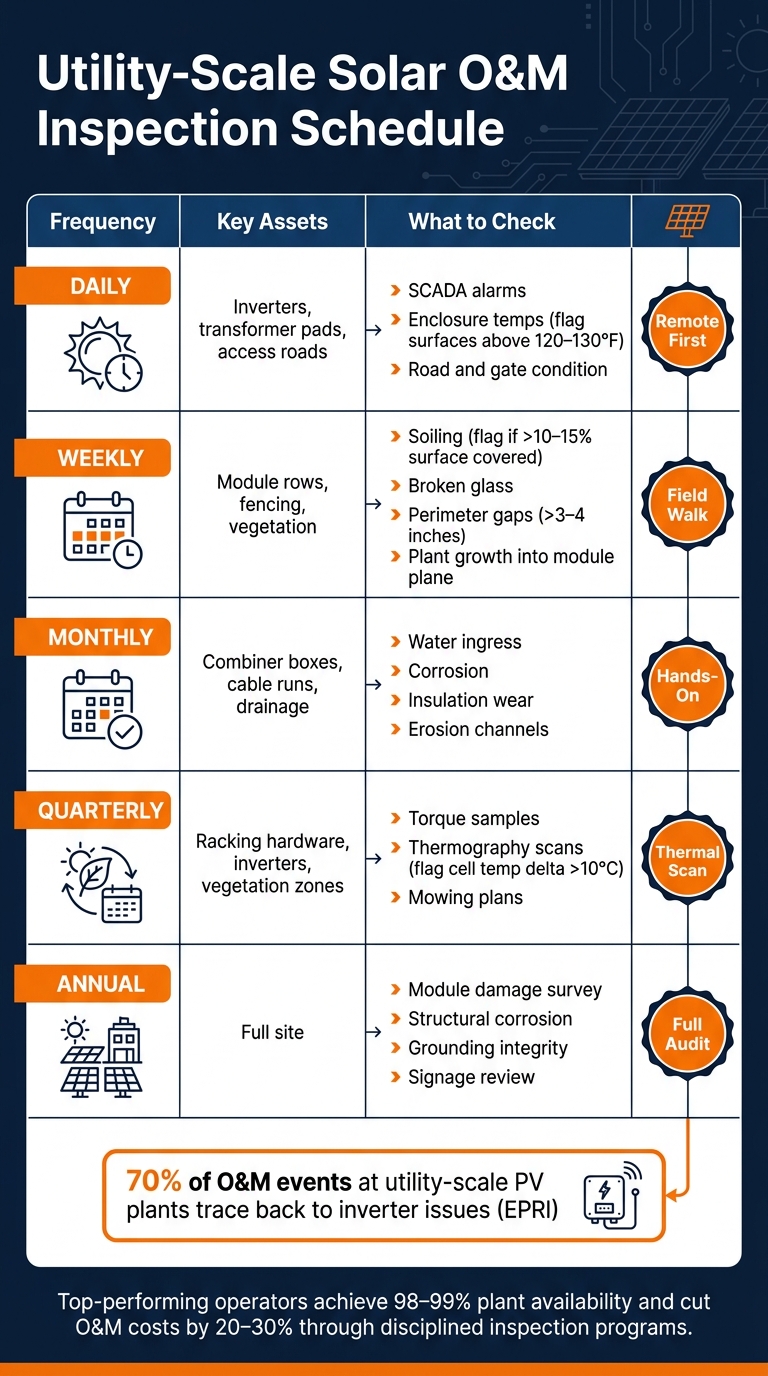
Utility-Scale Solar O&M Inspection Schedule by Frequency & Asset
Set Inspection Routines by Frequency and Asset Type
Strong inspection programs group checks by how often they need to happen and how much the asset matters to site output. The idea is simple: catch small issues before they turn into outages.
Daily checks are usually remote first. Before anyone heads out, technicians review SCADA dashboards to make sure major blocks are online, flag active alarms, and compare energy yield with the forecast. Once on-site, the shift-start walkdown focuses on inverter and transformer pads. Listen for odd noise, make sure enclosure doors are closed and locked, and look for surfaces running hotter than normal, especially metal above 120–130°F.
Weekly checks push deeper into the field. Technicians walk module rows and look for broken glass, delamination, discoloration, or heavy soiling. Modules with soiling on more than 10–15% of the surface should be flagged. Vegetation becomes a weekly issue too when it grows into the module plane or above racking height. Fencing also gets a perimeter pass, with attention to gaps wider than 3–4 inches near the ground.
From there, the rhythm gets more hands-on. Monthly inspections cover combiner boxes, cable runs, drainage, and erosion. Quarterly work usually includes torque sampling, hot-spot scans, and a review of vegetation before peak growth hits.
| Frequency | Key Assets | What to Check |
|---|---|---|
| Daily | Inverters, transformer pads, access roads | SCADA alarms, enclosure temps, road and gate condition |
| Weekly | Module rows, fencing, vegetation | Soiling, broken glass, perimeter gaps, plant growth |
| Monthly | Combiner boxes, cable runs, drainage | Water ingress, corrosion, insulation wear, erosion channels |
| Quarterly | Racking hardware, inverters, vegetation zones | Torque samples, thermography, mowing plans |
| Annual | Full site | Module damage survey, structural corrosion, grounding, signage |
When routine checks turn up something odd, the next step is targeted testing. That helps confirm the fault before repair crews get dispatched.
When to Use Thermography, IV-Curve Testing, and Condition-Based Checks
Infrared thermography is one of the best ways to spot hot cells, bypass diode failures, and high-resistance connections that look normal at first glance. It works best under clear skies, with irradiance above about 700 W/m² and wind speeds below 10 mph. Technicians usually walk rows at a steady distance of 3–6 feet from the module plane and document issues row by row. For equipment scans, cameras are used on terminations and busbars inside combiner boxes and inverters, with the right PPE and safe work setup in place. Cell temperature deltas above about 10°C should be flagged. Bigger gaps often point to failed modules or wiring faults and usually call for replacement or a deeper check.
Use that scan to sort out whether the problem is thermal, electrical, or a mix of both.
IV-curve testing comes in when thermography says something is wrong but doesn’t fully explain why. A tracer applies a controlled load across a string and records the current-voltage curve. That curve is then compared with the expected result for the module type and string setup. A good rule is to target strings running 5–10% below nearby peers under similar irradiance. Technicians should log ambient temperature in °F and irradiance at the time of testing so results can be normalized. Module surface temperatures in the 120–140°F range will pull voltage down compared with standard test conditions, so that detail matters. IV-curve data helps separate module aging from shading, bad connections, or string misconfiguration. That keeps teams from swapping modules they didn’t need to touch in the first place.
Use those results to focus on assets showing an actual performance drop.
Both tools are most useful when they’re triggered by data, not just a date on the calendar. Condition-based checks rely on SCADA trends, alarm history, and past inspection notes to direct crews to the assets that need attention most. If one combiner box keeps throwing overtemperature alarms, that’s the one to scan next – not the box that has been running clean. It’s a more focused way to use labor and cuts down on work performed on healthy equipment.
Once the pattern shows up, the process shifts from scheduled inspection to alarm-based isolation.
Troubleshooting with Alarms, SCADA, and Basic Fault Isolation
After an inspection points to a problem, confirm it through SCADA and then in the field. Start with the SCADA event log, not with a wrench in hand. The log shows when the fault began, which assets were hit, and whether the issue is confined to one area or spread across a block. Comparing the affected strings or inverters with neighboring units running normally under the same irradiance is one of the fastest ways to narrow the fault. That comparison can tell you whether you’re dealing with a single-string issue, a combiner problem, or something tied to the inverter.
Once the log gives you a direction, field checks should follow a clear sequence:
- Check combiner box fuses first
- Verify string continuity
- Make sure connectors are fully seated and not under mechanical tension
- Confirm grounding connections are intact
Not every low-production signal is a production problem. A stale SCADA point or a dead sensor can look like lost output when the issue is actually in communications. That’s why the communication cabinet and network hardware should be checked early in the process.
Some alarms need to move to the front of the line. Ground faults, repeated inverter trips, and MV alarms should be escalated right away. Self-clearing alarms can be logged for scheduled review. That distinction matters a lot on large sites, because it keeps crews from chasing noise while still acting fast on faults that carry more risk.
Inverter Support, Reporting, and Work Planning
How to Support Inverters Within Site and Manufacturer Procedures
Once alarms and field checks point to the inverter, the next move is to follow OEM instructions and site checklists. The best setup is an OEM-aligned inverter checklist inside the CMMS, so every technician records the same core details each time. That usually includes status lights and display readings, cabinet condition, signs of heat or corrosion, fan operation and airflow, rodent or debris buildup, and whether firmware matches fleet standards. Manufacturer instructions may also require torque checks on busbars and terminations, along with scheduled swaps of filters, fans, and surge protection devices.
Start with the simplest read first: the status lights and display. Use the display for initial fault triage – green means normal, amber means warning, and red means trip. Before changing anything, record the exact fault code, timestamp, inverter ID, and site conditions, including ambient temperature, irradiance, and any recent storm activity.
Cooling trouble is a common reason inverters derate or fail. Check that fans spin freely and don’t show vibration or looseness. Inspect filters and replace them on the manufacturer’s schedule, often every 6 to 12 months in dusty areas. Clear dust, nests, and vegetation from vents and louvers, and keep the needed clearance around air inlets and exhaust points. Look over the cabinet for corrosion, water ingress marks, cracked gaskets, and unsealed conduit entries. Use thermography on terminations, busbars, and cooling parts to spot internal heat buildup. Log the inverter ID, ambient temperature, approximate wind speed and direction, and any corrective steps taken so thermal alarms can be tied back to site conditions.
When a fault shows up – like a ground fault, grid fault, or communication failure – confirm how far the issue extends before resetting anything. Repeating control resets without finding the cause just burns time. Ground faults often appear as insulation resistance or residual current alarms. Grid faults such as overvoltage, undervoltage, or frequency excursions often hit more than one inverter and can point to a utility-side event. Communication failures can make an inverter look offline in SCADA even though it is still producing on-site. After any reset or reboot, document whether the fault cleared, whether it came back, and what the updated event log shows.
Once the fault is isolated, the paperwork has to turn that finding into a clear next step.
Write Inspection Reports and Work Orders That Drive Action
A report that doesn’t push work forward is just paperwork. Each inspection record and work order should give the next person enough detail to act without chasing extra answers.
At a minimum, every record should include:
- Date and time
- Weather conditions, such as ambient temperature, cloud cover, wind, and precipitation
- Asset ID linked to the plant’s one-line diagram
- Plain-language issue description
- Probable cause
- Any temporary action taken
- Downtime or production impact in kW or MWh estimated from SCADA data
- Escalation path
- Closeout notes after the issue is resolved
Good reporting also helps plant performance. Top 10% of operators reach 98–99% plant availability and cut O&M costs by 20–30% by tying inspection data to CMMS workflows and automating work order creation from SCADA alerts.
The table below shows how task type affects the trigger, owner, urgency, and documentation needed on large-scale sites:
| Task Type | Trigger | Owner (Role) | Urgency Level | Required Documentation |
|---|---|---|---|---|
| Routine Inspection | Scheduled by calendar or run-hours | Field Technician | Low–Medium | Date/time, weather, asset ID, checklist results, photos, minor findings, follow-up actions |
| Corrective Repair | Alarms, trips, performance deviation | Technician + Site Engineer | Medium–High | Fault codes, test results, root-cause notes, parts used, downtime impact, closeout verification |
| Preventive Maintenance | OEM schedule or reliability analysis | O&M Planner + Technician | Medium | Work plan, scope of work, parts list, before/after measurements, torque logs, OEM sign-off if required |
Plan Work Around Production, Weather, Site Access, and Energized-Equipment Limits
Work planning turns inspection findings into scheduled production loss, so timing matters. Jobs that require taking an inverter or feeder offline should be planned during low-irradiance periods – early morning, late afternoon, or low-sun winter days. Try to avoid clear-sky peak hours, which are usually around 10:00 AM–3:00 PM local time.
Weather shapes the schedule too. High wind or lightning risk should push back work at height or any job that involves opening large inverter doors. On very hot days, crews may need shorter shifts, more hydration breaks, or a plan to move heat-heavy work inside metal enclosures to cooler morning hours.
Site access and switching approvals can slow a job before it even starts. Technicians should confirm current badges, key codes, and any escort rules before heading out. Switching orders for high-voltage work often need advance notice to the utility, asset owner, or corporate safety teams. Keeping critical spares on-site or at a nearby warehouse can stop corrective work from turning into a long outage. Pre-job briefs that confirm tools, test instruments, and PPE are packed before travel can also cut avoidable delays.
For large portfolios, fast and compliant crew mobilization matters when outage windows open. During large maintenance campaigns, mobile crew-matching tools can speed compliant mobilization by matching technician certifications, availability, and location with approved outage windows.
Conclusion: Skills That Keep Large-Scale Solar Sites Safe and Productive
Large-scale solar O&M runs on a connected chain of work: safe field execution, disciplined inspection, fast troubleshooting, clear reporting, and practical scheduling. Each part feeds the next. Safe access leads to accurate diagnosis. Accurate diagnosis leads to clean records. Clean records make planned downtime easier to handle.
This matters most when energy output is at stake. Strong O&M programs help protect uptime and asset value, and inverter-related events remain one of the most common sources of corrective maintenance at utility-scale sites. The best-performing sites pair technical skill with disciplined execution: clear roles, job hazard analyses, accurate documentation, and schedules that account for weather, site access, and live-asset limits.
Lockout/tagout, inspections, fault logs, and work-order closeout are the baseline skills every large-scale solar technician needs to apply the same way, every time. Get those basics right, and large-scale solar sites stay safer, more productive, and easier to manage.
FAQs
What skills matter most in utility-scale solar O&M?
The most important skills in utility-scale solar O&M come down to three things: safety, electrical know-how, and solid troubleshooting.
On the job, technicians need to handle visual inspections, wire management, preventive maintenance, and corrective repairs. Just as important, they need to follow core safety procedures, including lockout/tagout, arc-flash protection, and safe work around energized systems.
They also need PV-specific skills. That includes IV curve testing, thermal imaging, inverter support, and system monitoring. OSHA 10 or 30 training is a must, and certifications like NABCEP PVCMS help show skill in maintenance and commissioning.
How do technicians troubleshoot solar faults safely?
Technicians should put electrical isolation and hazard control first. Treat photovoltaic conductors as energized at all times, even in low light. Before any work starts, check every energy source on the system, including PV strings, inverters, and grid feeds.
Use LOTO procedures, confirm there is no voltage with properly rated test instruments, and discharge stored energy safely. Wear arc-rated PPE and use DC-insulated tools. Troubleshooting should be handled only by qualified personnel with training in NFPA 70E and OSHA electrical safety standards.
Why are inverters such a major focus in solar O&M?
Inverters are a main focus in solar operations and maintenance because they sit at the heart of system output and electrical safety. Their job is straightforward but critical: they turn the panels’ DC electricity into AC power that can connect to the grid.
Since inverters manage high-voltage power flow, they need specialized care. That includes annual performance checks, routine service, and strict lockout/tagout procedures. And when batteries are part of the system, the job gets more complex because the inverter may also handle bidirectional energy flow.
Good inverter support helps keep the system reliable, safe, and efficient. It also helps teams stay in line with safety rules while reducing the chance of downtime.


