
If your crews can’t pull up an SDS in seconds, you have a safety gap and a HazCom gap. For U.S. energy sites, that matters even more now because OSHA’s updated Hazard Communication rule sets key deadlines on July 20, 2026 for substances and January 19, 2028 for mixtures.
Here’s the short answer: the right SDS tool depends on connection quality, inventory needs, and how much you want SDS data tied to the rest of your EHS work. In this article, I look at VelocityEHS MSDSonline, SpheraCloud, Chemwatch, 3E Protect, EcoOnline Chemical Manager, and Cority Chemical Management based on:
- HazCom support
- Mobile and offline SDS access
- Inventory and labeling
- Emergency response use
- Multi-site control
If I had to boil it down even more:
- Remote crews need offline access
- Large site networks need central control
- Chemical-heavy sites need inventory tied to labels and SDS records
- Incident-driven programs need SDS data linked to response workflows
One deadline stands out: employers should already be updating SDS programs for OSHA’s 2024 HazCom changes. That makes tool selection less about convenience and more about whether workers can get current chemical data during normal work, shutdowns, and spills.
Best Safety Data Sheet (SDS) Management Software
Quick Comparison
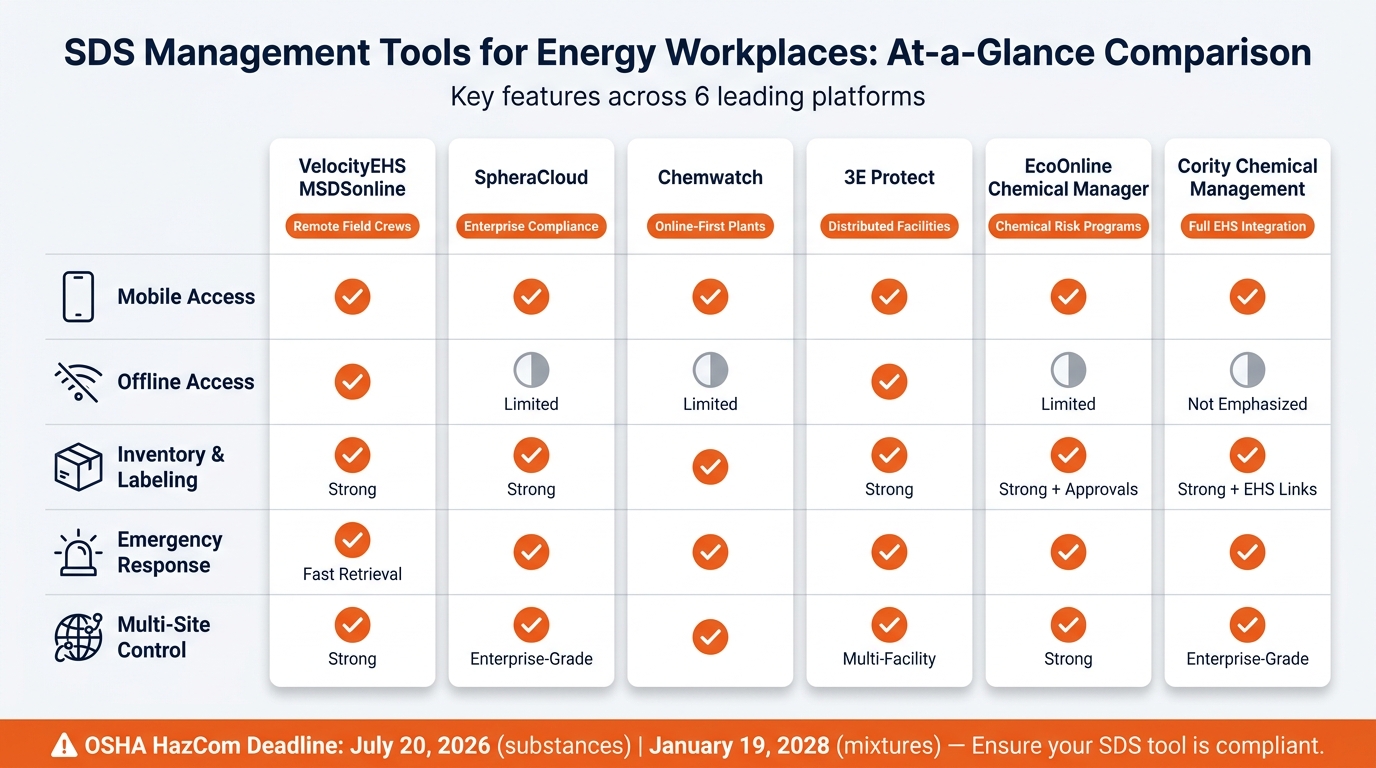
SDS Management Tools for Energy Sites: Feature Comparison Chart
| Tool | Mobile Access | Offline Access | Inventory/Labeling | Best For |
|---|---|---|---|---|
| VelocityEHS MSDSonline | Yes | Yes | Strong | Remote crews and field sites |
| SpheraCloud | Yes | Limited | Strong | Large compliance-driven programs |
| Chemwatch | Yes | Limited | Yes | Multi-site SDS standardization |
| 3E Protect | Yes | Yes | Strong | Distributed sites and contractors |
| EcoOnline Chemical Manager | Yes | Limited | Strong + approvals | Chemical review and risk tracking |
| Cority Chemical Management | Yes | Not a main focus | Strong + EHS links | Large teams using one EHS platform |
My main takeaway: if you still rely on paper binders or scattered spreadsheets, this article helps you narrow the list fast and pick a tool that fits how your sites work day to day.
1. VelocityEHS MSDSonline
VelocityEHS MSDSonline is a strong fit for remote, multi-site energy operations because it pairs offline access with site-level control and emergency response support. It’s a dedicated SDS management platform built for chemical control and HazCom compliance. That tighter focus gives it more depth in SDS workflows instead of spreading across a broad set of EHS functions.
HazCom Compliance
The platform includes a cloud-based SDS database with 24/7 access to auto-updated SDS binders for each site. VelocityEHS updated the software to match OSHA’s 2024 HazCom final rule and Revision 7 of the UN GHS. Safety managers can set up site-specific chemical lists, link SDSs to specific work areas, and pull reports for OSHA inspections.
That setup is especially useful in the field, where crews may need SDS access without a live connection.
Offline/Mobile SDS Access
Field crews can save SDSs and product details on iOS or Android devices for offline use in remote locations. The app also supports barcode, QR code, and UPC scanning for fast SDS and container lookups. Once connectivity comes back, updated SDSs from the central eBinder sync to user devices automatically.
Chemical Inventory and Labeling
Container-level inventory tracking gives operations teams a clear view of products and containers by facility, including location and status. Workers can update container status in the app and duplicate entries to add new containers without typing everything again. Built-in GHS labeling works with Avery, Brady, and Graphic Products’ DuraLabel printers for secondary container labels.
That kind of inventory control can also help teams move faster during an incident across multiple sites.
Multi-Site Emergency Readiness
For companies running multiple plants, terminals, or field locations, the platform supports site-specific SDS binders organized by facility, unit, or job role, while still giving teams central oversight across locations. Emergency access isn’t just an extra feature here. It’s part of how companies keep SDS information available across plants, terminals, and remote field sites.
The platform’s 24/7 emergency hotline gives first responders and supervisors immediate access to current SDS and hazard information during an incident. EHS teams can also share direct links to chemical safety information with fire departments or hazmat teams – even without an app account – during spills, releases, or fires.
2. SpheraCloud SDS Management
Where a dedicated SDS tool is mostly about document access, SpheraCloud goes much further. SpheraCloud SDS Management is an enterprise chemical governance platform, not just a place to store SDS files. For large, highly regulated operations, it brings chemical data, inventory records, and compliance reporting into one system.
HazCom Compliance
The platform gives teams centralized SDS access and builds regulatory intelligence into the system itself. That includes preloaded state right-to-know lists and cross-referencing tools that flag chemicals with extra compliance duties.
Version control is tight. Users only see the current, approved SDS, while older versions stay archived for audits and incident reviews. Sphera’s indexing team indexes more than 300 data points per supplier SDS, and the platform refreshes SDS records at least every 24 months. That kind of control helps in day-to-day work, especially when crews need the right SDS fast at the point of use.
Offline/Mobile SDS Access
SpheraCloud works on any internet-connected device, including smartphones and tablets. That lets field technicians and contractors search SDSs by product name, CAS number, or location instead of flipping through paper binders.
The platform is built around online access, so if your crews work in remote areas, it makes sense to confirm offline access before rollout.
Chemical Inventory and Labeling
SpheraCloud ties SDS data to chemical inventory management, so organizations can track chemical arrivals, departures, storage locations, and quantities in one place. Sites can assign materials by location and sort chemicals by process, unit, or asset. That’s a good fit for refineries or multi-pad drilling operations, where one product may move across several areas.
It also supports secondary container label generation based on current GHS classifications and pictograms. That helps keep field containers in line when chemicals are transferred for maintenance work or field use. Those same inventory records also feed emergency planning.
Multi-Site Emergency Readiness
Sphera provides emergency preparedness and response tools tied to its SDS and chemical management functions. In plain terms, teams can move from normal operations to emergency response using data from the same platform.
For multi-site energy operators, such as utilities, pipeline companies, and upstream oil and gas firms, location-based reporting can show where high-hazard chemicals are stored and which sites carry higher-risk profiles. SDS data, including acute toxicity, flammability, and reactivity details, also feeds into emergency scenarios and drill planning so site response plans match the materials actually on hand.
3. Chemwatch
Chemwatch is a global SDS platform that brings together inventory, labeling, and compliance tools. For energy employers, the big draw is simple: it helps standardize SDS access across plants, terminals, and field crews.
HazCom Compliance
Chemwatch lines up with OSHA’s Hazard Communication Standard, which requires SDSs to be accurate, current, and easy for workers to access. It puts current SDSs from different suppliers and sites in one place. That makes a difference when crews need the latest SDS right at the point of work.
Offline/Mobile SDS Access
Chemwatch gives workers web and mobile access to SDSs and labels in the field. So when teams are at remote sites or plant locations, chemical information stays close at hand instead of sitting back at the office.
Chemical Inventory and Labeling
Chemwatch pairs SDS management with chemical inventory tracking and label generation. It also supports API integrations with procurement and asset systems. Those same records can help during incident response, too.
Multi-Site Emergency Readiness
For operators with more than one site, a single searchable SDS library can speed up incident response and make drill prep less of a scramble.
4. 3E Protect

For teams that need more than basic document storage, 3E Protect adds site-level chemical control. It’s a cloud-based SDS and chemical safety platform built for multi-site energy operations.
HazCom Compliance
3E Protect supports HazCom with centralized access, version control, and audit-ready reporting. It also includes a processing and indexing guarantee.
Offline/Mobile SDS Access
3E Protect supports mobile SDS access for spill response, lockout/tagout, and contractor onboarding when desktop systems aren’t within reach.
Chemical Inventory and Labeling
3E Protect connects site inventories to current SDS and secondary-container labels. It supports GHS- and HazCom-aligned labels for drums, totes, and smaller field containers.
That link between inventory and labeling matters on energy sites, where chemicals can be spread across yards, mobile containers, and contractor staging areas. When records say one thing and the field says another, problems pile up fast. Tying inventory data to labels can help cut those mismatches.
Multi-Site Emergency Readiness
During remote incidents, response speed depends on fast access to current SDS data. Its centralized repository gives safety leaders site-level visibility and instant SDS lookup. API integration streamlines access to chemical safety data.
That makes it a good fit for turnarounds and contractor mobilizations, where people need answers fast and delays can ripple across the job. It’s also useful when SDS access needs to work side by side with inventory and label management.
sbb-itb-aa28329
5. EcoOnline Chemical Manager
For teams that need more than a place to store SDSs, EcoOnline Chemical Manager goes a lot further. It brings SDS management, chemical inventory tracking, risk assessment, and compliance reporting into one cloud platform built for multi-site energy operations.
HazCom Compliance
EcoOnline keeps a centralized SDS library and automatically reaches out to manufacturers for updated safety data sheets. That helps keep revision dates current without extra follow-up from EHS teams.
It also creates short-form hazard summaries with QR codes that link straight to the full SDS. On top of that, the platform supports GHS-aligned labels and updated regulatory lists that reflect changes in U.S. chemical rules.
That kind of document control matters even more when crews can pull up the same data on a phone or tablet in the field.
Offline/Mobile SDS Access
EcoOnline’s mobile apps give workers field access to SDSs, short-form summaries, risk reports, and exposure records. If a QR code is posted on a chemical storage area, process unit, or vehicle, a technician can scan it and open the SDS in seconds.
Chemical Inventory and Labeling
The platform lets EHS teams track chemicals by site, stock level, history, and approval status. That approval workflow gives safety staff a way to review and approve new chemicals before they come on site, covering OSHA, EPA, and state requirements that apply.
Its GHS-aligned labeling tools connect right to the inventory, so labels stay in sync with what’s actually on site.
Because inventory, labeling, and incident response all pull from the same data, site teams can act faster when something goes wrong.
Multi-Site Emergency Readiness
EcoOnline links chemical safety data with incident management, risk assessments, and crisis-response tools, including functions added through its acquisition of D4H. In plain terms, emergency plans can point to live SDS data and current chemical inventories instead of old static files.
The platform also supports SDS creation and publication in 80+ languages. That helps sites with multilingual crews or suppliers spread across different countries.
6. Cority Chemical Management
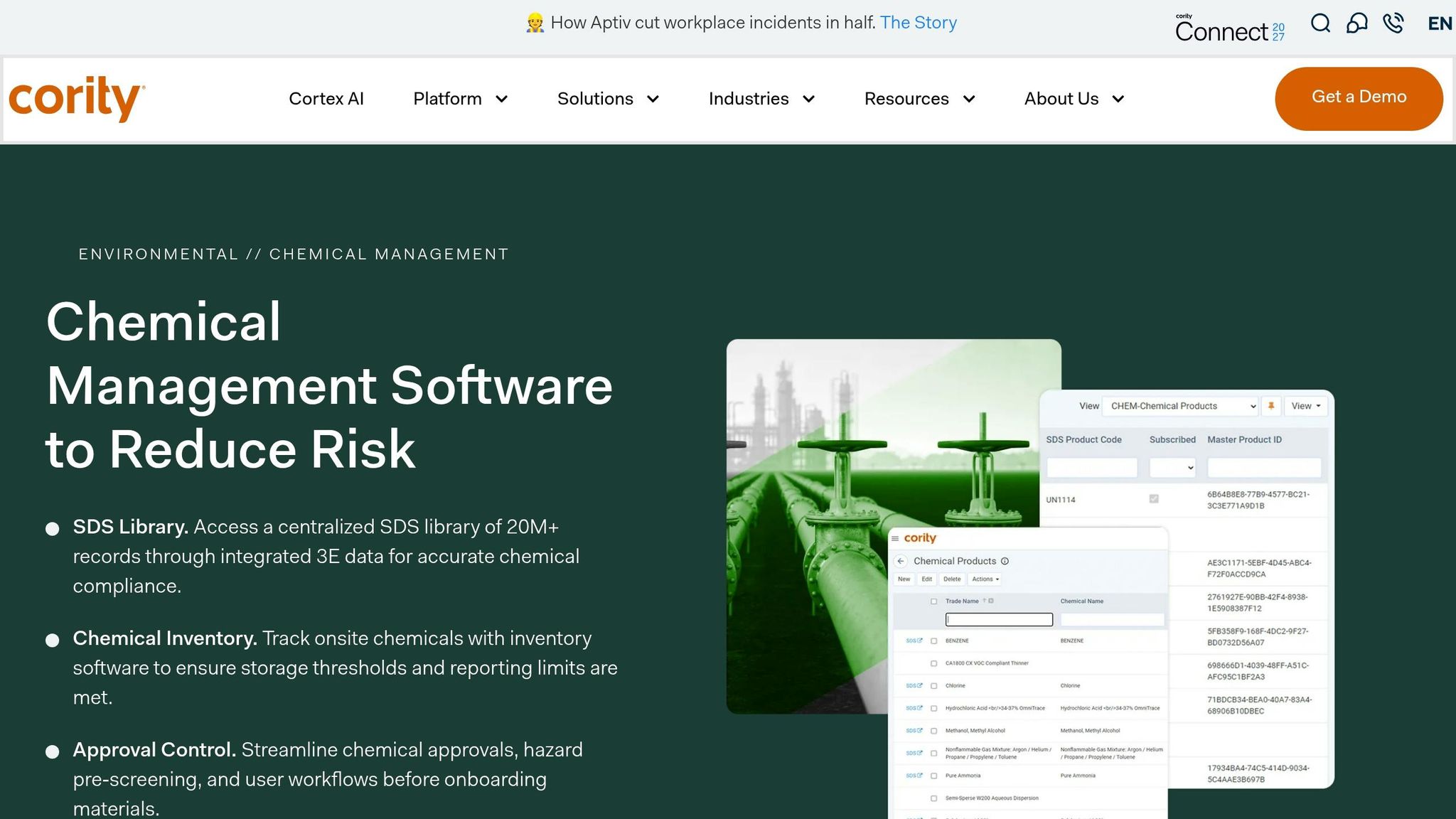
Cority Chemical Management sits inside the broader CorityOne™ platform, which means SDS data doesn’t live off by itself. It can flow into incident management, industrial hygiene, and compliance workflows. For large energy operators, that’s a big deal because chemical data stays inside the main EHS system instead of getting split across tools. This matters most for teams that want SDS management tied straight to the rest of their EHS program.
HazCom Compliance
That broader platform still leans on one thing: a current, searchable SDS library. Cority’s library is powered by 3E’s regulatory database, which became 30 times larger after the integration. Users now get access to 20M+ SDS records covering tens of millions of chemical records.
For U.S. energy sites handling chemicals under OSHA HazCom, that means current SDSs are more likely to already be there, without a manual upload. If a chemical is reclassified under GHS, Cority can update the SDS and push revised hazard classifications into labels and worker-facing documents.
Offline/Mobile SDS Access
Field workers can search for and access SDS information through the myCority mobile app. That gives crews at remote pipeline segments or substations access to PPE requirements, spill response steps, and handling instructions right where they are working. EHS managers can also control which SDS collections are visible to each role and location, so technicians only see the information tied to their site.
Chemical Inventory and Labeling
Cority tracks chemicals at the container level from receipt through disposal. Containers can be tagged or barcoded and linked straight to SDS records. If a solvent gets transferred to secondary containers, Cority can automatically generate GHS-compliant labels with pictograms, signal words, and precautionary phrases. That cuts down on labeling mistakes that often happen when labels are made by hand.
It also helps before a chemical ever reaches the site. New chemicals can be screened and approved in advance using OSHA, EPA, and internal restricted substance lists.
Multi-Site Emergency Readiness
Because inventory and SDS data sit together, incident response can be faster and more consistent. Cority supports large multi-site operations from one system. For a U.S. utility managing dozens of substations, or a pipeline operator spread across several states, each site pulls from the same up-to-date SDS library and chemical inventory.
During an incident, responders can quickly pull spill response procedures and incompatible chemical lists. Its container lifecycle tracking also helps corporate EHS teams spot risk hotspots across sites.
Strengths, Tradeoffs, and Best Fits at a Glance
No single tool is the best match for every energy setup. The right choice comes down to your site type, your level of connectivity, and how deeply you need to tie chemical management into EHS workflows. Put simply, the decision often comes down to two things: do your crews need offline field access, or do you need enterprise-level reporting?
| Tool | HazCom Compliance | Mobile | Offline Mode | SDS Library | Labeling & Inventory | Emergency Access | Multi-Site Control | Best Fit |
|---|---|---|---|---|---|---|---|---|
| VelocityEHS MSDSonline | Strong | Yes | Yes | Very large | GHS labels + barcode scanning | Fast retrieval | Strong | Remote field crews, turnaround teams |
| SpheraCloud | Strong | Yes | Limited | Large | Limited | Yes | Enterprise-grade | Enterprise compliance teams |
| Chemwatch | Strong | Yes | Limited | Very large | Auto-generated labels | Yes | Yes | Online-first industrial plants |
| 3E Protect | Strong | Yes | Yes | Very large | GHS secondary labels | Yes | Multi-facility | Pipeline crews, distributed facilities |
| EcoOnline Chemical Manager | Strong | Yes | Limited | Large | Inventory + risk assessments | Yes | Strong | Multi-site chemical risk programs |
| Cority Chemical Management | Strong | Yes | Not emphasized | Large, expanded | Inventory tracking + approval workflows | Yes | Enterprise-grade | Large operators integrating SDS into a full EHS platform |
Here’s the short version: remote crews need offline access, while centralized programs tend to need stronger reporting and governance.
How to Choose the Right SDS Tool for Your Energy Operation
Start with a simple question: where do workers need SDS access, and how dependable is the connection in those places?
That matters more than a long feature list. If service drops in the field, offline access can turn into a compliance problem fast. For sites like that, look at mobile-first platforms with offline caching and QR code lookup before you spend time on anything else.
After access, look at chemical control. If a site moves chemicals into secondary containers, you’ll want inventory-to-SDS links and direct GHS label printing. Without those, day-to-day work gets messy.
If SDS data also needs to support incidents, audits, and training, don’t settle for a stand-alone document library. Pick an integrated platform so the information flows into the rest of your EHS work instead of sitting off to the side.
Use the matrix below to narrow your options based on site conditions, not just a generic feature checklist.
| Site Condition | Key Selection Priority | Primary Fit |
|---|---|---|
| High contractor volume | Rapid user setup, temporary access, multilingual support | Contractor-friendly cloud SDS tools |
| Offline field use | Offline caching, mobile app, QR code retrieval | Mobile-first SDS platforms |
| Labeling workflows | GHS-aligned label generation tied to live inventory | SDS tools with integrated labeling |
| Broader EHS integration | Connections to incidents, audits, and training data | Full EHS suites with SDS modules |
Rollout Considerations for U.S. Energy Employers
Once you’ve picked the platform, the next part is what makes or breaks it: rollout. If workers can’t pull up the right SDS at the point of work, the system won’t do much good.
Start with OSHA HazCom alignment. Train workers to find and use SDSs in the exact system they’ll use on the job – desktop, kiosk, and mobile – before rollout begins. Make sure they know how to read GHS pictograms, hazard statements, and spill-response steps. Short modules tied to actual tasks, like chemical receiving or confined space entry, usually land better than one long annual session.
Then clean up the data. Go through paper binders, shared drives, and vendor portals before migration so you can catch missing files and old versions. From day one, organize the library by location, department, or product category. Also set a clear rule: vendors need to send SDSs in a standard digital format before any material arrives on site.
Access rights should line up with job roles. Field workers and contractors may only need read-only access. Supervisors can have edit rights, while EHS administrators handle approvals. Put those permissions in the site EHS plan and review them when contractor rosters change.
Offline access needs its own test. Map out sites with weak connectivity – offshore platforms, remote compressor stations, and wind farm substations – then set mobile devices to cache the SDS libraries crews will need before they head out. During maintenance drills, run network-loss tests to make sure workers can still search for and open documents without a live connection. Printed emergency binders for top-risk chemicals should stay in place as a backup.
Once access and inventory are set, tie the system into labeling and emergency response. Use the SDS library to pre-load emergency reference lists and label data for response teams. Put label printers in receiving and staging areas, pull label data from the live SDS, and spot-check labels during routine inspections. Preload high-risk chemical lists on response devices and in vehicle caches, and coordinate access with local HAZMAT teams and the State Emergency Response Commission. It also helps to run at least one joint drill each year that tests SDS retrieval under time pressure.
Conclusion
The right tool comes down to where crews need SDS access and how the site actually runs day to day.
Remote sites with weak or spotty service need offline mobile access. Large operations spread across many locations need central control and tight inventory oversight. And sites with frequent spills or higher risk need fast SDS retrieval without extra steps.
If field access is the first screen, inventory governance is the next one. Tools built for enterprise control support centralized version management and multi-site oversight across refineries, terminals, and complex facilities. EcoOnline fits teams that need inventory control and approval workflows.
Choose based on operational complexity, field connectivity, and how closely SDS data needs to tie into compliance workflows.
SDS readiness also depends on having the right workers on site. For shutdowns, emergency repairs, and contractor mobilizations, pairing SDS management with ABLEMKR helps crews arrive certified, trained, and ready to access site SDSs.
FAQs
How do I choose between offline access and EHS integration?
For energy job sites, this usually isn’t an either-or decision. Your tool should support both if you want to stay on top of compliance.
Offline access matters on remote sites where internet service can be spotty or unavailable. At the same time, EHS integration helps keep field data synced with broader safety records and day-to-day workflows.
What should energy employers do before the 2026 HazCom deadline?
Before the 2026 HazCom deadline, energy employers should:
- Finalize and maintain a written Hazard Communication Program
- Complete a hazardous chemical inventory
- Make sure all containers have GHS-compliant labels
- Keep an accessible SDS system
- Train employees, contractors, and temporary workers on chemical safety and how to use SDSs and labels
- Plan for emergencies and non-routine tasks, and review and update the program on a regular basis
Which SDS features matter most for remote job sites?
For remote energy job sites, the SDS features that matter most are offline access and simple use in the field. Crews and supervisors need to open, log, and update safety records even when the signal drops or internet access is spotty.
It also helps to have centralized, mobile-friendly data, automated alerts for expiring certifications, audit-ready digital trails, and automatic syncing once the connection comes back.


