
Geo-location matching works best when the system checks job fit first and distance second. In plain terms: I’d only use location data after I confirm a worker has the right training, licenses, availability, and work status. That’s how teams can cut fill time from hours to minutes without creating compliance problems.
Here’s the short version:
- I start with clean worker data: address, travel range, schedule, and verified credentials
- I pair that with clean job data: site address, shift time, required cards or licenses, pay, and urgency
- I use a geofence around the job site to find nearby workers
- I rank only qualified and available workers by distance or travel time
- I confirm arrival with mobile GPS check-in, plus a backup option like a QR code or supervisor approval
- I connect check-in data to timecards and payroll, which can cut manual time-entry errors of 1% to 8% and reduce payroll processing time by up to 95%
What this means for you is simple: location helps with speed, but verified worker data is what keeps the process safe and accurate.
The article breaks that flow into three parts: gather data, rank workers inside the right geofence, and verify check-in so records stay clean.
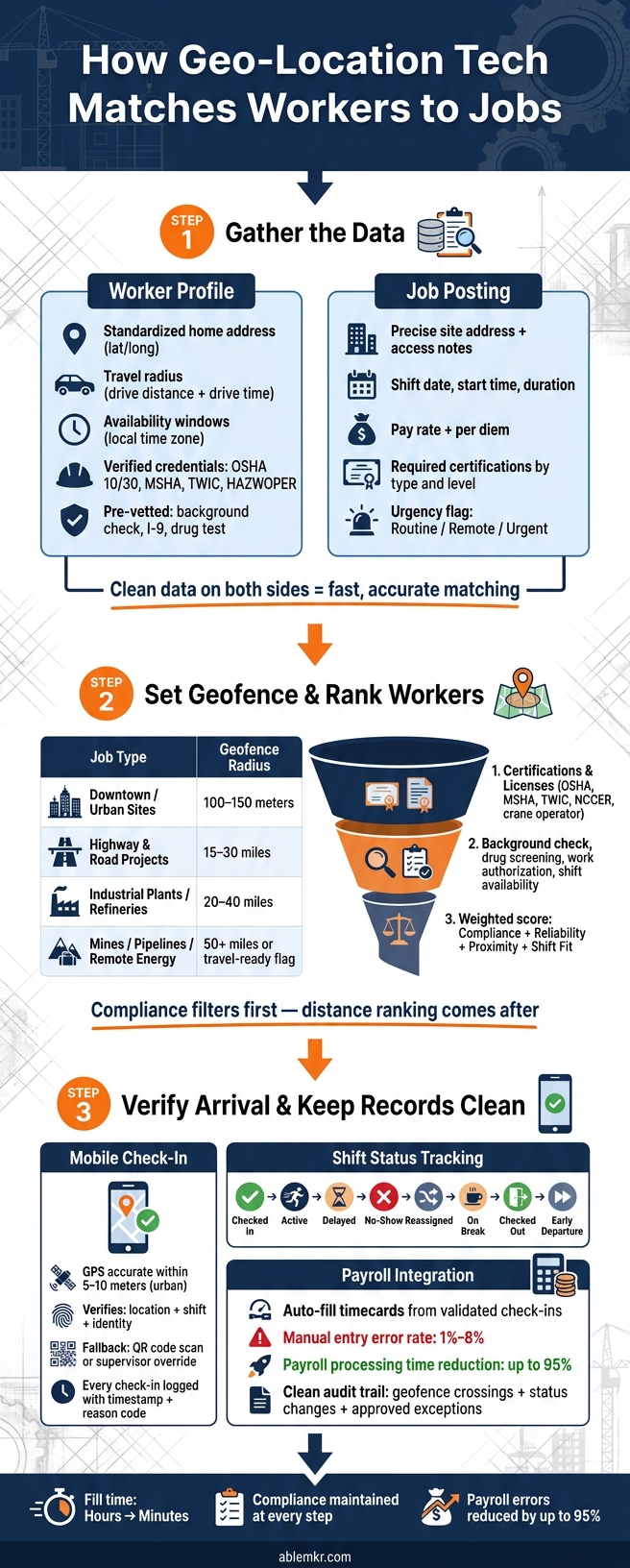
Geo-Location Job Matching: 3-Step Workflow for Fast, Compliant Dispatch
Top 3 Best Geofencing Time Tracking Apps for 2026 (Full Demo)
sbb-itb-aa28329
Step 1: Gather the Data the Matching System Needs
Before any matching can happen, the system needs clean, structured data from both sides: workers and employers. That’s what lets it rank the right workers fast.
Start with worker profiles. Location matching falls apart if the worker record is messy.
Worker Data: Location, Availability, and Qualifications
A solid worker profile needs four things:
- A standardized home address with latitude and longitude
- A defined travel radius
- Availability windows in the worker’s local time zone
- Verified qualifications
The home address should follow USPS-standard address format. For travel, use drive distance and drive time, not just a straight-line radius. That detail matters. A worker may look close on a map but still be an hour away because of roads, traffic, or site access.
Availability should be entered in the worker’s local time zone. For example, Mon–Fri, 6:00 AM–4:00 PM CT. It should also include flags for overtime or night shifts. On the qualifications side, the profile should cover trade role, experience level, state licenses, and safety credentials like OSHA 10, OSHA 30, or HAZWOPER. Use standard fields so the system can filter them the same way every time.
Pre-vetted workers have already cleared background checks, I-9 verification, drug testing, and required training. That verified package carries from job to job, so employers don’t have to restart the compliance process each time.
Then the job side needs matching fields so the system can compare worker location with site needs.
Job Data: Site Address, Shift Timing, and Urgency
On the employer side, a complete job posting should include a precise site address: street, city, state, ZIP, and access notes. It should also include the shift date and start time in U.S. format, such as 07/15/2026, 6:30 AM CT, along with expected duration, pay rate, and per diem if that applies.
Required certifications should be listed by type and level, such as NCCCO crane certification, TWIC card, or MSHA for mining. That way, the engine filters to compliant workers only. An urgency flag, like routine, remote, or urgent, tells the system how fast to surface the job.
With both records standardized, the platform can score matches automatically.
How ABLEMKR Uses These Inputs
ABLEMKR first filters for compliance, then availability, then proximity. That order matters. If an employer posts urgent work, like a last-minute pipeline repair or a scheduled mine development, they see workers who are actually ready to deploy, not just people who happen to be nearby.
Once the data is clean, the platform can set geofences and rank the best workers.
Step 2: Set Geofences and Rank the Best Available Workers
Once the data is verified, the platform draws a geofence, checks for compliance, and ranks the workers who are left. In plain English: it sets the site boundary, removes anyone who doesn’t meet the job rules, and then decides who should get the dispatch first.
Set a Geofence Around Each Job Site
A geofence is a GPS boundary around a job site. The right size depends on the type of work and the location. Tight geofences make sense for dense city sites, while bigger ones work better for highways, plants, and remote crews.
- Downtown and small urban sites: 100–150 meters, because GPS drift is more noticeable in dense areas
- Highway and road projects: 15–30 miles, to account for workers driving in from surrounding areas
- Industrial plants, refineries, and utilities: 20–40 miles
- Mines, pipelines, and remote energy sites: 50 miles or more, or a travel-ready flag instead of proximity alone
ABLEMKR can apply job-type templates like urban, industrial, and remote, then let dispatchers adjust the radius before posting. That gives teams a solid starting point without locking them into a one-size-fits-all setup.
Once the boundary is set, the platform filters out anyone who is not fully qualified.
Filter for Qualified Workers Before Sorting by Distance
Compliance comes first. Distance comes after.
Before the system sorts by proximity, it should filter for required certifications and licenses such as OSHA 10/30, MSHA, TWIC, HAZWOPER, NCCER, or crane operator licenses. It should also check completed safety training and site-specific clearances, background checks, drug screening, confirmed shift availability, and work authorization. If a worker misses even one required filter, that worker should not appear in the ranked list.
After that, the platform ranks the remaining workers with a weighted scoring model. The score should reflect compliance, reliability, proximity, and shift fit, with the mix tied to job risk. A hazardous nighttime shutdown should put more weight on compliance and reliability. A routine day shift can give more weight to proximity.
Handle Remote and Urgent Jobs Without Breaking the Process
Urgent and remote jobs can put the whole matching flow under stress. That’s usually when shortcuts creep in. They can’t here. Compliance filters still stay non-negotiable.
For urgent jobs, the platform should widen the geofence only after the first compliant pool is exhausted. Then it can rank workers by the fastest realistic arrival time. Workers marked as ready for same-day work should move to the top. From there, push notifications or SMS prompts go out to top-ranked candidates, and the system locks in the first qualified worker who confirms.
For remote sites, travel-readiness should outrank simple closeness. A worker who is farther away but ready to travel is a better match than someone nearby who can’t get to the site.
This gives ABLEMKR a way to fill urgent shutdowns and remote jobs fast without lowering compliance standards.
After a worker accepts the job, the next step is confirming arrival and tracking the shift.
Step 3: Verify Arrival, Manage the Shift, and Keep Records Clean
After a worker accepts the job, the platform needs to confirm arrival and track what happens during the shift.
Use Mobile Check-In to Confirm the Worker Is On Site
When a worker clocks in on mobile, the system should verify location, shift, and identity before it records the start time. That helps cut down on off-site check-ins and cases where someone clocks in for another person. In urban areas, modern GPS is usually accurate within 5–10 meters, which is enough to confirm that someone is at the job site in most geofences.
GPS doesn’t work as well everywhere, though. Indoor plants, underground operations, remote sites, and large industrial yards can all cause weak signals. In those cases, the platform should allow a fallback option. A supervisor-approved override or a QR code scan at the site entrance can keep people moving without losing the paper trail. Every check-in should be logged with a timestamp and reason code, including any approved exception. If GPS is weak, a logged override or site QR scan keeps the audit trail intact.
ABLEMKR’s mobile app gives employers real-time worker location visibility, so supervisors can confirm arrival before the shift starts and coordinate directly with workers when delays come up.
Track Status Changes During the Shift
Check-in is only the start. The platform should keep tracking status changes through the rest of the shift, including:
- checked in
- active
- delayed
- no-show
- reassigned
- on break
- checked out
- early departure
This matters even more when crews are split across several sites. A no-show at one location may be filled by a worker who’s already nearby. That gives dispatch a chance to close the gap before work slows down or stops.
Connect Location Validation to Timekeeping and Payroll
Validated check-ins should flow straight into timecards. When a check-in matches the geofence, the system can auto-fill the timecard instead of relying on manual entry. That’s a big deal because manual entry brings 1% to 8% error rates, and automating location-validated timekeeping can cut payroll processing time by up to 95%.
ABLEMKR can route verified attendance records into payroll and invoicing, creating a clean audit trail that includes geofence crossings, status changes, and supervisor-approved exceptions. Those records help settle disputes over overtime, missed punches, and shift length, while giving workers more accurate, on-time pay based on verified hours.
Conclusion: Build a Matching Process That Is Fast, Accurate, and Reliable
After data setup, geofence ranking, and mobile check-in, the workflow comes down to three rules.
A geo-location matching system only works when worker and job data are complete. Worker profiles need current certifications, safety training, availability, and a travel radius. Job postings need exact GPS coordinates, shift times, required credentials, and urgency flags.
Start with qualifications before distance. Proximity should only rank workers who already meet the job requirements.
After that filter is done, the geofence defines the search area. Set geofence size based on the job type and location, then fine-tune it with acceptance and no-show data.
ABLEMKR connects pre-vetted worker profiles, geo-location matching, GPS check-in, compliance tracking, and payroll in one mobile-first workflow.
Put together, these steps turn location data into faster dispatch and cleaner records. When the process is set up well, teams can deploy people faster, clean up attendance records, and give workers accurate pay and clear shift data.
FAQs
Why rank qualifications before distance?
In high-risk industries like energy and construction, qualifications have to come first. That’s how companies protect safety and meet regulatory requirements. When you put certifications, safety training, and verified expertise at the top of the list, you’re making sure workers can do the job safely and legally.
Distance still matters. It helps with fast mobilization and cuts travel time. But qualifications should come first. If you skip that step, you can end up with deployment failures, delays on site, and the very real risk of sending someone out without the right credentials.
How do geofences work for remote job sites?
For remote job sites, ABLEMKR uses geo-location tech and GPS to match pre-vetted, qualified workers with nearby projects based on proximity, availability, and the certifications each job requires.
That gives managers a clear view of who’s on-site, lets them track progress in real time, and helps them move crews fast for emergencies or remote repairs. It also cuts down on travel time and idle time, which matters a lot when teams are spread out.
What happens if GPS check-in fails on site?
The source material doesn’t say exactly what happens if a GPS check-in fails on site.
What it does make clear is that ABLEMKR supports offline data sync. So if a crew member loses service in the field, they can still log hours and complete checklists without an internet connection.
That information is stored on the device first, then syncs on its own when the connection comes back.


