
Remote construction teams lose time and money when the field and office work from different information. In this article, I show the core fix: put messages, drawings, issue logs, and worker status into one cloud system that crews can use from the jobsite or the office.
Here’s the short version:
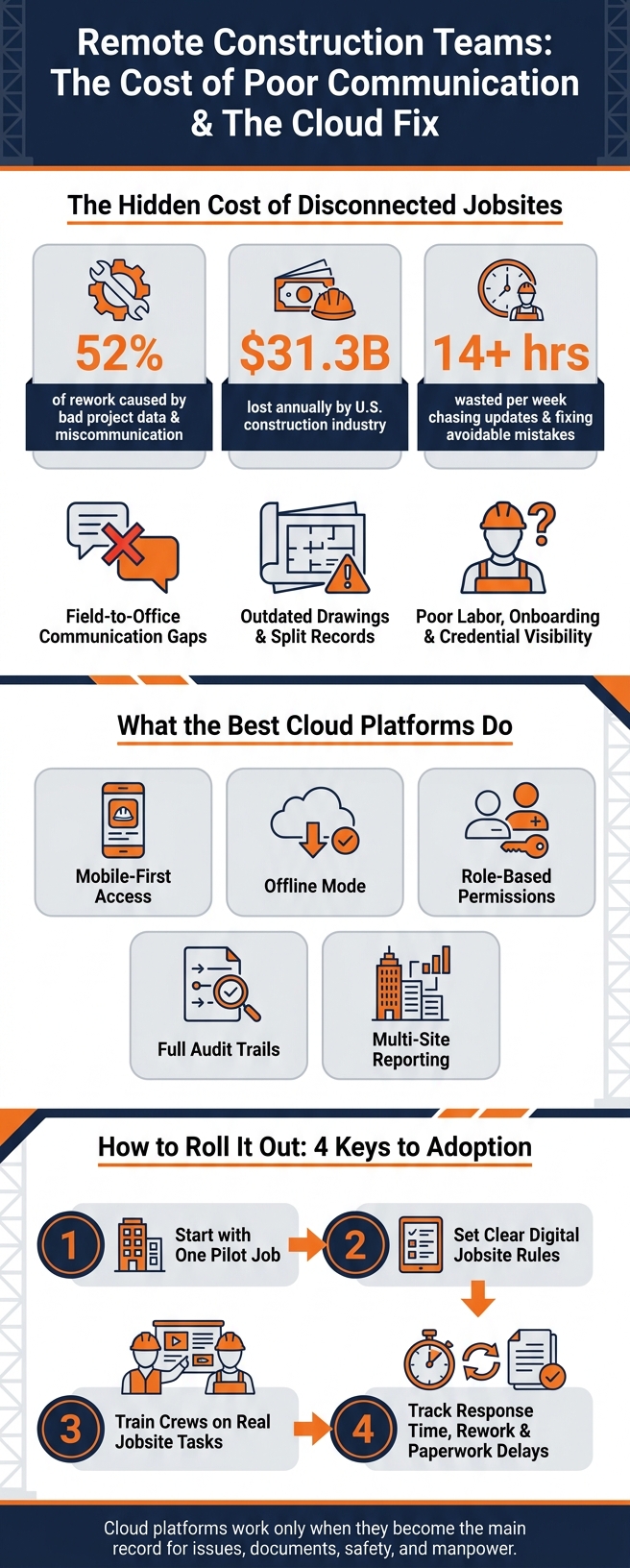
- Bad project data and miscommunication drive 52% of rework
- U.S. construction loses about $31.3 billion per year from those problems
- Teams waste 14+ hours per week chasing updates and fixing avoidable mistakes
- The biggest trouble spots are:
- field-to-office communication
- old drawings and split records
- poor visibility into labor, onboarding, and credentials
- The best cloud setups focus on:
- mobile use
- offline access
- clear permissions
- audit trails
- multi-site reporting
- Rollout matters just as much as software: start with one pilot job, set clear rules, train crews on jobsite tasks, and track response time, rework, and paperwork delays
Put simply: if your team works across remote sites, a cloud platform helps only when it becomes the main record for issues, documents, safety items, and manpower updates.
This article breaks down the problems, the fix, what to look for in a platform, and how I’d put it into use on a U.S. jobsite.
Remote Construction Teams: The Cost of Poor Communication & The Cloud Fix
The Main Problems Remote Construction Teams Face
Communication Gaps Between the Field and the Office
On remote jobsites, teams often rely on a messy mix of phone calls, text messages, and email threads. That can work for small updates. But once something needs a fast call, the whole setup starts to wobble.
A superintendent may report a field change by phone, and the office might not record it until hours later. A crew can sit around waiting for an RFI response buried in someone’s inbox. A punch item stays open because no one clearly owns it.
At the root of it is a simple issue: there’s no shared record of decisions, updates, and assignments.
When teams work across spread-out jobsites and use separate systems that don’t sync, key details slip through the cracks. Research on distributed construction teams points to weak spots like missed context, uneven access to information, clashing priorities, timing gaps, and silence that people misread. Without a shared log, teams end up double-checking every update before work can move ahead.
Data Silos, Outdated Drawings, and Duplicate Records
One crew may be building from an old drawing while another is using the latest set from a different folder. Most of the time, nobody catches the mismatch until the work is already in place.
It gets worse when the GC, subcontractors, design team, and safety staff all use separate systems that don’t talk to each other. Then you don’t have one project record. You have several versions of the same project, and they don’t match.
Drawings, RFIs, schedules, change orders, and reports end up scattered across:
- spreadsheets
- personal devices
A lot of construction firms now use digital tools, but their data is still fragmented and unstructured. That can lead to miscommunication, legal disputes, and budget blowouts. In other words, version control isn’t just an office headache. It becomes a field problem fast.
Limited Workforce Visibility on Remote and High-Risk Sites
On pipeline, utility, mining, and heavy civil projects, crews rotate often. Site access also depends on current credentials and safety requirements. That sounds simple on paper, but in the field, it can turn into a daily scramble.
Managers often don’t know who is on-site, whether credentials are current, or whether onboarding is done until a worker shows up at the gate or a compliance review starts. Tracking all of that with spreadsheets and phone calls across several remote sites is slow, error-prone, and hard to manage.
The result is straightforward: mobilization takes longer, and safety and compliance risk goes up. Those gaps make remote labor coordination slower and riskier than it needs to be.
sbb-itb-aa28329
Autodesk Construction Cloud
How Cloud Platforms Address These Problems
Cloud platforms fix these issues by giving field and office teams one shared system. The fix is pretty simple on paper: real-time communication logs, one place for documents, and live labor visibility.
Real-Time Messaging and Issue Tracking Cut Communication Delays
A foreman can log an issue from a phone, add photos, tag the engineer, and assign a due date on the spot. The engineer gets a push notification right away and can reply in the same thread.
That matters because the whole exchange stays in one place. No missed texts. No buried email chain. No guessing who said what.
A defined issue-status workflow also keeps things moving. Items go from raised to under review, approved, and closed, so both office and field teams can check status at a glance.
Centralized Cloud Records Create One Source of Truth
Centralized document control keeps one current set in view. Old versions are automatically superseded, and every RFI ties back to the relevant sheet.
Case studies from CF Evans Construction and Scott Construction Group show that centralized cloud records keep teams on the same set and reduce administrative work.
The same shared record helps with workforce coordination too. Teams can track who is cleared to work, where they are, and when they can mobilize.
Cloud Workforce Tools Improve Deployment, Compliance, and Labor Visibility
Remote jobsites need live visibility into headcount, credentials, and onboarding. Without it, a project manager ends up chasing updates through phone calls, texts, and spreadsheets. That’s slow, and on a busy job, slow can turn into a mess.
With cloud workforce tools, a project manager running multiple remote sites can see current headcount by trade, flag workers whose credentials are close to expiring, and confirm onboarding status from one dashboard.
ABLEMKR matches pre-vetted workers to jobsites based on certifications, safety training, availability, and geolocation. It also gives employers real-time worker status, compliance tracking, and payroll workflows.
What to Look for in a Cloud Platform for Remote Construction
Remote construction teams need a platform that can handle weak signal, protect project data, and still work across multiple crews.
Once you’ve fixed the basic communication and file-sharing issues, the next question is pretty simple: does the platform hold up in the field, and can it keep up as more projects come online?
Mobile Access, Offline Use, and Simple Field Workflows
The platform needs to work where the job happens: on mobile devices, in rough jobsite conditions, and often with little or no signal. On remote energy projects or rural highway work, offline use isn’t a nice extra. It’s a must. Crews should be able to fill out daily logs, complete safety checklists, and upload photo documentation in airplane mode, then have everything sync on its own when service comes back.
But offline access is only part of the story. The workflow itself has to be easy to use. Forms should rely on dropdowns and pre-filled fields instead of wide-open text boxes, so a newer worker can submit a safety observation just as well as someone who’s been on site for years. If a crew member has to stop and think through how to report an issue, that’s a sign the process is too clunky. A good gut check is to test a few basic tasks with someone in the field: logging time, uploading a photo, and flagging a safety issue in just a few taps.
Permissions, Audit Trails, and Secure Data Sharing
Once field use feels smooth, the next focus is security and accountability.
Role-based access should control what each person can view, edit, or approve. Every change, approval, and access attempt should be logged with a timestamp and user ID. That kind of record matters during OSHA reviews and when disputes pop up. Secure sharing also matters, especially on higher-risk sites where teams handle workforce records and sensitive project financial data. That includes encryption in transit and at rest.
Scalability Across Multiple Projects and Crews
A platform that runs well on one job should still run well when you’re juggling ten. In practice, that means reusable templates for onboarding, safety orientation, daily logs, and reporting. Teams should be able to set these up once, then copy them into new projects with small changes for client or site needs. Managers also need a single dashboard that shows what’s happening across sites.
Scale also depends on how well the platform connects with payroll, HR, and scheduling tools. Without those links, teams end up entering the same data again and again as project volume grows.
Putting Cloud Workflows Into Practice
Getting cloud tools into daily use on a jobsite takes more than buying a subscription. The rollout is what makes or breaks adoption. If there’s no clear system, crews usually drift back to a mix of platform updates, text messages, and paper notes.
Rollout Steps for U.S. Construction Teams
Start with one pilot project, not your full portfolio. Pick a job where communication problems and documentation slowdowns are already easy to spot. Before any training starts, run a connectivity survey, set device rules, and preload templates for issues, daily reports, permissions, and alerts.
For hardware, plan on company-issued devices for foremen and field engineers. If workers use their own phones, put a clear bring-your-own-device policy in place. That policy should cover OS requirements, security rules, and reimbursement terms.
Next, publish a short "Digital Jobsite Rules" document. Keep it plain and specific. It should say exactly what belongs in the platform:
- All RFIs and field clarifications
- Every safety incident and near-miss observation
- Any change that affects scope, cost, or schedule
- All daily manpower logs
For those items, text threads and paper forms should not serve as the record. It also helps to name a site-level champion – usually a foreman or field engineer – who repeats the rules during daily huddles and toolbox talks. That kind of steady reminder matters more than a one-time kickoff speech.
Training tends to work best in short bursts during the first few weeks. Show crews real situations they deal with on site. For example, walk through how to spot a rebar conflict, take a photo, tag the location, and submit it in the app. Make the point clear: cloud logging replaces end-of-day paperwork.
It also helps to show the small features that save time in the field, like photo markup, voice-to-text, and quick templates. If logging an issue feels slow, people will avoid it. If it feels simple, they’ll use it.
How to Measure Results After Adoption
Once the platform is live, don’t just track logins. Track whether it’s cutting delays and reducing paperwork.
On the process side, watch:
- Average time from issue creation to first response
- The share of issues submitted with all required fields filled out the first time
- How many field decisions still happen outside the platform
On the outcome side, measure rework tied to drawing miscommunication, hours spent on manual compliance documentation, and delayed inspections caused by missing paperwork.
The table below shows where cloud workflows make the biggest difference compared with paper-based processes:
| Workflow step | Paper-based process | Cloud-based process |
|---|---|---|
| Identify issue | Crew logs the problem before it gets lost in notes, calls, or texts. | Crew logs the issue with photos, location, and timestamp in the app. |
| Report issue | Information is duplicated or delayed while reaching the office. | The office sees the issue in near real time through a shared dashboard. |
| Resolve issue | Teams may work from outdated drawings or incomplete notes. | Everyone works from the current record. |
| Document issue | Closeout evidence can be scattered across paper, email, and photos. | Resolution, approvals, and audit trail stay with the issue. |
Remote jobsites need that same shared system for workforce readiness and deployment. ABLEMKR tracks worker certifications, safety training, availability, and location in real time, so project managers can see who is ready to deploy, who is on site, and whose credentials are expiring from one dashboard.
Key Takeaways
The main problems – communication gaps, document fragmentation, and limited labor visibility – start as process problems. Cloud tools help only when workflows match the way jobsites actually run: quick mobile forms, offline access, and clear rules about what gets logged where.
That’s why adoption usually comes down to three things: mobile usability, field-ready processes, and steady follow-through across every site – not just the pilot.
FAQs
How do cloud platforms reduce rework on remote jobs?
Cloud platforms cut down on rework by giving teams a single source of truth. That means everyone works from the latest project data instead of chasing old files, stale drawings, or mismatched specs. Automated version control also helps stop errors that happen when someone uses an outdated blueprint or specification.
With real-time syncing, centralized document access, and mobile updates, teams can catch issues early, avoid crossed wires, and do the job right the first time.
What features matter most on low-signal jobsites?
Offline use that works well matters most. On remote jobsites with spotty internet, teams need to capture data, log progress, and open key documents without a connection. Then, when service comes back, the app should sync on its own.
A mobile-first design helps too. Workers can update project status from a phone or tablet right from the field, which keeps work moving and everyone on the same page.
How should a construction team roll out a cloud platform?
Start by pinning down what your team needs from the project and who needs access to what. Set user roles early so the right people can view, upload, approve, or edit without getting in each other’s way.
Then fit the platform into the software you already use instead of tearing up your whole workflow. That approach is usually easier on the team and cuts down on friction during setup.
Support the rollout with hands-on training, internal champions, and short 15–20-minute sessions built around actual day-to-day tasks, like uploading photos or viewing blueprints. Keep it practical. If people can learn the system while doing work they already know, it tends to stick.
It also helps to give teams laminated quick-reference cards they can keep nearby. And before launch, set the platform formats for U.S. dates, currency, measurements, and time zones so everyone sees the same information the same way.


