
Pick the wrong platform, and you risk late hires, payroll errors, and compliance fines. If I were choosing one today, I’d score each option on four things: hiring fit, field use, compliance controls, and total cost.
Here’s the short version:
- I’d start with crew demand, trades, project type, and job locations
- Then I’d check worker matching, mobile onboarding, scheduling, and time tracking
- Next, I’d verify credential tracking, assignment blocks, worker classification, and audit logs
- Last, I’d compare integrations, support, mobile use, and 12–24 month cost
A few numbers make the stakes clear:
- The U.S. construction industry needs about 723,000 new workers per year through 2026
- Worker misclassification fines can hit up to $25,000 per worker
- I-9 errors can cost $252 to $2,507 per form
- Construction made up nearly 1 in 5 workplace deaths in 2022
My takeaway: I wouldn’t buy based on a demo alone. I’d use a written scorecard, test how the system works on a jobsite phone, and check whether it can stop expired credentials, handle multi-state pay rules, and show clean records when asked.
Quick comparison
| What I’d check | What I want to see |
|---|---|
| Hiring fit | Trades, skill levels, crew size, shift plans, mobilization targets |
| Field tools | Mobile onboarding, geofenced clock-in, offline punches, live worker status |
| Compliance | OSHA and license tracking, screening records, W-2 support, audit logs |
| Cost and fit | Clear fees, system connections, support response, multi-site use |
If I can’t verify those points in writing, I’d keep looking.
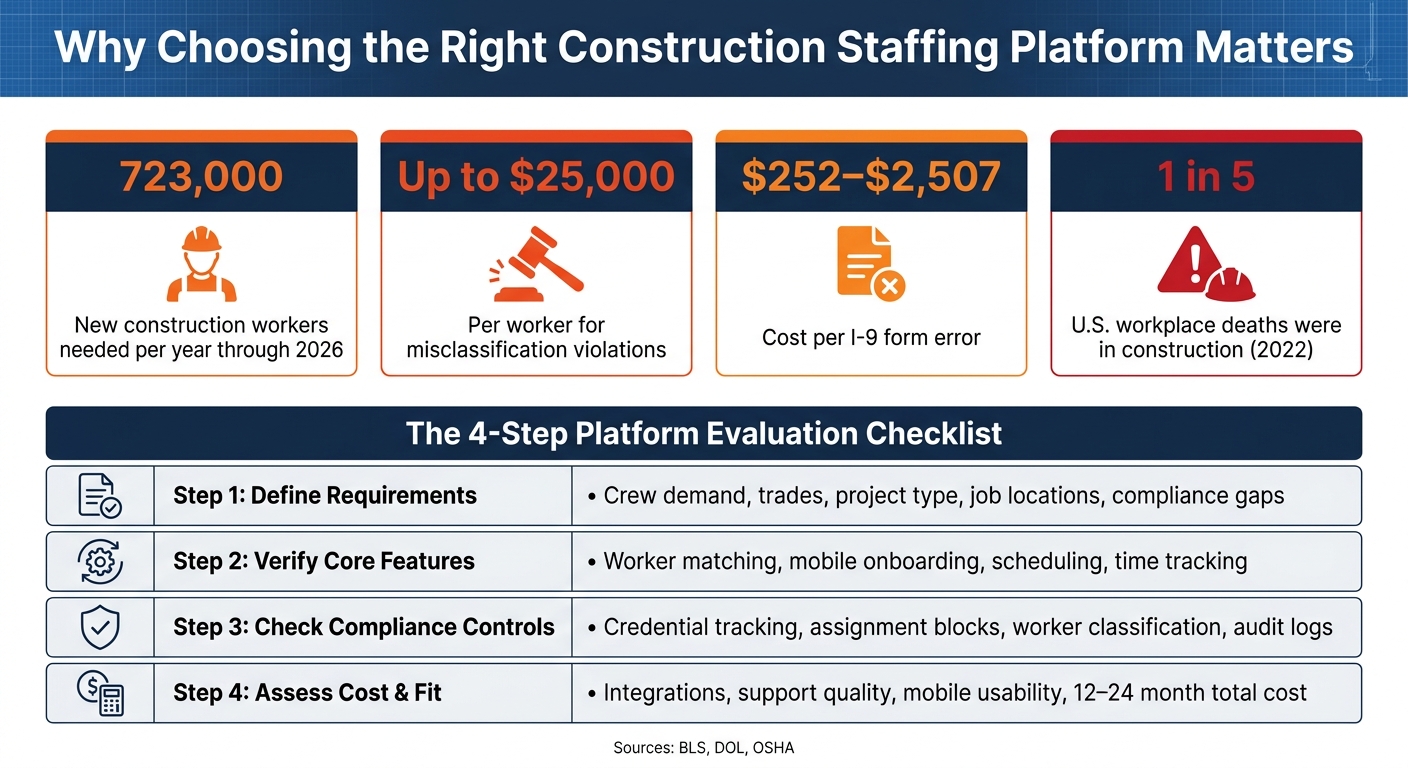
Construction Staffing Platform: Key Stats & Compliance Risks
Step 1: Define Your Hiring, Project, and Compliance Requirements
Before you compare platforms, get your requirements on paper. This gives you one clear baseline for every feature check that comes next.
Document Project Scope, Trades, and Crew Volume
Start with the kind of work you take on: commercial, industrial, heavy civil, energy, infrastructure, residential, multifamily, or specialty jobs like refinery turnarounds. Each one changes the trades you need, the credentials people must have, and the size of the crew.
Write down each project type, the trade needed, the skill level, and the expected crew size for each phase. That matters because crew volume shifts as a job moves along. A 2–4 week look-ahead for each trade helps you plan ahead instead of scrambling at the last minute. Include day shifts, night shifts, weekend work, and overtime.
Once your scope is mapped out, tie it to location and mobilization needs.
Confirm Geography, Mobilization Speed, and Remote Site Needs
Location shapes wage rules, licensing rules, and mobilization demands. Document each state’s wage, licensing, and labor-rule requirements. States like California and Massachusetts use strict ABC tests, and New York City requires Site Safety Training (SST) cards.
If you’re staffing remote jobs, spell out travel, per diem, and lodging needs. If you’re dealing with storm response, shutdowns, or other urgent work, set a mobilization target. You should also define your required time-to-fill before you start comparing platforms.
List Compliance Risks and Current Workflow Gaps
Now get specific about compliance. List every item you need to track: OSHA training, licenses, background checks, MVRs, drug screening, and any site-specific credentials. For specialty work, add H2S Safety training for oil and gas sites, TWIC credentials for ports and refineries, and MSHA Part 46 or Part 48 for mining.
Then list the onboarding forms you need every worker to complete, such as I-9, W-4, direct deposit, and safety acknowledgment forms.
This is also the time for a blunt look at your current process. Are OSHA cards expiring without notice? Is payroll showing up late? Are no-shows hurting the schedule? Those are the problems your platform needs to fix. If a platform can’t close those gaps, it’s not the right fit.
Use the checklist below to keep all of this in one place.
| Requirement Category | Key Items to Document |
|---|---|
| Project Details | Sector, phase (site prep, MEP, finish), duration |
| Labor Needs | Trade, skill level (helper, apprentice, journeyman, master), headcount |
| Logistics | Location, travel/lodging (per diem), shift schedule |
| Compliance | OSHA 10/30, state licenses, background checks, drug testing, I-9/W-4 |
| Budget | Prevailing wage requirements, bill rate targets, workers’ comp needs |
sbb-itb-aa28329
Step 2: Verify Core Staffing, Scheduling, and Payroll Features
Once your requirements are set, the next step is simple: check whether the platform fits the way construction crews work in the field.
You’re not just looking for a system that looks good in a demo. You need one that can handle the full flow of day-to-day operations, from picking the right worker to getting that person paid, without forcing your team to do manual handoffs at every stage.
Check Worker Matching and Digital Onboarding Tools
A matching engine only helps if it filters by the details that matter on a job site.
Start by checking whether the platform stores pre-vetted worker profiles that include trade, seniority level like journeyman or apprentice, equipment qualifications, and project history. Then test the search itself. It should filter by certifications, safety training, availability, and geolocation at the same time, not just by job title.
In plain English, the system should pull up pre-vetted workers by certification, safety training, availability, and location without someone having to sort through records by hand. Ask the vendor to run that search live. A canned screenshot won’t tell you much.
Digital onboarding should also work fully on mobile. Workers should be able to:
- Accept assignments
- Enter direct deposit details
- Complete onboarding documents
- Upload credentials from their phones before they arrive
The platform should also time-stamp each step and automatically flag missing or expired items. That matters because paperwork gaps have a bad habit of showing up at the worst possible moment.
Once matching and onboarding look solid, move to the next test: can the platform schedule workers and track them once they’re in the field?
Check Scheduling, Time Tracking, and Worker Status Visibility
After workers are matched and onboarded, the platform needs to keep crews organized even when site conditions change fast.
Scheduling tools should support rotating shifts like 4x10s, 7-on/7-off, and day/night schedules. They also need to handle multi-site crews and phase-based headcount changes. Supervisors should be able to build site rosters by trade, adjust crew assignments in bulk, and spot the cost impact when overtime starts to hit.
For time tracking, geofenced mobile clock-in should be standard. The app should only allow punches within a set radius of the job site. It also needs to store punches offline when service drops, which is a big deal for remote pipeline, energy corridor, or rural infrastructure jobs.
You’ll also want real-time worker status visibility. Supervisors and superintendents should be able to see who is:
- On-site
- En route
- A no-show
- Reassigned
That kind of live view helps teams fix staffing gaps right away instead of finding out at the morning meeting, when the crew is already short.
Check Payroll Workflows, Pay Rules, and Invoicing Support
Construction pay is rarely simple, and this is where weak systems tend to fall apart.
The platform needs to support project-specific pay rates, shift differentials, per diem, and travel pay. More than that, it should apply those rules automatically when hours are coded to the right project. Pay rules also need to support correct worker classification and payroll tax handling. There isn’t much room for “close enough” here. The rules have to be exact.
Then look past the pay calculation itself. You want a clean path from approved timesheets to payroll processing and client invoicing. If the platform can’t move cleanly from timesheet approval to payroll export and invoicing, that’s a red flag.
Step 3: Check Safety, Certification Tracking, and U.S. Compliance Controls
Construction accounted for nearly 1 in 5 workplace deaths in the U.S. in 2022, according to the Bureau of Labor Statistics. That’s why safety tracking can’t be treated like a nice extra during platform review. Once you’ve looked at scheduling and payroll, move to the controls that stop unqualified or undocumented workers from getting onto the jobsite.
Verify Training, Certification, and License Tracking
The platform needs to track credentials, expiration dates, and assignment limits. But storage alone isn’t enough. In the demo, ask the vendor to show how the system enforces those rules, not just where the records sit.
Instead of going back through the full credential list from Step 1, focus on what the software does with that data. Check these two controls:
- Configurable expiration alerts by role, project, or jurisdiction, not just one blanket alert for the whole system
- Automatic assignment blocks that stop a worker from being scheduled or dispatched when a required credential has expired
Also ask whether supervisors can override those blocks. If they can, every override should be logged. That record matters if you ever need to answer questions from an OSHA inspector or a general contractor’s compliance team.
There’s another detail here that trips people up. OSHA 10/30 is voluntary at the federal level, but states including New York, Connecticut, Massachusetts, Missouri, Nevada, New Hampshire, Rhode Island, and West Virginia require it for certain public or large-scale projects. So the platform should be able to apply different credential rules by site and jurisdiction. If it can’t, your team ends up patching the process by hand.
Verify Worker Classification, Screening Records, and Audit Trails
Worker classification is one of the most watched areas in construction compliance. The Department of Labor‘s Wage and Hour Division recovered more than $1.5 billion in back wages between 2017 and 2023, and construction was among the industries cited for repeat violations. Misclassifying a worker can lead to fines of up to $25,000 per worker.
Get clear on who carries payroll taxes, workers’ comp, insurance, and classification responsibility. If that line is fuzzy in the system, it’ll be fuzzy when there’s a dispute too.
Then look at how the platform stores background checks, drug test results, I-9 and E-Verify records, and right-to-work documents. These records should connect directly to each worker profile, and the system should keep version history when documents are renewed or changed. I-9 errors alone can cost between $252 and $2,507 per form, and knowingly hiring unauthorized workers can bring penalties of up to $25,076 per worker.
For audit trails, don’t settle for a screen view. The platform should produce downloadable logs for credentials, approvals, timekeeping, and pay records in a format you can hand to auditors, general contractors, or internal compliance teams.
Add a Compliance Comparison Table Before Final Selection
During each demo, score the platform based on enforcement, not sales claims. A simple Yes, No, or Partial works well. Partial usually means the feature exists, but only with manual work, weak automation, or limits by role.
| Compliance Feature | Platform A | Platform B | Platform C |
|---|---|---|---|
| OSHA 10/30 training tracking | |||
| Trade license & certification storage | |||
| Credential expiration alerts | |||
| Automatic assignment blocks for lapsed credentials | |||
| W-2 classification support | |||
| Background check & drug test record storage | |||
| I-9 and E-Verify records | |||
| Right-to-work record storage | |||
| Workers’ comp record storage | |||
| Downloadable audit logs |
If a platform scores mostly Partial here, that’s a warning sign. It usually means your team will still have to chase records, check expirations, and plug holes on its own – which undercuts the whole point of buying the platform.
Step 4: Assess Mobile Usability, Integrations, Cost, and Final Fit
Compliance controls matter, but they don’t mean much if the field team struggles to use them on site or the office team has to re-enter data into other systems. This step is about a simple test: does the platform work for both field and office teams day to day?
Check Mobile Access, Role-Based Views, and Multi-Site Scalability
After compliance, check how the platform performs in the field and across more than one jobsite.
Field supervisors, recruiters, payroll staff, and workers do not need the same tools or the same level of access. A good platform keeps those views separate, so each person sees the tasks that matter to their role.
Look closely at mobile access. Ask if the product is a true native mobile app or just a mobile web app. Then test it on a standard jobsite phone. Pay attention to speed, offline use, and how easy it is for workers to punch in.
You should also confirm that the platform can support multiple business units, projects, and high worker volumes at the same time without slowing down or forcing separate logins. If your crews move across several sites, the system should treat that like normal day-to-day usage, not an edge case.
Check Integrations, Pricing Clarity, and Support Quality
If mobile use looks good, move to the systems behind the scenes.
A staffing platform that doesn’t connect cleanly to your payroll, HRIS, ERP, or timekeeping systems can add manual work instead of cutting it down. Before signing anything, map the systems you already use and ask exactly how data moves between them. Don’t stop at “yes, we integrate.” Setup work and the upkeep after launch matter just as much as the integration itself.
Pricing needs the same level of scrutiny. Get implementation, subscription, user, integration, and add-on fees in writing. Then compare the total cost over 12 to 24 months. For W-2 staffing models, bill rates usually run 30% to 70% above a worker’s gross wage to cover payroll taxes, insurance, and administrative overhead.
Support quality is easy to miss until something breaks at 6:00 a.m. and crews are waiting. Ask whether the support team understands jobsite scheduling, payroll, and compliance issues. Then ask how fast they fix field problems when they happen.
Conclusion: Use a Weighted Checklist to Make a Documented Choice
Work through all four steps before making the final call: define your requirements, verify core staffing features, test safety and compliance controls, and then review usability, integrations, and total cost. Score each platform in writing so the choice is documented and easier to defend.
Use the same 1-to-5 scale for every category. Assign a weight based on what matters most to your operation, then multiply the score by the weight to get a total.
| Category | Weight | Platform A Score | Platform A Total | Platform B Score | Platform B Total | Platform C Score | Platform C Total |
|---|---|---|---|---|---|---|---|
| Staffing & scheduling features | 25% | ||||||
| Safety & compliance controls | 25% | ||||||
| Mobile usability | 20% | ||||||
| Integrations | 15% | ||||||
| Total cost of ownership | 10% | ||||||
| Support quality | 5% | ||||||
| Total | 100% |
Use the weighted total to document the decision and keep the selection defensible.
FAQs
How do I score platforms fairly?
Score staffing platforms against your day-to-day operating needs, not just price or who happens to be available. The goal is simple: pick the features that help your projects run better.
Look closely at verified worker profiles, performance ratings, and automated matching by location and availability. Those tools can lead to safer hiring, clearer reliability signals, and fewer scheduling problems.
Which compliance features matter most?
Prioritize platforms that support proper W-2 worker classification, built-in workers’ compensation, and payroll tax management. That helps cut legal, financial, and admin risk before it turns into a headache.
It also helps to look for credential tracking with alerts for expiring safety certifications and OSHA requirements. On top of that, check for strong data security standards like SOC 2, along with tools for real-time safety reporting and documentation.
What hidden costs should I watch for?
Watch for hidden markups, opaque pricing, and worker conversion fees. Those fees often land between 10% and 25% of a worker’s first-year salary.
Also, check that the bill rate covers workers’ compensation, payroll taxes, and general liability. If it doesn’t, you may end up dealing with misclassification penalties, extra admin costs, or more work from detailed invoicing.


