
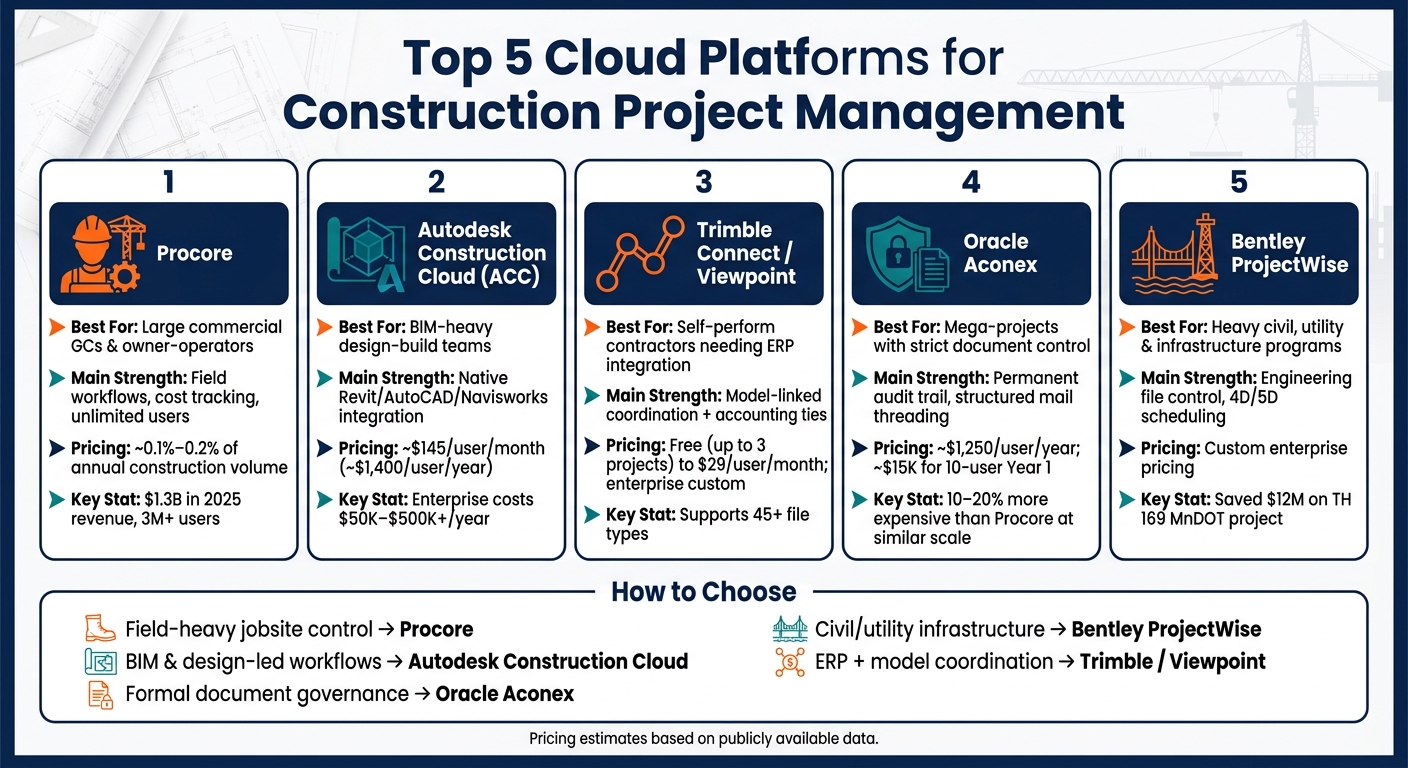
If you pick the wrong platform, your team pays for it in missed updates, rework, and slow handoffs. I’d narrow this list down fast: Procore for field-heavy commercial jobs, Autodesk Construction Cloud for BIM-led building teams, Trimble Connect / Viewpoint for model + ERP workflows, Oracle Aconex for strict document control, and Bentley ProjectWise for heavy civil and utility work.
Here’s the short version:
- Procore: best fit for large commercial GCs that want strong field and cost workflows
- Autodesk Construction Cloud: best fit for teams deep in Revit, AutoCAD, and Navisworks
- Trimble Connect / Viewpoint: best fit for contractors that need model-linked coordination plus accounting/ERP ties
- Oracle Aconex: best fit for high-control, multi-party projects with strict audit records
- Bentley ProjectWise: best fit for infrastructure programs built around engineering files and reviews
A few numbers stand out right away:
- Procore reported $1.3 billion in 2025 revenue
- Procore pricing often lands around 0.1% to 0.2% of annual construction volume
- ACC is often estimated near $145/user/month
- ProjectSight Go starts at $29/user/month
- Aconex public estimates put pricing near $1,250/user/year
If I were choosing, I’d look at four things first:
- how your team handles RFIs, submittals, and drawings
- how much your work depends on BIM and design tools
- whether cost, schedule, and change control sit in the same system
- whether your jobs are commercial buildings, civil works, or mega-projects
Top 5 Cloud Platforms for Construction Project Management: Side-by-Side Comparison
Winning in Project Management with Autodesk Construction Cloud
sbb-itb-aa28329
Quick Comparison
| Platform | Best For | Main Strength | Main Tradeoff | Pricing Snapshot |
|---|---|---|---|---|
| Procore | Commercial GCs and owners | Field workflows, cost tracking, unlimited users | BIM depth is lighter than Autodesk-first setups | Roughly 0.1%–0.2% of annual volume |
| Autodesk Construction Cloud | BIM-heavy design-build teams | Tight links with Autodesk design tools | Per-user pricing can get expensive | About $145/user/month |
| Trimble Connect / Viewpoint | Self-perform and ERP-driven teams | Model issues + document hub + accounting ties | Product mix can feel split across modules | From $0 to $29/user/month, plus enterprise tiers |
| Oracle Aconex | Large, document-heavy programs | Audit trail, mail threading, approval control | Steeper learning curve and more admin work | About $1,250/user/year by public estimate |
| Bentley ProjectWise | Heavy civil, utility, and engineering-led work | Engineering file control and multi-discipline design reviews | Less centered on field task management | Custom enterprise pricing |
Bottom line: I see this as a fit question, not a feature race. If you want day-to-day jobsite control, start with Procore. If the model drives the job, start with ACC. If the project is ruled by document governance, look at Aconex. If you run civil or utility work, ProjectWise belongs on the shortlist. And if you need model coordination tied to ERP tools, Trimble / Viewpoint is worth a close look.
That’s the frame I’d use before getting into the full comparison.
1. Procore
Procore is one of the best-known construction project management platforms on the market. It has more than 3,000,000 users and brought in $1.3 billion in 2025 revenue. In practice, it tends to fit mid-to-large commercial GCs and owners that run multi-trade projects.
Collaboration Workflows
One of Procore’s biggest selling points is its unlimited-user licensing model. That matters a lot on jobs with a long list of stakeholders. Owners, GCs, and subcontractors can all get into the platform without per-seat fees, so everyone works from the same live project record for RFIs, submittals, drawings, and daily logs.
On the field side, the mobile app helps crews stay in the flow of the job. Teams can upload photos, fill out daily logs, and track tasks in real time, and those updates sync back to office dashboards.
That setup makes Procore a strong pick for day-to-day coordination, even if design coordination happens in another system.
BIM and Design Integration
Procore does a good job with drawing management. It includes version control, markups, and revision tracking. Its native BIM coordination, though, is more limited. The platform connects to Revit and Navisworks through third-party tools.
So if a team needs deep BIM coordination, Procore usually works better as the collaboration layer around the project rather than the main design environment.
Project Controls
Project controls are one of Procore’s stronger areas, especially on the financial side. Its document control features cover versioning, approvals, and transmittals for drawings and specifications. Budget tracking, change orders, commitments, and cost forecasting are also tied back to project execution.
Procore’s Helix AI helps flag cost and schedule risk, and Datagrid is expected to improve RFI validation and data connections across design and ERP systems.
Scale and Project Fit
Procore is built for mid-to-large commercial GCs and owner-operators, usually those managing $20 million or more in annual construction volume. Instead of charging by seat, pricing is tied to annual construction volume, usually around 0.1% to 0.2% of that total.
That puts annual costs at roughly $30,000 to more than $2 million, depending on scale. Implementation usually takes 6 to 12 weeks, and teams should plan for some short-term productivity dips during onboarding.
Procore stands out most in operational control and field collaboration. If your team cares more about design coordination and BIM-first workflows, the next platform has the edge there.
2. Autodesk Construction Cloud
Autodesk Construction Cloud (ACC) sits inside Autodesk Forma and stands out most in BIM-led planning, design, and delivery. The big shift here is focus: ACC leans toward model-centered coordination, not field execution first. Compared with Procore’s field-first setup, ACC is built more for design-led teamwork and BIM-heavy project delivery.
BIM and Design Integration
ACC connects straight to Revit, AutoCAD, Civil 3D, and Navisworks, so design updates can move to field teams without manual handoffs or extra translation steps. That matters more than it sounds. Fewer handoffs usually means fewer mistakes.
It also uses model-based issue tracking, which links markups and tasks to specific 3D elements. That helps cut rework because teams can see exactly what part of the model the issue belongs to.
"We can do the entire project in Autodesk Forma instead of doing BIM coordination in a separate piece of software first." – Jay Mathes, Virtual Construction Civil Lead, Miron Construction
Collaboration Workflows
That same model link carries over into document control and field coordination. Autodesk Docs brings RFIs, submittals, and drawings into one place, with version control and approval flows built in. The mobile app also supports offline field work and automated status alerts, which helps when teams are moving between the trailer, the jobsite, and the office.
Project Controls
ACC also pulls schedule data and risk analysis into the same workflow. Teams can import schedules from Primavera P6, Microsoft Project, and ASTA Powerproject, then work with them through custom views and filters.
On top of that, Construction IQ adds AI-driven risk scoring and quality trend analysis. In plain English, it helps teams spot patterns early, before they turn into expensive field mistakes.
Scale and Project Fit
ACC fits best with mid-sized to large enterprise firms, especially design-build teams and companies already deep in the Autodesk ecosystem. Pricing is usually custom-quoted, but reported estimates place it at about $145 per user per month, with annual enterprise costs ranging from $50,000 to more than $500,000, depending on the modules included.
That per-user pricing can add up fast at scale. Teams should also plan for a 6- to 12-week rollout, plus a short onboarding slowdown while people get used to the system.
If your firm runs on Revit and design coordination sits at the center of how you manage risk, ACC makes a lot of sense. If your top concern is subcontractor network management and day-to-day field execution, the tradeoff may be hard to justify for the price.
3. Trimble Connect / Viewpoint For Projects
Trimble Connect focuses on model coordination. Viewpoint For Projects works as the document hub. ProjectSight handles field workflows. Together, they sit inside Trimble Construction One and link design, estimating, field management, and accounting in one suite.
BIM and Design Integration
Trimble Connect uses model-linked issue tracking. That means comments and tasks attach straight to 3D objects, so clash and defect details stay connected to the model instead of getting lost in email threads or separate logs. It supports more than 45 file types and has native connections with Revit, Tekla, and SketchUp.
Collaboration Workflows
VFP serves as an ISO 19650-aligned common data environment (CDE), while ProjectSight handles RFIs, submittals, drawings, and punch lists, with visual evidence tied to each record. Teams can set permission-based access, run approval workflows, and use Microsoft 365 co-editing.
Field View adds offline data entry, which helps when crews are working in places with weak service. Once the device reconnects, updates sync on their own.
Project Controls
Audit trails and version control are a strong point here. You can track what changed, when it changed, and who changed it, which matters a lot on jobs with tight document rules.
The trade-off is that workflow automation is lighter than what you get in bigger PM suites, and more complex permission setups can take a while to configure across large teams.
Scale and Project Fit
ProjectSight Free costs $0 per user/month for up to three projects. ProjectSight Go costs $29 per user/month, billed annually. ProjectSight Enterprise uses custom pricing and includes BIM collaboration, 360 Capture, and unlimited storage.
This suite can work for small subcontractors, but it also scales to large general contractors running major infrastructure, hospital, and mechanical, electrical, and plumbing projects. It makes the most sense for teams that need ISO 19650 compliance, model-linked field coordination, and ERP integration, especially if they’re already using Viewpoint Vista or Spectrum.
For teams that want tighter enterprise document control, the next platform comes at the problem from another angle.
4. Oracle Aconex
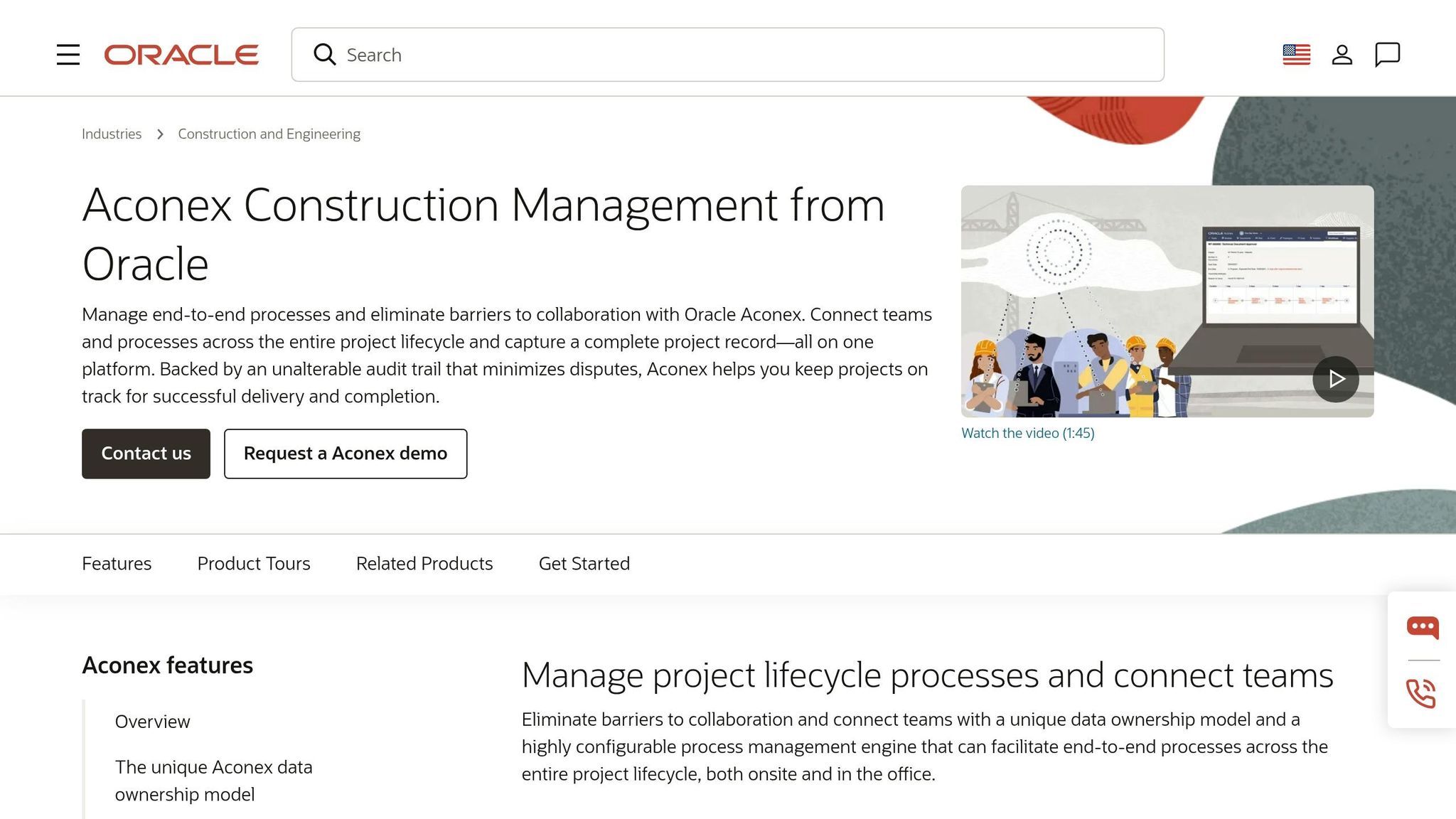
When a project lives or dies by document control, not day-to-day field execution, Aconex tends to stand out. Oracle Aconex is built around governance: controlled document exchange, structured communication, and a permanent audit trail. That makes it a strong match for large infrastructure, energy, and civil projects, where document disputes can turn into costly commercial problems.
Collaboration Workflows
Instead of relying on email, Aconex uses a structured mail threading system. Each message, reply, and attached document stays connected in one permanent chain. Oracle says it plainly:
"Unlike email, messages in Aconex cannot be deleted or altered after the fact, so you can rely on a permanent record."
Aconex also uses a data ownership model. Each organization on the project gets its own private workspace and decides what to share, and when to share it. On jobs with owners, contractors, and consultants all moving submittals, RFIs, and approvals back and forth, that setup matters. It keeps each party in control of its own data while still giving the team a shared place to work.
BIM and Design Integration
Aconex’s Model Coordination Cloud Service lets teams review 3D models, including Revit files, without needing authoring software. It also includes cloud clash detection for automated clash detection and design issue management. In plain terms, model review doesn’t sit off to the side. It stays tied to the same project record used for approvals, comments, and audits.
Project Controls
A big part of Aconex’s appeal is how tightly it handles approvals. The Automated Review Matrix routes approvals based on document metadata, so notices go to the right people at the right stage without manual routing. For vendor submittals, it can automate due-date calculations and track status across large volumes of packages.
Schedule integration through Oracle Primavera Cloud links engineering and construction documents to the project schedule. That connection helps teams trace documents back to planned work instead of treating files and schedules like two separate worlds.
Underneath all of this is the immutable audit trail. Every document version, decision, and piece of correspondence is stored as a permanent record.
Scale and Project Fit
Aconex goes deep, but that depth comes with more admin work. So fit matters just as much as the feature set. The platform is aimed at infrastructure, energy, resources, and large commercial construction. On simpler projects, the depth and price can be more than a team wants to deal with.
Pricing is sales-led and custom-quoted. Public estimates put Aconex at about $1,250 per user per year, with a Year 1 total cost of ownership of around $15,000 for a 10-user setup. At similar project scales, it is usually 10%–20% more expensive than Procore and 15%–25% more than Autodesk BIM 360.
User feedback follows a pretty clear pattern. Teams often praise Aconex for reliability on complex, multi-stakeholder programs. The common downside is a steep learning curve and an interface that can feel heavy for non-admin users. On large projects, it’s smart to plan for a dedicated administrator to handle workspace configurations and granular security settings.
5. Bentley Infrastructure Cloud ProjectWise
ProjectWise is built around engineering files and models. That makes it a strong fit for distributed teams working on large, document-heavy infrastructure programs like highways, bridges, water systems, and major capital projects, where engineering workflows shape how the job gets done.
Collaboration Workflows
ProjectWise gives teams one live record for active project files, and design changes can sync automatically across distributed users through application integration. It also enforces review and approval cycles through visual approval workflows, with support for ISO 19650. Version control and archiving are automated, which helps cut the risk of teams working from outdated files.
Put simply, ProjectWise shines in engineering-led coordination. It’s less focused on lightweight field task management.
BIM and Design Integration
ProjectWise serves as the core CDE for Bentley Open applications, including OpenRoads, OpenRail, OpenBridge, OpenBuildings, OpenTunnel, and OpenFlows. It also connects with Autodesk Revit, Civil 3D, and Tekla Structures, which helps multidisciplinary teams work across different authoring systems without a lot of friction.
On top of that, automated clash detection and version comparison help teams spot and sort out design conflicts before those issues hit the field.
Scale and Project Fit
ProjectWise is built for large, complex, document-intensive programs. Users score it well, though some point to a steeper learning curve and an older interface compared with newer platforms.
A good example is the TH 169 Redefine project for the Minnesota Department of Transportation. WSB used ProjectWise and Bentley’s digital civil workflows to support timely digital delivery and saved $12 million on the freeway conversion. Jon Chiglo, Chief Operating Officer, WSB, said:
"Our use of ProjectWise… allowed for timely digital delivery on the TH 169 Redefine project for the Minnesota Department of Transportation (MnDOT) and lays a foundation for future digital deliveries and industry success."
Pricing is enterprise-led and varies by region and module. Bentley also offers a one-year Virtuoso Subscription for individual contributors on existing projects.
In the comparison below, ProjectWise stands out most for infrastructure-heavy document and model control.
Side-by-Side Comparison by Key Construction Needs
The breakdown above covers each platform on its own. This section narrows things down to the tradeoffs that matter most in day-to-day use.
At a glance, the biggest gaps show up in team workflow, BIM depth, project controls, and project size.
Collaboration Workflows
Each platform handles team coordination a little differently.
Procore puts RFIs, submittals, change orders, and daily reports in one place, which gives teams a single audit trail. Autodesk Construction Cloud (ACC) ties markups and field tasks back to BIM elements, so teams can move from the model to site issues without much friction. Oracle Aconex leans hard into document control and information management, with a permanent audit trail built into the system. Trimble Connect connects comments and issues to exact 3D geometry, which helps when teams need to sort out clashes or model-based coordination. Bentley Infrastructure Cloud ProjectWise stands out most in engineering document control and approval workflows.
BIM and Design Integration
ACC has the clearest lead for building-focused BIM because it connects natively with Revit and AutoCAD. If your team already lives inside Autodesk tools, that link can make a big difference.
Trimble Connect works well for open, multi-vendor coordination. That makes it a solid pick when not everyone uses the same design stack. Bentley Infrastructure Cloud ProjectWise fits engineering-led infrastructure work best, especially when linking schedule and cost is a core part of delivery.
Procore gives teams model viewing plus a broad set of integrations. Oracle Aconex supports BIM viewing on mega-projects without pushing teams toward one design tool or vendor.
Project Controls
This is where the platforms start to feel very different. Cost, change, and closeout are handled in distinct ways, and that can shape how a project runs from kickoff to handover.
| Platform | Cost Tracking | Change Management | Field Issues & Punch Lists | Closeout Records |
|---|---|---|---|---|
| Procore | Deep financial and budget tracking | Unified change orders | Strong punch list workflows | Centralized documentation |
| Autodesk Construction Cloud | Risk prediction via Construction IQ | Construction IQ risk prediction | BIM-linked issue tracking | Linked design and field records |
| Oracle Aconex | Permanent audit trails | Transmittal-based workflows | Formal correspondence tracking | Permanent record management |
| Trimble Connect / Viewpoint | ERP-integrated job costing | Real-time labor and material flow | Model-element issue tracking | ERP-linked closeout |
| Bentley Infrastructure Cloud ProjectWise | Earned-value forecasting | Engineering document workflows | Document version control | Engineering file archives |
Scale and Project Fit
Procore is a strong match for commercial GCs managing multi-site portfolios. Its Annual Construction Volume pricing includes unlimited users, which helps keep costs predictable as subcontractor counts climb.
ACC is a good fit for design-build teams and groups doing heavy BIM work. Oracle Aconex is often the go-to choice for high-compliance public infrastructure projects that need multi-organization document control. Trimble Connect and Viewpoint line up well with self-perform contractors and heavy civil teams. Bentley Infrastructure Cloud ProjectWise fits engineering-led infrastructure programs where document-heavy workflows and earned-value reporting play a central role in delivery.
Pros and Cons
Each platform fits a different kind of job, and each one comes with tradeoffs. The table below helps line up platform strengths with project type, instead of just stacking up feature lists.
| Platform | Key Pros | Main Limitations | Best-Fit Project Type |
|---|---|---|---|
| Procore | Strong mobile field tools; 400+ integrations; unlimited users | ACV pricing scales with revenue; implementation takes time and change management | Large commercial GCs managing multi-trade workflows |
| Autodesk Construction Cloud | Native Revit/BIM integration; unified design-to-build workflow | Per-seat pricing adds up quickly for large subcontractor teams | Design-build and BIM-heavy commercial projects |
| Oracle Aconex | Strong document control and a neutral audit trail; audit trails suited to dispute-heavy projects | Complex setup; dated interface; high implementation cost | Mega-projects and global infrastructure programs |
| Trimble Connect / Viewpoint | Model-linked issue tracking; deep ERP integration for self-perform teams | Fragmented product lines; some legacy modules feel dated | Self-perform contractors and design-to-field coordination |
| Bentley Infrastructure Cloud ProjectWise | Strong 4D/5D schedule-to-cost tracking; built for linear and utility projects | Complex setup; overbuilt for basic project management | Utility, telecom, and heavy civil infrastructure |
A few platform-specific tradeoffs deserve a closer look.
Procore stands out on large jobs because the unlimited-user model makes rollout much easier across owners, supers, PMs, and trade partners. But there’s a catch: renewal pricing can climb year over year, so ask for renewal caps in writing before you sign.
Autodesk Construction Cloud costs about $1,400 per user per year. That can make sense if your team already lives in Revit and wants design and field work tied together. If not, that price is worth a hard second look.
Oracle Aconex makes the most sense when contract terms call for strict multi-party document control and a neutral audit trail that no single organization can alter. For smaller firms, though, the setup load may feel like using a sledgehammer to crack a walnut.
Features matter, but contract terms matter too. Data portability can shape your long-term fit just as much as daily workflow. Check export formats before you sign, because weak exports can lock you in.
Conclusion
There’s no one winner for every kind of construction team. The right platform comes down to how your team works day to day and how your projects are set up. So the comparison above is less about a simple feature race and more about fit.
The biggest gap between these tools shows up in how they keep drawings, RFIs, schedules, and cost data aligned. Procore fits large commercial GCs that juggle multi-trade workflows. Autodesk Construction Cloud makes the most sense for design-build teams already working in Revit. Oracle Aconex fits mega-projects that need formal document control and a neutral audit trail. Trimble Connect / Viewpoint works well for self-performing contractors that want ERP and field coordination connected in one setup. Bentley Infrastructure Cloud ProjectWise is made for heavy civil and utility teams where 4D scheduling and earned-value tracking shape project controls.
Before procurement, pin down the contract terms that can change cost and data access. Before signing, confirm how seats are defined, what limits apply to renewals, and what export rights you get for RFIs, drawings, and logs.
FAQs
How do I choose the right platform for my project type?
Assess your project’s main focus and scale. Look at whether your work leans more toward design-led tasks, residential building, or large commercial job management.
It also helps to check how well the platform fits the way your team already works. Think about team size, accounting links, mobile access for field crews, and compliance needs tied to your infrastructure work. When a platform matches those day-to-day needs, people are more likely to use it well, and your team can work with less friction.
What should I budget for implementation and training?
Budget for both the subscription fee and professional services during onboarding. In most cases, implementation takes 6 to 12 weeks. And in year one, total cost of ownership can land at 2 to 2.5 times the base subscription price because setup work adds to the bill.
It also helps to build in a productivity buffer. Some teams report a 25% to 40% drop in productivity during early onboarding as people get used to new workflows and tighter process discipline.
Which platform is best if my team relies heavily on BIM?
If your team leans hard on BIM, Autodesk Construction Cloud is the top pick. It’s built for design-heavy jobs and connects deeply with Autodesk Revit, so models can move into construction work without losing detail in the handoff.
It’s a strong fit for firms already using Revit or BIM 360. You also get solid support for BIM-linked issue tracking and model-based coordination.


