
Robots help cut worker exposure on the most dangerous parts of a job site. In construction, 1,075 workers died on the job in 2023, and the highest-risk tasks often involve falls, dust, collapse, debris, or tight spaces. The main use case is simple: let the robot enter the hazard zone while people stay back and stay in control.
Here’s the short version:
- Use robots for short, high-exposure tasks
- Match the robot to the hazard
- Set barriers, crew roles, and stop-work rules before launch
- Watch the job live and stop fast if conditions change
- Shut down, clear the area, and log what happened for the next run
In practice, that usually means four task types:
- Roof scans to cut fall exposure
- Confined-space checks to test air and inspect before entry
- Concrete drilling to limit silica dust and hand-held strain
- Demolition support to keep crews away from debris and unstable structures
A study cited in the article found a 72% average drop in time spent on hazardous tasks when robots were used. That does not replace site controls. You still need barriers, lockout/tagout, spotters, and clear stop triggers.
| Task | Main Risk | Robot Use |
|---|---|---|
| Roof scans | Falls, weak surfaces | Remote inspection from a distance |
| Confined-space checks | Low oxygen, toxic gas, entrapment | Remote entry and air sensing |
| Concrete drilling | Silica dust, vibration, layout strain | Automated drilling path and depth |
| Demolition support | Debris, struck-by risk, collapse | Remote breaking from outside the zone |
If I boil the article down to one point, it’s this: robots do not make dangerous work safe on their own. They work best when the crew plans the task, controls access, watches conditions in real time, and checks the area before anyone goes back in.
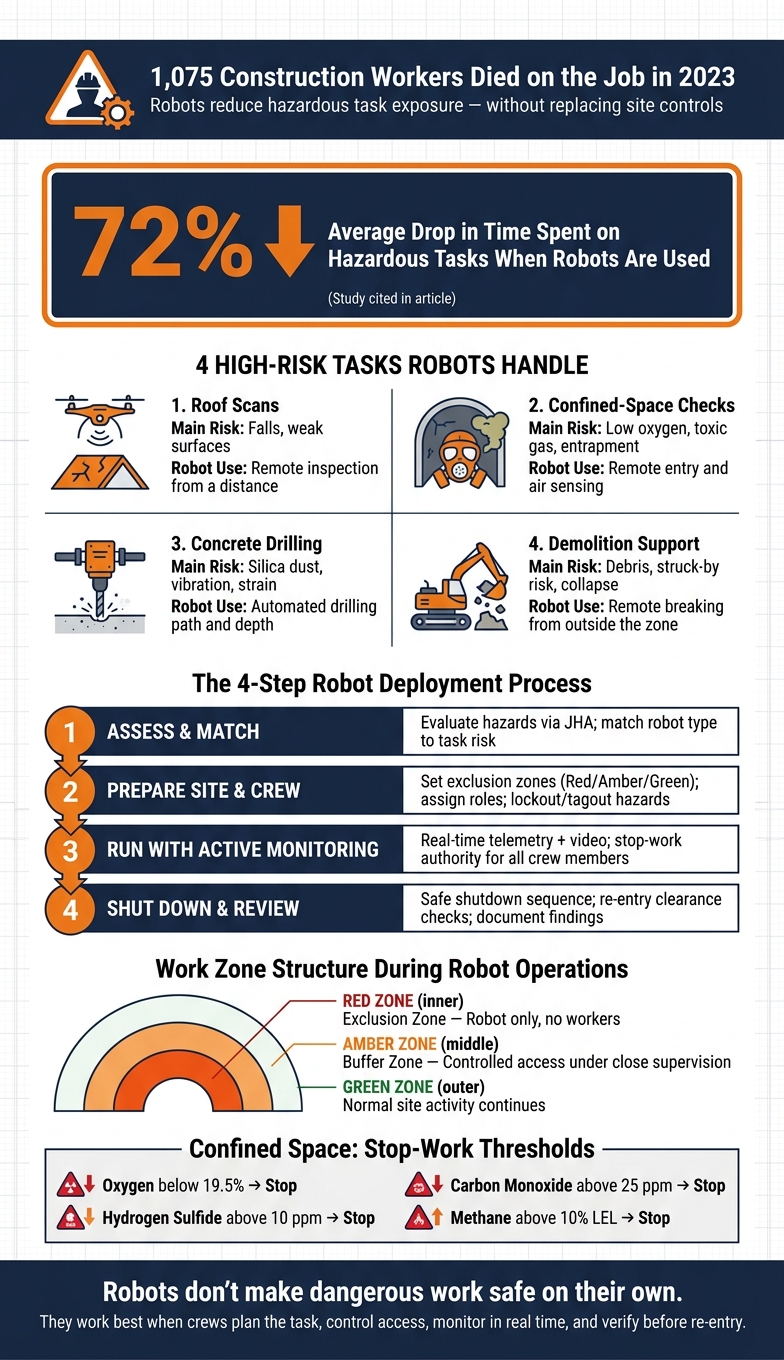
How Robots Handle High-Risk Construction Tasks: 4-Step Safety Process
Building Better Safety for Robotics and AI on Construction Jobsites
sbb-itb-aa28329
Step 1: Assess the Task and Match the Right Robot
Before deployment, the team first decides whether a robot is the safest tool for the job. Safety managers and foremen review site drawings, incident history, and OSHA rules to look at hazards such as fall exposure, access difficulty, air quality, and surface conditions. The call comes down to a simple fit: match the hazard to the robot’s limits and to the level of control the crew needs.
Use clear JHA triggers. If the JHA flags issues like unstable surfaces, poor air quality, or restricted access, robot assignment becomes the preferred option.
Which Robot Type Fits Each Task
Match the task to the robot and the controls it needs.
| Task | Main Hazard | Robot Role | Required Crew Oversight | Primary Safety Control |
|---|---|---|---|---|
| Roof scan | Fall from height; skylight breakthrough | Drone or remote inspection system with visual and thermal imaging | FAA-compliant pilot and spotter | Controlled roof-access zone; exclusion boundary at roof edge; geofenced flight plan |
| Confined-space check | Oxygen deficiency; toxic gases; limited egress | Mobile inspection robot with cameras and multi-gas sensors | Confined-space supervisor and attendant | No-entry until space is cleared; continuous atmospheric monitoring; ventilation plan |
| Concrete drilling | Respirable silica dust; musculoskeletal strain | Robotic drilling unit on a mobile platform automating hole spacing and depth | Equipment operator and safety tech | Integrated dust collection; perimeter barriers; lockout/tagout for robot maintenance |
| Demolition support | Flying debris; structural instability | Remote-controlled demolition machine with hydraulic breaker | Demolition foreman and remote operator | Engineered shoring; debris curtains; hard exclusion zone with access control |
When Robot Use Justifies the Setup Time
Setup time is part of the deal. Sending out a drone crew, setting up a robotic drilling unit, or placing a remote-controlled demolition machine takes planning and coordination.
Still, robots tend to make sense when worker exposure is high, repeated, or tough to control with PPE alone. For example, scanning a large multi-building distribution center with brittle deck sections and multiple skylights usually justifies the setup. A manual inspection would put several workers near unprotected edges, and that’s a risky way to gather basic site data.
The same logic applies to repetitive drilling. If the task is large, hazardous, or hard to control by hand, the setup time starts to pay for itself.
Suspected oxygen deficiency or visible structural instability often makes robot use the clearest compliance path.
Once the robot is selected, the next move is to lock down the work zone and crew roles.
Step 2: Prepare the Site and Assign the Crew
Once the robot is picked, the focus shifts from choosing equipment to controlling the site. The supervisor and safety lead should walk the area and plan for controlled robot use. That means mapping the robot’s reach, travel path, and debris-throw zone, then checking for loose debris, overhead hazards, pinch points, and nearby trade activity.
Before setup begins, lock out live electrical, wiring, pressurized, and mechanical hazards. This needs to be coordinated with other trades so no one accidentally re-energizes a circuit while the robot is running, in line with OSHA 29 CFR 1910.147 principles.
Before launch, make sure the control link works across the full route. Test control links, video feeds, and radios end to end. If there’s a dead spot, fix it before the robot moves.
Set Work Zones, Exclusion Boundaries, and Stop-Work Rules
Use three work zones: a red exclusion zone, an amber buffer zone with controlled access under close supervision, and a green zone where normal site activity can continue. Mark those boundaries in a way workers can see at a glance. Temporary fencing works well for high-energy tasks like drilling and demolition. Cones and tape fit lower-energy work like roof scans.
Every access point should have signage that says Robot Operating Zone – Authorized Access Only, plus PPE rules and the supervisor’s contact details. In low-visibility areas, flashing beacons tied to the robot’s operating status add another warning layer. If nearby trades usually move through the area, reroute them around the zone and use floor markings or directional signs to keep people clear of the perimeter.
Stop-work triggers need to be written before launch. Work must stop at once if debris shifts in an unexpected way, weather changes, visibility drops, or unplanned worker traffic enters the exclusion zone. Both the spotter and the robot operator need clear stop-work authority. Either one can shut things down without waiting for supervisor approval. And any worker can call a stop on the spot.
With the perimeter in place, the next step is simple: assign the people who will run it.
Define Crew Roles Before Launch
Every person on the crew needs a clear job before the robot powers on.
| Role | Core Responsibility | Readiness Check |
|---|---|---|
| Foreman/Supervisor | Authorizes launch; confirms barriers, signage, energy isolation, and trade coordination | Signs off on completed pre-launch checklist |
| Robot Operator | Inspects robot, tests controls and emergency stop, monitors telemetry during operation | Confirms communication links and route program |
| Spotter/Safety Watcher | Maintains sightlines to robot and perimeter; calls stop-work when conditions change | Positioned outside collapse/debris path with radio in hand |
| Maintenance Support | Handles faults and troubleshooting; manages lockout for any adjustments | Spare parts and diagnostics staged and accessible |
The spotter should walk the planned path before work starts and flag soft ground, overhead lines, and trench edges.
Staff the Job With Qualified, Compliant Workers
Robotic work on high-risk sites calls for people who are already certified and safety-trained, not workers learning as they go. Before launch, check that each crew member is qualified for the assignment and that their credentials match the task.
ABLEMKR helps contractors staff robot-supported work by matching pre-vetted workers to site needs based on certification, safety training, availability, and location, while also tracking onboarding and compliance.
After the crew is set, move to live monitoring and controlled adjustments.
Step 3: Run the Task With Active Monitoring and Controlled Adjustments
Once the crew is set and the perimeter is marked, the job shifts into live control mode. At that point, the main focus is simple: watch everything in real time.
Start with a pre-use check of the power supply, controls, sensors, tool head, emergency stop, communications, and video feed. The operator checks battery charge, the spotter confirms the zone is clear, and the supervisor approves startup. Those pre-launch checks are now the crew’s first line of defense.
Job sites can change in a heartbeat, so the robot needs constant oversight. The operator tracks live telemetry and video the whole time, while the spotter watches the area for pedestrians, moving equipment, and anyone crossing the boundary. If the signal weakens, the surface shifts, or a worker enters the zone, stop work right away. When an intrusion sensor detects intrusion, the robot stops and only resumes after workers leave and no further intrusion is detected. Restart happens only after the supervisor confirms the hazard is gone.
Managing Roof Scans and Confined-Space Checks
The same watch-and-stop rules apply here, but the warning signs differ by task.
For roof scans, keep the robot moving at a controlled pace and track the live video feed, signal strength, battery level, unstable surfaces, ponding water, loose materials, and traction loss. If the camera feed falls below usable quality or the robot can’t finish the planned route, pause and reassess. The crew does not send workers onto the roof until the data is enough to support that move.
Confined-space checks follow a remote review process. The robot completes a full pass, the team reviews atmospheric data, video, and sensor readings, and the supervisor makes a documented decision on entry. Common alarm thresholds include oxygen below 19.5%, hydrogen sulfide above 10 ppm, carbon monoxide above 25 ppm, and methane above 10% LEL. If the robot’s data is incomplete, blocked, or points to a hidden danger, extend the remote assessment. No one goes in until the findings support entry.
Controlling Robotic Drilling and Demolition Support
Robotic drilling starts with a stable, level setup and enough room for the robot’s full movement envelope. That includes tool swing, hose routing, power leads, and the debris path. Before removal starts, calibrate the drill angle, depth, feed rate, and stopping points. During operation, watch for unexpected resistance, excess vibration, or tool drift. Those signs can point to rebar, embedded utilities, or a harder layer under the surface. Any abnormal response is a stop trigger.
Demolition support adds another layer of risk because the structure itself can change as the work moves forward. The spotter must also watch for structural movement as material breaks away. Debris paths can shift. Members can move without warning. Dust or smoke can cut visibility below a safe level. If dust suppression or debris containment stops working as intended, stop the job and get those controls back in place before moving on.
Crew Responsibilities During Live Operations
Each person on the crew has a set job during live operations, and all four can stop work if they spot an immediate hazard. The supervisor decides when restart is allowed after the issue is fixed.
| Role | Live Duty | What They Monitor | Stop-Work Authority |
|---|---|---|---|
| Supervisor | Coordinates trades and authorizes restart | Overall site conditions, hazard changes | Yes – makes restart decision |
| Operator | Runs the robot and makes controlled adjustments | Live video, telemetry, tool response, signal quality | Yes – stops on abnormal robot behavior |
| Spotter | Watches the perimeter and surrounding zone | Pedestrian movement, boundary breaches, structural changes, debris paths | Yes – stops on any zone intrusion or hazard |
| Technician | Handles faults, battery swaps, and sensor issues | Equipment status, communication links, calibration data | Yes – stops for equipment faults or safety concerns |
Step 4: Shut Down Safely and Review the Job
When live operation ends, the work shifts to shutdown, re-entry checks, and paperwork.
Use the same shutdown sequence every time. Lower the robot into a stable position. Neutralize the controls. Shut off power. Then finish lockout/tagout by cutting control voltage, locking and tagging the main switch, and securing any hydraulic or compressed air sources before anyone gets close. Stop with tools unloaded. That puts the site in the right state for area checks before crews come back in.
Verify Area Safety Before Workers Re-Enter
The exclusion zone stays in place until the safety lead signs off on three clearance checks.
First, check for falling material. Scan overhead structures, ledges, and cut lines. Then remove or secure anything that could fall.
Second, check dust and airborne hazards. Give dust suppression and ventilation enough time to clear the air. In enclosed spaces, oxygen must stay between 19.5% and 23.5% by volume, and flammable contaminants must remain below 5% of the lower explosive limit (LEL).
Third, check structural stability. Confirm that shoring and bracing still hold up and that no voids, delaminations, spalled sections, or over-drilled areas have created collapse or trip hazards.
Also verify that all lockout/tagout isolations from before deployment are still in place. If the robot made contact with conduit, panels, or equipment housings, a qualified electrician needs to inspect for exposed conductors or damaged insulation before anything is re-energized. Only after all three checks pass should the supervisor release the area and update the job permit.
Record Notes for the Next Deployment
Once the area is cleared, document what changed on the job.
Record these five items:
- Incidents, including near-misses, boundary breaches, and unplanned contact
- Communication problems, such as dead zones and delayed commands
- Equipment performance, including actual battery life versus plan, tool wear, and sensor problems
- Access limits, such as tight corridors, stair-only routes, and repositioning delays
- Control changes, including added barricades, ventilation changes, or updated fall protection
These notes go straight into the next robot assignment. They may change exclusion zone sizes, lead to a tool-head swap, or flag an area for engineering review before robotic work starts. ABLEMKR can match certified operators and safety leads to the next job using documented training and safety history, so the next crew fits the recorded risk.
FAQs
When should a contractor use a robot instead of sending workers?
Contractors should use robots for tasks that are high-risk, physically demanding, or repetitive. That’s especially true when workers would otherwise face hazards like falls, confined-space entry, or structural instability.
Robots are a strong fit for demolition, concrete screeding, rebar tying, and hazardous inspections. They keep people out of harm’s way while freeing up crews to handle supervision, quality control, troubleshooting, and complex detailing.
What training does a crew need to run robots safely on a job site?
Crews need both technical and safety training. On the technical side, they should know basic robot operation, how to use the dashboard and teach pendant, simple troubleshooting, and basic programming.
Safety training should follow OSHA guidelines. It needs to cover lockout/tagout, emergency stops, exclusion zones, and human-robot safety tools such as proximity sensors, light curtains, and pressure mats.
A mix of training methods tends to work best:
- Classroom instruction
- Hands-on practice
- Manufacturer training
- Regular toolbox talks
That kind of repetition helps crews build good habits and operate the equipment safely day to day.
How do contractors decide when an area is safe for workers to re-enter?
Contractors allow re-entry only after they’ve dealt with the hazard and the area is back within set safety limits.
They confirm a zero-energy state by finding every electrical, mechanical, and thermal energy source and locking each one out. In confined spaces, they check that oxygen is between 19.5% and 23.5%, flammability stays below 10% of the Lower Explosive Limit, and toxic gases remain within OSHA Permissible Exposure Limits. They support those checks with real-time monitoring and site-specific protocols.


