
If your app needs signal to do basic field work, it will fail on many U.S. jobsites. This comparison looks at 5 apps – ABLEMKR, Raken, Procore, Fieldwire, and Buildertrend – across 5 offline workflows: job viewing, crew updates, onboarding forms, safety files, and payroll entries.
Here’s the short version:
- ABLEMKR covers the most offline field actions after an initial sync, including time, forms, safety records, and crew status.
- Raken is strongest for offline reports, notes, photos, and time cards, but project access is limited to recent or preselected jobs.
- Procore works offline only for items users opened or downloaded earlier.
- Fieldwire is strong on mobile for plans, tasks, forms, and checklists after project download.
- Buildertrend has the narrowest offline use, mostly Time Clock and Daily Logs.
If I strip it down even more, the main split is simple:
- Best for full-shift offline field work: ABLEMKR
- Best for offline reporting: Raken
- Best for preloaded drawings and forms: Procore
- Best for mobile plan and task work: Fieldwire
- Best for basic offline logs and time: Buildertrend
What matters most? Not just whether an app has offline mode, but what still works when service drops and how much prep your crew must do before leaving coverage.
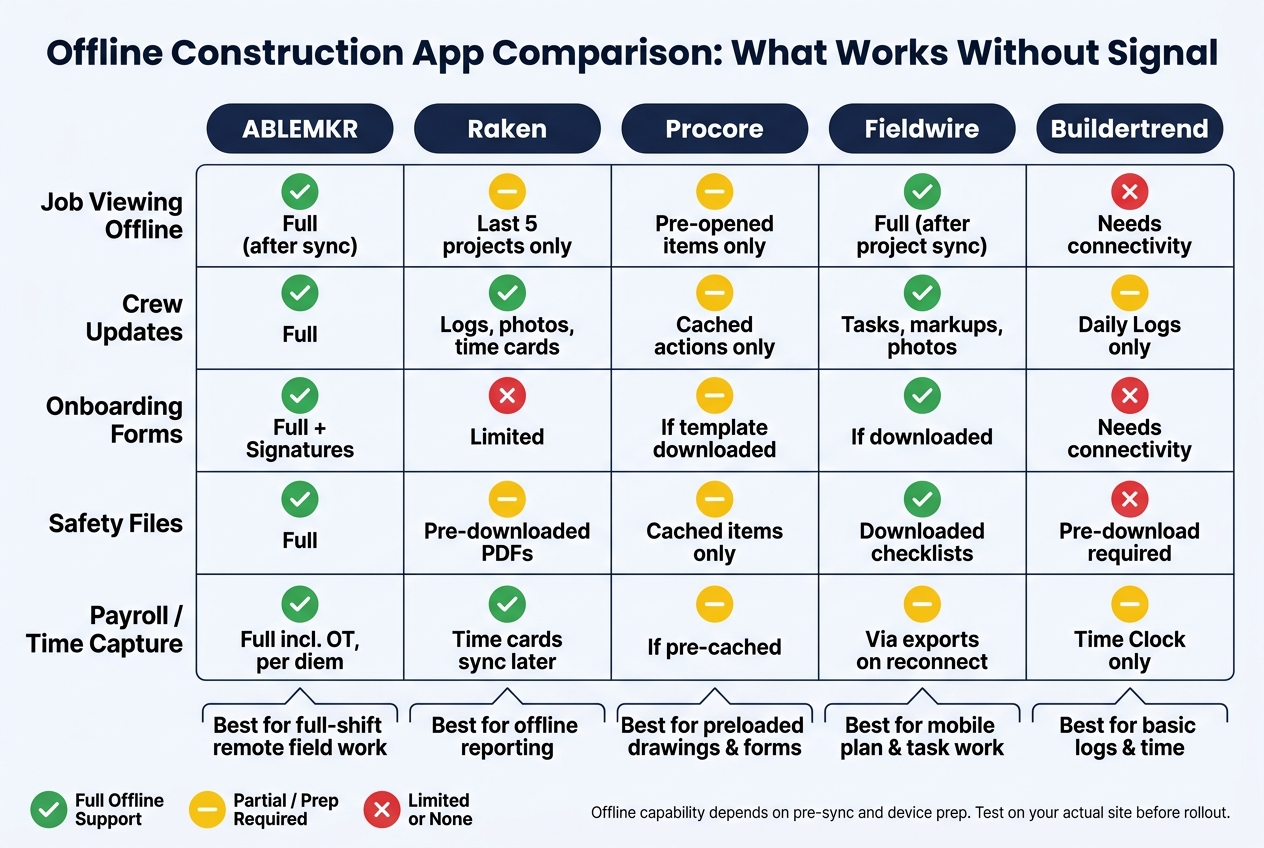
Offline Construction App Comparison: What Works Without Signal
Quick Comparison
| App | Job Viewing Offline | Crew Updates | Forms | Safety Files | Payroll/Time |
|---|---|---|---|---|---|
| ABLEMKR | Yes, after initial sync | Yes | Yes | Yes | Yes |
| Raken | Limited to recent/preloaded projects | Yes | Limited | Partial | Yes |
| Procore | Only cached/opened items | Partial | Yes, if downloaded | Yes, if cached | Yes, if cached |
| Fieldwire | Yes, after project sync | Yes | Yes | Yes | Yes, via exports |
| Buildertrend | Limited | Partial | Limited | Limited | Partial |
Bottom line: if your crew works in dead zones for hours at a time, cached viewing is not enough. You need an app that lets people read, enter, edit, and save field data offline, then sync it later without a mess.
That’s the lens I’d use for the full breakdown below.
sbb-itb-aa28329
1. ABLEMKR
ABLEMKR is built for offline field work on remote pipelines, mines, refineries, and utility projects. After an initial sync, crews can keep working even when service drops.
Offline read/write: Workers and supervisors can view job details, locations, certifications, shifts, and crew rosters offline. They can also log clock-ins, clock-outs, breaks, cost codes, and status updates without a connection. Once coverage comes back, those entries sync. Foremen can reassign approved workers, mark no-shows, and log standby or in-transit status offline too. New job creation may still need a short connection. The same setup also applies to forms and safety records.
Sync and conflict handling: When devices reconnect, changes sync automatically. If two or more people changed the same record while offline, the system handles the conflict by timestamp order or supervisor override, while keeping an audit trail.
Forms, safety files, and compliance: Onboarding forms, safety acknowledgments, permits, and pre-use checklists can be completed and signed offline. Workers can fill out and sign forms in the field, and the data stays on the device until sync. Job hazard analyses, lockout/tagout procedures, and manuals can also be downloaded for offline use. Certification records can be cached so foremen can check qualifications before assigning tasks. Expired or soon-to-expire credentials stay visible in that cached data. The same local storage also supports time capture for payroll.
Payroll entries: Time entries sync to payroll when coverage returns, including overtime and project-specific rates. Per diem, hazard pay, and travel time can also be logged offline.
2. Raken
Raken works best for offline reporting, not full jobsite admin. It’s built around field documentation and daily reports, so the mobile app keeps working when the signal drops. Crews can log daily reports, notes, and photos offline, then the data syncs on its own when service comes back.
There’s one catch: on mobile, Raken stores the five most recent projects by default. If a crew needs a different project before heading into a dead zone, a supervisor has to add it by hand in the app’s offline preferences before service disappears. Without that step, offline access is limited to whatever projects are already stored on the device.
That setup makes Raken a good fit for crew updates and safety tasks, but it’s less clear for onboarding. Teams can create safety checklists, toolbox talks, safety observations, and incident reports on mobile without a connection. But offline onboarding support isn’t confirmed, so it’s smart not to count on Raken for full onboarding packets in remote areas.
For time tracking, supervisors and individual workers can enter time cards offline. That includes support for cost codes, classifications, pay types, shifts, and overtime. There’s also a kiosk mode, which turns a shared tablet into a jobsite clock-in station. That’s handy for bigger crews where not everyone has their own device. Those entries stay queued on the device and sync later to payroll exports and integrations after reconnecting.
Raken also doesn’t spell out how offline conflict handling works, so it’s worth testing duplicate edits before rollout.
3. Procore
Procore’s mobile app only works offline for items that were opened earlier while the device still had a connection. If something wasn’t opened first, it stays locked until service comes back. That one cache-first rule shapes how the whole app works day to day.
It affects crew data too. Superintendents can review drawing revisions and check RFIs offline, but only if those items were viewed earlier. Cached directory data, like users, contacts, and companies, also stays viewable offline. But if you need to add users, contacts, or companies, you’ll need a connection.
The same pattern shows up in forms and safety files. Forms work offline once the templates have been downloaded. Safety manuals, procedures, JHAs, and site-specific safety plans can also be downloaded for offline access. When forms are completed in the field, they sync after the device reconnects.
Crews can add and edit time entries offline, and those entries sync on reconnect. In plain terms, preloading time data before crews head out of coverage isn’t optional. It’s part of making the workflow work.
4. Fieldwire
Fieldwire puts the focus on mobile field work, not cached desktop access. On iOS and Android, crews can view drawings, create and edit tasks, fill out forms, complete checklists, and attach photos while offline. One limitation matters here: offline mode is only available in the mobile apps. The Windows app doesn’t support it. So if your team works out on-site and needs plans, tasks, forms, and time capture without a signal, that’s where Fieldwire fits best.
For job viewing, Fieldwire includes an HD plan viewer that works offline after drawings are synced to the device. Crews can zoom and pan through plans, place tasks directly on drawings, and add markups such as clouds, arrows, and text notes. That means the plan set stays usable even when the trailer Wi-Fi is nowhere in sight.
For crew updates, foremen can assign tasks on plans and add notes, checklists, and photos. Workers can also update task status and punch-list items while offline, then sync those changes once they’re back online. In plain terms, work keeps moving instead of piling up until the signal comes back.
For onboarding forms in remote conditions, Fieldwire’s forms engine supports custom templates for worker details, safety briefings, equipment checklists, and first-day orientation steps completed in the field. That’s handy when new hires start on a site where connectivity is spotty or flat-out missing.
For safety files, crews can open documents like safety manuals, JHAs, checklists, and inspection forms from mobile devices while offline. So the crew doesn’t have to wait for a connection just to pull up the paperwork they need.
For time capture, Fieldwire records time through timesheet forms and CrewCenter, then exports those entries to payroll or ERP systems after the device reconnects. It does not run payroll itself.
One last detail is worth knowing: all changes stay on the device until the next sync. Task IDs are assigned only after reconnection, and the first device back online gets the first block of numbers.
5. Buildertrend
Buildertrend has a pretty limited offline mode. It’s a cloud-based system, so when the signal drops, the app mostly stops with it. In practice, only Time Clock and Daily Logs keep working without a connection.
For job viewing, crews can’t pull up live schedules, project details, or change-order details offline. If a team needs that info in the field, someone has to download PDFs of schedules or short project summaries ahead of time.
For crew updates, supervisors do get one useful offline tool: Daily Logs. They can record job progress, site conditions, weather notes, and delays while offline. The entries stay saved on the device and sync once the app reconnects.
For onboarding forms and safety files, offline use is thin. It’s best to finish compliance forms before arriving on site. Safety manuals and other reference files also need to be downloaded before leaving cell coverage.
For time capture, Buildertrend’s offline Time Clock does the most work. Workers can:
- clock in and out
- log breaks
- apply cost codes
- add notes
- use Quick Switch between jobs without signal
That said, some actions still don’t work offline. Manual shift edits, approvals, and clocking in for other users are all left out. Payroll processing also still needs a connection.
Those limits are easiest to spot in the workflow comparison below.
Workflow-by-Workflow Comparison
No single app handles every offline workflow the same way. Some are great for field edits. Others are fine for viewing files, but only if someone planned ahead and opened or downloaded them first.
The table below shows which workflows still work when service drops.
| Workflow | ABLEMKR | Raken | Procore | Fieldwire | Buildertrend |
|---|---|---|---|---|---|
| Job Viewing Offline | Job details, locations, certifications, shifts, and crew rosters are available offline after an initial sync. | Five recently active projects are cached automatically, and more can be stored through Offline preferences. | Only items that were previously viewed are available offline, so drawings and other documents need to be opened in advance. | Once a project is synced to the device, plans, tasks, photos, files, and forms can be viewed and edited offline. | Project schedules and details need connectivity, so crews should plan on PDFs downloaded in advance. |
| Crew Updates Without Signal | Clock-ins, clock-outs, breaks, cost codes, status updates, and worker reassignments can all be logged offline and sync when coverage returns. | Daily logs, notes, photos, and time cards can be created offline and sync automatically later. | Cached mobile actions, including observations, can be queued and sync later. | Task status changes, comments, and markups save locally and sync later. | Daily Logs and Time Clock entries can be created offline, but approvals and manual edits wait for connectivity. |
| Onboarding Forms in Remote Conditions | Onboarding forms, safety acknowledgments, permits, and checklists can be completed and signed offline, with records queued for sync. | Signature capture on daily reports works offline, but formal onboarding forms generally still need connectivity. | Cached checklists and inspection forms can be completed offline, with partial progress saved locally and synced later. | Field forms and checklists can be filled offline once downloaded, with progress saved on the device. | Custom forms are limited, so onboarding-style work is safest to finish before going remote. |
| Safety Files and Field Access | Job hazard analyses, lockout/tagout procedures, manuals, and pre-use checklists can be downloaded for offline reference. Certification records are cached so foremen can verify qualifications without signal. | Previously downloaded PDFs can be referenced offline, but updated versions wait until reconnect. | Cached inspections, observations, and related safety tools work offline, but updated templates still require a refresh after reconnect. | Downloaded checklists and forms stay available offline, but teams should watch for version drift after reconnect. | Safety reference files must be downloaded before leaving coverage; Daily Logs still capture field notes offline. |
| Payroll Entries and Time Capture | Time entries, including overtime, per diem, hazard pay, and travel time, queue offline and sync when coverage returns. | Time cards can be created offline and sync automatically later. | Time entries can be added and edited offline and sync on reconnect. | Time and task data are stored locally and sync on reconnect. | Clock in/out, breaks, cost codes, tags, and notes can be entered offline, but approvals and manual shift handling wait for signal. |
The table gives the big picture. The notes below focus on the offline strength that matters most in each workflow.
Job Viewing Offline
This is where planning ahead can make or break the day. Raken keeps recent projects ready offline. Procore works, but only for items users opened before losing service. Fieldwire does a better job once a project is synced, since plans, tasks, photos, files, and forms stay usable on the device. Buildertrend is more limited here because schedules and project details still need connectivity, so crews usually rely on PDFs downloaded ahead of time.
ABLEMKR keeps the core field info available offline after the first sync: job details, locations, certifications, shifts, and crew rosters. That matters when a foreman needs the basics fast and doesn’t want to hunt through cached files.
Crew Updates Without Signal
For day-to-day field activity, ABLEMKR and Raken cover the most ground offline. ABLEMKR lets crews log clock-ins, clock-outs, breaks, cost codes, status updates, and worker reassignments without service, then syncs everything later. Raken also handles daily logs, notes, photos, and time cards offline, with auto-sync after reconnect.
Procore and Fieldwire both handle offline work, but in a narrower way. Procore queues cached mobile actions, including observations, for later sync. Fieldwire stores task changes, comments, and markups locally until service comes back. Buildertrend covers basic Daily Logs and Time Clock entries, but approvals and manual edits stop until the device is back online.
Onboarding Forms in Remote Conditions
This workflow tends to expose gaps fast. If a new worker arrives at a remote site and paperwork still needs to happen, not every app can keep up.
ABLEMKR supports offline completion and signatures for onboarding forms, safety acknowledgments, permits, and checklists, then queues the records for sync. Fieldwire also works well here, as long as the forms and checklists were downloaded first. Procore handles cached checklists and inspection forms offline, and it saves partial progress locally for later sync.
Raken is less clear for full onboarding packets. Signature capture on daily reports works offline, but formal onboarding forms usually still need connectivity. Buildertrend is the tightest fit in this category because custom forms are limited, which makes it safer to finish onboarding-style tasks before crews head out of range.
Safety Files and Field Access
Safety documents are one of those things nobody wants to realize they’re missing after the signal disappears. ABLEMKR lets teams download job hazard analyses, lockout/tagout procedures, manuals, and pre-use checklists for offline reference. Certification records are also cached, so foremen can verify who is cleared for what even without service.
Raken and Procore depend more on files or items that were already cached. Raken supports offline access to previously downloaded PDFs, but updates wait until reconnect. Procore keeps cached inspections, observations, and related safety tools working offline, though refreshed templates still need a sync later. Fieldwire keeps downloaded checklists and forms available, but teams need to pay attention to version drift once devices reconnect. Buildertrend can work for safety reference too, but only if the files were downloaded before leaving coverage.
Payroll Entries and Time Capture
Offline time capture is often where a platform either helps the field team or slows payroll down later. ABLEMKR queues the full set of time entries offline, including overtime, per diem, hazard pay, and travel time, then syncs them when service returns.
Raken and Fieldwire both handle offline time collection and push that data later after reconnect. Procore also supports offline time entry and editing, but only for items that were cached first. Buildertrend allows clock in/out, breaks, cost codes, tags, and notes offline, though approvals and manual shift handling still wait for signal.
Pros and Cons by App
The table below shows a simple truth: some apps handle offline work well, but each one has a catch. In most cases, that catch comes down to prep work. If the right data, forms, or projects aren’t on the device before signal disappears, crews can get stuck.
The summary below cuts each app down to four things: where it helps, where it falls short, the kind of field job it suits best, and the main thing teams need to watch.
| App | Pros | Cons | Best Offline Use Case | Key Limitation |
|---|---|---|---|---|
| ABLEMKR | Mobile workforce deployment, onboarding, compliance, and payroll workflows fit remote, high-risk jobs. | Validate offline behavior in the specific field workflow before rollout. | Remote shutdowns, pipeline repairs, or mine development crews that need labor deployment and compliance records in low-connectivity conditions. | Teams should confirm offline check-ins, forms, and time capture work as expected before field use. |
| Raken | Notes, photos, work logs, time cards, and daily reports can be created offline and sync on reconnect. | Offline access is mobile-only, and only recently active projects are cached by default unless users adjust offline preferences. | Foreman on a wind farm or rural highway project completing daily reports and crew time cards in a no-signal area, then syncing later. | Jobs never cached to the device will not be available when signal drops. |
| Procore | Cached items, drawings, observations, and forms remain usable offline; forms can be completed offline if the correct template is already downloaded. | Offline access depends entirely on what was viewed or downloaded in advance. | Superintendent in a basement or mechanical room reviewing pre-downloaded drawings, adding markups, and logging punch list items without coverage. | If the document or form was not preloaded, it will not be available offline. |
| Fieldwire | Plans, tasks, files, photos, and forms can be accessed and edited offline after a project is downloaded. | New projects cannot be accessed without a prior download. | Safety manager at a remote utility substation reviewing downloaded safety plans, flagging hazards, and taking photos without signal. | Authentication and new project access both require a connection at some point. |
| Buildertrend | Offline Daily Logs and Time Clock entries work reliably, with records held until reconnect. | Offline coverage is limited to specific modules, and workflows outside Daily Logs and Time Clock still need connectivity. | Residential subdivision crew recording site conditions and labor hours offline, with automatic sync to payroll later. | Offline parity does not extend across the full platform. |
A quick read of the table makes the pattern pretty clear:
- ABLEMKR fits crews working in remote, high-risk settings where labor deployment, compliance, onboarding, and payroll all need to keep moving.
- Raken is a strong match for field reporting, especially for foremen handling daily reports, photos, and time cards from mobile devices.
- Procore works best when teams know what they need ahead of time and preload drawings, forms, and other job data.
- Fieldwire is a good fit for plan and task management in the field, as long as the project is downloaded before going offline.
- Buildertrend works well for narrower offline needs, mainly Daily Logs and Time Clock.
Put another way: offline support isn’t just about whether an app has it. It’s about how much planning the crew has to do before the day starts, and whether the offline tools match the work happening on-site.
These tradeoffs lead into the final recommendation.
Conclusion
Cached viewing is not the same as offline work. That gap shows up fast in job viewing, crew updates, onboarding, safety files, and time capture. And when it does, it decides whether work keeps moving or stalls out.
That matters most on remote industrial sites. Crews in the field need more than access to documents. They need tools that keep field data moving, even with no signal. ABLEMKR is built for that job, with a focus on credentials, worker status, onboarding records, and payroll workflows that still need to function when connectivity drops.
Test before you trust. Run one offline shift on your actual site, whether that’s a rural transmission line, a remote shutdown, or something similar. Check that field inputs are stored locally, sync status is easy to see, and every record flows cleanly into your payroll and compliance systems after reconnecting. If it can’t pass that test, it’s a viewer, not a field tool.
Choose the app that matches your worst-signal day, not your best one.
FAQs
How much setup is needed before going offline?
Very little. Good construction apps handle offline transitions on their own by storing needed data, like job assignments, safety protocols, and task details, on the worker’s device before they get to remote sites.
Most users don’t need to change settings or switch on a manual mode. If the signal drops, the app moves to offline status automatically and syncs saved data in the background when service comes back.
Will offline entries sync later?
Yes. Offline entries stay on the device when there’s no internet connection.
When the connection comes back, the app picks it up and automatically syncs saved data – like time entries, safety forms, and reports – to the main system. In most cases, the user doesn’t need to do anything beyond seeing a confirmation notification.
What should crews test before relying on offline mode?
Before you count on offline mode in the field, make sure the app actually saves data on the device and syncs it on its own once service comes back. Don’t just take that on faith. Run a small pilot and test the tasks crews use most, like clocking in, switching cost codes, adding notes, and checking geofence accuracy in low-signal areas.
It also helps to prep the basics ahead of time. Download needed documents, such as safety protocols and blueprints, before crews head out. And make sure users know how to spot the app’s offline status cues, so they’re not left guessing whether their data went through.


