
If you use the wrong incident form, you can miss facts that matter for OSHA logs, claims, and follow-up. In construction, that risk is hard to ignore: 1,075 workers died in 2023, and 39.2% of those deaths involved falls, slips, or trips. Construction also made up about 20% of all U.S. workplace deaths.
If I had to boil this guide down to one point, it would be this: start with a general incident report, then add the right form for the event type, and finish with a follow-up log. That basic flow helps me keep records clear, link related details together, and track fixes through closeout.
Here’s the short version of what the guide covers:
- General incident report: the main record for almost any site event
- Injury incident report: adds body part, treatment, and work-status details
- OSHA Form 301 or equivalent: used for recordable injury and illness cases
- Property damage report: focuses on damaged assets, ownership, and cost
- Near miss report: logs close calls with no injury or damage
- Witness statement: records what someone saw, heard, and where they were
- Corrective action log: assigns fixes, due dates, and closure checks
The main takeaway is simple:
- Use the shortest form that still gets the facts down
- Keep the same core fields on every form: date, time, location, project, people involved, what happened, and first response
- Link forms together instead of splitting one event into separate, disconnected records
- Track OSHA deadlines, including the 7-day entry rule and the 8- or 24-hour notice rules when they apply
- Keep records for 5 years
Construction Incident Report: When to Use and What to Include
sbb-itb-aa28329
Quick Comparison
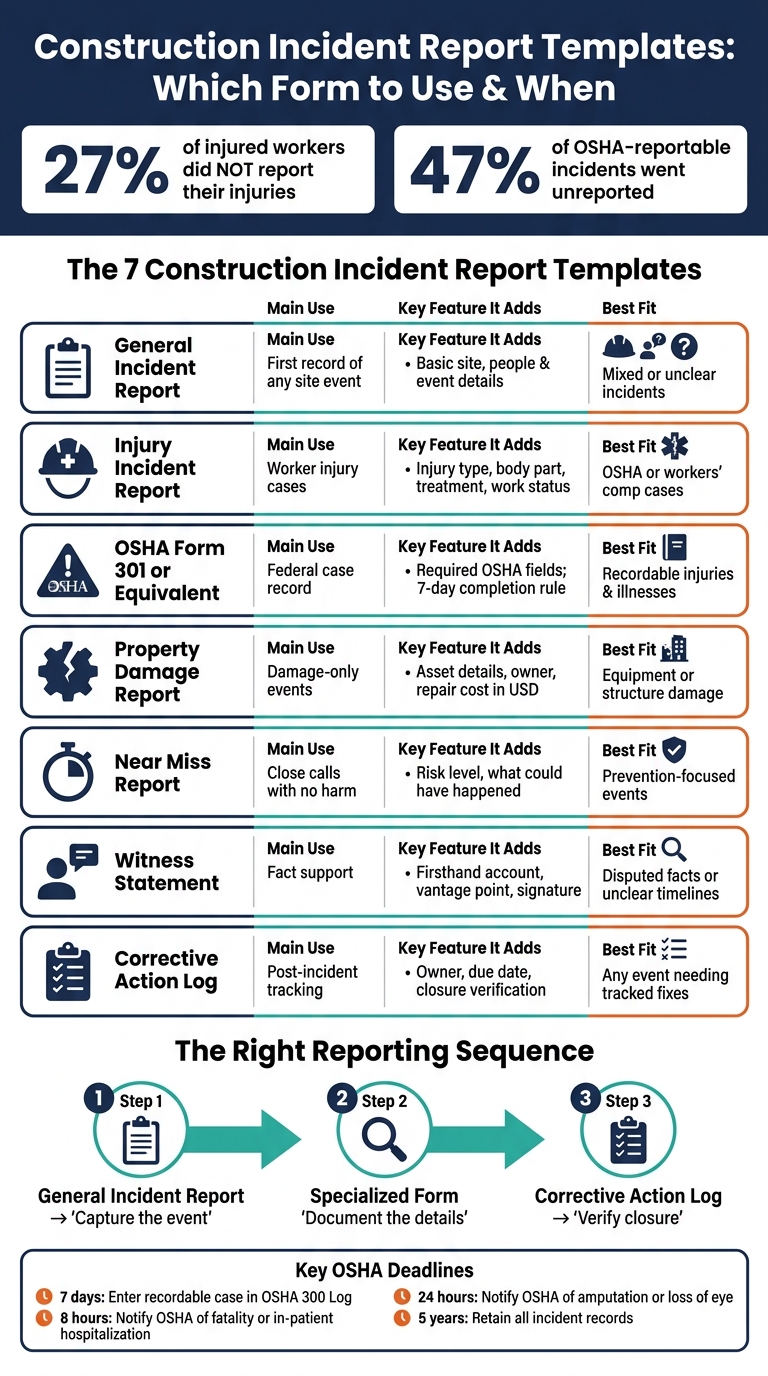
Construction Incident Report Templates: Which Form to Use & When
| Template | Main Use | What It Adds | Best Fit |
|---|---|---|---|
| General Incident Report | First record of the event | Basic site, people, and event details | Mixed or unclear incidents |
| Injury Incident Report | Worker injury cases | Injury type, body part, treatment, work status | Cases that may lead to OSHA or workers’ comp steps |
| OSHA Form 301 or Equivalent | OSHA case record | Required OSHA case fields | Recordable injuries or illnesses |
| Property Damage Report | Damage-only events | Asset details, owner, repair cost | Equipment, structure, or third-party damage |
| Near Miss Report | Close calls | Risk, what could have happened, hazard type | No injury and no damage |
| Witness Statement | Fact support | Firsthand account, vantage point, signature | Disputed facts or unclear timeline |
| Corrective Action Log | Post-incident tracking | Owner, due date, status, proof of closure | Any event that needs tracked fixes |
One more point stood out to me: under-reporting is still a problem. The article notes that 27% of injured workers did not report their injuries, and one study found that 47% of OSHA-reportable incidents went unreported. That’s why a plain, repeatable format matters so much.
So if I’m setting up a reporting process, I’d keep it simple: record the event, add the right detail form, then verify the fix was completed.
1. General Construction Incident Report Template
The general construction incident report is the main form for almost any site event: injuries, property damage, near misses, environmental events, or unsafe acts. Use it when an incident is mixed, not fully clear yet, or cuts across more than one category. In plain terms, this is your master record. The templates that follow get more specific by incident type.
Required Fields
Record the date and time, the exact site location, the project name and number, company and subcontractor details, and the names and roles of everyone involved.
Then document what happened in clear language. Include the trade or task in progress, site conditions like weather or lighting, and the reporter’s name, title, and contact details. That way, the form answers the basic questions right away instead of forcing someone to piece things together later.
Incident Coverage
Add an incident-type selector for:
- Injury/Illness
- Property Damage
- Near Miss
- Environmental
- Other
Each option should branch into its own module. One form can then feed injury, damage, near-miss, and corrective-action tracking without making people enter the same details twice.
That setup matters more than it may seem at first glance. If one event involves, say, a minor injury and damaged equipment, you still keep one record instead of splitting the story across separate forms. That branching setup is what makes the general form useful before the injury, damage, and witness templates below.
OSHA Alignment
Include an OSHA compliance block with fields for "Is this incident OSHA recordable?" (Yes/No), the OSHA 300 Log case number, and the date the case was added to the log.
Also note the 7-day recordkeeping deadline and the 8- or 24-hour OSHA notification duties for fatality, in-patient hospitalization, amputation, or loss of an eye. Those time limits are strict, so putting them directly on the form helps teams act fast when it counts.
The form should also collect employee details such as full name, job title, date of birth, and hire date, so it can work as a Form 301 equivalent under 29 CFR 1904.29. OSHA requires incident records to be kept for five years after the calendar year they cover.
Follow-Up Tracking
The corrective action section should follow a tight sequence: immediate action, long-term controls such as guardrails or retraining, responsible owner, due date in MM/DD/YYYY format, and supervisor verification of completion.
That sequence helps close the loop. It shows what was done right away, what will be done to stop it from happening again, who owns the fix, and whether a supervisor confirmed the work was finished. The injury template keeps this same core setup but adds case-specific medical fields.
2. Injury Incident Report Template
An injury incident report template builds on a general incident form. It keeps the basic incident facts, then adds the worker, treatment, and work-status details needed for injury cases.
Required Fields
Start with the core incident details, then add injury-specific fields: injury type, body part affected, whether medical treatment was given, and the names of any supervisors, witnesses, and first responders. On U.S. jobsites, it also helps to include crew or shift, equipment in use, and site conditions so the injury is tied to the task and what was happening around it. If the injured person works for a subcontractor, the employer or company field needs to be filled in clearly so the reporting chain stays traceable.
Incident Coverage
Use checkboxes to show whether the case involved:
- First aid only
- Medical treatment beyond first aid
- Restricted duty
- Days away from work
- Hospitalization
- Loss of consciousness
These categories help separate recordable cases from first-aid-only events.
The narrative should spell out the task being performed, the tools or materials involved, the sequence of events, and what happened right after the injury. A practical example is: Worker sustained a 2-inch laceration to the left palm while cutting conduit; first aid provided; supervisor notified; blade replaced.
OSHA Alignment
Set up the form so its fields transfer straight into OSHA Form 301 or an equivalent state form. That means it should capture employee details, treating provider information, event description, and case outcome without forcing someone to rewrite the facts later.
Follow-Up Tracking
The follow-up block should track corrective action, assigned owner, target date in MM/DD/YYYY format, status, and closure date.
| Follow-Up Field | Purpose |
|---|---|
| Corrective action taken | Documents what changed right after the injury |
| Assigned owner | Names who is responsible for the fix |
| Target completion date | Sets a deadline in MM/DD/YYYY format |
| Work status | Notes restricted duty, return to full work, or current medical review |
| Status | Tracks Open, In Progress, or Closed |
| Closure date | Confirms when the action was verified complete |
When the case is recordable, these fields feed the OSHA 301-equivalent form.
3. OSHA Form 301 or Equivalent Incident Report
OSHA Form 301 is the case-level record that sits behind each entry on the OSHA 300 Log. You need to use OSHA Form 301, or an equivalent form, for every recordable injury or illness. It must be completed within 7 calendar days and kept for 5 years after the end of the year.
For recordable injuries and illnesses, this is the baseline compliance format that the other templates should line up with. If the event is not a recordable injury or illness, use the damage or near-miss formats instead.
Required Fields
An equivalent form has to include every OSHA 301 data element and stay just as clear and complete as the official version. It covers the same incident facts as the injury template, but in OSHA’s exact order.
It should include:
- Case ID: incident number, date, and whether the case is new or updated
- Employee data: name or unique ID, address, date of birth, gender, job title, and date hired
- Incident details: date and time of the injury or illness, location, whether the employee stopped work, the task being performed just before the incident, what happened and how, the nature of the injury or illness, the body part affected, and the direct cause
- Care and outcome: whether there was an emergency room visit or hospitalization
- Treating provider: name and address of the healthcare professional or facility
Incident Coverage
Compared with the injury incident template, this version records the same event in OSHA’s required case format. The Work Activity at Time of Incident section should do more than list a job title. It should ask for the exact task, tool, and project phase.
In construction, that means prompting people to note facts such as trench depth, scaffold level, or equipment visibility within the narrative fields OSHA already asks for. That extra detail matters. “General labor” doesn’t tell you much. A plain-language entry like this does:
Employee was lifting 80 lb rebar bundles when right shoulder was strained.
OSHA Alignment
Field labels should match OSHA’s item numbers so users can map each answer straight to the form. Export fields should also be set up for the Injury Tracking Application when electronic submission is required.
One simple safeguard helps here: remind users not to include Social Security numbers or unrelated medical details in narrative fields.
Follow-Up Tracking
The form should also track what happened after the initial report. That includes first aid, shutdowns, barricades, corrective actions, the action owner, due date, outcome change, and final status.
Outcome-change and final-status fields matter because a case doesn’t always stay the same. What starts as a minor case can later become more serious, and the record needs to reflect that.
4. Property Damage Report Template
Unlike the injury and OSHA 301 formats, a property damage report is about what was damaged, who owns it, and what it will cost. It does not focus on worker health outcomes. Use this format when equipment is hit, part of a structure is damaged, or third-party property is affected and no one is injured.
Required Fields
Start with the standard incident header. Then add the damage-specific details: date, time, project name, project number, site location, supervisor, and project manager.
You’ll also want the property owner’s name and contact details, along with the asset identifier: make, model, serial number, and asset ID. From there, label the damage as structural, cosmetic, mechanical, or electrical. The form should also include an estimated cost of damage in U.S. dollars ($) at the time of the first report, even if an adjuster hasn’t reviewed it yet. Early cost estimates can affect how claims move forward.
Add the work in progress and the site conditions too. That way, the report shows not just what was damaged, but what was happening when it occurred.
Incident Coverage
Property damage should stand on its own as an incident type, alongside injury, near miss, fire, and spill. That setup helps safety teams sort damage-only events from incidents that involve both damage and injury, which matters when looking for patterns over time.
The report should describe:
- the work in progress
- the equipment in use
- what failed or what was struck
- the damage that followed
A separate "Property Damage Details" section, kept apart from any injury fields, helps keep the record complete even when no one gets hurt. Include a direct question: Was anyone injured as a result of this damage? If the answer is yes, record the OSHA 301 case number.
OSHA Alignment
OSHA recordkeeping rules focus on work-related injuries and illnesses, so there isn’t a dedicated OSHA form for property-only damage. If someone was injured, include the OSHA 301 case number. Even when the event involves only damage, the report should still capture the date, time, exact location, work being performed, and whether any injuries or near misses took place.
A "Notifications made" field is also useful here. It should list who was notified, such as OSHA, the fire department, the utility owner, or the police, along with the date and time of each notice.
Once the initial record is finished, the same form should continue through containment, notification, and repair.
Follow-Up Tracking
The follow-up log keeps containment, repair, cost, and closure in one place. Start by documenting the immediate protective actions. Then assign each corrective action to one responsible person and give it a target completion date.
That follow-up can include steps like securing the area, shutting off utilities, adding temporary protection, assigning an owner, setting a due date in MM/DD/YYYY format, and confirming closure.
The form should track both the estimated damage cost and the actual repair or replacement cost once that number is known. This ties the safety record to accounting and insurance work without splitting details across multiple systems. A closure sign-off confirms that repairs were checked and the case has been resolved.
If the event caused no damage, the next format is the near miss report.
5. Near Miss Report Template
Use a near miss report when something could have caused harm or damage, but didn’t. In this kind of situation, speed and clarity matter most.
One industry source says that in construction, there are roughly 300 near misses for every serious accident. That puts a lot of weight on this simple form. If crews use it well, it can help stop injuries before they happen.
Required Fields
Keep the form short. It should take less than two minutes to fill out. Include the date, time, exact location, the task in progress, and a plain-language note about what happened.
Two fields make a near miss form far more useful than a generic incident form:
- Who or what was at risk
- What could have happened
Those two prompts help supervisors see the danger behind the close call, not just the event itself. Make the reporter’s name optional.
Incident Coverage
Print the definition right on the form. A near miss should be defined as an event with no injury or damage, but with clear potential for both.
From there, use checkboxes for hazard type, such as unsafe act, equipment issue, area hazard, or policy violation. That makes reports easier to sort and review over time. Add a simple High / Medium / Low rating for both potential severity and likelihood of happening again. This helps supervisors put high-energy events first, like a dropped load or a crane boom passing near an overhead power line, instead of spending the same attention on lower-risk close calls.
OSHA Alignment
OSHA does not require near miss reporting, and near misses are not OSHA-recordable cases under 29 CFR 1904.7. Put a clear no-blame statement on the form: this report is for prevention, not discipline.
Also add a field asking whether safety procedures were violated, along with a short narrative area that explains why the unsafe condition existed. Once the event is classified, the form should move straight into corrective action.
Follow-Up Tracking
The form should end with corrective action. Include a section that records the steps needed to stop the same thing from happening again, such as installing temporary guardrails or revising the lift plan. Each action should be assigned to one person, whether that’s a foreman, safety manager, or superintendent, and each one should have a due date in MM/DD/YYYY format. Add a final field for supervisor sign-off, then share lessons learned at the next toolbox talk.
Use near miss forms for prevention. Use injury and damage forms for case documentation and claims.
If the near miss involves conflicting accounts, pair it with a witness statement.
6. Witness Statement Template
When the main incident report needs backup, a witness statement helps fill in the gaps. It records what someone saw and heard before, during, and after the incident, using the witness’s own words. Use one when stories don’t match, the timeline is fuzzy, or the main report doesn’t have enough detail. It helps with fact-finding and claims review.
Required Fields
The form should cover five basic questions: Who, What, Where, When, and How.
Start with the witness’s identification:
- Full name
- Job title
- Employer, whether that’s the general contractor or a subcontractor
- Contact information
Then record the incident date in MM/DD/YYYY format, the exact time in 12-hour format with AM/PM, and the exact location. Be specific here. Instead of a vague note, use details like “north scaffold, Level 3” or “east trench, Grid B.”
You should also include a field for vantage point. That means where the witness was standing, how far away they were from the event, and what they were doing at the time. Finish with the witness’s signature and the date signed.
Incident Coverage
A simple way to structure the account is with three prompts: before, during, and after. That keeps the statement clear and makes it easier to compare with the main report.
For injuries, record only visible signs. For property damage, note the asset involved and how the damage affected operations. For near misses, explain what almost happened and what stopped it. If positions or distances matter, add a sketch or photo. Sometimes a rough drawing says more than a full paragraph.
OSHA Alignment
OSHA guidance says witness statements should be written and signed, and any corrections should be initialed by the witness. The form should also include the interviewer’s name, title, and the interview date and time. Add a no-blame statement too, making it clear the form is for fact-finding, not discipline or retaliation.
Follow-Up Tracking
Each witness statement should connect back to the main incident file. Include the incident report number, investigator review notes, contradiction flags, review date, and signature.
Tie the statement to the case ID so the next follow-up log can use the same record. Use neutral, nonpunitive language. People tend to give fuller accounts when they don’t feel like they’re being cornered.
7. Corrective Action and Follow-Up Log Template
After the investigation, use the corrective action log to assign fixes and confirm they were done. Once the facts are in place, the follow-up log turns findings into clear tasks. Its job is simple: document, assign, track, and verify each post-incident action until the case is closed for good.
Required Fields
Each entry should include an action ID linked to the incident ID, plus the date, project name, and jobsite address. The action itself needs to be specific and measurable.
"Install guardrails on the 4th-floor perimeter by 08/20/2026."
You should also include the responsible owner, due date in MM/DD/YYYY format, actual completion date, and a status field with a clean flow:
- Open
- In Progress
- Verified
- Closed
A verification section should record the verifier’s name, role, verification note, and sign-off date.
This setup lets one log handle every incident without making duplicate records.
Incident Coverage
Use one standard log for every incident type, including recordable injuries, first-aid cases, near misses, and property damage. Add a standard incident type field so entries don’t get split up by category. Each corrective action should link back to the source report, whether it came from an injury, near miss, property damage, or witness record. Include a root cause field too, so the log deals with the issue underneath the event, not just the surface problem.
OSHA Alignment
Note whether the incident is recordable and link it to the related OSHA log or case form. Cite the right standard for each action, such as 29 CFR 1926.501 for fall protection or 29 CFR 1910.147 for lockout/tagout. Records should be kept for five years under 29 CFR 1904 requirements.
Follow-Up Tracking
Track age, review date, owner, and closure evidence. Add Days Open and Next Review Date so overdue actions don’t slip through the cracks. Track on-time closure and verify the fix after about 90 days. Attach proof of closure, such as photos, revised procedures, training records, and a follow-up audit to confirm the fix is still working.
That way, the record stays active until the fix has been checked and confirmed.
Pros and Cons of Each Template Format
No single template works for every incident. The right form depends on what happened: an injury, property damage, a near miss, or a case where people tell different versions of the same event.
The table below compares seven formats by strengths, limits, and best use. The goal is simple: pick the shortest form that still gets the facts down clearly.
| Template Type | Pros | Cons | Best Use Case |
|---|---|---|---|
| General Incident Report | Flexible; standardizes most site events. | Too broad for serious cases; open fields invite inconsistent entries. | Day-to-day events needing a quick snapshot before escalating to a specialized form. |
| Injury Incident Report | Captures body part, injury type, treatment, and lost-time status; maps cleanly to OSHA 301 data points. | Misses damage or near-miss context; medical details require tighter privacy controls. | Any injury that may be OSHA-recordable, trigger workers’ comp, or involve treatment beyond first aid. |
| OSHA Form 301 or Equivalent | Directly supports federal recordkeeping; audit-friendly; helps demonstrate due diligence in disputes. | Complex for field users; limited narrative space; poorly suited for near-miss tracking. | Confirmed recordable injuries and illnesses on sites covered by OSHA recordkeeping rules. |
| Property Damage Report | Aligns with insurance claims and cost tracking; captures asset details, repair estimates in USD, and vendor info. | Misses medical details when injury and damage occur together; early cost estimates often change. | Equipment, machinery, third-party property, or infrastructure damage – especially when insurance is involved. |
| Near Miss Report | Identifies hazards before harm occurs; supports leading indicator tracking; builds proactive safety culture. | High volume can lead to shallow entries; supervisors may delay review. | Any high-potential event where nobody was hurt and nothing was damaged – yet. |
| Witness Statement Template | Preserves firsthand accounts; helps reconcile conflicting versions; supports legal and insurance review. | Memory bias and stress affect accuracy; multiple statements add administrative overhead. | Serious incidents, disputed facts, or events involving multiple trades, subcontractors, or members of the public. |
| Corrective Action / Follow-Up Log | Assigns owners, due dates, and completion status; creates a traceable record of lessons learned. | Requires active updates to stay useful; fragmented site-level logs reduce trend visibility. | Any incident or near miss revealing a systemic issue that needs tracked remediation and verified closure. |
A practical way to use these forms is to stack them instead of treating them like either-or choices. Start with the general report to log what happened. Then use the specialized form to record the facts tied to that event type. After that, use the corrective action / follow-up log to make sure fixes are assigned, tracked, and closed.
That sequence tends to work well because it follows the way incidents unfold in real life: capture the event, document the details, then verify closure.
Conclusion
A general incident report is the starting point. It is not the whole system.
The goal isn’t to pick one form and call it done. It’s to use the right forms together. Each one has a clear job, and taken as a set, they cover the full path of an incident – from the first report to final closeout.
Across every template and project, keep the same core fields in place: date, location, project name, involved parties, incident type, immediate response, and corrective-action status. That consistency keeps records clean and ready for compliance checks.
This matters because reporting still falls apart on the ground. Under-reporting is still common. Studies show that 27% of injured workers did not report their injuries, and one study found that 47% of OSHA-reportable incidents went unreported.
A simple workflow works best:
- Start with a general incident form
- Add separate forms for injuries, property damage, near misses, witness accounts, and corrective actions
- Record the event, document the details, and then verify corrective action
FAQs
Which incident form should I start with?
Start with a detailed incident report that covers the basic facts: the date, time, location, involved parties, what happened, and any immediate actions taken. That report gives you the base for later review and compliance work.
For recordable incidents, complete OSHA Form 301 within seven days and keep the OSHA 300 Log up to date. It also helps to include forms for near misses, injury investigations, and follow-up corrective actions so nothing slips through the cracks.
When do I need OSHA Form 301?
You must complete OSHA Form 301 for every recordable work-related injury or illness.
This form records the main facts of the case, such as:
- the employee’s job title
- where the incident happened
- what happened
- which body parts were affected
Complete the form within 7 days of the recordable incident.
If your establishment is subject to electronic reporting rules, you must also submit this data each year by March 2.
How should I link multiple forms for one incident?
Use one central digital platform to link every form tied to the same incident. That means the first report, witness statements, equipment logs, and follow-up corrective actions all stay attached to the main case file.
When records live in one place, the file becomes searchable and much easier to work with. It also cuts duplicate entry, keeps details consistent across forms, and makes inspections or safety audits a lot easier.


