
Worker classification software in 2026 should do more than label someone W-2 or 1099. I’d expect it to apply the right federal and state tests, store the facts behind each decision, connect with payroll and time data, and recheck status when the job changes.
Here’s the short version:
- One test is not enough. Software should handle both FLSA economic reality rules and IRS control rules, plus stricter state tests like ABC tests.
- Location matters. A setup that works in one state can fail in another, especially for crews moving across job sites.
- Audit trails matter. A yes/no result without dated records, answers, overrides, and approval history leaves gaps.
- Field data matters. Time logs, site changes, tools used, supervisor links, and pay setup can show when a worker’s status no longer matches the facts.
- Rechecks matter. A correct decision on day one can become wrong after months on the same site or after duties shift.
- The cost of mistakes is high. The article points to $259 million in back wages recovered in FY 2025 and 443,288 misclassified employees found across 73,912 unemployment insurance audits.
If I were reviewing a platform, I’d look for four things right away:
- Rule coverage: federal tests plus state-specific rules
- Proof: time-stamped records and plain-English decision memos
- System links: payroll, time tracking, job costing, deployment, and credential data
- Monitoring: alerts for red flags like fixed shifts, company equipment, long assignments, or one-client income concentration
This guide is mainly about staffing, construction, and energy, where worker movement, mixed duties, public works rules, and multi-state jobs make classification harder to manage by hand.
A short comparison helps show what the software needs to track:
| Area | What the software should do | Why it matters |
|---|---|---|
| Federal rules | Run FLSA and IRS tests separately | Tax and wage rules may not match |
| State rules | Apply the rule for the work state | ABC-test states are stricter |
| Audit file | Store answers, approvals, and rule version used | Needed for DOL or IRS review |
| Job changes | Trigger reassessment when facts shift | Status can drift over time |
| Data links | Pull payroll, time, site, and supervisor data | Actual work may differ from contract |
| Red flags | Spot fixed schedules, company tools, and core-role work | These facts often point to employee status |
If you hire project crews, rotate workers across states, or deal with public works, this article lays out what the software must support and what buyer questions to ask.
How to Properly Classify Employees and Independent Contractors
sbb-itb-aa28329
U.S. Classification Rules the Software Must Support
Good classification software needs to do three things well: run the right legal test, apply it the same way every time, and keep the facts behind each decision. That matters even more for crews that move between job sites and states. In the U.S., employers often have to meet both federal and state rules at once, and those rules don’t always line up. So the system has to gather the right facts before it makes a call that can stand up to review.
Federal Tests: FLSA Economic Reality and IRS Control Factors
The Fair Labor Standards Act (FLSA) uses an economic reality test built around one main question: is the worker economically dependent on the employer, or are they in business for themselves? The Department of Labor looks at six factors: profit or loss, investment, permanence, control, whether the work is integral, and the worker’s skill and initiative. No single factor decides the outcome.
The IRS looks at the issue through three categories: behavioral control, financial control, and the relationship of the parties. That can create a tricky split. The same worker might land in one place under IRS rules and somewhere else under FLSA rules. So the software can’t lump everything into one bucket. It needs separate tax and wage-and-hour findings.
A simple example helps. Equipment ownership can matter under both tests. But the system should tag that fact for each legal framework and then produce parallel assessments. That way, compliance teams can see the full picture instead of guessing from one blended result.
These rules only work if the platform collects job, site, and worker data in a structured format.
State ABC Tests and Stricter State Rules
Some states, including California, New Jersey, and Massachusetts, use an ABC test that starts with the presumption that the worker is an employee. To classify that worker as an independent contractor, the employer has to satisfy all three prongs:
- A: the worker is free from control and direction
- B: the work is outside the usual course of the hiring entity’s business
- C: the worker is customarily engaged in an independently established trade or business
Prong B is where construction and energy employers often run into trouble. If a general contractor’s main business is construction, it’s hard to argue that a laborer’s on-site work falls outside the usual course of that business. That’s why the software needs a state-by-state rules library that applies the right test based on where the work is performed.
That last point matters a lot. The system should use the rule tied to the place where the work happens, not the company’s headquarters. It also needs to flag cases where the same setup passes in one state but fails in another. That’s not edge-case stuff. For mobile crews, it’s part of day-to-day compliance.
Industry Complications: Prevailing Wage, Mixed Duties, and Changing Job Sites
Public works add another layer. The software has to classify both the worker and the labor type – such as ironworker, electrician, or laborer – and then apply the right prevailing wage and fringe rates for that site. It should also keep certified payroll records and daily labor-classification detail.
This is where mixed duties turn into a day-to-day headache. A worker might spend part of a shift doing manual labor and another part handling supervisory tasks. In that case, the same person may need two classifications on the same day. Once crews start rotating between job sites every week, manual tracking can fall apart fast.
The software should connect each assignment to its location, project type, and labor class, then recalculate when any of those inputs change. That’s what makes the result defensible. It also sets up the next step: assignment data has to flow straight into classification logic without manual rework.
Core Software Features and Workflow Setup
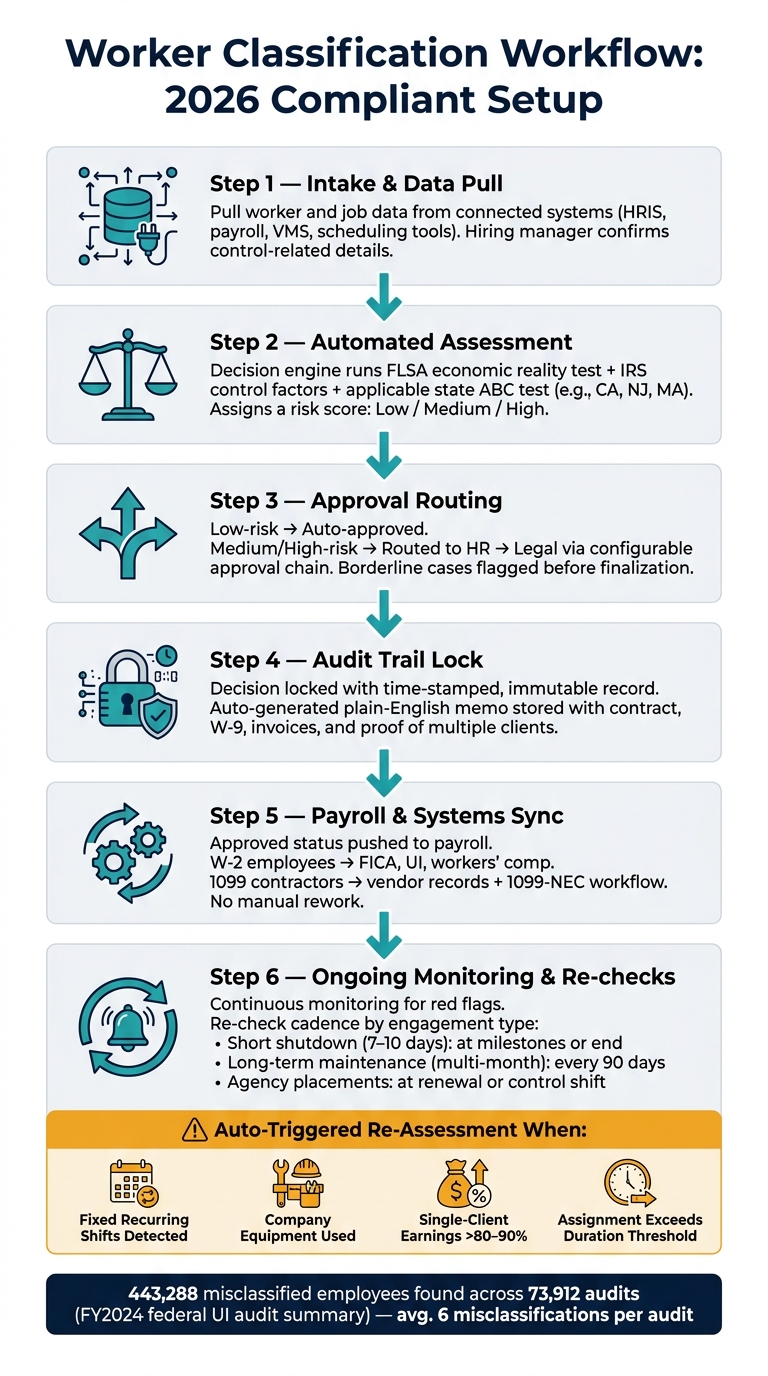
Worker Classification Software: Compliant 2026 Workflow
The previous section covered which legal tests apply and where. This section shifts to the software itself: what it needs to do, and how it should fit into the day-to-day work of classifying, approving, and documenting each engagement.
Decision Engines, Rule Libraries, and Audit Trails
Once the system knows which rules apply, it has to turn those rules into repeatable decisions.
At the center of any classification platform is the decision engine. In 2026, that engine should bring together guided questionnaires, factor scoring, and a jurisdiction-aware rule library. The questionnaires need to ask plain-language questions, such as who sets the schedule, who provides the tools, and whether the worker can make or lose money based on how the job is managed. The system then maps those answers to the right legal test and produces a scored result.
Factor scoring helps keep similar fact patterns from ending up with different risk ratings. The engine should weight each factor, flag the outcome as likely employee, likely contractor, or borderline, and send borderline cases to legal or HR before anything is finalized.
Rule libraries also need version control tied to effective dates. If the rules change, the system must use the version that was in force on the engagement date. That matters when an auditor asks a simple but tough question: Which rules applied on that exact day?
Audit trails matter just as much. Every question asked, every answer recorded, every rule applied, every human override, and every approval must be time-stamped and immutable. The system should also auto-generate a plain-English decision memo and store it with the contract, W-9, invoices, and proof of multiple clients. That file set is what you hand over in an IRS or DOL audit.
Worker and Job Data the System Must Capture
Classification is only as good as the data behind it. The system needs structured inputs from connected systems, not manual entry.
| Data Field | Source System |
|---|---|
| Legal name, SSN/ITIN | HRIS or onboarding platform |
| Work authorization / I-9 status | Compliance or onboarding system |
| Pay rate, pay type, overtime eligibility | Payroll or VMS |
| Contract type (MSA, SOW, PO), notice provisions | Contract management or legal system |
| Project duration, expected hours, schedule | Project management or scheduling tools |
| Supervisor name and reporting structure | HRIS or org chart tool |
| Tools, equipment, and PPE provided | Asset or site management system |
| Assigned site and location | Field ops tools or GPS platform |
| Trade classification, certifications, union status | HRIS, LMS, or credentialing platform |
| Whether worker serves multiple clients | Accounts payable or vendor management |
Platforms like ABLEMKR can pre-populate credential and location data. That cuts down on manual entry and helps crews get moving faster.
A Step-by-Step Workflow for 2026 Operations
With the rules and data capture in place, the workflow needs to keep each classification current.
A compliant workflow should run from intake through re-checks, and it should restart any time material facts change.
The intake step pulls core data from connected systems and asks hiring managers or project leads to confirm control-related details. From there, the automated assessment runs the decision engine and assigns a risk score. Low-risk engagements with a clear scope can be auto-approved. Medium- and high-risk cases should go to legal or HR through a configurable approval chain, like manager → HR → legal for higher-risk energy projects. Once approved, the decision should be locked into the audit trail and tied back to payroll and project systems so classification status can drive tax withholding, benefit eligibility, and wage calculations automatically.
Ongoing rechecks are where many teams slip. Different engagement types need different review timing, and the trigger points are not always the same.
| Engagement Type | Re-check Cadence | Key Risk Triggers |
|---|---|---|
| Short shutdown work (7–10 days) | At project milestones or when the engagement ends | Repeated re-engagement with the same operator; employer-level control over schedule |
| Long-term maintenance (multi-month) | Every 90 days | Duration crossing 6 months; duties expanding beyond the original SOW |
| Agency placements | At renewal or when day-to-day control shifts | Shift in day-to-day control from agency to client; client-provided equipment |
When a trigger fires, the system should open a new assessment and alert compliance. That’s the difference between a live control and a one-time checkbox.
Those alerts only work if payroll, time tracking, and job data stay connected.
Integrations and Ongoing Monitoring
Once a classification gets approved, integrations help keep that decision tied to what’s happening on the ground.
Payroll, Time Tracking, and Job Costing Connections
Payroll needs to reflect the approved status automatically. The integration should send approved decisions into payroll so tax withholding, overtime rules, benefits eligibility, and year-end reporting match the worker’s correct status. W-2 employees should trigger FICA, unemployment insurance, and workers’ compensation coverage. 1099 contractors should go to vendor records and 1099-NEC workflows, not payroll tax processing.
Payroll shows what the system paid. Time tracking shows what the worker actually did. That’s where the compliance signal often shows up first. When time entries are tagged by project, trade, cost code, and site, the classification engine can compare actual hours against the documented role. If a contractor is logging full-time hours at one site, using company time clocks, and working under supervisor-led scheduling, that should trigger an employee-status review.
Field data matters because the job site often shows risk before payroll does. Job costing adds another check. If a worker labeled as a project-based consultant is being coded to core operational tasks across multiple pay periods, that gap should appear in a dashboard before it appears in an audit.
| Integration | Key data it provides | Classification risk it helps catch |
|---|---|---|
| Payroll | Pay type, overtime, tax treatment, benefits deductions | Mismatched withholding or benefits for actual worker status |
| Time tracking | Hours by day, job, cost code, supervisor, site | Contractor hours and control patterns that suggest employee status |
| Job costing | Labor by project, phase, and cost code | Core-task work coded under contractor classifications |
Deployment, Credentialing, and Geo-Location Data
For field work, deployment data shows whether the contract still matches day-to-day reality. Crews in construction, energy, and remote field work move between sites, shifts, and jurisdictions, and each move can change the facts behind a classification. Assignment history, shifts, client IDs, and supervisor links help show whether the classification still fits.
Deployment tools matter most when crews move often and job conditions change fast. GPS check-ins, geofenced boundaries, and verified certifications create objective proof of presence and qualification. In a utility-scale solar build, Sitemetric‘s site access control system captured attendance, credentials, employer information, and trade data automatically at the gate, giving project leadership a reliable record of who was on site and when.
ABLEMKR matches workers to job sites using certifications, safety training, availability, and location, and keeps verified worker profiles with integrated payroll workflows and embedded compliance tracking. For construction, oil & gas, utilities, mining, and heavy infrastructure teams, ABLEMKR can prompt a classification check before a worker is confirmed to an ABC-test state or prevailing-wage project.
Red Flags, Buyer Questions, and Conclusion
Red Flags the Software Should Catch Early
The software should flag contract-to-workplace drift before an audit does.
| Red Flag | How Software Detects It | Follow-Up Action |
|---|---|---|
| Contractor working fixed, recurring shifts | Cross-reference contractor status with time entries showing recurring start/end times tied to a single client job code | Route to HR for a classification questionnaire |
| Worker using company tools, vehicles, or PPE | Integrate with asset tracking; flag when contractor IDs are linked to company-owned equipment | Reassess under FLSA economic reality and applicable state tests |
| Daily reporting to a client supervisor | Pull supervisor approval records from daily logs or field apps to identify direct oversight patterns | Add manager justification to the audit file |
| 80–90%+ of earnings from a single client | Track contractor earnings by client over a trailing period; alert when concentration exceeds a defined threshold | Prompt a reclassification review |
| Long-term assignment in a core business role | Compare assignment duration and job description tags against core job families; flag engagements beyond a configurable threshold | Capture written justification in the audit trail |
In construction and energy, two extra patterns need close attention.
First, watch for contractors who are scheduled and dispatched across multiple job sites exactly like employees: same dispatch system, same foreman, same mandatory safety meetings. That’s a warning sign.
Second, watch travel and per diem setups that look just like employee policies. Geo-location and deployment data can surface both issues. If a "contractor" keeps checking in during core hours at company-controlled sites, the software should open a review workflow.
This is why one-time reviews aren’t enough. You need continuous monitoring.
And the numbers back that up. A 2024 federal unemployment insurance audit summary found 443,288 misclassified employees across 73,912 audits – an average of 6 misclassifications per audit.
Once the system can spot these signals, buyers need to see whether it can handle them the same way across sites and states.
Buyer Questions for Selecting Worker Classification Software
Score vendors on legal coverage, auditability, integrations, and field usability.
The questions that matter most are pretty simple:
- Which federal tests are explicitly modeled? The platform should map straight to FLSA economic reality factors and IRS control factors, not just mention them in broad terms.
- Which state ABC tests are built in, and how does the system handle workers who cross state lines? California, Massachusetts, and New Jersey each use stricter standards. The software needs to apply the right test based on where the work physically happens.
- How often are rules updated, and what triggers an early update? Look for at least quarterly reviews, with faster updates when major federal or state rulings hit. Ask for versioned rule sets and change logs.
- What does the audit export include? The file should contain the completed assessment, signed contracts or SOWs, job descriptions, time records, and a rule-based explanation of the classification decision – enough to walk an IRS or DOL investigator through each step.
- Can the system track workers across multiple sites, states, and clients at the same time? For construction and energy teams running rotating crews, this is non-negotiable.
For ABLEMKR users, those same questions should lean more toward deployment, credentialing, and payroll linkage. For ABLEMKR, focus on workers’ comp, credential verification, payroll linkage, and real-time status alerts.
Conclusion: What a Compliant 2026 Setup Requires
A compliant 2026 setup has four non-negotiable traits: it is rule-based (encoding FLSA, IRS, and applicable state tests explicitly), evidence-driven (storing documentation behind each decision), integrated (connected to payroll, time tracking, deployment, and credentialing systems), and dynamic (monitoring actual working conditions continuously, not just at the point of hire).
For staffing, construction, and energy teams, the hard part is movement. Workers shift between sites, states, clients, and roles. A classification that starts out correct can drift out of line as the assignment changes.
The software should schedule periodic reassessments, monitor red flags automatically, and notify the right people when conditions change. It should also recheck status on a set schedule and whenever material facts change.
FAQs
How often should worker status be rechecked?
Worker status should be checked in real time throughout deployment, not just once at the start. Set regular review cycles for eligibility data, with extra attention on credentials and documents.
For expirations, automated reminders usually go out 90, 60, and 30 days before the deadline, with escalation if nothing gets fixed. To stay in line with changing rules, including multi-state requirements, review and update your protocols about once a quarter.
Which states make contractor classification harder?
No specific states are named as “harder,” but the rules can change a lot from one state to another. That means the risk of worker misclassification also changes by jurisdiction.
Some states use the stricter ABC test. Others rely on the more flexible economic realities test. Put simply, the same worker setup might pass in one state and run into trouble in another.
California is specifically noted as having stricter criteria than federal rules.
What data matters most for classification?
The most important data is the worker’s documented economic reality. That means showing how the job works in practice, not just what a contract says.
Focus on three areas:
- Behavioral control: who decides how, when, and where the work gets done
- Financial control: the pay setup, the worker’s chance of profit or loss, and whether the worker pays for their own tools
- Relationship: whether the work is ongoing, exclusive, or tied to a specific project
You should also keep supporting records that back this up. That includes worker IDs, job titles, certifications, safety training, and wage/time data linked to project codes so your audit trail stays consistent.


