
Push notifications are transforming staffing in industries like construction, oil and gas, and mining by enabling real-time communication for urgent workforce needs. Unlike emails or manual SMS, these alerts instantly notify workers about shift openings, missed clock-ins, or compliance risks – directly on their mobile devices.
Key Takeaways:
- For Employers: Push notifications streamline staffing by automating tasks like shift coverage, compliance alerts, and scheduling updates. This reduces delays, administrative overhead, and payroll errors.
- For Workers: They offer immediate job access, flexible scheduling, and reminders to prevent missed shifts, improving engagement and retention.
- Best Practices: Prioritize urgent alerts, personalize messages by role and location, and avoid overwhelming workers with excessive notifications.
Platforms like ABLEMKR leverage these tools to match pre-vetted workers with jobs based on certifications, location, and availability – ensuring rapid responses while maintaining compliance and efficiency. By balancing urgency and relevance, push notifications can significantly improve staffing operations and outcomes.
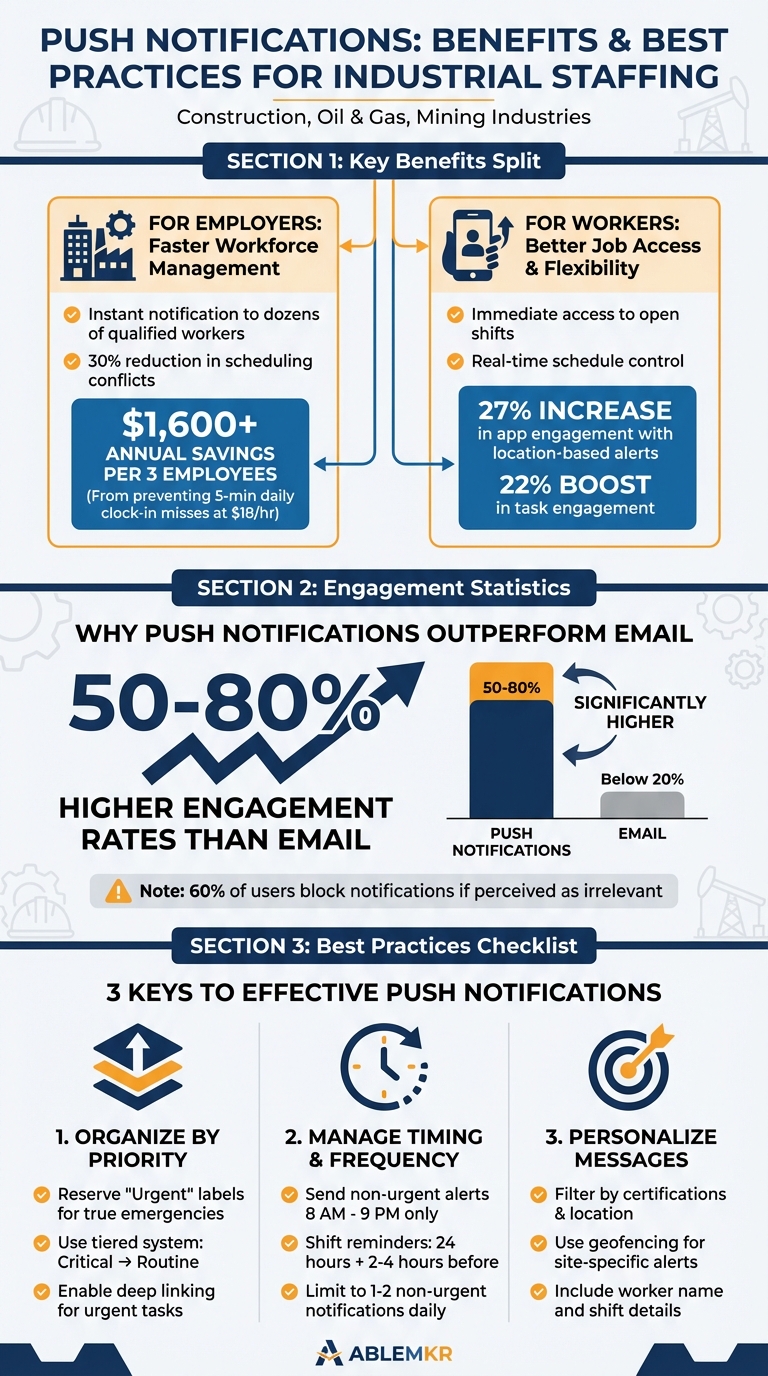
Push Notification Benefits and Best Practices for Staffing Operations
Push Notifications
Key Benefits of Push Notifications in Staffing
Push notifications make it easier for employers to fill staffing gaps quickly while giving workers more control over their schedules. Acting as a real-time communication tool, these alerts connect job sites with available workers, cutting out delays that often come with emails or phone calls.
For Employers: Faster Workforce Management
One of the biggest advantages is speed. Imagine a certified welder calls out sick at 6:00 AM for a 7:00 AM pipeline repair. Instead of scrambling with phone calls, managers can instantly notify dozens of qualified workers through push notifications. This quick response saves time and ensures the job gets done without disruption.
Push notifications also reduce the administrative workload. Tasks like confirming schedules, approving time-off requests, or managing shift swaps can be automated. This frees up managers to focus on more strategic responsibilities while the system handles routine updates and alerts.
Another perk is how these systems help with compliance. For example, staffing platforms can flag potential issues like back-to-back shifts without enough rest, overtime limits being exceeded, or missed mandatory breaks. If a worker is close to hitting their weekly overtime cap, the system alerts managers right away. Geofencing features can even notify employers if a mobile worker leaves an authorized location during their shift.
"Push notifications don’t just solve common scheduling problems, they improve efficiency so dramatically that it transforms the entire process."
- Liz Strikwerda, Content Strategist
Real-time alerts also address missed clock-ins or unauthorized timecard edits. For instance, if three employees forget to clock in for just five minutes daily, it can cost a business over $1,600 annually at an $18.00 hourly wage. By addressing these errors immediately, companies can save money and improve efficiency. ABLEMKR’s mobile-first technology supports these rapid adjustments, ensuring staffing needs are met seamlessly.
For Workers: Better Job Access and Flexibility
While employers benefit from streamlined operations, workers gain immediate access to opportunities and more control over their schedules.
With push notifications, workers can quickly claim open shifts, whether it’s an emergency job at a remote drilling site or a last-minute pipeline repair. This instant access can boost earning potential for those ready to step in.
The system also gives workers more flexibility. Notifications for shift swaps or trade requests make it easier to balance personal and professional commitments. Real-time updates on time-off requests and schedule changes eliminate the stress of waiting for confirmation.
Automated reminders sent 24 hours – and again 2–4 hours – before a shift help workers stay on track and avoid accidental no-shows. For mobile or off-site workers, these alerts also keep them connected to team updates and company news, reducing the sense of isolation that can come with remote assignments.
"For employees, those alerts increase transparency and give them more control over swapping or picking up shifts, which is a major driver of retention in high-turnover industries."
- Silas Mercer, Small Business Efficiency Strategist
Best Practices for Using Push Notifications
Push notifications can be a powerful tool for keeping workers informed, but they need to strike a balance between being helpful and overwhelming. These tips will help ensure notifications are effective without causing frustration in high-pressure staffing situations.
Organizing Notifications by Priority
Not every notification needs the same level of urgency. Separating critical alerts from routine updates helps workers focus on what truly matters. For example, a last-minute request to fill an emergency shift at a drilling site should grab attention, while a general update about new company policies can wait.
A tiered system works best. Urgent alerts – like safety warnings or emergency shift coverage – should go out immediately. Routine updates, on the other hand, can be grouped together or scheduled for less disruptive times. This approach ensures that critical messages don’t get lost in the noise.
"If everything is labeled ‘urgent,’ nothing feels urgent anymore. Don’t misuse urgency" – Ian McCutcheon, Client Success Manager at Thrive
Reserve labels like "Urgent" or "Action Required" for truly time-sensitive tasks. Overusing these tags can lead to workers ignoring them altogether. For high-priority communications, consider requiring acknowledgment to confirm the message has been seen. This way, you can follow up if necessary. Also, enable deep linking so that urgent notifications take workers directly to the relevant task or shift page.
By categorizing notifications effectively, you can ensure the most important messages get the attention they deserve.
Managing Timing and Frequency
Timing is everything when it comes to push notifications. Non-urgent messages should be sent during regular hours – between 8:00 AM and 9:00 PM – while off-hours alerts should be reserved for emergencies.
For shift-based roles, a reminder system works well. Send an alert 24 hours before a shift and a final reminder 2–4 hours ahead. This helps reduce no-shows without being overly intrusive. To avoid overwhelming workers, limit non-urgent notifications to one or two per day.
Batching non-critical updates into a single daily digest can also reduce interruptions. If a worker repeatedly dismisses a certain type of alert, take that as a cue to adjust the frequency for that individual. This personalized approach can help maintain engagement, especially since around 60% of push notifications are blocked by users due to perceived irrelevance or excess noise.
Once notifications are sent at the right time and frequency, tailoring them to individual workers can make them even more effective.
Personalizing Notifications
Generic messages often get ignored. Tailoring notifications based on a worker’s skills, certifications, location, and schedule can significantly improve engagement. For instance, if you need a certified welder for a pipeline repair in Texas, send the alert only to qualified welders within a reasonable distance – not to everyone in your system.
Geofencing can help by sending location-specific alerts when workers are near job sites. Schedule-aware messaging ensures non-urgent notifications don’t reach staff who are off-duty. Including personal details like the worker’s name and specific shift information (date, time, and location) also boosts response rates.
Customizing notifications in this way not only increases engagement but also ensures that workers feel the messages are relevant and worth their attention.
sbb-itb-aa28329
How Staffing Platforms Use Push Notifications
Today’s staffing platforms lean heavily on event-driven automation to simplify communication. Instead of managers manually sending updates, systems like ABLEMKR automatically trigger notifications for key events – such as new job openings, schedule changes, urgent staffing needs, or compliance deadlines. This ensures workers receive critical updates immediately, without constant supervision from managers. This automated setup makes managing staffing tasks more efficient.
One standout example is alerts for available shifts. Imagine an emergency shutdown that creates a sudden opening – platforms can instantly notify qualified workers who meet the job’s requirements and are available. These alerts often highlight details like premium pay or other incentives to encourage fast responses. Push notifications are particularly effective here, boasting engagement rates that are 50% to 80% higher than email, making them perfect for urgent staffing needs.
Automated notifications also streamline everyday tasks like shift swaps, trade approvals, and time-off requests. These systems create a clear communication trail, reducing misunderstandings and preventing no-shows. For compliance, automated reminders prompt workers to clock in and out at the right times, minimizing "ghost time" – those few missed minutes that can add up.
Automating Notifications for Staffing Tasks
When a new schedule is posted, workers are immediately alerted to their upcoming shifts. The system also flags potential compliance issues, such as workers nearing overtime limits, helping to avoid labor law violations and unexpected payroll costs. Companies using real-time notification systems have seen scheduling conflicts drop by as much as 30%.
"Used well, those same alerts can cut late clock-ins, clean up timesheets, and stop expensive payroll corrections in just a few weeks." – Silas Mercer, Small Business Efficiency Strategist
Adding another layer of efficiency, geofencing technology enhances real-time updates by incorporating workers’ physical locations.
Location-Based Alerts and Real-Time Updates
Geofencing takes push notifications a step further by tailoring alerts to workers’ locations. This technology ensures that only nearby workers receive essential updates, such as site-specific safety instructions or shift details, the moment they enter a geofenced job site.
For urgent situations, location-based alerts help mobilize workers quickly. For instance, if a mining operation needs immediate coverage due to equipment failure, the system can notify nearby, certified workers, filling the gap faster than traditional methods like phone calls or texts.
Location-based push notifications also boost app engagement – app open rates increase by 27%, and task engagement rises by 22%. ABLEMKR’s mobile-first design uses this technology to match pre-vetted workers with job sites based on location, certifications, and availability. This ensures rapid deployment for everything from last-minute shutdowns to remote repair projects.
Geofencing also strengthens compliance efforts. By verifying that workers are physically present at the job site before they can clock in, it reduces timecard fraud and ensures payroll accuracy. This added layer of accountability benefits both employers and workers.
Measuring Push Notification Performance
Tracking how well your push notifications perform is crucial for fine-tuning staffing operations. The right data points can show you what’s working, where you’re losing engagement, and how to speed up response times.
Key Metrics to Track
Start with the opt-in rate – the percentage of workers who allow notifications. This gives you a sense of how much value your workforce places on staying connected through the app. Then, check the delivery rate to ensure notifications are actually reaching devices. Issues like poor connectivity or outdated app versions can impact this.
Engagement is another critical area. Measure both direct opens (immediate taps on notifications) and influenced opens (app activity sparked by the alert) to see how well your messages resonate. For staffing platforms, response time is a top priority: how quickly do workers accept shifts after being notified? Faster responses can prevent costly delays, especially in industries like construction or energy, where last-minute staffing needs can make or break a project.
The action completion rate tells you whether workers follow through on the tasks prompted by notifications – like clocking in, submitting timesheets, or confirming shifts. On the flip side, keep an eye on opt-out and uninstall rates. High numbers here could mean workers are overwhelmed by too many alerts or find them irrelevant [8, 11].
| Metric Category | Key Indicator | What It Reveals |
|---|---|---|
| Engagement | Direct Open Rate | How well the message content connects with workers |
| Retention | Opt-out/Uninstall Rate | Signs of notification fatigue or lack of perceived value |
| Operational | Response Time | How quickly staffing gaps are addressed |
| Compliance | Missed-Punch Alerts | Reductions in payroll errors like "phantom overtime" |
| Technical | Delivery Rate | Whether critical updates are reaching workers |
These metrics provide a framework for improving the effectiveness of your notifications.
Improving Notifications Based on Data
Once you’re tracking these metrics, use them to fine-tune your strategy. A/B testing can help you figure out what works best – for example, whether emphasizing pay rates or shift flexibility leads to more responses. Timing matters too. Optimizing send times ensures alerts hit when workers are most likely to engage, rather than during off-hours like 3:00 AM.
Take a cue from mon-marché.fr, a Paris-based online grocer. In 2025, they used personalized push notifications to send order reminders, resulting in a 21% push open rate and a 43% boost in total orders. Staffing platforms can apply the same approach by tailoring alerts based on worker certifications, location, or past behavior. This makes notifications more relevant and less intrusive.
Deep linking is another game-changer. It sends workers directly to the relevant shift or task page, cutting down on response time. ABLEMKR, a mobile-first staffing platform, uses this tactic to ensure urgent alerts – like those for last-minute shutdowns or remote repairs – lead to immediate action.
Keep an eye on opt-out trends over time. A sudden spike might not mean much, but if certain alerts, like daily schedule reminders, consistently cause opt-outs, it’s worth reconsidering their frequency or moving them to a less disruptive channel.
"If everything is urgent, nothing is." – Silas Mercer, Small Business Efficiency Strategist
Balancing urgency with relevance is key to keeping workers engaged. With these insights, staffing platforms can refine their notification strategies to improve efficiency and better meet staffing demands.
Conclusion
Push notifications are reshaping the way staffing communications work, turning what was once a sluggish, reactive process into a real-time coordination system. For industries like construction and energy, where demand can shift rapidly, this means filling critical roles in minutes rather than hours. The result? Avoiding costly delays, maintaining safety standards, and keeping projects on track. Workers, on the other hand, gain instant access to job opportunities tailored to their certifications and location. This transparency and scheduling control are key to improving retention in industries prone to high turnover.
The numbers back it up: push notifications drive higher engagement and can lead to noticeable cost savings when used effectively. Platforms like ABLEMKR showcase this in action, leveraging mobile-first push notifications to match pre-vetted workers with job sites based on real-time factors like certifications, safety training, availability, and location. Whether it’s responding to a last-minute shutdown, tackling a remote pipeline repair, or staffing a scheduled mine development, the system ensures crews are mobilized quickly while maintaining compliance and real-time visibility into worker statuses. This highlights the efficiency and reliability push notifications bring to staffing operations.
The secret to success lies in balance. Notifications should be urgent when necessary and silent when they’re not. By prioritizing alerts, respecting off-duty hours, and analyzing data to fine-tune strategies, push notifications can do more than just improve staffing – they can redefine how work gets done.
FAQs
How can push notifications enhance staffing efficiency in industries like construction and energy?
Push notifications improve staffing efficiency by enabling real-time communication for urgent job openings, unexpected shift changes, and compliance updates. This ensures workers receive critical information immediately, helping businesses fill shifts faster and cut down on no-shows.
In industries such as construction and energy, where quick crew mobilization is often essential, push notifications allow employers to instantly reach pre-qualified workers. By factoring in availability, certifications, and location, these notifications simplify workforce deployment, saving both time and reducing operational delays.
How can employers use push notifications effectively without overwhelming workers?
To make push notifications work without overwhelming employees, it’s essential to focus on sending targeted, relevant messages. These should cover critical updates like urgent shift changes, safety alerts, or compliance reminders. This approach minimizes unnecessary interruptions and helps reduce notification fatigue.
Timing matters, too. Notifications should arrive during appropriate hours to respect personal time, which can boost engagement. Keep the messages clear, concise, and action-oriented so employees can quickly understand and respond. Using segmentation – based on location, skills, or certifications – ensures that workers only get updates that are directly relevant to them.
It’s also important to regularly review engagement data and gather feedback to fine-tune your notification strategy. By balancing effective communication with avoiding overload, you can maintain trust and keep notifications as a useful tool for both employers and employees.
How does geofencing improve push notifications in staffing operations?
Geofencing takes push notifications to the next level in staffing by automatically sending alerts when workers arrive at or leave specific job sites. This enables real-time attendance tracking, improves safety oversight, and ensures timely updates on job progress.
For employers, geofencing simplifies operations, helps meet worksite regulations, and allows for quicker responses to unexpected changes. On the flip side, workers gain from clearer communication and improved coordination, making the entire staffing process more efficient and hassle-free for everyone.


