
Cloud onboarding in construction simplifies project workflows by centralizing data, improving collaboration, and streamlining processes. It connects field teams with office operations, reduces inefficiencies, and ensures everyone works with the latest information. Key steps include assessing needs, setting goals, selecting the right platform, and following a phased rollout plan to ensure success.
Key Takeaways:
- Centralized Data: A single digital hub for blueprints, RFIs, and project documents.
- Improved Field Access: Mobile apps with offline functionality keep teams connected.
- Step-by-Step Process: Assess workflows, run a pilot project, and scale gradually.
- Automation: Simplifies compliance, safety tracking, and document approvals.
- Metrics and Feedback: Track user engagement and refine processes over time.
A structured 90-day rollout plan ensures a smooth transition, starting with foundational setup, followed by a pilot project, and ending with scaling and optimization. This approach minimizes disruptions and maximizes long-term efficiency.
Autodesk Construction Cloud Full Training 2025
Preparing for Cloud Platform Onboarding
Moving to the cloud isn’t just about adopting new technology – it’s about aligning it with your organization’s needs. A well-thought-out plan can make all the difference in ensuring a smooth onboarding process.
Assessing Your Organization’s Needs
Before diving into a cloud platform, take a close look at your current workflows. Are there inefficiencies that could be addressed? For instance, can your manual processes be replaced with standardized digital templates that work seamlessly across projects, no matter their scale?
Think about how your field teams connect with the office. Are they still marking up printed drawings or losing RFIs in email threads? The right cloud platform can bridge these gaps by giving on-site staff direct access to project data, cutting out unnecessary steps.
Field operations often face challenges with connectivity. A platform with mobile and offline functionality ensures that your team can download data and automatically sync updates once they’re back online.
Integration is another key factor. Many modern platforms can connect with over 200 essential tools, such as SharePoint, Box, Microsoft 365, and various ERP systems. By consolidating these tools into a single system, you can eliminate the need for repetitive manual data entry.
Permissions are also critical. Construction projects involve a variety of stakeholders, each with different access needs. Leading platforms offer multiple permission levels, ranging from "view-only" to "full administrative control". Take the time to map out who needs access to what.
"Onboarding is the responsibility of the cloud customer, not the provider." – Will Kelly, Author
Lastly, assess your team’s expertise. If you lack the necessary skills in-house, consider bringing in external support. Just make sure their processes are well documented so that the knowledge stays within your organization.
With these considerations in mind, set measurable goals to guide your onboarding journey.
Setting Goals and KPIs
Clear goals can turn cloud onboarding into a strategic win for your business. Start by defining objectives using OKRs (Objectives and Key Results). This helps you articulate the "why" behind the change, while KPIs (Key Performance Indicators) track the "how".
"Measuring KPIs without a clear business goal framework is like a shot in the dark." – Buildertrend Staff
Use the S.M.A.R.T. framework to create goals that are specific, measurable, achievable, relevant, and time-bound. For example, instead of saying "improve communication", aim for something like "reduce RFI response time from 72 hours to 24 hours within 60 days."
Focus on metrics that directly impact your business. Track schedule and cost variance by comparing estimates to actual budgets and timelines. Measure labor downtime by calculating the ratio of downtime hours to total hours worked – ideally, this should approach zero. Understanding how RFIs affect time management can also reveal areas for improvement.
Safety is another critical area. Monitor lost time injury rates in comparison to OSHA averages. Better safety performance not only boosts your company’s credibility but can also lead to lower insurance premiums.
Getting everyone on board is essential. Whether it’s owners, managers, or field workers, make sure they understand how the platform benefits them. Aligning incentives with morale and participation can make adoption much smoother.
Once your goals and metrics are established, it’s time to choose the right platform.
Selecting the Right Cloud Platform
Armed with a clear understanding of your needs and goals, focus on finding a cloud platform that aligns with your operations. At a minimum, it should cover essentials like document management, safety orientations, credential verification, and access control.
For field-heavy operations, mobile and offline functionality is a must. A good platform should offer an app that lets workers access sheets, markups, and RFIs even when offline, syncing updates automatically once they reconnect.
Integration is equally important. Your software should seamlessly connect with tools like ERP systems, payroll software, and design platforms such as Autodesk Revit or AutoCAD. With 40% of construction companies using Building Information Modelling (BIM) technology and 39% relying on cloud management software, compatibility is key.
A centralized data environment – a single source of truth – can help reduce rework and communication issues.
Security features should also be a top priority. Look for platforms with strong data encryption, user access controls, and compliance tracking for items like OSHA certifications and insurance.
Involve your team in the decision-making process. Stakeholders can provide valuable insights into how the platform fits into real-world workflows. Request demos to see how the platform handles specific scenarios, such as onboarding a new worker or flagging compliance issues.
Before fully committing, test the platform on a small, low-risk project. This pilot phase allows you to identify and fix any issues without jeopardizing larger projects. Finally, evaluate pricing models – whether per-user, per-project, or annual – and consider the total cost of ownership, including maintenance and implementation fees.
Step-by-Step Cloud Onboarding Process
After laying the groundwork with preparation and goal-setting, it’s time to dive into the actual cloud onboarding process. Breaking it into clear steps helps ensure everyone involved knows what to expect and when. Start by evaluating your existing workflows to pinpoint the best candidate for a pilot project.
Step 1: Review Current Workflows and Select a Pilot Project
Begin by documenting how your team currently handles file management, communication, scheduling, and compliance tasks. This evaluation helps identify workflows that are good candidates for cloud migration. It’s wise to start small – focus on less critical workloads first to gain experience before tackling high-stakes applications. Choose a pilot project that’s small in scope, low-risk, and reflective of your typical work. This allows your core team to get comfortable with essential tasks like navigating the interface and uploading files before involving others.
Step 2: Set Up Accounts and Configure Project Settings
Create your cloud account with a structure that promotes organization. Use resource groups, consistent naming conventions, and tagging strategies to make management and cost tracking more straightforward. Assign clear roles and responsibilities within the onboarding team. Define specific tasks and set role-based access levels for project managers, field teams, administrators, and compliance staff. Document these roles in your project templates to maintain consistency across future projects.
Step 3: Migrate Data and Integrate Existing Tools
Take a phased approach to data migration. Transfer project files, historical records, schedules, budgets, and compliance documents systematically, ensuring proper synchronization and configuration management along the way. Test every stage thoroughly to confirm everything works as expected. To ensure smooth data transfer, establish connectivity between your on-premises systems and the cloud using VPNs or dedicated network links. Many platforms support open standards, allowing seamless integration with your existing software and hardware tools.
Step 4: Train Core Users and Launch the Pilot
Provide targeted training tailored to each role. Use manuals, video tutorials, and dedicated support to get users up to speed quickly. Focus on core functions like navigating the platform, uploading files, viewing sheets, tracking issues, and logging daily site activities. Encourage ongoing learning and active engagement with the software to build team confidence. With your core users trained, launch the pilot project and gather feedback to refine the process.
Step 5: Full Rollout and Automation
Instead of rolling out everything at once, scale deployment gradually. Group related applications and manage dependencies in phases. Expand access step by step, ensuring readiness before involving more stakeholders. Standardize workflows for tasks like daily logs, issue tracking, and document management, embedding automation from the start. Automated reporting tools can simplify compliance tracking and reduce administrative burdens. Set up continuous support systems, including internal knowledge bases, vendor support, and professional services. Use feedback from each migration phase to fine-tune your approach. Once the full rollout is complete, the next step is tackling common adoption challenges.
Overcoming Common Cloud Onboarding Challenges
Even with a well-designed onboarding process, teams can encounter obstacles that slow down their progress. One of the biggest pitfalls is underestimating how complex cloud migration can be. Many assume it’s as simple as flipping a switch, but when the real work of transferring applications begins, frustration often sets in. This can lead to resistance, especially if the benefits of the new system aren’t immediately apparent. For IT departments to gain the trust of the broader organization, they need to feel fully prepared to handle the migration process effectively.
Resistance to Change
Misunderstandings about the onboarding process and a lack of confidence in using cloud technology can make adoption harder.
Data Migration and Integration Issues
Moving large volumes of project files, schedules, and compliance records to the cloud requires careful planning. To simplify the process, take advantage of bulk import templates provided by your platform. These templates allow you to download an Excel file, fill it with project locations and sub-locations, and re-import it to streamline data entry.
Another critical step is consolidating scattered legacy folders into a single, organized "Project Files" structure. Setting up role-based permissions early ensures data security throughout the migration process. During the initial setup, configure approval workflows for RFIs and submittals so that migrated documents seamlessly follow standardized review procedures. Additionally, test desktop sync tools to confirm all necessary files are cached locally before teams go offline. This ensures everyone has access to the latest versions of their work.
sbb-itb-aa28329
90-Day Phased Rollout Plan
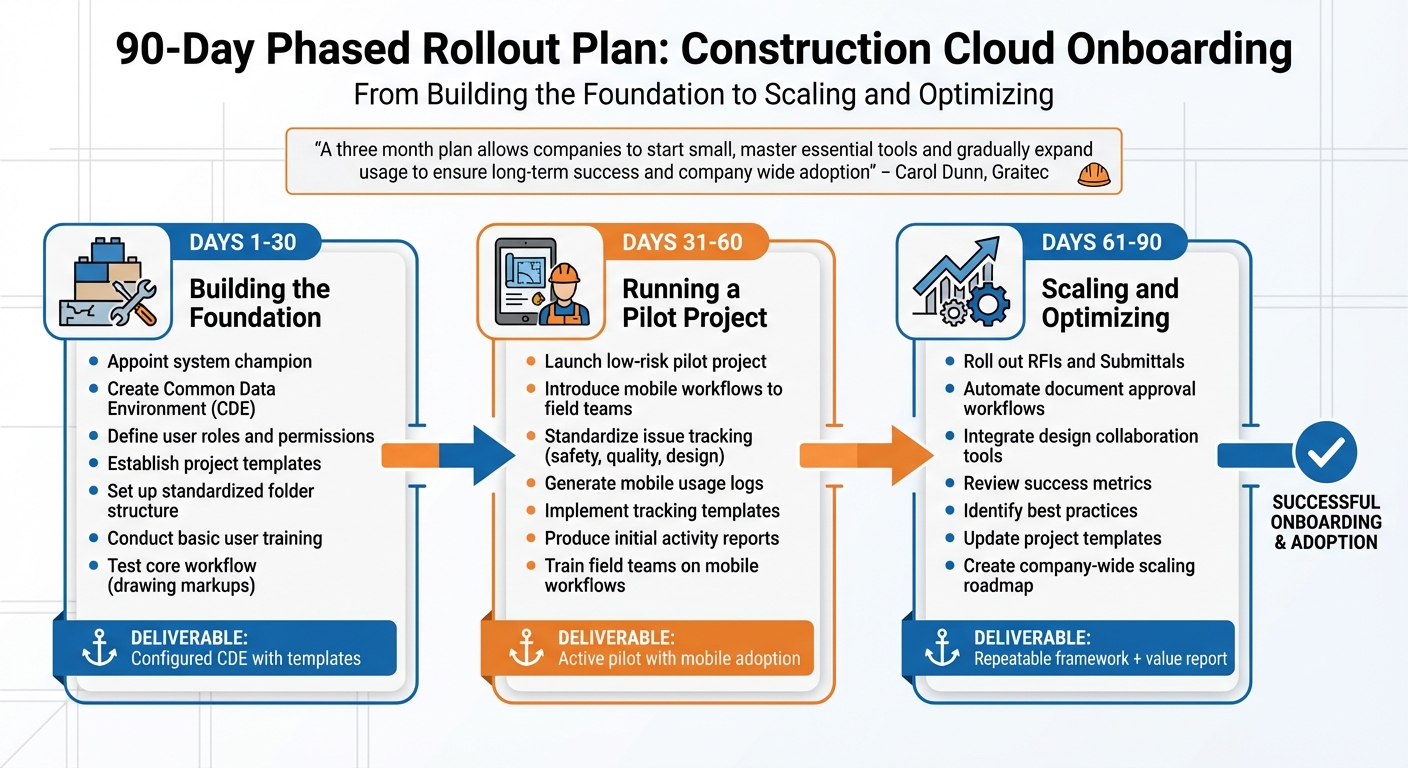
90-Day Cloud Onboarding Rollout Plan for Construction Teams
Implementing a new system over three months can ease the transition and build confidence among teams. Carol Dunn from Graitec highlights the importance of this approach:
"A three month plan allows companies to start small, master essential tools and gradually expand usage to ensure long-term success and company wide adoption".
This gradual rollout aligns with the earlier onboarding strategy, breaking the process into clear, manageable phases with specific milestones to maintain momentum.
Days 1-30: Building the Foundation
The first month is all about setting up the basics before diving into live projects. Start by appointing a system champion – someone who understands both the technology and the on-site processes – to guide the team through the transition. The champion’s initial tasks include creating a Common Data Environment (CDE) with a centralized document hub, defining user roles and permissions, and establishing project templates.
Key activities during this phase also include setting up a standardized folder structure, conducting basic user training, and testing a core workflow, such as drawing markups on a test project. For efficiency, account administrators should integrate folder structures and permission settings directly into project templates, which will help automate future project setups. Laying this groundwork minimizes inconsistencies and ensures teams don’t develop disjointed systems later on.
Days 31-60: Running a Pilot Project
In the second month, the focus shifts to a live pilot project. Choose a low-risk, active project to introduce mobile workflows to field teams. This ensures that any hiccups during implementation won’t cause significant disruptions. Standardizing issue tracking for safety, quality, and design is a priority during this phase.
The pilot project should aim to generate active mobile usage logs, implement standardized issue tracking templates, and produce initial project activity reports via dashboards. Field teams should receive training on mobile workflows to enable real-time data capture. Regular discussions between project leadership and field crews can help address concerns and highlight the benefits of the new system. Encourage team members to subscribe to specific cloud folders for automatic update notifications.
Days 61-90: Scaling and Optimizing
The final month focuses on expanding the system and introducing automation. Roll out advanced tools like RFIs (Requests for Information) and Submittals to the pilot team, automate document approval workflows, and integrate design collaboration tools for clash detection. Use this phase to review success metrics, identify best practices, and pinpoint areas for improvement.
Deliverables for this phase include updated project templates based on pilot feedback, a roadmap for scaling the system company-wide, and a value report that outlines the benefits achieved during the initial rollout. By the end of this phase, the pilot project transforms into a repeatable framework ready for broader deployment.
| Phase | Focus | Activities |
|---|---|---|
| Month 1 | Foundation & Standards | Champion selection, CDE setup, role definition |
| Month 2 | Pilot & Mobile | Low-risk project launch, mobile app rollout |
| Month 3 | Advanced Workflows | Approval automation, RFI/Submittal rollout, scaling roadmap |
This structured rollout plan ensures a smooth transition while setting the stage for continuous improvement, which will be explored further in the next section.
Measuring Success and Continuous Improvement
Key Metrics to Track
To gauge success, keep an eye on how often users engage with the platform and how frequently they use its core features. These metrics act as a foundation for understanding user behavior and help guide meaningful feedback collection efforts.
Gathering Feedback from Teams
Collecting feedback from field teams is essential, but generic surveys often fall short. Instead, focus on structured conversations that dive into how well the platform supports their day-to-day tasks. Use this feedback to fine-tune the cloud environment’s configuration. Participation rates can also highlight areas where additional training or system tweaks might be necessary. When teams notice that their input leads to real improvements, they’re more likely to embrace the system wholeheartedly.
Continuous Process Optimization
Feedback isn’t just for show – it’s the driving force behind refining your processes. Regular updates to features mean your workflows must evolve too. Use insights from the field to decide which updates to prioritize, ensuring the platform keeps pace with your team’s needs. By sticking to this loop of tracking metrics, gathering input, and making adjustments, your cloud onboarding process will stay aligned with your operational goals and continue to improve over time.
Conclusion
Shifting from manual to digital processes is a game-changer for construction workflows. It centralizes data, streamlines credential tracking, and provides instant access to critical information. This shift not only simplifies compliance and safety but also connects team members effortlessly, cutting out the administrative roadblocks that can delay projects and increase risks.
With digital onboarding, teams benefit from automated credential alerts, real-time dashboards, and version control – all of which leave behind the inefficiencies of spreadsheets, scattered data, and outdated paperwork.
To make this transition smooth, start by setting up standardized templates, integrating current systems, and conducting a focused pilot project. A phased rollout, like the 90-day plan we’ve discussed, allows teams to adapt gradually without feeling overwhelmed. The goal is to build a solid foundation that gets stronger with every project.
Integrated platforms that combine onboarding, access control, and workforce analytics are the next step in creating unified workflows. Today’s mobile-first tools, equipped with offline sync capabilities, have become essential. Teams adopting these digital workflows unlock new levels of efficiency, compliance, and scalability.
As you implement cloud-based onboarding, refine your process with metrics, feedback, and thoughtful adjustments. When teams see their suggestions lead to real improvements, they’re naturally more engaged. Start embracing cloud onboarding now to set the stage for more streamlined and scalable operations in the future.
FAQs
What are the main advantages of using cloud-based platforms for onboarding in construction?
Cloud-based onboarding makes bringing new workers, tools, and data into construction projects much easier and more efficient. With real-time updates for schedules, certifications, and assignments, it helps cut down on delays and miscommunication. A centralized platform lets teams quickly access worker profiles, safety records, and project documents, keeping everything compliant and enabling quicker decisions.
By moving systems online, companies can reduce IT and administrative expenses while automating repetitive tasks like payroll and timesheets. Plus, mobile-friendly platforms let field crews update their availability, check assignments, and communicate directly from their smartphones – essential for managing teams spread across multiple locations or handling last-minute changes.
The result? Better efficiency, reduced costs, stronger safety compliance, and faster project completion – giving construction firms the edge they need to stay ahead in a competitive industry.
What steps can construction companies take to transition smoothly to a cloud platform?
To transition seamlessly to a cloud-based collaboration and project management platform, careful planning and a step-by-step strategy are essential. Start by mapping your existing workflows – things like scheduling, timesheets, and payroll – onto the platform’s digital tools. Consolidate all worker profiles and documents into a single, secure location. This eliminates scattered spreadsheets and minimizes the risk of losing data during the migration process.
Look for a platform that offers mobile access, real-time updates, and compliance tracking. These features make it easier for teams to manage tasks, log hours, and track certifications from any device – especially helpful for multi-site projects. Begin with a pilot phase: test the system with a small team or at one job site, gather feedback, and adjust settings as needed before launching it across the entire company.
Training plays a critical role in the transition. Offer hands-on workshops to ensure employees and supervisors feel confident using the platform. Emphasize how it reduces manual errors and speeds up routine processes. Assign a few team members to provide on-site support and answer questions during the rollout.
Finally, take advantage of the platform’s data insights – such as labor cost trends and staffing efficiency metrics. Use this information to refine operations and demonstrate measurable improvements, keeping your team engaged and motivated throughout the process.
What are the biggest challenges during cloud onboarding in construction, and how can they be resolved?
Cloud onboarding in construction often runs into hurdles like resistance to change, insufficient training, and unclear objectives. Teams are often reluctant to abandon familiar, paper-based workflows. Without adequate training, users can find it challenging to get comfortable with new tools. On top of that, undefined goals can lead to departments working at odds, causing delays and inefficiencies.
To address these challenges, begin by establishing clear, measurable objectives – for example, aiming to cut admin time by 20%. Engage key team members early in the process, such as project managers and field staff, to build support and enthusiasm. Offer tailored, role-specific training that focuses on practical, everyday tasks to make the transition easier. Leveraging a cloud-native platform like ABLEMKR can also simplify the process with automated workflows, real-time updates, and centralized compliance tracking. This strategy promotes smoother transitions, quicker project execution, and better safety and cost management.


