
E-Verify is a free, web-based system that helps employers confirm if their new hires are authorized to work in the U.S. It cross-checks Form I-9 details with records from the Social Security Administration (SSA) and Department of Homeland Security (DHS). While optional for most businesses, it’s mandatory for federal contractors and in certain states. The system is especially useful in industries like construction and energy, where compliance with employment laws is critical.
Key takeaways:
- Who must use E-Verify: Federal contractors, businesses in specific states, and those hiring under certain conditions (e.g., STEM OPT extensions).
- How it works: Employers create cases within three business days of hire, and most results are processed instantly.
- New update: Since August 1, 2023, remote document verification is allowed for E-Verify participants.
- Compliance risks: Missing deadlines or mishandling cases can lead to fines or contract termination.
E-Verify simplifies hiring while ensuring legal compliance, and tools like ABLEMKR can automate much of the process. Keep reading for a deeper dive into enrollment, case management, and compliance best practices.
Complying with I-9 and E-Verify Requirements
sbb-itb-aa28329
What is E-Verify and How Does It Work?
E-Verify is an online system that confirms whether new hires are authorized to work in the United States. It’s managed by U.S. Citizenship and Immigration Services (USCIS) and is free for employers to use nationwide.
The system works by electronically cross-checking information provided by employees on Form I-9 with records from the Social Security Administration (SSA) and the Department of Homeland Security (DHS). After completing the Form I-9 process, employers must create an E-Verify "case" using details from Sections 1 and 2 of the form. This must be done within three business days of the employee’s hire date. In most cases, the system provides an "Employment Authorized" result almost immediately, enabling the hiring process to move forward without delays.
Purpose of E-Verify
E-Verify aims to prevent unauthorized employment and assist businesses in maintaining a compliant workforce. According to the E-Verify Quick Reference Guide for Employers:
E-Verify helps employers ensure a legal workforce by electronically verifying information entered on the Form I-9, Employment Eligibility Verification, against authoritative sources available to the U.S. Department of Homeland Security.
For certain employers, particularly those involved in federal contracts, using E-Verify is mandatory. Federal contractors working on projects issued on or after September 8, 2009, that include the FAR E-Verify clause are required to use the system for both new hires and current employees assigned to the contract. Additionally, companies hiring F-1 students who are seeking a 24-month STEM OPT extension must also be enrolled in E-Verify.
How E-Verify Differs from Form I-9
Although Form I-9 is required for all U.S. employers, E-Verify is generally optional – unless mandated by federal contracts or state laws. While the two systems complement each other, there are key differences that can impact the hiring process.
For instance, if an employee provides a List B identity document, such as a driver’s license, it must include a photograph if the employer is enrolled in E-Verify. This is not a requirement for the standard Form I-9 process. Another important distinction is that while Form I-9 can be used to reverify expired employment authorization, E-Verify cannot be used for this purpose.
| Feature | Form I-9 | E-Verify |
|---|---|---|
| Requirement | Required for all U.S. employers | Optional for most; required for federal contractors and certain states |
| Social Security Number | Not required | Required |
| Identity Documents (List B) | Photo optional | Photo required |
| Document Examination | Requires in-person review | Allows remote review under approved procedures |
| Reverification | Used for expired authorization | Cannot be used for reverification |
Who Needs to Use E-Verify in Skilled Labor?
E-Verify State Requirements and Thresholds for Skilled Labor Industries
E-Verify is a system that certain industries and contract types are required to use, especially within the skilled labor sector. Knowing when you’re legally obligated to use it – and when it might be a smart choice – can save you from fines and project delays.
Federal and State Requirements
Federal contractors have clear guidelines. If your company holds a federal contract that includes the Federal Acquisition Regulation (FAR) E-Verify clause – applicable to contracts issued on or after September 8, 2009 – you must verify both new hires and any employees assigned to that contract. This is particularly relevant for construction, energy, and infrastructure projects funded by federal dollars.
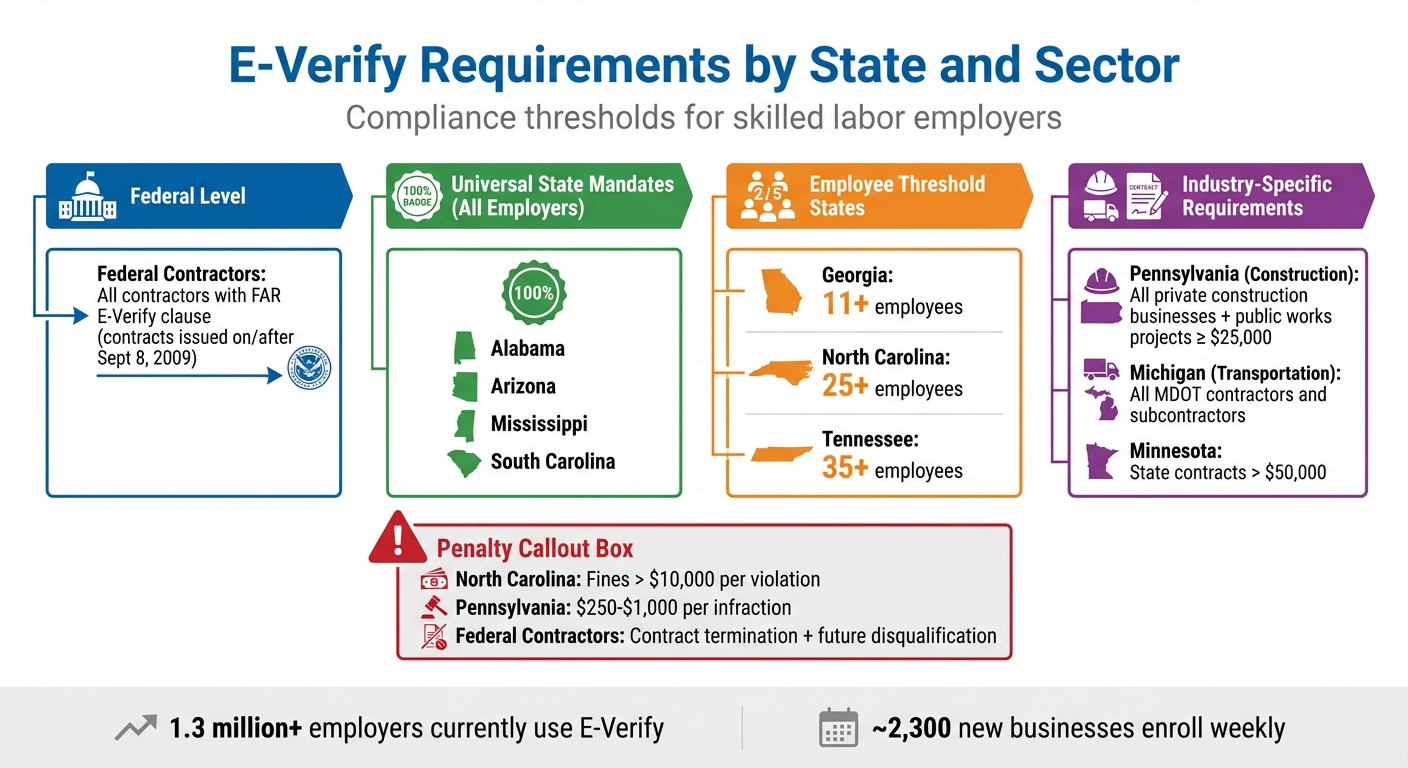
State requirements, however, vary significantly. Some states, like Alabama, Arizona, Mississippi, and South Carolina, require all employers to use E-Verify, no matter the industry or size of the business. Other states set thresholds based on the number of employees:
- Georgia: Required for businesses with 11 or more employees.
- North Carolina: Applies to businesses with 25 or more employees.
- Tennessee: Mandated for companies with 35 or more employees.
Certain states have additional, industry-specific rules. For example, Pennsylvania requires E-Verify for all private construction businesses, including subcontractors, and for public works projects worth $25,000 or more. Michigan mandates it for contractors and subcontractors working with the Department of Transportation, while Minnesota enforces it for state contracts exceeding $50,000.
| State/Sector | Requirement Type | Threshold or Condition |
|---|---|---|
| Federal Contractors | Federal Mandate | Contracts with FAR E-Verify clause |
| Alabama / Arizona / Mississippi / SC | State Mandate | All employers |
| Georgia | State Mandate | 11+ employees |
| North Carolina | State Mandate | 25+ employees |
| Tennessee | State Mandate | 35+ employees |
| Pennsylvania (Construction) | State Mandate | Projects ≥ $25,000 |
| Michigan (Transportation) | State Mandate | All MDOT contractors |
| Minnesota | State Mandate | State contracts > $50,000 |
Failing to comply can be costly. In North Carolina, civil penalties can surpass $10,000 per violation. Pennsylvania imposes fines ranging from $250 to $1,000 per infraction. Federal contractors risk even harsher consequences, including contract termination and disqualification from future government projects.
These rules highlight the strict compliance expectations in skilled labor, where project-specific demands often make E-Verify not just a legal requirement but also a practical tool.
Skilled Labor Applications
The construction, energy, and infrastructure industries are under particular scrutiny because of the nature of their work. Federal funding, secure facilities, and critical infrastructure all make verifying worker eligibility a priority.
E-Verify simplifies this process, especially for companies operating across multiple states or managing remote sites. Through remote Form I-9 verification, employers can streamline hiring for decentralized teams. The system also offers a layer of legal protection by presuming compliance with hiring laws. With an impressive 99.87% accuracy rate and the ability to confirm 98.48% of employees as work-authorized within 24 hours, E-Verify helps companies stay efficient and compliant.
"E-Verify complements Form I-9 by taking employment verification to the next level, helping employers stay compliant with federal immigration law, prevent unauthorized employment, and protecting American Jobs." – E-Verify.gov
Currently, more than 1.3 million employers use E-Verify, with roughly 2,300 new businesses signing up every week. For skilled labor companies dealing with high turnover, dispersed crews, or operations across multiple states, using E-Verify often becomes a practical necessity, even when it’s not a legal one.
How to Enroll in E-Verify: Step-by-Step
Getting started with E-Verify requires some preparation. The entire process must be completed in one web session. To streamline your experience, have the following details ready: your company’s EIN, NAICS code, hiring site addresses, and, if applicable, your Unique Entity Identifier (UEI). Enrollment is the first step toward simplifying case management and ensuring compliance.
During enrollment, you’ll need to decide how your company will access the system. Most employers choose Employer Access, which is the standard option. Other choices include E-Verify Employer Agent (if you’re outsourcing the process), Corporate Administrator (for managing multiple accounts across locations), or Web Services (for custom software integration). You’ll also classify your employer type – federal contractor, government organization, or private business – and provide essential company details like your legal name, employee count, and hiring site locations. If you have multiple hiring sites, you can upload them all at once using a CSV file.
Signing the Memorandum of Understanding (MOU)
The MOU is a legally binding agreement between your business and the U.S. Department of Homeland Security. You’ll need to designate a Signatory, such as the business owner, CEO, or HR director, who has the authority to bind your company. This person will review the company details entered during enrollment and electronically sign the MOU by selecting "Review and Agree to the Terms and Conditions". Completing this step activates your participation in E-Verify and sets the stage for assigning user roles.
Once signed, the MOU takes effect immediately. For most employers, this means you must begin verifying new hires on the same date. Be sure to save or print a copy of the signed MOU for your records. If the person enrolling the company is also the authorized signatory, you can check the box labeled "The Signatory is the same person as the Program Administrator" to avoid entering duplicate information.
Registering Administrative and General Users
Every E-Verify account needs at least one Program Administrator. This role has full access to the account, including registering new users, creating and managing cases, updating company information, and viewing reports. General Users can create and manage cases and view reports but cannot register new users or update company settings. You can add as many users as you need for either role.
To add a new user, the Program Administrator logs in, navigates to "Company Account", selects "Manage Users", and clicks "Add User." You’ll need the new user’s email address, role (Program Administrator or General User), name, and phone number. The system will generate a User ID and send an activation link to the new user’s email. All users must complete an online tutorial and pass a knowledge test before they can process cases.
Finally, display the E-Verify Participation and Right to Work posters at all hiring sites in both English and Spanish. This is a federal requirement and also applies to remote employees. E-Verify is a free service, so there are no costs for enrollment or ongoing use.
Managing E-Verify Cases for Skilled Labor Hires
Once your E-Verify account is set up and users are registered, the next step is managing cases for each new hire. This process demands strict attention to federal deadlines. For businesses hiring skilled labor in large numbers, staying on top of case creation and resolution is essential to avoid compliance issues and ensure workers can start on time. Following the required timelines is key to keeping everything on track.
Timeline for Case Creation
You must create an E-Verify case within three business days of the employee’s start date using accurate Form I-9 details. If you miss this deadline, the system will prompt you to provide a reason for the delay, either by selecting from a dropdown menu or entering a custom explanation. Make sure to document the reason for any delay to maintain compliance.
In most cases, the system returns an "Employment Authorized" result within seconds. If additional time is needed, the Department of Homeland Security (DHS) typically responds within 24 hours. Always record the E-Verify case number on Form I-9 to stay compliant.
Resolving Tentative Nonconfirmations (TNCs)
Sometimes, discrepancies arise during the E-Verify process. This is where Tentative Nonconfirmations (TNCs) come into play.
A TNC occurs when information from Form I-9 doesn’t match records from DHS or the Social Security Administration (SSA). It doesn’t mean the employee is unauthorized – it simply signals the need for further action. You must notify the employee and document their decision within 10 federal working days from the TNC’s issuance date. Review the Further Action Notice with the employee privately to safeguard their personal information.
Before moving forward, confirm with the employee that the information at the top of the Further Action Notice is accurate. If it’s not – due to a data entry error, for example – you’ll need to close the case, select the appropriate reason for the error, and create a new case with the correct details.
If the employee contests the TNC, they must contact DHS or visit an SSA office within 8 federal working days of the referral date. Provide them with the Referral Date Confirmation, which outlines their deadline. DHS and SSA then have 10 federal working days to update the case result. If the employee doesn’t respond by the end of the 10th day, you can close the case and terminate employment without legal liability.
| Case Result | Meaning | Required Action |
|---|---|---|
| Employment Authorized | Employee’s information matches government records. | No further action; E-Verify closes the case automatically. |
| Tentative Nonconfirmation | Information doesn’t match DHS/SSA records. | Notify the employee and provide the Further Action Notice. |
| Case in Continuance | Employee has contacted the agency, but more time is needed. | Check E-Verify periodically for updates. |
| Final Nonconfirmation | Eligibility couldn’t be confirmed after referral. | Close the case; you may terminate employment. |
| Close Case and Resubmit | Errors require a new case. | Close the current case and create a new one immediately. |
Maintaining E-Verify Compliance and Privacy Standards
Once your account is set up and you’ve started processing cases, staying compliant becomes an ongoing commitment. For employers in industries like skilled labor, where hiring often happens at a high volume across multiple locations, consistency in compliance is critical.
Employer Best Practices for Compliance
Conduct an annual audit of your E-Verify account to stay ahead of potential issues. The E-Verify Self-Assessment Guide can help you spot and fix noncompliance problems before they grow. During these audits, update your company profile, remove access for former employees, and ensure at least one active Program Administrator is assigned to handle compliance notifications. Training is also mandatory for all users managing E-Verify cases.
Make sure to display the required posters – "Notice of E-Verify Participation" and "Right to Work" – in both English and Spanish at all hiring locations. Visibility of these posters is a key part of compliance.
Avoid using E-Verify to pre-screen job applicants before a formal offer is made and Form I-9 is completed. Additionally, don’t dictate which documents employees must provide for Form I-9, and never take adverse actions – like withholding pay, delaying training, or terminating employment – based on a Tentative Nonconfirmation (TNC) until it escalates to a Final Nonconfirmation.
"Failure to abide by the terms of use may lead to employer liability for the violation of employee rights."
- E-Verify Quick Reference Guide for Employers
Protecting sensitive employee information is equally important to maintaining compliance.
Data Security and Privacy
Follow legal requirements to safeguard employee information. Limit access to authorized users only, and assign each person a unique ID and password. Sharing login credentials is strictly prohibited, as it creates security risks and accountability issues.
Store employee records and Form I-9 documents securely, whether in locked physical cabinets or encrypted digital systems. When discussing E-Verify results, always do so privately to protect employees’ personal details. Additionally, E-Verify itself helps secure personally identifiable information (PII) by disposing of records older than 10 years in line with National Archives and Records Administration (NARA) schedules.
"Failure to properly protect employee information can result in identity theft or fraud and can cause considerable inconvenience, harm or embarrassment to the employees or employer affected."
- E-Verify Quick Reference Guide for Employers
If you work with third-party agents, you’re still responsible for ensuring they follow all MOU guidelines, including displaying updated participation posters. Keep in mind that for E-Verify purposes, the hiring site refers to where Form I-9 was completed – this is not the employee’s home address, even if they work remotely.
These measures are essential for managing your workforce efficiently and staying on the right side of the law – especially in industries like construction, energy, and infrastructure, where rapid deployment across multiple job sites is common.
Using Technology to Simplify E-Verify for Skilled Labor
Efficient E-Verify management is critical for industries like construction, oil and gas, and mining, where hiring happens quickly and at scale. Relying on manual processes across multiple job sites is not only time-consuming but also prone to mistakes. Technology platforms like ABLEMKR provide a smarter way for employers to manage E-Verify, ensuring compliance while keeping operations running smoothly.
Automating Compliance with ABLEMKR
ABLEMKR is a workforce management platform designed specifically for skilled trades in industries such as construction, energy, and mining. One of its standout features is automating the transition from Form I-9 to E-Verify case creation. This ensures federal deadlines are met and reduces errors that could lead to Tentative Nonconfirmations. For companies operating across multiple states – many of which require E-Verify compliance – this automation is a game-changer.
But ABLEMKR doesn’t stop at compliance. It also incorporates Verified Skills and robust vetting processes to confirm that workers are both qualified and authorized to work. This dual-layer verification helps employers avoid hiring delays, penalties, and setbacks on crucial projects.
By automating these tasks, ABLEMKR not only simplifies compliance but also improves operational efficiency for everyone involved.
Benefits for Employers and Workers
For employers, automation with ABLEMKR reduces administrative workloads and provides real-time tracking of worker status, case progress, and Tentative Nonconfirmation resolutions – all within a single app. This is especially valuable for companies with small or fractional HR teams, as it centralizes the entire process and offers greater visibility.
For workers, the benefits are just as clear. ABLEMKR speeds up onboarding by enabling mobile-first completion of I-9 forms and real-time updates on E-Verify case status. This means workers can get to job sites faster, earning sooner on high-paying projects. Additionally, transparent workflows and timely payments ensure a smoother experience for everyone involved.
Conclusion
E-Verify plays an essential role in industries like construction, energy, and mining. Federal contractors and subcontractors are required to use it under the Federal Acquisition Regulation (FAR) E-Verify clause, and many states enforce their own mandates as well. Beyond meeting legal obligations, E-Verify offers a reliable way to electronically confirm employment eligibility, helping maintain a legal workforce while minimizing potential penalties.
The system delivers an "Employment Authorized" result in seconds, which is particularly valuable for projects with tight deadlines. By cross-referencing data with the Social Security Administration and Department of Homeland Security, E-Verify achieves a level of accuracy that surpasses traditional document review methods.
Managing E-Verify manually, however, can be both time-consuming and prone to errors. Automation offers a solution, ensuring compliance while improving efficiency. Platforms like ABLEMKR simplify the entire process – from completing Form I-9 to creating E-Verify cases – helping employers meet federal deadlines and reducing the likelihood of Tentative Nonconfirmations. For employers, this means real-time tracking, centralized compliance management, and less administrative hassle. For employees, it speeds up onboarding and provides quicker access to lucrative job opportunities. Tools like ABLEMKR transform what was once a manual challenge into a streamlined process.
"Using E-Verify can help mitigate risk from allegations of knowingly hiring unauthorized workers, especially important for federal contractors".
FAQs
Do I have to use E-Verify in my state?
E-Verify rules differ depending on the state. In some states, all employers or certain industries are required to use it, while others have no such requirement. Be sure to review your state’s specific regulations to see if E-Verify is necessary for your business.
What should I do if an employee gets a TNC?
If an employee gets a Tentative Nonconfirmation (TNC), you must inform them within 10 federal working days and give them a copy of the Further Action Notice. Go over the notice with the employee to verify the details, and ask them to confirm whether they plan to resolve the TNC. Make sure they sign and date the notice. If the employee doesn’t respond within the 10-day period, you’ll need to close the case in E-Verify.
Can I remotely verify I-9 documents with E-Verify?
Employers participating in E-Verify now have the option to review employee documents remotely through a procedure approved by the Department of Homeland Security (DHS). To use this method, employers must maintain good standing in the E-Verify program and strictly follow the outlined guidelines. It’s crucial to adhere to every step in the official instructions to stay compliant with the rules for remote document verification.


