
If you’re a contractor, OSHA reporting isn’t just a requirement – it’s a critical part of managing workplace safety and avoiding penalties. Here’s what you need to know for 2026:
- Key Deadlines: Submit electronic reports for the 2025 calendar year between January 2 and March 2, 2026.
- Who Reports:
- 100+ employees in high-risk industries: Submit Forms 300, 301, and 300A.
- 20–249 employees in high-hazard industries: Submit Form 300A only.
- Immediate Reporting:
- Fatalities: Report within 8 hours.
- Hospitalizations, amputations, or eye losses: Report within 24 hours.
- Forms to Maintain:
- OSHA Form 300: Log of incidents.
- OSHA Form 300A: Annual summary (post Feb 1–Apr 30).
- OSHA Form 301: Detailed incident reports.
- Record Retention: Keep forms for 5 years.
Failing to meet these requirements can lead to fines or increased scrutiny. Accurate recordkeeping not only ensures compliance but also helps identify workplace risks.
This guide explains how to manage these tasks, meet deadlines, and handle updates for 2026. Keep reading for a breakdown of reporting rules, electronic submission tips, and best practices for documenting incidents.
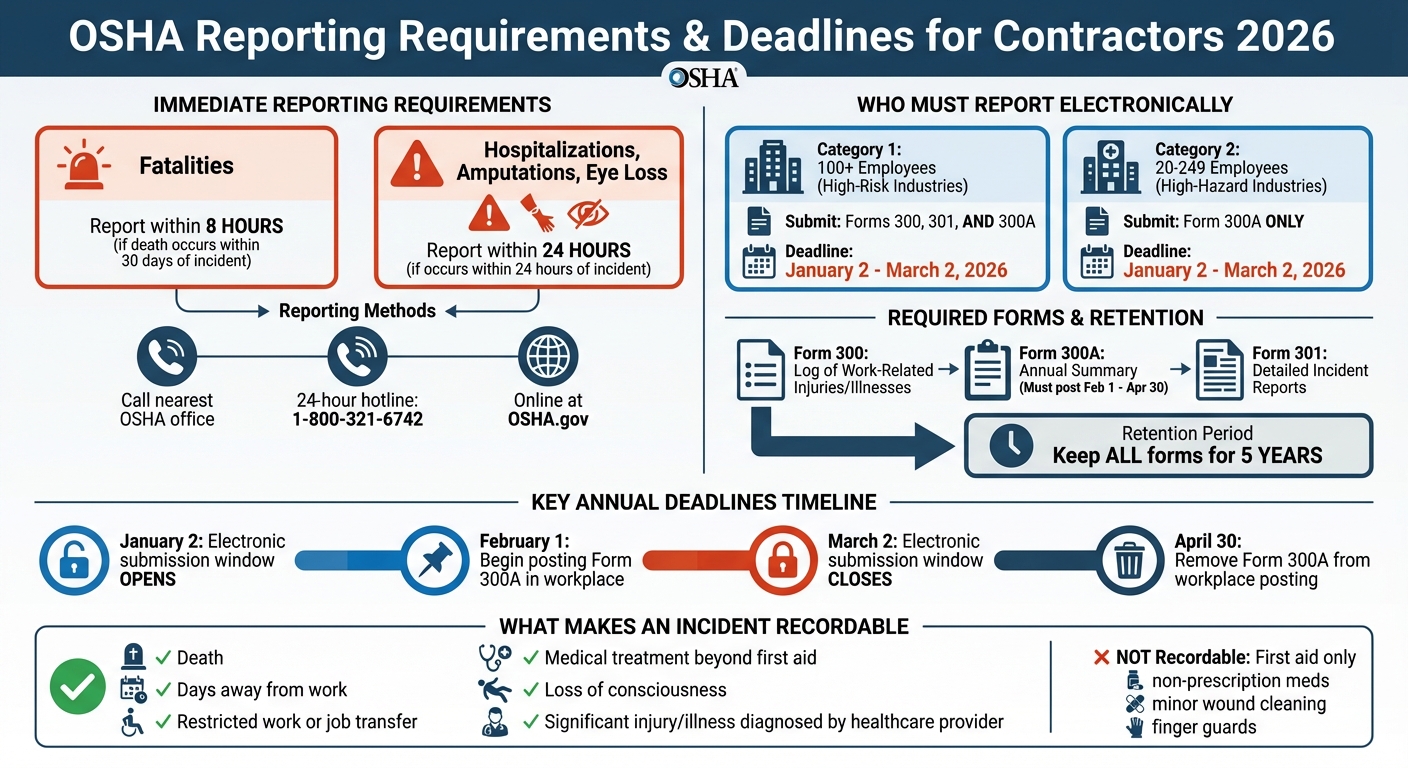
OSHA Reporting Requirements and Deadlines for Contractors 2026
How to Comply with OSHA Recordkeeping Requirements
sbb-itb-aa28329
OSHA Reporting Requirements Explained
When it comes to OSHA compliance, contractors have two main responsibilities: immediately reporting severe incidents and maintaining ongoing records of work-related injuries and illnesses. Here’s a closer look at what needs to be reported, what records to keep, and how to meet submission requirements.
Reporting Severe Incidents
Certain incidents require immediate reporting to OSHA. Specifically:
- Work-related fatalities must be reported within 8 hours, provided the death occurs within 30 days of the incident.
- In-patient hospitalizations, amputations, or eye losses need to be reported within 24 hours, as long as they happen within 24 hours of the incident.
It’s important to note that a visit to the emergency room doesn’t count as in-patient hospitalization unless the employee is formally admitted to the hospital’s in-patient service.
You can report these incidents by:
- Calling your nearest OSHA office
- Using OSHA’s 24-hour hotline: 1-800-321-6742
- Submitting a report online at OSHA.gov
When reporting, be ready to provide:
- Your business name
- Names of affected employees
- Location and time of the incident
- A brief description of what happened
- A contact phone number
Here’s a breakdown of the reporting requirements:
| Incident Type | Reporting Deadline | Condition for Reporting |
|---|---|---|
| Work-Related Fatality | Within 8 hours | Death occurs within 30 days of the incident |
| In-patient Hospitalization | Within 24 hours | Occurs within 24 hours of the incident |
| Amputation | Within 24 hours | Occurs within 24 hours of the incident |
| Loss of an Eye | Within 24 hours | Occurs within 24 hours of the incident |
Keeping Records of Work-Related Injuries and Illnesses
For recordable incidents, contractors are required to maintain three key OSHA forms:
- OSHA Form 300: A log of all recordable incidents throughout the year.
- OSHA Form 300A: An annual summary of recordable incidents, which must be certified and posted in the workplace.
- OSHA Form 301: A detailed incident report for each recordable case.
These records must be kept for five years following the end of the calendar year they cover. An incident qualifies as recordable if it results in:
- Death
- Days away from work
- Restricted work or job transfer
- Medical treatment beyond first aid
- Loss of consciousness
- A significant injury or illness diagnosed by a licensed healthcare provider
However, incidents requiring only first aid (e.g., using non-prescription medication, cleaning minor wounds, or using finger guards) are not recordable.
The OSHA Form 300A summary must be displayed in the workplace annually from February 1 through April 30. While smaller employers with 10 or fewer employees are typically exempt from routine recordkeeping, they are still required to report severe injuries or fatalities immediately.
Electronic Submission Requirements
Some contractors must also submit their injury and illness data electronically using OSHA’s Injury Tracking Application (ITA). Here’s who needs to submit:
- Establishments with 20–249 employees in high-hazard industries (see Appendix A) must submit Form 300A data.
- Establishments with 100 or more employees in designated high-risk industries (see Appendix B) must submit detailed data from Forms 300 and 301, along with the 300A summary.
The electronic submission window for 2026 runs from January 2 to March 2. Before submitting Forms 300 and 301, ensure that personal information – like names, addresses, and Social Security numbers – is removed from narrative fields.
These requirements not only ensure compliance with OSHA standards but also help businesses identify and manage workplace hazards more effectively.
Identifying and Documenting Recordable Incidents
What Makes an Incident Recordable
To determine if an incident is recordable, follow these four steps: the incident must involve an employee, be work-related, be a new case, and meet at least one of OSHA’s specific recording criteria.
An incident is generally considered work-related if an event or exposure in the work environment caused or contributed to the condition – or made a pre-existing condition worse. This applies even if the injury happens before the employee officially clocks in or while they’re in the company parking lot.
One critical factor is whether the treatment qualifies as first aid or medical treatment. According to OSHA’s regulation in 29 CFR 1904.7(b)(1)(ii), treatments like sutures or surgical glue are classified as medical treatment and are recordable. On the other hand, treatments such as butterfly bandages fall under first aid and are not recordable.
For contractors and temporary workers, the responsibility for recording incidents lies with the employer who provides day-to-day supervision. OSHA clarifies this by stating:
"You must record the recordable injuries and illnesses that occur to employees who are not on your payroll if you supervise these employees on a day-to-day basis".
Once an incident meets the criteria for recordability, it’s essential to document it correctly.
Documentation Best Practices
Record incidents in the OSHA 300 Log within seven days of being notified. When calculating days away from work or days of restricted activity, start counting the day after the incident. OSHA caps this count at 180 days.
Use OSHA Forms 300, 300A, and 301 for documentation. Before certifying the 300A summary annually, review the OSHA 300 Log thoroughly to ensure all entries are complete and accurate.
For cases involving sensitive information, do not include the employee’s name on the OSHA 300 Log. Instead, classify it as a "privacy case". When submitting data through the Injury Tracking Application (ITA), double-check all text fields to remove personally identifiable information such as names, home addresses, or Social Security numbers.
It’s also crucial to coordinate with subcontractors and staffing agencies to establish clear communication about who is responsible for day-to-day supervision. This ensures that incidents are recorded accurately and are not overlooked or duplicated.
2026 OSHA Recordkeeping Changes
New Electronic Submission Rules
Starting in 2026, businesses with 100 or more employees in specific high-hazard industries will need to electronically submit detailed information from both Form 300 and Form 301. This goes beyond the current requirement of submitting just the 300A summary. The submission window for the previous year’s data will open on January 2 and close on March 2, using OSHA’s Injury Tracking Application (ITA). It’s also mandatory to include the company’s legal name in these submissions.
This updated process requires reporting more detailed case-specific information, such as the incident date, location, injury severity, worker details, and a description of how the incident happened. While fewer than 1% of U.S. establishments are impacted by this change, the data collected will account for nearly 30% of all reportable incidents.
Contractors can submit data through various methods, including web entry, CSV upload, or API. A single CSV file can be used for multiple sites, making the process more manageable. These new requirements aim to strengthen OSHA’s ability to monitor workplace safety while complementing existing recordkeeping practices.
Enforcement and Data Use
With the added detail in submissions, OSHA is ramping up enforcement efforts and increasing public data transparency. The agency plans to use this data to focus enforcement on high-hazard industries. Doug Parker, Assistant Secretary for Occupational Safety and Health, explained:
"OSHA will use this data to intervene through strategic outreach and enforcement to reduce worker injuries and illnesses in high-hazard industries."
In previous years, OSHA identified close to 220,000 employers that may have failed to report required data. These non-responders are now prioritized for inspections. Additionally, businesses with injury rates significantly above or below their industry average – or those showing rising trends over three years – are flagged for further review.
Inspections under the Site-Specific Targeting (SST) program are thorough, with compliance officers examining logs and incident reports from the past three calendar years. OSHA also plans to share de-identified, establishment-specific injury and illness data publicly. This will allow researchers, potential employees, and the general public to assess workplace safety more effectively. To ensure privacy, OSHA has implemented automated tools to strip personally identifiable information from Form 300 and 301 data before publication.
Contractors should use OSHA’s search tool to check their NAICS codes and confirm whether they fall under Appendix A or Appendix B reporting requirements. If a business discovers past reporting failures, submitting the overdue data promptly – along with an explanation – may help reduce enforcement penalties. Staying ahead of these changes is critical to maintaining compliance and demonstrating a commitment to workplace safety.
How ABLEMKR Helps with OSHA Compliance

Built-In Compliance Tracking
ABLEMKR takes the hassle out of tracking worker certifications and safety training – both of which are vital for meeting OSHA standards. When you’re overseeing temporary or contracted workers, OSHA requires you to log any injuries or illnesses under your supervision. This can lead to coordination headaches between contractors and staffing agencies to ensure incidents are recorded accurately and only once on the correct OSHA 300 Log.
The platform simplifies this process by matching workers to job sites based on their certifications, safety training, availability, and location. For instance, forklift operators need to be certified and re-evaluated every three years, and ABLEMKR ensures their records are up-to-date before they even step on-site. By automating recordkeeping, ABLEMKR eliminates the need for manual tracking, saving time and reducing the likelihood of errors.
This automated system also ensures you always have quick access to a worker’s current compliance status, which is crucial for meeting OSHA requirements.
Real-Time Worker Status Updates
With ABLEMKR’s mobile-first platform, contractors can access real-time updates on worker safety status and compliance information. This feature is especially important when OSHA mandates that you provide injury and illness records to employees or their representatives by the next business day upon request. Instead of digging through paperwork, you can instantly pull up the details you need.
This real-time visibility becomes even more critical when managing multiple job sites, especially in remote or high-demand locations like energy corridors. Whether you’re dealing with an emergency pipeline repair or a planned mining project, ABLEMKR ensures that every worker on-site has the necessary certifications and safety training before starting their tasks.
By providing instant updates, the platform not only simplifies safety checks but also supports efficient incident reporting when needed.
Simplified Recordkeeping and Reporting
Keeping up with OSHA’s recordkeeping requirements – Forms 300, 300A, and 301 – can be a major administrative burden. ABLEMKR eases this load by integrating compliance tracking into its platform, helping you meet OSHA’s strict 8-hour and 24-hour reporting deadlines for severe incidents. When an incident occurs, ABLEMKR provides instant access to worker details, site information, and incident descriptions, making it easier to notify OSHA through their 24-hour hotline or online system.
Looking ahead to the new 2026 electronic submission requirements, ABLEMKR is ready to simplify the process. The platform allows contractors to meet electronic reporting deadlines seamlessly through OSHA’s designated submission window. Plus, its integrated payroll workflows centralize all worker data, streamlining hiring, onboarding, and compliance efforts in one place.
Conclusion
Keeping up with OSHA reporting means understanding exactly what needs to be reported, when it’s due, and how to document it correctly. For example, fatalities must be reported within 8 hours, while severe injuries like hospitalizations, amputations, or eye loss need notification within 24 hours. Missing these deadlines can lead to fines and tarnish your safety record.
Accurate recordkeeping does more than help you avoid penalties – it also helps identify workplace hazards and trends, reducing the risk of future incidents. OSHA’s Injury Tracking Application makes much of this data public, meaning your safety record can influence how potential employees and customers view your business. In high-risk industries, contractors who keep detailed records show a strong commitment to worker safety, which is increasingly important.
Key reporting deadlines include electronic submissions between January 2 and March 2, retaining forms for five years, and posting Form 300A from February 1 to April 30. These rules apply to each physical location, not the company as a whole, so make sure to track data for every site individually.
Using compliance technology can simplify these processes. Tools that automate tasks like certification tracking, provide real-time updates on worker status, and centralize recordkeeping help reduce errors and missed deadlines. For businesses managing multiple sites or coordinating with subcontractors, having instant access to safety and compliance data is critical for staying on top of OSHA’s strict timelines.
Make safety documentation a core part of your day-to-day operations. Whether through specialized software or streamlined internal processes, investing in effective recordkeeping now will protect your workers, ensure compliance, and strengthen your overall safety culture. A consistent focus on accurate records not only keeps you in line with regulations but also solidifies your reputation for safety and dependability.
FAQs
How do I know if my job site must e-submit OSHA data in 2026?
If your job site employs 100 or more workers in specific industries or 20–249 employees in high-hazard industries, you’ll need to electronically submit OSHA injury and illness data starting in 2026. OSHA typically sets the submission deadline for March 2 each year. To ensure compliance, verify your industry classification and employee count to see if these rules apply to your business.
Who logs an injury for temp workers – the contractor or staffing agency?
The responsibility for recording an injury for temporary workers generally lies with the employer overseeing their daily tasks. Typically, this is the host employer or contractor, depending on who directly supervises and manages the worker.
What should I do if I missed an OSHA reporting deadline last year?
If you missed an OSHA reporting deadline last year, don’t wait – submit the required injury and illness data as quickly as possible. Check out OSHA’s guidance on handling late submissions to make sure you’re following the rules. Acting promptly can help you avoid additional complications and keep your reporting practices on track.


