
On construction sites, poor communication can lead to safety risks, delays, and budget overruns. The right tools can prevent these problems by ensuring clear, reliable communication across teams, especially in noisy or remote environments. Here’s what you need to know:
- Assess Your Jobsite: Understand the size, layout, and challenges like noise, signal interference, or extreme conditions.
- Worker Needs: Use mobile-first tools for non-desk workers, offline functionality for remote sites, and noise-canceling features for loud environments.
- Key Features: Prioritize real-time safety alerts, multilingual support, role-based messaging, and integration with project management systems.
- Usability: Choose user-friendly tools that work with gloves, in harsh weather, and with limited connectivity. Push-to-talk radios and visual aids can simplify communication.
- Data Organization: Centralize project data for quick access, version control, and accountability with audit trails.
- Connectivity & Compatibility: Ensure tools work with your devices, offer offline options, and support wearables or IoT devices.
- Team Adoption: Provide training, 24/7 support, and tools that align with workflows while maintaining data security.
Start small by identifying your biggest communication gap and addressing it with the right tool. Clear communication improves safety, reduces errors, and keeps your projects on track.
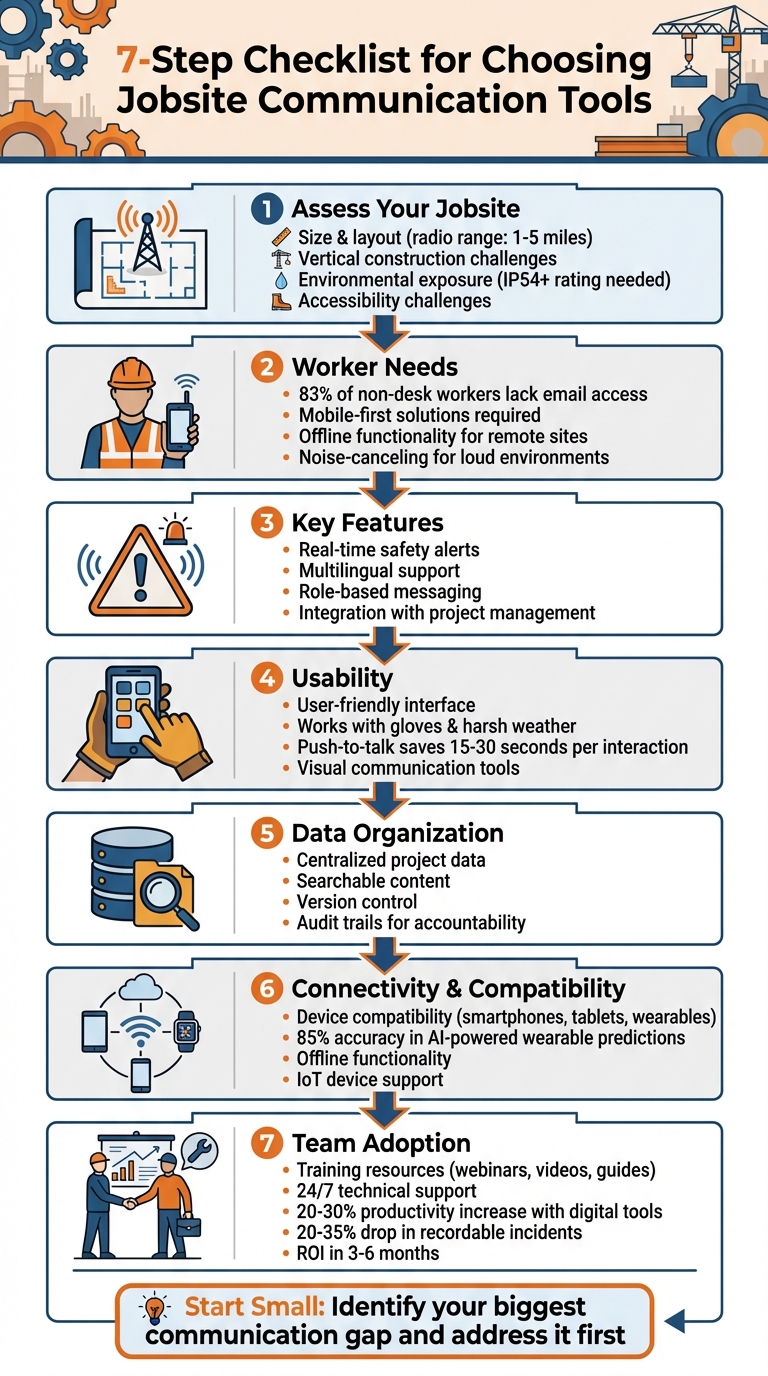
7-Step Checklist for Selecting Construction Jobsite Communication Tools
Communication: The Secret Weapon In Construction Management
sbb-itb-aa28329
Assess Your Jobsite Needs and Environment
Before diving into communication tools, take a moment to pinpoint the specific challenges of your jobsite. A suburban home renovation is a world apart from a sprawling pipeline project or a towering high-rise in downtown Chicago. The conditions and workforce demands at your site will ultimately dictate which tools are reliable when it counts.
Evaluate Physical Jobsite Conditions
Start by mapping out your jobsite’s size and layout. For example, two-way radios typically operate within a range of 1–5 miles. If your site is larger, you might need range extenders or even nationwide Push-to-Talk over Cellular (PoC) systems to maintain reliable communication.
Vertical construction and obstacles bring their own set of challenges. High-rise buildings, deep excavation sites, and crane operations introduce barriers like concrete, steel, and elevation that can block signals. In these cases, standard analog radios often fall short. Digital radios or base stations designed for vertical communication are better suited to handle these conditions, ensuring clear crane-to-ground coordination in urban settings.
Don’t overlook environmental exposure. If your site deals with heavy dust, moisture, or extreme temperatures, your equipment needs to be tough enough to handle it. Look for hardware with an Ingress Protection (IP) rating of at least IP54 to ensure durability. For crews working in confined spaces, crawlspaces, or while operating machinery, compact hands-free devices – like earpieces or belt-clipped units with tactile buttons that can be used with gloves – are essential.
Finally, think beyond the physical layout and materials. Accessibility challenges can significantly impact your team’s ability to stay connected, so factor these into your planning.
Consider Worker Accessibility Needs
Statistics reveal that 83% of non-desk workers don’t have regular access to company email. If your communication system assumes workers will check their inboxes between shifts, you’re setting yourself up for failure. Frontline teams need mobile-first solutions that work seamlessly on the devices they already carry, without requiring complicated logins or constant internet access.
For remote or connectivity-limited sites, offline functionality is crucial. Natural terrain, harsh weather, and a lack of cellular infrastructure can easily disrupt communication. In such scenarios, satellite phones or traditional two-way radios become indispensable backups. And for high-noise environments – where jackhammers and bulldozers dominate the soundscape – noise-canceling technology, automatic gain control, and high-volume audio output are non-negotiable features to ensure clear communication.
Define Communication Features and Requirements
After assessing your jobsite, the next step is to identify and implement communication features tailored to meet your operational needs. These features should prioritize both safety and efficiency, ensuring smooth workflows and quick responses in critical situations.
Core Features for Safety and Efficiency
To maintain a safe and efficient work environment, real-time safety alerts are non-negotiable. Your communication system should support push notifications, mass notifications (delivered simultaneously via SMS, email, and voice), and emergency triggers like "Man Down" or "Lone Worker" features on radios. Using multiple communication channels – such as two-way radios, SMS, mobile apps, and satellite phones – ensures redundancy. This way, workers can still receive alerts even during network disruptions or equipment failures.
Two-way communication is essential for feedback, hazard reporting, and acknowledgment of critical alerts. In noisy environments, supplement audio communication with visual and audible mass alerts. Loudspeakers, visual symbols, or diagrams can help ensure all crew members understand alerts, regardless of ambient noise levels.
Pre-scripted templates for common scenarios, such as power outages, can save valuable time during emergencies. Additionally, multilingual support is critical for diverse crews. Use visual aids and provide digital protocols and physical signage in multiple languages to minimize the risk of miscommunication. Platforms should also offer offline capabilities, ensuring emergency contacts and protocols remain accessible even without internet connectivity.
Role-Based Access and Integration
Effective communication also requires controlling who receives which information. Implement role-based messaging to ensure workers receive updates relevant to their specific tasks or zones. This can be done via SMS or mobile apps, particularly for workers who may not have access to email. By filtering information this way, you avoid overwhelming workers with unnecessary details. As Jay Nasibov from Ulabs, Inc. points out:
A structured contractor onboarding checklist gives you a repeatable way to bring contractors in safely, consistently, and with clear accountability.
Documenting each team member’s role, location, and work schedule before they arrive on-site is critical. This not only helps restrict access to sensitive areas but also ensures clear boundaries are in place, reducing the risk of unauthorized access.
Your communication tools should also seamlessly integrate with existing systems like payroll, project management platforms (e.g., Procore, Autodesk BIM 360), and workforce management software. Integration allows data to flow smoothly between the field and the office, reducing manual input errors and improving accuracy. Centralized document storage with role-based permissions ensures a "single source of truth" while preventing unauthorized changes to critical documents. Additionally, digital platforms should maintain audit trails of sent messages and acknowledgments, providing accountability and aiding investigations when needed.
Evaluate Usability and Mobile-First Design
After considering jobsite needs and communication features, usability and practical design are crucial for maintaining safety and efficiency on-site.
User-Friendly Design for Field Use
The tool you choose must work seamlessly in tough field conditions, such as when workers are wearing gloves or dealing with bright sunlight. Native mobile apps are ideal, as they operate on devices workers already carry. The interface should be straightforward, allowing workers to use it without requiring extensive training or navigating through multiple steps.
Push-to-talk (PTT) radios are a great example of simplicity in action. They work right out of the box, without the need for complex IT setup or multi-step processes. Compared to smartphones, PTT interfaces save 15 to 30 seconds per interaction, which adds up to significant time savings over the course of a day. Additionally, tools with visual communication features – like photo markup capabilities and georeferenced maps – are invaluable. They simplify instructions and help overcome language barriers. As Keyan Zandy, CEO of Skiles Group, explains:
Visual communication tools significantly help bridge communication gaps and facilitate better trade to trade collaboration.
But usability isn’t just about simplicity; the tool must also perform reliably under the demanding conditions of a jobsite.
Performance in Challenging Environments
Field tools must be built to withstand the harsh realities of jobsite environments. Ruggedized hardware is essential to handle temperature extremes, dust, and water exposure – conditions that can easily damage standard smartphones. Beyond durability, the tool should also account for inconsistent connectivity. Features like threaded chats and searchable message histories ensure that workers can maintain context even when moving in and out of coverage areas. While real-time tools like video conferencing depend on stable internet, asynchronous options remain effective even with limited connectivity.
Notifications are another critical element. They need to be noticeable enough to cut through the noise of a busy jobsite but not so disruptive that workers turn them off. For example, read receipts can confirm that safety messages are received, even in loud or chaotic environments.
Verify Information Organization and Accessibility
Once you’ve confirmed that a tool can handle the demands of fieldwork, the next step is making sure it keeps information well-organized and accessible when your team needs it most.
Centralized and Searchable Content
Modern construction platforms are designed to centralize project data, eliminating the chaos of scattered emails and endless paper trails. Field crews often need quick access to critical information like daily logs, photos, inspections, and punch lists. That’s why having a mobile-first, searchable database is key – it ensures that time-sensitive requirements can be retrieved instantly, right on-site.
Automatic version control is another game-changer. It replaces outdated drawings and notifies the relevant trades about updates, reducing the risk of rework. A good digital document repository should store RFIs, submittals, and specifications, complete with revision histories that track who made changes and when. As PeakPTT puts it:
Centralizing project information prevents the productivity losses that happen when different team members work from different versions of the truth.
To keep things running smoothly, update centralized contact lists on a monthly basis. Also, make sure the platform offers offline functionality or backups so your team isn’t stranded during connectivity issues.
Once your data is organized, the next step is ensuring accountability through clear audit trails, which further enhances communication and transparency.
Accountability and Audit Trails
Centralized data isn’t just about convenience – it’s also a foundation for accountability. Robust audit trails help ensure compliance and make it easier to hold workers accountable. Digital platforms like ABLEMKR consolidate incident data, alerts, and worker locations, making it easier to review what happened and improve future protocols. These tools should also maintain a complete communication history, highlighting any gaps in procedures and turning emergencies into opportunities for improvement through after-action reports.
Standardized templates for documenting incidents – complete with timelines and eyewitness accounts – are crucial for transparency and constructive reviews. Conduct post-incident reviews within 48 hours to ensure insights are fresh and documentation remains accurate. Platforms with features like verified worker profiles and real-time updates allow supervisors to track who’s on-site and verify team actions through mobile check-ins. This creates a reliable record of activity during crises. StruxHub highlights the importance of this approach:
Documentation is crucial for tracking progress, resolving disputes, and providing accountability.
In fact, many construction companies see a return on their investment in communication tools within just three to six months, thanks to better coordination and fewer project delays.
Confirm Technical Compatibility and Connectivity
A communication tool won’t be effective unless it works smoothly with the hardware and infrastructure you already rely on. Before committing to a platform, make sure it supports the devices your teams use daily – whether those are smartphones, tablets, or rugged laptops. Many jobsites today also use wearable tech like smart helmets with impact sensors or biometric smartwatches, so ensuring compatibility with these devices is crucial. In fact, AI-powered tools using data from wearables can predict worker impairment with an impressive 85% accuracy.
Connectivity is another major consideration, especially for remote or underground worksites. ConstructEdge highlights a key challenge:
Wireless signals don’t penetrate concrete very well and access points may require hardwiring.
For locations where coverage is unreliable, seek tools with offline functionality. These allow workers to complete tasks like checklists or reports without an active connection and automatically sync data once they’re back online. Beyond device compatibility, evaluate your network setup to ensure it can handle the demands of real-time communication on site.
Infrastructure and Hardware Requirements
Start by determining the bandwidth your site needs, factoring in the number of users and connected devices. If your team frequently transfers large files like BIM or CAD designs, you’ll need much more bandwidth than what’s required for basic messaging. For projects that demand high security, consider using Private LTE networks to maintain secure and congestion-free communication. Keep in mind that network equipment is sensitive to power fluctuations, so having backup solutions – like generators, batteries, or mobile solar kits – is essential for remote sites.
Mesh networks can be an effective solution for providing consistent coverage across large jobsites. For underground or heavily obstructed areas, hardwired access points are often necessary since wireless signals struggle to penetrate materials like concrete. ABC Greater Tennessee underscores how critical reliable connectivity is:
Construction teams use smartphones, tablets, and rugged laptops to complete safety checks that automatically sync to central systems.
Integration with Current Systems
Once your connectivity needs are addressed, ensure the communication tool integrates seamlessly with your existing software. This includes platforms like Procore or Autodesk for project management, HR systems, payroll, and even access control software. For teams using hybrid setups, some tools allow digital radios and PoC (Push-to-Talk over Cellular) apps to operate on the same system, bridging field devices with office workflows. This cross-platform functionality is especially useful for multi-site operations requiring GPS tracking and instant field updates.
Jay Nasibov from Udext highlights the importance of mobile-first solutions:
Contractors often lack email or portal access, which makes mobile-first internal communication critical.
Smooth integration ensures data flows efficiently from the field to your central systems. To avoid costly mismatches, confirm device compatibility before purchasing any tools. Additionally, check that the platform supports IoT devices like RFID tags for asset tracking or security cameras for remote monitoring. The benefits are clear: companies using digital safety platforms have reported a 20-35% drop in recordable incidents.
Assess Team Adoption and Support Features
The most advanced communication tool won’t make an impact if your team struggles to use it. Before committing to a solution, it’s critical to evaluate how easily your team can adapt and what kind of support they’ll receive when challenges arise. Miscommunication isn’t just an inconvenience – it’s costly. For instance, an employee earning between $100,000 and $150,000 can lose 41 workdays annually searching for information, which translates to roughly $19,760 in wasted salary. On the bright side, when implemented effectively, digital communication tools can increase productivity by 20–30%.
Onboarding and Training Resources
Look for vendors that provide diverse training options to cater to different learning styles. The most effective platforms offer a mix of in-person training, webinars, video tutorials, and written guides, with on-demand access for those who can’t attend live sessions. For example, some companies have successfully used digital orientation videos to distribute essential safety messages across jobsites. They’ve also delivered trade-specific training to eliminate unnecessary content and keep workers engaged.
Check whether the vendor offers sandbox environments where employees can practice using the system before deploying it in real-world scenarios. Mobile-friendly, just-in-time training is especially useful, allowing workers to access task-specific instructions right before handling complex or high-risk tasks. Designating field supervisors as platform champions can further enhance adoption, as they can guide peers through the process. Use the platform to track training completion, ensuring everyone is ready for their assignments. Additionally, your vendor contract should include 24/7 technical support via phone, chat, and email during the critical first week of implementation.
Once your team is trained and support systems are in place, verify that the tool aligns with your workflows and meets your security requirements.
Customization and Security
The best tools adapt to your workflows instead of forcing you to adapt to them. Push-to-talk systems, for example, allow for unlimited talk groups, enabling you to segment channels by trade, project phase, or management level. This ensures workers only receive information relevant to their roles. Many platforms also offer customizable mobile forms for tasks like safety inspections, permits, and incident reporting, helping you digitize outdated paper-based processes. Ensure the platform is optimized for personal devices and avoids clunky portal logins.
Security is just as important as customization. For jobsites managing sensitive data like payroll or proprietary plans, choose a platform with secure communication features that comply with data privacy regulations. Some projects may benefit from Private LTE networks, which provide a more secure and closed environment compared to standard Wi-Fi. As Datamart Unified Communications emphasizes:
The vendor you choose should offer more than just a solution – they should be your dedicated partner that is with you every step of the way.
Finally, confirm that the vendor offers a system status page for real-time updates on uptime and issues, as well as a help center with searchable troubleshooting resources.
Conclusion
Choosing the right communication tools for your jobsite isn’t about chasing the latest tech – it’s about finding solutions that fit your specific needs. Start by assessing your physical environment. Are you dealing with areas where signals are weak, remote locations that need satellite support, or noisy sites that require specialized gear? Matching tools to these realities is key.
The stakes are high. Miscommunication – whether from outdated drawings or delays in accessing critical information – can quickly lead to costly errors. Keep in mind that many frontline workers don’t have regular email access, so every moment saved in communication can make a huge difference in safety and efficiency.
It’s not just about the tools, though. Standardized communication protocols are equally important. Combine digital tools with visual aids like constraint boards or three-week look-ahead schedules during daily huddles. These methods ensure everyone on-site knows what’s expected of them and what resources they’ll need.
Start small. Identify your most pressing communication gap – maybe it’s late deliveries, missed safety meetings, or confusion over updated plans. Tackle that issue first, implement a targeted solution, and build on those early successes. A well-thought-out communication strategy not only reduces rework but also improves safety and keeps everyone on the same page.
FAQs
Should we use radios, an app, or both?
Using radios and apps together creates a dependable communication system for job sites. Radios are perfect for loud environments and provide quick, direct voice communication, especially in emergencies. Apps complement this by enabling detailed messaging, real-time updates, and tracking for compliance purposes. When used together, they improve safety, efficiency, and adaptability – radios handle instant communication, while apps offer structured, recordable coordination for better overall management.
What offline features matter most on remote sites?
Remote worksites often face challenges like limited connectivity and unpredictable outages. To tackle these, having multiple communication channels is crucial. Options like radios and SMS provide redundancy, ensuring teams can stay connected during emergencies or downtime.
Equally important are tools that support real-time coordination and enforce safety protocols. These help streamline operations and keep workers safe. Additionally, systems to verify worker certifications are essential for maintaining compliance and ensuring that only qualified personnel are on-site.
How can we roll out a new tool without slowing crews down?
To bring a new tool into the workflow without causing disruptions, careful planning is key. Start with a phased rollout – test the tool with a small pilot group first. This allows you to spot potential issues early and gather feedback from users on the ground.
Clear communication is crucial. Use mobile apps or visual aids to provide training and instructions. Real-time updates can help keep everyone informed as changes are implemented. Finally, maintain multiple communication channels to ensure the transition goes smoothly and delays are kept to a minimum.


