
Construction companies face challenges like outdated workflows, disconnected data, and compliance headaches that lead to delays and budget overruns. This case study shows how Hermosillo Construction solved these issues by switching to customized cloud tools, improving collaboration, workforce management, and compliance tracking.
The Highlights:
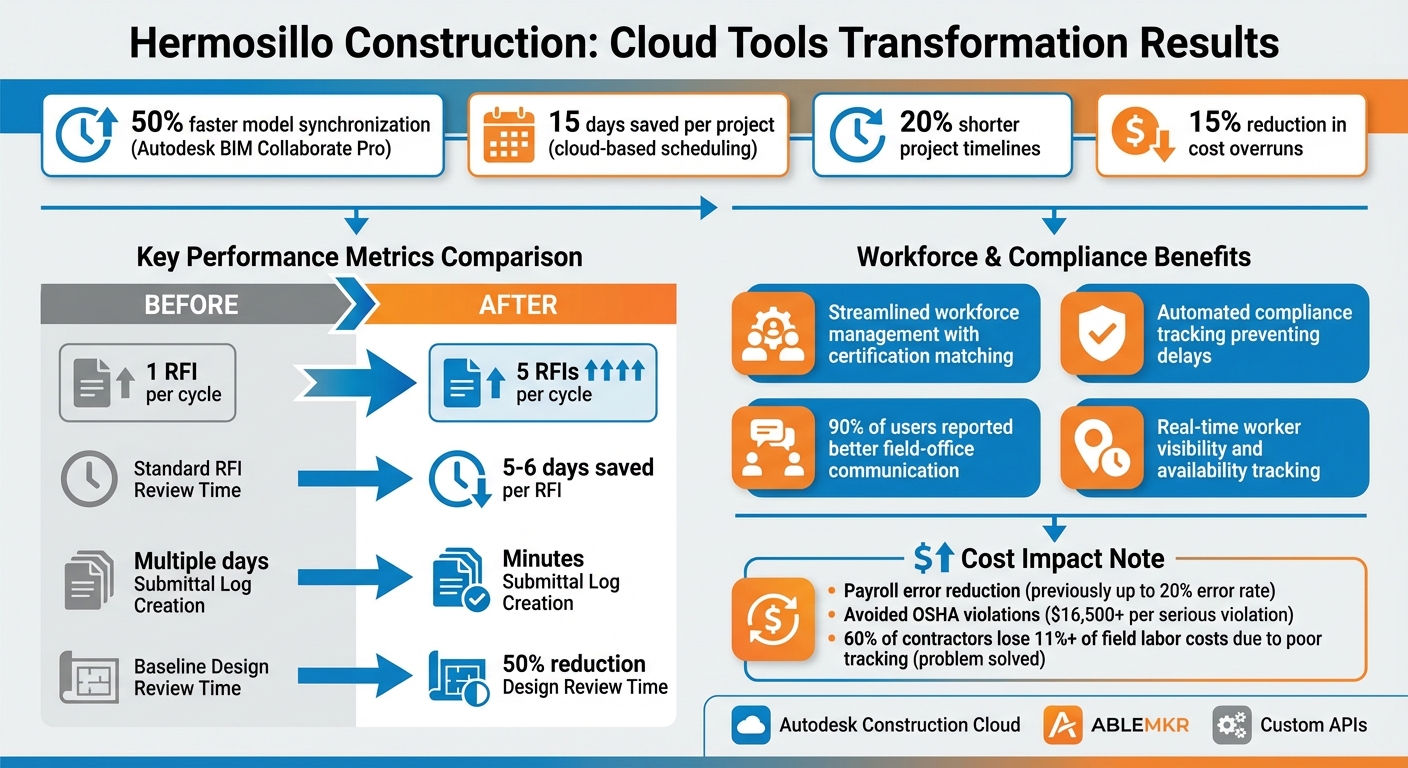
- 50% faster model synchronization: Transitioned from local Revit models to Autodesk BIM Collaborate Pro.
- 15 days saved per project: Cloud-based scheduling and automation reduced delays.
- Streamlined workforce management: ABLEMKR matched workers based on certifications and availability, avoiding costly errors.
- Compliance tracking automated: Prevented delays due to expired certifications and met stricter labor regulations for 2026.
- 20% shorter project timelines: Improved RFI processing, design reviews, and submittal log creation.
By integrating tools like Autodesk Construction Cloud and ABLEMKR, the company created a unified system that improved communication, reduced errors, and kept projects on schedule and within budget.
Hermosillo Construction Cloud Tools Implementation Results and Key Metrics
Common Problems in Construction Project Management
Disconnected Data and Communication Problems
Construction teams deal with a mountain of data every day – blueprints, safety reports, submittals, and daily logs, to name a few. But when this information is scattered across disconnected systems, things can quickly spiral into inefficiency. For example, relying on tools like Microsoft Word for sequential workflows slows updates and makes real-time collaboration almost impossible.
Justin Pritchett, Construction Division Manager at Auburn Mechanical in Auburn, Washington, shared his experience managing massive projects covering over 1.5 million square feet with more than 40 craftspeople on-site. He explained how manual processes create bottlenecks:
"When it’s a Word file, it’s either this awkwardly shared document, or it’s, ‘Hey, I did my portion. Now, you all do your portions.’ … That’s a heavily manual process. The biggest risk is that it doesn’t happen."
On top of that, workers often have to leave their tasks to retrieve data from jobsite trailers throughout the day, disrupting progress. Updating physical drawing sets with RFI sketches is so time-consuming that teams often skip it altogether, which can lead to costly mistakes when outdated drawings are used.
These disconnected workflows don’t just slow communication – they set the stage for bigger issues with scheduling and compliance.
Workforce Scheduling and Compliance Tracking Difficulties
Managing workforce schedules and tracking compliance adds another layer of complexity. Using manual timesheets and spreadsheets for payroll often leads to errors – up to 20% in some cases – wasting money and frustrating workers. Research shows that 60% of contractors report losing 11% or more of field labor costs due to poor tracking and management.
Compliance challenges are no less daunting. If a worker’s certification expires mid-project, they must be removed immediately, which can halt critical work. New labor regulations for 2026 require 10–12 hours of rest between shifts and impose stricter overtime limits, forcing contractors to rethink their staffing strategies. Prime contractors are now legally responsible for ensuring compliance across all subcontractor tiers. The penalties for non-compliance are severe: stop-work orders, debarment from public contracts, and hefty fines. In California alone, over 150 contractors were debarred in 2024, with back wage claims totaling $28 million.
These scheduling and compliance hurdles often lead to delays and budget overruns.
Effects on Project Timelines and Budgets
Disconnected workflows and poor scheduling have a direct impact on project timelines and costs. When workers or equipment aren’t available as scheduled, it causes idle time and reduced productivity. Research shows that hiring additional workers to address labor shortages can increase costs by as much as 104.25% compared to simply paying overtime to existing staff.
Compliance missteps can also be incredibly costly. In 2025, a single serious OSHA violation could result in fines exceeding $16,500, while willful violations could surpass $165,000. Additionally, the total labor burden is expected to rise by 18.4% in 2026 due to mandatory training requirements and smart-PPE subscriptions.
These challenges underscore the urgent need for construction firms to adopt integrated cloud solutions that streamline data management, scheduling, and compliance into a single, cohesive platform.
sbb-itb-aa28329
The Solution: Customizing Cloud Tools for Construction
Choosing the Right Cloud Platforms
The construction company needed a platform that could serve as a single source of truth while supporting mobile-first workflows. To find the perfect fit, they evaluated tools against four key criteria: the ability to connect teams from design to operations, seamless integration with their existing systems, scalability without requiring additional infrastructure, and an interface simple enough for field crews to use effectively.
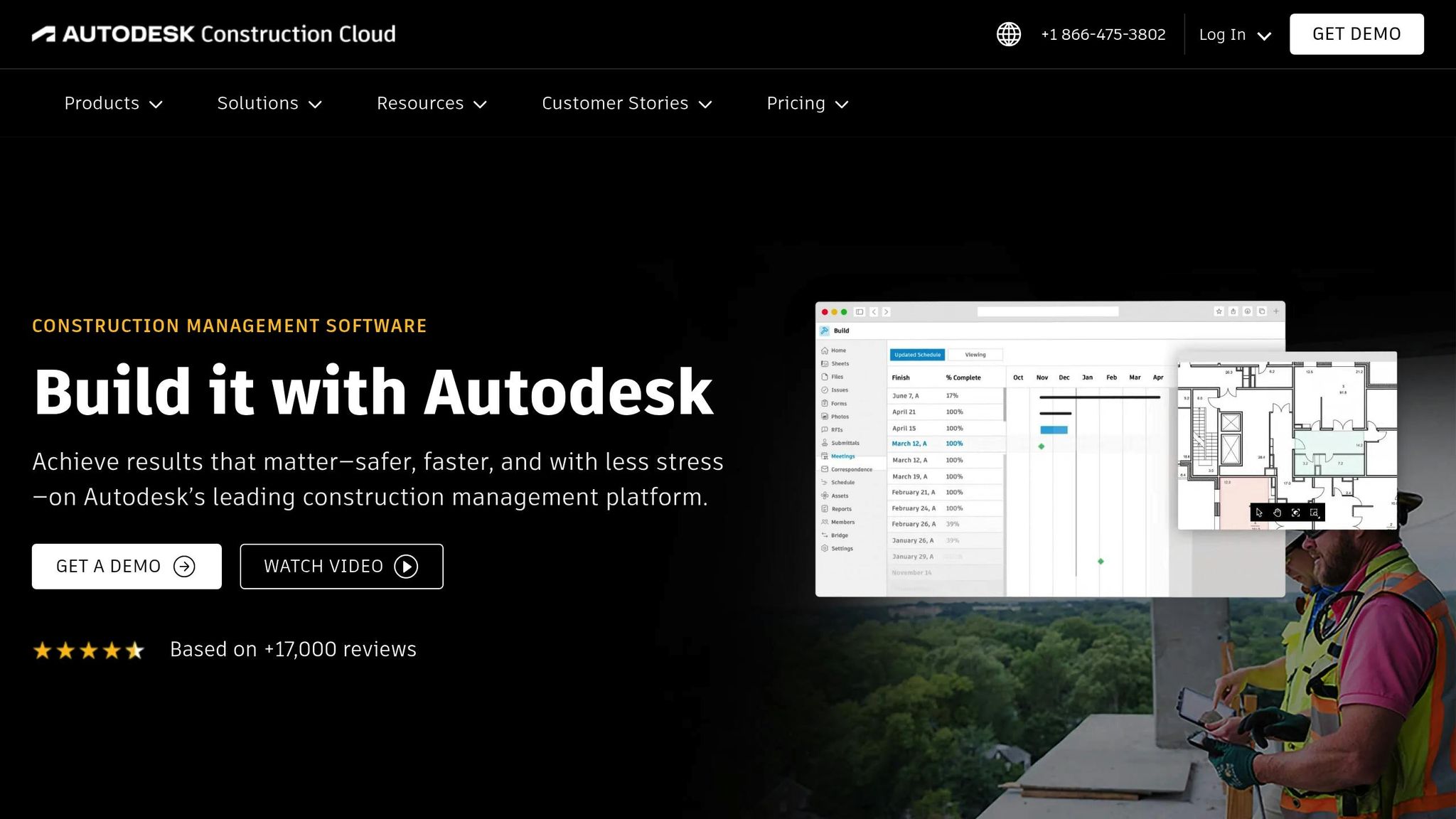
After careful consideration, they chose Autodesk Construction Cloud as their main project management hub. This platform stood out with its 400+ pre-built integrations for ERPs and CRMs, making it easy to connect with their existing tech stack. The results were impressive: 90% of users reported better communication between field and office teams, and the company shaved an average of 15 days off each project thanks to cloud-based scheduling and automation. With the project management system in place, the next step was fine-tuning workforce management.
Integrating ABLEMKR for Workforce Management
Taking full advantage of the mobile-first features of their chosen platform, the company integrated ABLEMKR to tackle the challenge of assigning skilled workers to job sites. The system matched workers based on factors like certifications, safety training, availability, and location, providing real-time visibility into worker status. ABLEMKR’s built-in compliance tracking flagged expiring certifications automatically, helping the company avoid costly mid-project delays. It also streamlined payroll processes, ensuring workers were paid on time, and made mobilizing crews for both scheduled tasks and emergencies much more efficient.
Custom API Development and Offline Access
The company’s scale demanded more than standard integrations could offer, so developers created custom APIs using Autodesk Platform Services. These APIs enabled direct communication between their on-premises data systems and cloud platforms. Middleware tools further automated the execution of custom scripts.
For field teams working in remote areas with spotty internet, offline functionality was a must. Mobile apps were deployed to let workers annotate blueprints, document defects with photos, and complete safety forms directly on-site. Once connectivity was restored, the data synced automatically. This setup significantly reduced latency and highlighted how tailored cloud solutions could transform operations.
ACC Connect | Autodesk Construction Cloud
Implementation Process: From Planning to Execution
The implementation process combined technical upgrades and team-focused strategies to ensure smoother operations and better results.
Moving to a Unified Cloud Infrastructure
The company began by auditing its existing systems to pinpoint isolated data sources that were causing inefficiencies in management, payroll, and compliance tasks. To address this, they migrated essential data to a unified cloud platform. This transition followed a clear path: a pilot phase, a scaled rollout, and eventually a full-scale deployment across the company. Automated directory synchronization further simplified user provisioning by automatically assigning team members to their respective project hubs, eliminating tedious administrative tasks. With the technical foundation in place, the focus shifted to preparing the workforce to embrace and effectively use the new tools.
Training Teams and Ensuring Adoption
Rather than focusing solely on cost savings, leadership introduced the new tools by highlighting their potential to save time, reduce frustration, and support professional growth. To encourage adoption, field supervisors took on roles as "training champions", offering feedback and motivating their teams. The company also paired experienced employees with younger, tech-savvy colleagues during testing sessions, ensuring the tools were intuitive and accessible for everyone – an especially thoughtful approach given the construction workforce’s median age of 42.3.
For example, Samsung Electronics successfully implemented Autodesk Construction Cloud by integrating Okta for Single Sign-On and biometric Multi-Factor Authentication, meeting stringent security requirements while maintaining a straightforward login experience. Similarly, this company conducted introductory training sessions followed by feedback rounds, ensuring the process was collaborative and open to continuous improvement.
"If you do not have workforce buy-in, the digital construction tool will immediately fail." – CAHill TECH
Once the tools were in use, the focus shifted to refining the system through ongoing feedback and testing.
Testing and Continuous Improvements
Weekly feedback sessions became a cornerstone of the process, allowing the company to address issues quickly and refine the system. A comparable example comes from S. M. Wilson & Co., which utilized their team’s familiarity with digital tools during their transition to Autodesk Build. This approach reduced RFI review times by five to six days, thanks to more efficient digital reviews. To ensure long-term success, the company tracked key adoption metrics like login frequency, feature usage, and time spent on administrative tasks. These insights guided further updates, ensuring the tools continued to deliver meaningful benefits in daily operations.
Results: Improved Project Management Efficiency
The implementation of a customized cloud tool brought measurable improvements, transforming how projects were managed. By comparing key performance metrics before and after deployment, the company clearly quantified gains in efficiency and project outcomes.
Key Performance Metrics
The results showed major time savings and reduced administrative workloads. Tasks like submittal log creation, which previously took days, now only take minutes thanks to automation. Additionally, the system allowed for processing five RFIs in the time it used to take to handle just one. These changes helped shorten project durations by 20% and reduced cost overruns by 15%.
| Metric | Before Implementation | After Implementation |
|---|---|---|
| RFI Processing Capacity | 1 RFI per cycle | 5 RFIs per cycle |
| RFI Review Duration | Standard timeline | 5–6 days saved per RFI |
| Submittal Log Creation | Multiple days | Minutes |
| Design Review Time | Baseline | 50% reduction |
These improvements also created opportunities for optimizing workforce deployment and operations.
Better Workforce Deployment with ABLEMKR
The integration of ABLEMKR into the cloud system further enhanced workforce management. This mobile-first platform efficiently matched pre-vetted workers to job sites based on their certifications, safety training, and proximity, ensuring quicker crew mobilization for urgent projects. With real-time visibility into worker availability, scheduling became more streamlined, and built-in compliance tracking ensured certifications and safety records remained accurate and up-to-date.
Improved Collaboration and Decision-Making
The unified cloud platform addressed previous communication challenges by providing a single source of truth for all stakeholders. This centralized approach reduced field errors and facilitated better decision-making. On-site teams benefited from real-time mobile data for immediate decisions, while office teams monitored progress continuously, ensuring both tactical and strategic alignment.
Lessons Learned for Construction Teams
This case study sheds light on how construction teams can effectively tailor cloud collaboration tools to their unique needs. The key takeaways emphasize prioritizing field usability, integrating compliance into daily routines, and selecting platforms that can grow alongside the business. These insights stem from the challenges and solutions explored earlier, offering practical strategies for successful tool customization.
Focus on Mobile-First and Offline Capabilities
Field teams are more likely to embrace tools that function effortlessly on mobile devices. Justin Pritchett, Construction Division Manager at Auburn Mechanical, shared his experience working on projects exceeding 1.5 million square feet:
"From a field-specific perspective, the usability from a mobile device was hands-down the reason why the field wanted to use it"
By transitioning from paper records to digital tools, his team gained access to critical on-site data. Real-time synchronization eliminated the need for frequent trips to jobsite trailers, enabling workers to access submittal data, installation manuals, and 3D models directly at the worksite.
Build in Compliance and Safety Tracking
Integrating compliance tracking into digital workflows simplifies oversight while ensuring safety and legal requirements are met. ABLEMKR’s system automates the monitoring of certifications, safety training, and worker qualifications. This real-time tracking prevents the scheduling of unqualified workers, allowing skilled labor to focus on production, quality, and safety. By embedding compliance into daily operations, it becomes a seamless part of the workflow rather than an added administrative task.
Plan for Scalability and Future Growth
Selecting tools that can scale with your business is critical. Cloud platforms should support real-time collaboration, allowing multiple users to input data simultaneously rather than relying on sequential updates. Auburn Mechanical transitioned from Word-based systems to cloud-based reports, enabling simultaneous data entry and photo uploads across large job sites. Pairing seasoned field leaders with tech-savvy team members also facilitates the transfer of knowledge across generations. Additionally, platforms like ABLEMKR not only address current construction needs but also prepare companies to adapt quickly to projects in other industries, such as energy or heavy infrastructure, as market demands evolve.
Conclusion
Custom cloud collaboration tools are reshaping how complex construction projects are managed. This case study highlights how tackling challenges like disconnected data, workforce scheduling headaches, and budget overruns requires solutions tailored to the realities of field operations. Take Hermosillo Construction, for example – they achieved a 50% improvement in model synchronization by switching to cloud-based workflows. Similarly, Bechtel used a centralized platform to detect clashes early, avoiding expensive rework across multiple international projects. These tailored strategies effectively bridge the gap between data integration and efficient, on-the-ground execution.
ABLEMKR takes things further by automating tasks like certification tracking, safety compliance, and real-time worker visibility. By cutting out administrative bottlenecks, it allows for faster job site mobilization. Its mobile-first design ensures uninterrupted functionality, even offline – perfect for field conditions. This seamless compliance tracking, paired with scalability, lays a strong foundation for growth, whether in construction or expanding into new sectors like energy and mining.
Real-world success stories make the benefits clear. Turner Construction slashed file search times, while Skanska improved on-site communication – all thanks to cloud-based tools. These examples show how cloud solutions can lead to timely, cost-efficient project delivery.
FAQs
What should we customize first in our cloud setup?
To improve efficiency, start by focusing on real-time communication and centralized data management. Set up a system that integrates centralized data storage with tools designed for instant updates. This setup allows for quick access to worker profiles, verification of certifications, and seamless collaboration across different locations. By ensuring everyone has access to the latest information, schedules, and credentials, you’ll create a smoother process for managing projects and deploying your workforce effectively.
How do you keep jobsites working with bad or no internet?
Construction companies rely on offline-capable tools to keep jobsites running smoothly, even when internet access is limited or nonexistent. Mobile apps from platforms like ABLEMKR and Autodesk Construction Cloud are designed to store essential data directly on devices. This means updates can still be made without connectivity. Once the internet is restored, the apps automatically sync the data, ensuring everyone stays informed. This approach helps reduce delays and keeps workflows on track, even in remote or underground locations where reliable internet can be a challenge.
How can we automate certification and labor compliance tracking?
Automating certification and labor compliance tracking in construction is now easier with cloud-based systems. These platforms simplify the process by centralizing worker credentials, keeping track of expiration dates, and sending out renewal reminders – all while minimizing manual errors. Tools like ABLEMKR offer mobile-friendly solutions that provide real-time updates, making it seamless to ensure that only properly certified workers are assigned to projects. This not only helps maintain safety standards and reduce risks but also streamlines administrative tasks and avoids expensive fines.


