
In construction, expired certifications can lead to project delays, safety risks, and regulatory fines. Many firms still rely on outdated methods like spreadsheets, which are prone to errors. Digital credential management systems solve these issues by centralizing records, automating expiration alerts, and enabling real-time updates. Here’s how to stay compliant and efficient:
- Centralized Storage: Keep all worker certifications in one secure digital system.
- Automated Alerts: Receive notifications for expiring credentials to prevent delays.
- Mobile Updates: Allow workers to upload certifications instantly from their phones.
- QR Code Verification: Quickly confirm certification authenticity on-site.
- Workforce Integration: Link credential data with scheduling and deployment tools.
- Regular Audits: Run automated checks to ensure ongoing compliance.
- Training: Teach teams how to use digital tools effectively.
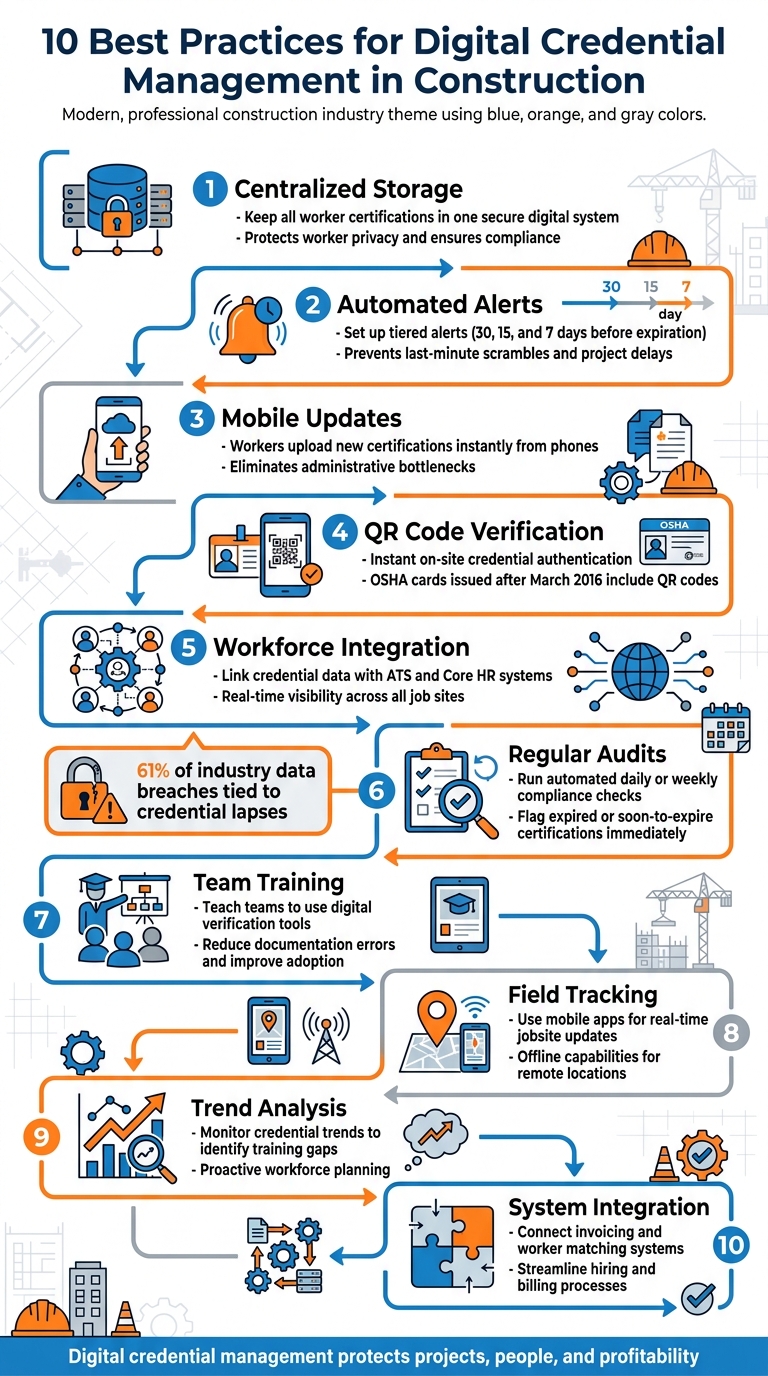
10 Best Practices for Digital Credential Management in Construction
1. Store All Worker Credentials in One Secure System
Centralization and Security
Keeping track of worker certifications across scattered records can lead to oversights, like missing OSHA cards or expired licenses. A centralized digital system solves this by securely storing all credentials – OSHA cards, equipment licenses, and safety training certificates – in one place. This approach not only protects worker privacy but also ensures projects run smoothly and meet compliance standards.
In 2025, the Construction Career Collaborative (C3) revamped its credential verification process after noticing a surge in unverifiable OSHA certifications. They required workers to upload both sides of OSHA cards issued after March 2016, which display QR codes and issuing center details on the back. To tighten compliance, C3 introduced a 90-day certificate expiration policy and offered "Database Refresher" sessions, giving workers a 60-day grace period to update their credentials. These changes strengthened the verification process, ensuring that only properly credentialed workers participated in C3 projects.
"Our credential database is secured with encrypted storage and strict access controls. Only authorized personnel involved in verification and compliance can view uploaded materials."
- Construction Career Collaborative (C3)
Centralized and secure storage is just the first step – automation takes compliance to the next level.
Automation and Real-Time Updates
Once credentials are centralized, automation simplifies compliance management. Digital systems can automatically track certification expiration dates and notify workers about upcoming renewals. This prevents common issues like unnoticed license expirations or missing trade-specific certifications, which can lead to failed inspections, costly rework, or insurance complications. Automated workflows also perform regular audits, reducing the need for time-consuming manual checks.
Field supervisors see immediate benefits from these advancements. As NSC Skilled Trades highlights:
"When safety credentials are present and current, field supervision spends less time correcting basics and more time managing productivity and quality."
- NSC Skilled Trades
sbb-itb-aa28329
2. Set Up Automatic Alerts for Expiring Credentials
Automation and Real-Time Updates
Expired certifications can throw a wrench into operations. Workers with outdated credentials often have to be pulled from projects, leading to delays and disruptions. Automated alert systems are a game-changer, keeping track of expiration dates and notifying both workers and managers in advance.
Using tiered alerts – sent out 30, 15, and 7 days before a credential expires – ensures that renewals happen on time, keeping teams ready for deployment. This proactive approach eliminates the last-minute scramble to replace workers with lapsed certifications.
Casella Construction, based in Pittsford, Vermont, offers a great example of how this system works in practice. In 2025–2026, the company shifted from manual spreadsheet tracking to a centralized workforce management system. Under the guidance of Eric Schubert, their Head of IT, they cut onboarding paperwork from days to hours while also addressing expiring certifications before they could cause operational hiccups.
"Real-time compliance tracking ensures we address expiring certifications before they become an issue." – Eric Schubert, Head of IT, Casella Construction
This system became even more essential as construction activity surged. For instance, construction starts saw a 13% rebound in March 2026, making automated alerts crucial for maintaining compliance during such busy periods.
Integration with Workforce Systems
Timely alerts are just the beginning. Linking credential data with existing workforce tools takes efficiency to the next level. By integrating with systems like ATS and Core HR, companies can eliminate data silos and gain real-time visibility into credential statuses.
Dashboards that offer live updates allow managers to see credential statuses across teams and job sites instantly. Instead of juggling spreadsheets or making endless calls, project managers can quickly spot workers who need renewals and plan accordingly. Platforms like ABLEMKR make this process even smoother by combining automated alerts with mobile-friendly technology, ensuring your workforce stays ready to go.
3. Allow Instant Updates When Workers Get New Certifications
Mobile Accessibility and Usability
With mobile-first platforms, workers can upload new certifications immediately, cutting out delays caused by administrative bottlenecks. This ensures that everyone stays on track and workers are ready to be deployed without unnecessary holdups.
Take the Construction Career Collaborative (C3) as an example. They require workers to upload both sides of their OSHA cards for instant verification. The back of the card includes QR codes and issuing Education Center details, which confirm its validity. Additionally, C3 gives workers a 60-day window to replace temporary certificates with permanent cards, ensuring compliance across job sites in real time.
These mobile uploads also kick off automated verification processes, streamlining the entire workflow.
Automation and Real-Time Updates
Once certifications are uploaded, automated systems handle verification instantly. This means uncertified workers are immediately restricted from performing certain tasks, and supervisors gain real-time updates through dashboards. No more chasing down paperwork – project leaders can focus on the actual work at hand.
These real-time dashboards give supervisors an up-to-the-minute view of credential updates. Tools like ABLEMKR take this a step further by integrating updates with workforce deployment systems. This ensures that only properly certified workers are assigned to tasks like working on energized systems or at high elevations. The result? Fewer safety incidents, less pushback from project owners, and smoother insurance processes. Plus, projects keep moving without unnecessary interruptions. This seamless integration with workforce management tools helps maintain the safety, efficiency, and readiness of job sites.
4. Use QR Codes and Mobile Access for Quick Verification
Mobile Accessibility and Usability
QR codes and mobile access are game-changers for real-time credential management, making on-demand verification faster and easier. OSHA cards issued after March 2016 now include QR codes that link directly to the issuing OSHA Education Center. With just a quick scan, supervisors can confirm a card’s authenticity in seconds – no need for phone calls, waiting, or digging through paperwork.
"Workers should be able to show proof of certification on demand, whether it’s to a supervisor, inspector, or client." – AlignOps
This technology allows workers to instantly pull up their certifications on their phones when needed – whether for an inspector’s visit or a supervisor’s review before assigning critical tasks. This immediate access eliminates delays and keeps projects running smoothly, ensuring that qualifications are verified without slowing down the workflow.
Automation and Real-Time Updates
Here’s how it works in practice:
"The back of the OSHA card includes essential verification details such as the issuing OSHA Education Center and a QR code. Without it, we can’t confirm authenticity." – Construction Career Collaborative (C3)
Without QR codes, verifying credentials often involves contacting outreach trainers, which can be time-consuming and complicated. By contrast, mobile apps allow workers to upload their certifications, enabling systems to verify them automatically and update dashboards in real time. This automation not only reduces the risk of fraudulent certifications but also ensures that only qualified workers are assigned to specialized equipment or high-risk tasks .
Platforms like ABLEMKR take this a step further by integrating QR code verification with workforce deployment systems. These tools provide real-time updates on worker credentials, ensuring that teams are properly qualified before being assigned to job sites. Whether you’re managing a pipeline repair or a high-stakes shutdown, this mobile-first approach ensures instant credential checks, keeping your projects compliant and on schedule.
5. Connect Credential Data with Your Workforce Management Tools
Integration with Workforce Systems
Tying credential tracking to workforce management tools creates a single, streamlined record that keeps tabs on certifications and their expiration dates across all trades. Instead of juggling scattered records, this approach ensures workers are assigned to tasks they are legally and professionally qualified to handle – whether it’s MEP (mechanical, electrical, plumbing) work or structural welding. On top of that, integration supports automated alerts and mobile updates, offering a more cohesive way to stay on top of compliance in real time.
"Building certifications into staffing is not about chasing badges for their own sake. It is about ensuring that the people you deploy can work safely and productively within the regulatory and contractual expectations of modern construction." – NSC Skilled Trades
By directly integrating credential data, you can standardize role profiles with clear definitions of required, preferred, and optional certifications for every trade and supervisory role. This proactive strategy eliminates the risk of discovering midway through a project that a worker isn’t properly certified. With all credential data centralized, you also set the stage for automated processes that improve real-time decision-making when assigning workers.
Automation and Real-Time Updates
Automation within integrated systems takes the administrative weight off supervisors, letting them focus more on quality and productivity. Real-time digital badges provide instant, verifiable proof of skills, making it easy to confirm certifications the moment workers check in.
This connected approach is a game-changer for field operations. Platforms like ABLEMKR integrate credential tracking with workforce deployment, offering features like real-time worker status, payroll integration, and compliance tracking. With these tools, you can verify certifications, assign workers to job sites based on their qualifications, and keep audit-ready records – all from a single platform. For critical projects, such as pipeline repairs or scheduled shutdowns, this ensures teams are fully qualified before they even hit the ground.
6. Run Regular Audits to Check Compliance
Automation and Real-Time Updates
Automated audits, paired with real-time updates, ensure compliance is continuously monitored across all records. By setting up workflows to audit credentials daily or weekly, any expired or soon-to-expire certifications are flagged immediately. This allows administrators and supervisors to quickly identify who is compliant and who requires attention .
Neglecting certification checks can lead to serious issues: higher safety risks, resistance from project owners or inspectors when unqualified workers are on-site, and insurance complications if incidents occur. Regular spot-checks of active crews help confirm that their credentials match the tasks they’re performing. This proactive approach prevents delays and avoids the need to pull unqualified workers mid-project, which can lead to costly rework.
"Safety and integrity are not just principles. They are promises we keep to every worker, contractor, and owner… updated credential verification and compliance procedures ensure every jobsite upholds the highest standards of accountability." – Construction Career Collaborative (C3)
Real-time audits become even more effective when paired with a secure, centralized database for compliance monitoring.
Centralization and Security
A centralized, encrypted database simplifies compliance management by consolidating all records and restricting access to authorized personnel . This ensures that project managers, supervisors, and field workers have consistent access to the same information, all while safeguarding worker identity and privacy.
For added efficiency, store complete OSHA card images. Plastic cards issued after March 2016 include a QR code and the issuing OSHA Education Center on the back, making authenticity checks faster and more reliable.
7. Train Your Team on Digital Credential Tools
To make the most of automated alerts and mobile-friendly features, proper training is key. Ensuring your team knows how to use digital credential tools effectively can significantly improve verification processes and reduce errors.
Mobile Accessibility and Usability
Field workers and supervisors should be trained to use mobile tools for on-the-spot credential verification. This includes learning how to scan QR codes and upload both sides of physical cards to ensure all necessary details are captured. This kind of hands-on training helps avoid missed verification steps and ensures the mobile features of the system are fully utilized.
For example, Construction Career Collaborative (C3) tackled this issue in 2025/2026 by offering "Database Refresher" sessions. These sessions helped Accredited Employers understand new compliance standards. Additionally, C3 hosted monthly Safety Committee meetings where teams could exchange peer-led tips for using digital verification tools effectively. This approach not only reduced documentation errors but also allowed teams to adapt quickly to updated processes without slowing down projects.
Automation and Real-Time Updates
Training is also crucial for managing automated workflows and staying on top of compliance deadlines. Teams need to act quickly when automated alerts flag credential lapses. Angie Ruhstorfer from Tines highlights the importance of this:
"Ongoing validation helps maintain hygiene and ensures standards are continuously met, even as new credentials are added or updated".
This underscores the value of training teams to respond promptly to real-time updates and keep credentials up to date.
Integration with Workforce Systems
Proper training ensures that teams can seamlessly integrate credential verification into broader workforce systems. For instance, NSC Skilled Trades screens every candidate for technical skills and licenses before assigning them to critical projects. This proactive approach avoids sending unqualified workers to job sites and eliminates the stress of last-minute compliance checks.
8. Use Mobile Apps for Field Updates and Tracking
Mobile Accessibility and Usability
Mobile apps make it easier than ever to manage certifications and compliance directly from the jobsite. Workers can snap a photo of their new OSHA cards or certifications and upload them instantly using their smartphones – no need to deal with mailing delays or extra steps. Once uploaded, these credentials are displayed on real-time dashboards, giving supervisors the ability to quickly verify a worker’s certification status before assigning tasks or granting access to restricted equipment. This immediate access to updates helps keep compliance processes running smoothly.
Newer OSHA cards even come with QR codes, allowing for instant verification of authenticity. With this feature, safety officers, inspectors, or clients can confirm credentials on-site in just seconds, eliminating the hassle of tracking down physical documents. For the best results, ensure that all uploaded documents include complete verification details.
Automation and Real-Time Updates
Mobile platforms don’t just make it easier to upload certifications – they also help prevent lapses through automation. These systems can send alerts directly to workers’ devices when their certifications are close to expiring, giving them a heads-up to renew on time. Some tools even take it a step further by automatically blocking workers with expired or missing certifications from being assigned to restricted equipment, minimizing risks before they even set foot on-site.
For remote locations with poor connectivity, mobile apps with offline capabilities are a game-changer. Workers can still photograph and log their certifications without internet access, and the app will sync the data automatically once the connection is restored. This ensures compliance tracking remains uninterrupted, no matter where the jobsite is located.
Integration with Workforce Systems
When mobile updates are integrated with workforce management systems, the benefits extend even further. Credential data can be tied directly to project schedules, making it easy to spot potential delays caused by expired certifications. This integration streamlines real-time credential verification, a key factor in keeping construction workflows efficient. By connecting credential tracking with scheduling tools, supervisors can make informed decisions about crew assignments – without needing to juggle multiple systems or make last-minute phone calls to confirm qualifications.
9. Track Credential Trends to Identify Training Needs
Keeping an eye on credential trends, alongside automated alerts and real-time dashboards, can sharpen your training strategies and help you stay ahead of potential workforce challenges.
Automation and Real-Time Updates
Real-time dashboards are a game changer for monitoring active certifications, upcoming expirations, and workforce gaps. For example, if you notice a sudden increase in unverifiable OSHA certifications, it might be a sign that your training standards or onboarding processes need a closer look. Addressing these trends early can prevent compliance issues and avoid costly project delays.
"Certification lapses don’t just hurt the company; they sideline workers. When an operator can’t get on equipment or a laborer’s OSHA card has expired, productivity suffers." – AlignOps
These insights can also be integrated with scheduling tools, making it easier to focus on workforce improvements where they matter most.
Integration with Workforce Systems
By linking credential tracking to project scheduling tools, you can quickly identify areas where you’re lacking qualified workers. For instance, if workers are blocked from equipment assignments due to missing certifications, it’s a clear signal for targeted training. Using standardized role profiles – outlining required and optional certifications for each trade – and comparing them to current workforce credentials can pinpoint specific training gaps. This is especially important as industries like green energy expand, creating demand for new certifications in renewable energy.
Mobile Accessibility and Usability
Mobile tools add another layer of efficiency by providing immediate access to credential data from the field. Workers can upload updated credentials directly, giving you real-time insights into workforce readiness. Features like digital badges and QR-coded cards not only validate skills but also highlight areas where training is needed. By analyzing this data as it comes in, you can adjust training plans on the fly to meet emerging needs.
10. Choose Systems That Handle Invoicing and Worker Matching
Integration with Workforce Systems
This step goes beyond simple credential checks and focuses on streamlining the hiring and billing processes. By integrating credential tracking with invoicing and worker deployment, staffing partners can efficiently match skilled professionals – like welders, electricians, or pipefitters – to the right projects. This ensures their verified qualifications align with the project needs, avoiding costly errors like failed inspections, rework, or financial setbacks.
A key strategy is to standardize role profiles before projects kick off. Clearly defining which certifications and licenses are required, preferred, or optional for each trade or supervisory role helps speed up the matching process while reducing administrative tasks. This approach creates a seamless connection between staffing and billing, ensuring only qualified and pre-vetted workers are assigned to jobs.
Automation and Real-Time Updates
When worker credential systems and invoicing tools are synced, the advantages go well beyond basic verification. Automated onboarding processes verify workers before they even set foot on-site, cutting down on delays and compliance issues. Linking billing to compliant labor also safeguards contractors from potential disputes with owners or inspectors, reducing financial risks. This streamlined system minimizes administrative bottlenecks and ensures real-time compliance monitoring, so only workers with up-to-date certifications are deployed to job sites.
Tools like digital badges and web-based credentials make it easy to verify worker qualifications instantly. This real-time visibility eliminates the hassle of manual checks and documentation gaps, allowing projects to progress smoothly without unnecessary interruptions.
Conclusion
Managing real-time credential updates in construction is more than just a box-ticking exercise – it’s about protecting your projects, your people, and your bottom line. Digital credential management systems offer a smart way to keep everything running smoothly by centralizing tracking, automating alerts, and pre-verifying certifications. As NSC Skilled Trades aptly puts it:
"Building certifications into staffing is not about chasing badges for their own sake. It is about ensuring that the people you deploy can work safely and productively within the regulatory and contractual expectations of modern construction".
Without a proper system in place, credential lapses can lead to serious consequences like safety incidents and compliance failures, which can derail even the best-laid plans. In fact, 61% of recent industry data breaches were tied to credential lapses. Digital tools like QR code verification and web-enabled badges make it easy to confirm worker qualifications instantly, reducing risks and delays.
Platforms such as ABLEMKR take this a step further by connecting credential verification with workforce matching and project scheduling. This means construction managers can ditch the endless paperwork and instead gain real-time insights into worker status, automated compliance tracking, and assurance that only qualified individuals are deployed to job sites. The result? Faster onboarding, fewer safety issues, and smoother operations overall.
In today’s construction landscape, project owners, insurers, and contractors are increasingly demanding verifiable proof of training. By adopting centralized tracking, automated alerts, and mobile updates, you not only meet these expectations but also create a more efficient and scalable operation. Start with centralized storage and automated reminders, then expand to mobile access and regular audits to build a system that supports both compliance and productivity.
FAQs
What credentials should we track for each trade?
Tracking critical credentials like certifications, safety training, licenses, permits, and environmental approvals is essential. These records confirm that workers meet compliance standards and are fully equipped to handle their responsibilities on the job.
How far in advance should expiration alerts be sent?
To stay on top of renewals and maintain compliance, make sure to send expiration alerts about 30 days before a certification or credential expires. This gives recipients plenty of time to handle updates and avoids the stress of last-minute scrambling.
How do we verify OSHA cards with QR codes on-site?
To check OSHA cards with QR codes while on-site, simply scan the QR code located on the back of the card using your smartphone or tablet’s camera. This will display details from the issuing organization, such as an OSHA-authorized trainer or an OTI Education Center. By doing this, you can instantly confirm the card’s legitimacy straight from the original source.


