
Struggling to keep projects on track due to labor shortages? You’re not alone. With 82% of U.S. construction firms unable to fill hourly craft positions and project delays affecting 45% of contractors, workforce data is the key to smarter staffing. Here’s what you need to know:
- The construction industry employs 8.33 million workers, but hiring rates hit a record low of 3.3% in February 2026.
- Labor costs are rising – averaging $50.93 per hour in late 2025 – while replacing skilled workers can cost up to 213% of their annual salary.
- Workforce data, like certifications, safety records, and performance metrics, can align labor supply with demand, reduce costs, and improve project outcomes.
- Tools like ABLEMKR automate worker matching, scheduling, and compliance to save time and cut errors.
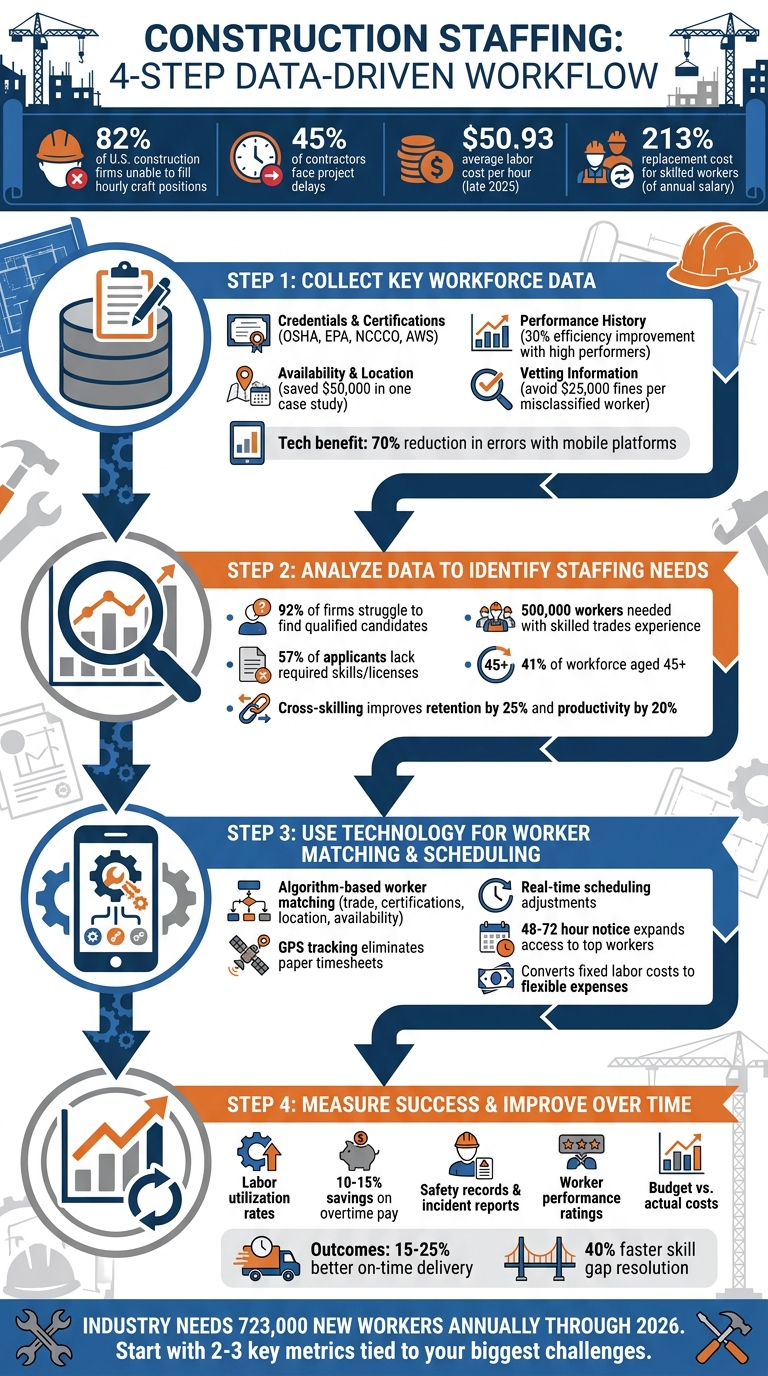
4-Step Process for Using Workforce Data to Improve Construction Staffing Decisions
Step 1: Collect Key Workforce Data
To create an efficient staffing strategy, start by gathering accurate and relevant workforce data. This process ensures that hiring decisions and project assignments are based on solid information, leading to better job-worker alignment.
Workforce Metrics to Track
Here are some key data points to monitor for effective workforce management:
- Credentials and Certifications: Keep a record of verified trade licenses, state certifications, and safety training such as OSHA 10/30 cards. For specialized roles, track certifications like EPA 608 for HVAC technicians, NCCCO for equipment operators, or AWS for welders.
- Performance History: Collect qualitative data like punctuality, skill assessments, safety compliance, and post-job ratings. High-performing workers can improve project efficiency by up to 30%.
- Availability and Location: Maintain real-time data on worker availability, location, and notice periods. For example, a Texas pipeline company reduced downtime from three days to eight hours by quickly deploying 20 certified welders within a 100-mile radius, saving $50,000.
- Vetting Information: Record background checks, identity verification, and work authorization (I-9) to avoid costly fines, which can reach up to $25,000 per misclassified worker.
- Productivity Metrics: Track outputs like square feet of wall framed or cubic yards of concrete poured daily. These metrics refine labor forecasting and improve future workforce planning.
| Role | Key Data/Certifications to Track |
|---|---|
| General Labor | OSHA 10, Flagger certification, First Aid/CPR |
| Electrician | State Journeyman/Master license, NFPA 70E, OSHA safety |
| Plumber | State license, Backflow prevention, Medical gas piping certifications |
| HVAC Tech | EPA Section 608 Universal certification, State HVAC license |
| Equipment Operator | NCCCO (cranes), NCCER cards, MVR/CDL status |
| Welder | AWS certifications (D1.1, D1.6), specific weld test results |
Using Technology to Collect Data
Technology can simplify and speed up workforce data collection, reducing errors and manual effort.
Manual processes often lead to mistakes and inefficiencies. Instead, mobile platforms automate data entry, cutting errors by 70% and providing instant access to workforce information. Features like GPS-verified clock-ins, QR code certification uploads, and API integration with HR software streamline the process.
For instance, ABLEMKR’s mobile-first platform keeps pre-vetted worker profiles up-to-date with certifications, safety training, availability, geo-location, and performance history. This real-time visibility can cut crew mobilization times by up to 50% for construction and energy projects.
To implement this effectively, use mobile apps for daily time tracking with GPS verification. Integrate these tools into your HR systems for automatic updates, train workers on app usage, and review dashboards weekly to ensure data is current.
Digital platforms also help manage certifications by storing digital copies and flagging upcoming expiration dates. This prevents compliance violations, which can cost an average of $15,000 per incident, and ensures all on-site workers meet safety standards.
sbb-itb-aa28329
Step 2: Analyze Data to Identify Staffing Needs
Once you’ve gathered workforce data, the next step is to analyze it to determine where staffing adjustments are needed. This involves identifying critical skill shortages and understanding labor demand fluctuations.
Spot Skill Gaps and Role Shortages
Start by comparing your current workforce capabilities to the demands of upcoming projects. Perform a skills inventory to map existing certifications and qualifications against the skills you’ll need in the next 6–12 months. This analysis helps you uncover potential role shortages before they disrupt your projects.
Here’s the reality: 92% of U.S. construction firms face challenges in finding qualified candidates, and 57% of applicants lack the required skills or licenses for the job. The industry currently needs around 500,000 workers with skilled trades experience, and 45% of firms report project delays due to workforce shortages.
Hard-to-fill roles often include specialized positions such as heavy equipment operators, electricians, plumbers, and certified welders. Additionally, retirement trends are a growing concern – 41% of the workforce is aged 45 or older, and 10,000 Baby Boomers retire daily, a trend expected to continue through 2029. Succession planning is no longer optional; it’s essential.
"Construction projects of all types are being delayed because there aren’t enough qualified workers available for firms to hire." – Ken Simonson, Chief Economist, AGC
Consider cross-skilling your workforce to address these gaps. Cross-skilling has been shown to improve retention by 25% and boost productivity by 20%. It’s a proactive way to strengthen your team while reducing dependency on external hiring.
Beyond skills, understanding how labor needs fluctuate over time is key to refining your workforce strategy.
Track Seasonal Trends and Labor Demand
Historical data can be a goldmine for identifying staffing patterns. Predictive workforce forecasting models, built on past data, help general contractors optimize utilization rates and align project timelines with workforce availability.
Keep an eye on utilization rates (billable versus total available hours). This metric is crucial for balancing workloads, minimizing idle time, and avoiding burnout. It’s not just about efficiency – these factors directly impact profitability and worker safety.
Seasonal trends also play a big role. Use historical data to anticipate peak hiring periods and start recruiting 6–12 months in advance to secure top talent. During slower periods, focus on upskilling your current team instead of relying on costly outsourcing down the line.
"Workforce forecasting is the workforce management strategy used by general contractors that employs predictive models – usually based on the GC’s historical workforce data – to reveal ideal utilization rates and project lineups for current and prospective jobs." – Buildr
Finally, ensure that workforce data is shared across teams. Align hiring strategies with project bids and overall capacity to avoid overcommitting. This kind of coordination helps you stay on track and prevents staffing bottlenecks.
Armed with these insights, you’ll be ready to implement more precise, tech-driven workforce matching and scheduling in the next phase.
Step 3: Use Technology for Worker Matching and Scheduling
Using workforce data to automate worker matching and scheduling takes staffing accuracy to a whole new level. By replacing manual processes, technology ensures quick, precise matches while reducing errors and delays across multiple job sites. This approach streamlines operations and ensures the right workers are assigned to the right tasks in real time.
Automated Worker Matching
Modern staffing platforms rely on algorithms to match workers based on key factors like trade expertise, certifications, location, and availability. These platforms also handle critical verification tasks, such as checking identities, conducting background screenings, ensuring I-9 compliance, and monitoring trade licenses. They even flag certifications that are about to expire, keeping compliance up to date.
Once a match is made, job details are sent directly to workers through app notifications or SMS. Many systems refine the matching process further by prioritizing workers with strong ratings for punctuality, safety, and skills. After matching, workers are seamlessly integrated into schedules managed through mobile tools.
Real-Time Scheduling and Crew Visibility
Mobile scheduling tools give supervisors the flexibility to make real-time adjustments for delays, worker shortages, or unexpected absences. GPS tracking confirms whether workers are on-site, eliminating the need for paper timesheets and offering accurate, up-to-the-minute crew status updates.
With GPS tracking and centralized dashboards, managers gain instant insights into worker locations and labor costs. This enables quick schedule changes and better budget control. Providing a 48–72 hour notice for standard roles expands access to top-rated workers and reduces the risk of paying extra for last-minute staffing. Even for urgent needs, automated matching ensures projects stay on track without disruption.
Shifting from manual staffing to a technology-driven approach not only saves time but also transforms fixed labor costs into flexible expenses. This allows companies to scale their workforce efficiently to meet project demands.
Step 4: Measure Success and Improve Over Time
Post-Project Analytics
After a project wraps up, diving into workforce data can reveal what worked and what didn’t. Start by evaluating labor utilization – compare workforce hours to actual production output across crews, trades, and project phases. This helps identify which teams are consistently meeting goals and which might need extra support or adjustments.
Take a close look at incident reports and safety records alongside productivity stats. This can highlight risky conditions and give you a sense of worker reliability. Past worker ratings are another useful tool – they shed light on punctuality and skill levels, making it easier to assign top performers to future projects.
Financial tracking is just as important. Connect production activity to cost reporting to understand how staffing choices impact the bottom line. Keep an eye on overtime expenses, budget usage, and billable hours. Smart worker allocation can lead to 10-15% savings on overtime pay.
Apply Lessons Learned
The data you gather post-project isn’t just for analysis – it’s a roadmap for doing better next time. Use these insights to build a historical database that improves future bids and estimates. Look for patterns in delays or skill shortages, then tweak crew sizes, schedules, and the timing of specialized tasks to fine-tune labor allocation.
Pay attention to periods where certain trades are underutilized, especially as projects wind down. Efficiently reallocating these workers can minimize downtime and keep costs under control. Cross-training your workforce based on recurring skill gaps can also boost flexibility and reduce reliance on external hires. Encourage field workers to share their feedback digitally, and incorporate their ideas into planning for upcoming projects.
ABLEMKR: Workforce Deployment Platform

ABLEMKR takes workforce data and turns it into smarter staffing decisions, making it easier to manage job site staffing efficiently. Designed specifically for construction leaders, this platform connects you with pre-vetted workers through automated matching. It considers key factors like trade skills, verified certifications, location, and availability to find the right fit for your project. Worker profiles are thoroughly reviewed, complete with compliance documents, so you can skip the hassle of manual screenings. By transforming workforce metrics into actionable insights, ABLEMKR simplifies and speeds up worker deployment.
Key Features of ABLEMKR
ABLEMKR uses a performance-based system to rank workers based on punctuality, skills, safety records, and professionalism, helping you assign top performers to future projects. The platform also tracks compliance digitally, automatically flagging expiring certifications to ensure your job sites remain up to code.
Time tracking is made simple with a mobile app that includes GPS verification. This gives you real-time insights into crew attendance and eliminates the errors often associated with paper timesheets. The mobile-first design ensures you have up-to-the-minute visibility into your workforce, which is essential for effective project management. Additionally, ABLEMKR acts as a W-2 employer, handling payroll taxes, workers’ compensation, and general liability insurance. This approach reduces administrative headaches and minimizes legal risks, especially since worker misclassification can lead to penalties of up to $25,000 per worker.
How ABLEMKR Improves Staffing Efficiency
With its fast and flexible hiring options, ABLEMKR makes addressing staffing needs a breeze. The platform offers next-day worker placement, which is perfect for dealing with unexpected challenges like weather disruptions, crew turnover, or sudden project changes. Instead of spending weeks on hiring, you can deploy pre-vetted crews almost instantly.
ABLEMKR supports various staffing models, including temporary, flex-to-hire, and permanent positions. This flexibility allows you to test a worker’s performance and fit on-site before committing to a long-term hire. For better workforce planning, aim to maintain a 2–4 week look-ahead schedule to anticipate labor needs. Providing 48–72 hours’ notice for standard roles ensures access to the most qualified workers available.
Conclusion
Workforce data has transformed the way hiring, scheduling, and crew management are handled. Instead of relying on outdated spreadsheets or guesswork, construction companies now see clear benefits from data-driven strategies. For example, firms using workforce analytics report 15–25% better on-time delivery rates and can address skill gaps 40% faster. These improvements directly reduce delays, cut labor costs, and enhance safety compliance.
The secret lies in treating workforce data as an ongoing strategy, not a one-time solution. By continuously analyzing metrics, companies can identify trends like seasonal demand surges or recurring skill shortages. From there, they can make smarter decisions about staffing and scheduling. Tools like ABLEMKR make this process seamless by automating workflows – matching workers to jobs in real-time based on certifications, location, and performance – while removing manual inefficiencies.
This type of automation doesn’t just streamline processes; it gives construction leaders a distinct edge. Data-driven staffing creates a cycle of improvement: every project generates insights that refine future strategies. Over time, companies can build stronger talent pipelines, reduce emergency hiring expenses, and earn reputations as dependable employers.
With the construction industry needing approximately 723,000 new workers annually through 2026, efficient workforce management is more important than ever. Companies that leverage technology to match skilled workers with the right projects – while maintaining compliance and visibility – set themselves up for long-term success in a highly competitive market.
Start small by focusing on 2–3 key metrics tied to your biggest challenges. Audit your current data practices and explore automation tools. The insights you begin gathering today will lay the foundation for smarter, more effective decisions in the future.
FAQs
Which workforce metrics should I track first?
Tracking key workforce metrics is a smart first step. Focus on areas like total employment levels, hiring challenges, and labor supply limitations. This means keeping an eye on the number of workers, job opening rates, and how easily positions are being filled. Tools like ABLEMKR are particularly useful here. They can deliver real-time updates on worker status, certifications, and even location. With this data, you can make smarter staffing decisions and tackle labor shortages head-on.
How do I forecast staffing needs 6–12 months out?
To plan staffing needs 6–12 months in advance, start by reviewing your project schedules, identifying required skills, and assessing labor demands in light of current industry trends. Tools like ABLEMKR can make this process easier by providing real-time data on worker availability, certifications, and locations. By aligning project timelines with workforce insights, you can streamline planning, prevent delays, and ensure you have the right team ready for future projects.
How can ABLEMKR help reduce compliance risk?
ABLEMKR helps businesses stay on top of compliance by providing real-time insights into worker status, integrated payroll workflows, and built-in compliance tracking. With this platform, certifications, safety training, and other compliance requirements are kept up-to-date and well-documented. This reduces the chances of falling short of industry regulations and helps maintain operational peace of mind.


