
Accessibility in mobile apps isn’t just helpful – it’s essential for skilled workers like welders, electricians, and operators. Workers often face challenges like bright sunlight, bulky gloves, or unreliable connectivity, which can make apps difficult to use. Poor app design leads to lost productivity, safety risks, and frustration. This guide highlights practical solutions to make apps more usable in demanding work environments.
Key Takeaways:
- Voice commands and hands-free tools improve usability in hazardous conditions.
- High contrast ratios (minimum 4.5:1) ensure readability in bright light.
- Large touch targets (at least 48 dp) reduce errors for workers wearing gloves.
- Offline functionality ensures access to data in remote areas.
- Multilingual support and clear, simple layouts improve understanding for diverse workforces.
Designing apps for skilled laborers means addressing their unique needs – glove-friendly controls, visual clarity, and offline access. These features not only improve efficiency but also help prevent accidents and ensure workers can focus on their tasks without unnecessary distractions.
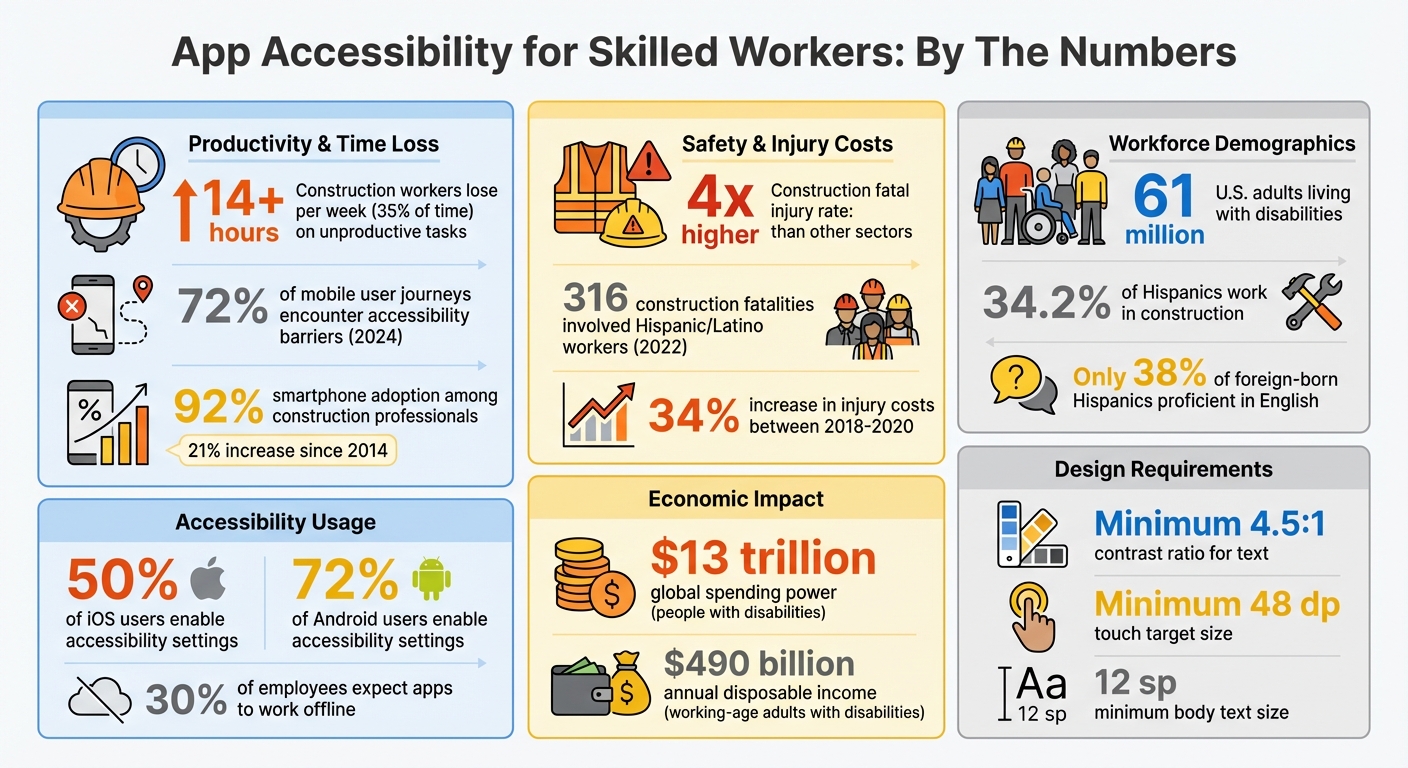
App Accessibility Statistics for Skilled Workers in Construction and Energy
Technology and Blue Collar Workers | Krish Sridhar | TEDxTanglinTrustSchool
Accessibility Challenges Skilled Laborers Face
Skilled laborers in industries like construction and energy face challenges that are worlds apart from those encountered in office settings. Picture this: a welder perched 40 feet high on a scaffold, unable to make out small text. Or an electrician battling harsh sunlight, struggling to see washed-out screens. Then there’s the pipeline technician, miles from civilization, cut off from cellular service. These scenarios highlight the unique hurdles that workers in these fields face, especially when it comes to digital tools. The impact? A significant hit to productivity and efficiency.
Digital Barriers in Construction and Energy
Industrial environments come with their own set of digital roadblocks. For starters, outdoor lighting often renders standard screens practically useless. Bright sunlight can wash out displays, leaving workers squinting at their devices. And even rugged devices, designed for tough conditions, aren’t always up to the task. Their small screens force constant zooming to read detailed specs or safety instructions, adding unnecessary friction to already demanding jobs.
Touchscreens, a staple of modern tech, often fall short in these environments. Workers wearing gloves – essential for safety – struggle to use small buttons or precise touch inputs. Apps that rely solely on touch controls don’t account for industrial realities, where alternatives like voice commands or pressure-sensitive inputs could make a huge difference. Then there’s the variety of hardware workers rely on: smartphones, rugged tablets, smartwatches, and IoT devices. All of these need to function seamlessly, even in challenging conditions like glaring sunlight or noisy job sites.
Connectivity issues add another layer of complexity. Remote locations, such as solar farms or pipeline installations, often lack reliable Wi-Fi or cellular networks. Workers in these areas can’t access updated blueprints or safety protocols, leaving them to rely on outdated information – or worse, paper-based systems that slow everything down. With nearly a third of employees expecting work apps to function offline, the lack of connectivity is a glaring gap that hampers efficiency and safety.
How Accessibility Gaps Affect Worker Productivity
These digital challenges don’t just make tasks harder – they actively reduce productivity and compromise safety. Consider this: construction workers already lose over 14 hours a week – more than 35% of their time – on unproductive tasks like hunting down project details. When apps are difficult to navigate or fail to work offline, the problem only gets worse. Workers with conditions like dyslexia face additional barriers, struggling with complex interfaces that aren’t designed with their needs in mind. Similarly, those with limited dexterity may find it nearly impossible to use precise touch controls, leading to errors that ripple through schedules and compliance requirements.
Safety takes a direct hit, too. The construction industry has a fatal injury rate four times higher than the average across other sectors. In remote locations, where connectivity is spotty, workers can’t quickly report accidents or access emergency protocols. This lack of access can be life-threatening. The financial toll is just as alarming: injury costs in construction jumped by 34% between 2018 and 2020. Many of these incidents stem from communication breakdowns – issues that better-designed, more accessible apps could help mitigate.
Core Accessibility Principles for Mobile Apps
When designing mobile apps for skilled laborers in demanding environments, accessibility is not just a feature – it’s a necessity. The Web Content Accessibility Guidelines (WCAG 2.2) lay the groundwork with four key principles: Perceivable, Operable, Understandable, and Robust. These principles apply to mobile apps by treating each screen or view as equivalent to a web page. For workers in fields like construction or energy, where challenging conditions are the norm, these principles address real-world usability issues.
Picture this: workers wearing gloves, standing in bright sunlight, or surrounded by loud machinery. In such scenarios, accessibility becomes critical. As one source puts it, "Accessibility in design, then, is fundamental to creating an inclusive, usable, and high-quality app – it leads to the best results for users and can prevent costly rework". When these principles are integrated from the start, they don’t just save time and money – they can save lives. Let’s explore how these principles translate into actionable design features.
Perceivable Features: Visual and Audio Clarity
Ensuring information is perceivable means workers can see, hear, or otherwise sense what’s on their screens, regardless of the environment. For example, in bright outdoor settings, contrast ratios are critical. Guidelines recommend at least a 4.5:1 contrast between background and text, with a 3:1 ratio for non-text elements like icons. This ensures that even in direct sunlight, safety instructions remain readable.
Body text should be no smaller than 12 sp to allow for user scaling. Apps must also support both portrait and landscape modes, as devices may be mounted on machinery or held at fixed angles. Additionally, relying solely on color to convey information can be risky. For instance, a red “danger” indicator should also include a text label or a distinct icon so workers with color vision deficiencies can recognize it.
Operable Features: Simple Navigation and Input
Operability focuses on how users interact with apps, especially in situations where fine motor control is limited – like when wearing gloves. To address this, touch targets must be at least 48 dp to ensure reliable tapping. Tiny buttons that might work in an office setting can become a major frustration – or even a safety hazard – on a job site.
For complex gestures, apps should offer single-pointer alternatives. For example, instead of requiring a swipe to delete, provide a clear on-screen button. Avoid features that rely on device shaking; instead, offer practical, on-screen alternatives. Features like Voice Access and Switch Access are also invaluable, allowing hands-free operation when workers are busy with tools or equipment. In noisy environments, haptic feedback – vibrations that confirm actions – can replace audio cues effectively.
Ultimately, the goal is to create interfaces that are not only easy to use but also intuitive under high-pressure conditions.
Understandable and Compatible Design
Even if an app is perceivable and operable, it won’t succeed if workers can’t understand it. Clear labels, consistent navigation, and straightforward language are essential. For example, use android:hint in input fields and contentDescription for icons so screen readers can group related elements into a single announcement.
In apps with complex layouts – common in energy monitoring or construction management – accessibility pane titles help screen readers identify distinct sections as they change. Grouping related information, such as job site details, into single containers ensures that screen readers announce them as cohesive units rather than fragmented pieces. This reduces cognitive strain and allows workers to process information quickly, even in stressful situations.
The bottom line: an app should enable workers to complete their tasks efficiently and without confusion, no matter the conditions they face.
Required Accessibility Features for Construction and Energy Apps
Skilled workers in construction and energy face tough, often unpredictable conditions. Apps designed for these industries need to address specific challenges like offline functionality, loud work environments, and extreme weather. A 2024 study revealed that 72% of mobile user journeys encountered accessibility barriers. For workers operating heavy machinery, wearing gloves, or working under direct sunlight, these barriers aren’t just inconvenient – they can pose real safety risks.
With smartphone adoption among construction professionals reaching 92% – a 21% jump since 2014 – mobile apps have become indispensable tools. But these apps can’t be one-size-fits-all; they must be tailored to the demands of real-world job sites. That means including features like offline access, multilingual support, and hands-free operation.
Voice Commands and Text-to-Speech
In environments where workers need both hands free for tools or safety gear, voice commands are a game-changer. AI-powered voice recognition enables hands-free navigation, making apps more accessible in hazardous conditions. Tools like talking tape measures or digital rulers that announce measurements out loud allow workers to stay focused on their tasks.
To overcome the challenge of loud job sites, advanced headsets with noise-canceling and bone conduction technologies ensure clear audio. For non-audio alerts, haptic feedback solutions – like vibrating wristbands or smart helmets – can provide critical notifications.
"AI voice recognition… will allow users with mobility impairments to navigate apps hands-free." – Casandra Visser
These hands-free features are just one piece of the puzzle. Offline functionality is equally critical for remote or low-connectivity areas.
Offline Functionality and Low-Data Modes
In remote locations where connectivity is unreliable, offline functionality is a must. Workers need uninterrupted access to job specs, blueprints, safety checklists, and time-tracking tools. Apps designed with offline-first functionality can store data locally and sync automatically once a connection is restored. This is especially important, as 30% of employees expect work apps to function offline to avoid using personal data or dealing with poor connectivity.
Additionally, features like image alt-text and simplified content layouts ensure that crucial information remains accessible even in low-bandwidth environments.
Multilingual Support and Simple Interfaces
The construction and energy sectors are incredibly diverse. For example, 34.2% of Hispanics in the U.S. work in construction, and among foreign-born Hispanics, only 38% report being proficient in English. Language barriers can lead to dangerous misunderstandings, as seen in 2022 when 316 construction fatalities involved Hispanic or Latino workers, many due to miscommunication about safety protocols.
To address this, apps should offer both English and Spanish versions, ensuring safety guidelines and job instructions are clear. Pairing multilingual support with intuitive visual cues, icons, and simplified interfaces can help workers with varying levels of digital literacy or education. Accessibility profiles, such as "Visually Impaired" or "ADHD Friendly" modes, combined with jargon-free language, can also support workers with neurodiverse or cognitive needs.
These features aren’t just about compliance; they help create safer, more inclusive job sites where everyone can perform at their best.
sbb-itb-aa28329
How ABLEMKR Builds Accessibility for Skilled Workers
ABLEMKR’s mobile-first platform is crafted with accessibility in mind. Considering that nearly 50% of iOS users and over 72% of Android users enable accessibility settings, designing with inclusivity is more than just a feature – it’s a necessity. The platform tackles practical challenges head-on, such as operating the app with gloved hands in cold weather or maintaining screen visibility under bright sunlight. These thoughtful design choices ensure the platform works seamlessly for all users, even in tough environments.
Automated Job Matching with Accessible Design
The automated job matching system is built to integrate accessibility features into its core. By using standard interface elements, the platform ensures compatibility with tools like TalkBack, which can read job details aloud for visually impaired workers.
To make navigation easier, the app focuses on simple gestures like taps and swipes, reducing the need for complex interactions. Features such as checkboxes, autofill, and location-sharing further simplify the process, cutting down on manual text entry and making the app more user-friendly.
Real-Time Notifications and Clear Scheduling
ABLEMKR enhances workflow efficiency by sending real-time updates and reminders that are designed with accessibility in mind. Push notifications include descriptive labels and maintain a color contrast ratio of at least 4.5:1, ensuring they remain visible even in bright outdoor conditions. These visual cues are paired with text labels and haptic feedback to assist users with color vision deficiencies.
The scheduling interface is thoughtfully organized, grouping related information in a way that’s easy to follow. Workers can quickly check upcoming shifts, job site details, start times, and required certifications. For users relying on screen readers, the app delivers this information as a clear, coherent announcement. This consistent layout reduces cognitive strain, helping workers with attention or learning difficulties stay on track.
Compliance Tracking with Audio and Visual Tools
In addition to its accessible design, ABLEMKR simplifies compliance tracking to protect workers and ensure safety. The platform incorporates both audio and visual tools to make compliance tasks more manageable. Safety training videos come with closed captions and text transcripts, making them accessible to workers with hearing impairments. For those who prefer audio, voice-enabled navigation powered by AI allows hands-free access to compliance checklists and certification details.
The compliance dashboard is designed with accessibility in mind, featuring pane titles like "Safety Certifications" and "Training Status" that alert screen readers when a new section is reached. Visual indicators combine color with clear text labels and icons, ensuring that everyone can easily differentiate between categories.
"Users must be able to clearly distinguish between categories of elements in a UI. To do so, use patterns and position, along with color, to express these differences."
How to Test App Accessibility
Testing app accessibility isn’t just about ticking boxes – it’s about ensuring the app works effectively for skilled workers in real-world environments. While automated tools can flag basic issues like missing labels or poor contrast, they often uncover only a small portion of potential problems. To truly evaluate accessibility, testing needs to happen under actual working conditions.
User Testing with Skilled Workers
The best way to uncover accessibility barriers is by involving the people who will actually use the app. Skilled laborers should be part of the testing process, with attention to a range of needs – visual, auditory, motor, and cognitive impairments – as well as situational factors like bright sunlight or limited hand mobility.
Recruit a diverse group of testers that mirrors your user base. Have them complete routine tasks, such as scheduling shifts, reviewing compliance requirements, or reporting safety concerns, while using assistive technologies like screen readers or voice commands. To avoid overlapping results, test each assistive tool separately.
Motor accessibility deserves special focus. Workers wearing gloves or those with limited dexterity need touch targets that are large enough, as outlined in earlier design principles. Test app functionality in both portrait and landscape orientations. Ensure actions are triggered only when users lift their finger (up-event), which allows them to cancel accidental taps.
Accessibility Audits and Testing Tools
In addition to user testing, structured audits using a mix of automated and manual tools can provide a thorough evaluation. Start with free tools like Google Accessibility Scanner for Android or Xcode Accessibility Inspector for iOS to catch code-level issues such as missing content descriptions or inadequate contrast ratios. Keep in mind, though, that these tools can’t fully assess the user experience.
For manual testing, use native screen readers – TalkBack for Android and VoiceOver for iOS – to ensure all interactive elements are announced correctly. Test keyboard navigation with a Bluetooth keyboard to confirm that focus indicators work as they should for users relying on external input devices. Also, verify that color contrast meets the minimum ratios needed for outdoor visibility, as specified in design guidelines.
"Accessibility is more than just meeting a standard… It means creating a product that works for everyone, in all situations and under different conditions." – Abra
To catch operating system–specific issues that simulators might miss, cloud-based platforms like BrowserStack allow testing on thousands of real devices. It’s important to note that about half of accessibility testing requires human input, as automated tools can’t detect every usability challenge or cognitive barrier.
Conclusion
Accessible mobile apps play a crucial role in improving safety and productivity in industries like construction and energy. With 61 million U.S. adults living with disabilities, and job sites presenting challenges like glare, noise, and the need for gloves, accessibility becomes a necessity, not a luxury.
As David Gibson aptly states, "Accessibility is the pinnacle of Usability".
But it’s not just about usability – it’s also a smart business move. Accessible design opens up access to an estimated $13 trillion in global spending power and $490 billion in annual disposable income among working-age adults with disabilities. Plus, it helps companies retain experienced, older workers who bring valuable skills to the table.
Platforms like ABLEMKR showcase how accessibility drives operational improvements. Features such as voice commands, offline access, and multilingual support help reduce input errors and streamline processes like job matching, compliance tracking, and scheduling. Haptic feedback and multi-modal notifications ensure workers receive confirmations, even in environments where visual or auditory cues might fail. These features directly address the real-world challenges faced in the field.
Additionally, accessible apps provide legal and compliance benefits. Under Title III of the ADA, proactive design isn’t just about meeting regulations – it becomes a strategic advantage.
The result? Faster mobilization, fewer errors, improved safety, and a workforce that feels valued and empowered.
FAQs
How do mobile apps help improve safety for skilled workers in high-risk industries?
Mobile apps play an important role in improving safety for skilled workers in high-risk industries by providing tools for real-time monitoring, emergency response, and compliance management. These apps often come equipped with features like fall detection, worker-down alerts, and panic buttons, enabling workers to quickly alert supervisors or emergency contacts when faced with dangerous situations.
Many of these apps also use geofencing and GPS tracking to ensure workers remain within designated safe zones and adhere to safety protocols. For example, platforms like ABLEMKR utilize these technologies to monitor worker locations, automate attendance, and minimize risks tied to unauthorized access or unsafe areas. By incorporating these tools into daily operations, companies can better manage safety, respond more quickly to incidents, and provide safer working conditions for skilled laborers.
What accessibility features are essential for mobile apps used by skilled workers in construction and energy?
To make mobile apps practical and user-friendly for skilled workers in construction and energy, they need specific accessibility features designed for challenging work environments. For instance, apps should offer large, easy-to-tap buttons to accommodate workers wearing gloves or handling devices in rugged conditions. Additionally, intuitive navigation is essential, enabling users to quickly find the tools they need, even under stressful circumstances.
Features like multilingual support and visual cues are crucial for fostering clear communication among diverse teams, ensuring everyone stays on the same page. In remote areas with limited connectivity, offline functionality becomes indispensable, allowing workers to access vital tools and data without interruption. Moreover, real-time push notifications can deliver critical updates, such as safety alerts, job changes, or compliance reminders, boosting both efficiency and safety on the job.
By integrating these features, apps can better serve the needs of workers in demanding industries, ensuring usability, safety, and inclusivity remain top priorities.
Why is offline functionality important for mobile apps used by skilled laborers?
Offline functionality is crucial for mobile apps designed for skilled laborers in fields like construction and energy. Many job sites are located in remote areas where internet access is unreliable or completely unavailable. Without offline access, workers might face challenges retrieving vital information such as blueprints, safety guidelines, or task updates. This lack of access can lead to delays, miscommunication, and even safety hazards.
Apps equipped with offline-first capabilities address this issue by storing key data directly on the device. This means workers can continue their tasks without interruption, even when disconnected. Once the app detects a restored connection, data is automatically synced, ensuring everything stays accurate and up to date. For those working in remote or high-risk environments, offline functionality doesn’t just improve efficiency – it also supports safety and clear communication, making it an essential tool for effective workforce operations.


