
If a matching tool can’t block expired credentials, it can’t do the job. In fields like construction, utilities, mining, and energy, a bad match leads to gate turnaways, work delays, and extra labor cost. The article’s main point is simple: I’d judge these tools on six checks first – skill libraries, certification tracking, rule-based filters, worker scoring, audit logs, and mobile profile updates.
Here’s the short version:
- Skill libraries should define roles clearly, so an apprentice and a journeyman are not treated the same.
- Certification tracking should log issue dates, expiration dates, verification status, and source documents.
- Rule-based filters should remove workers who miss hard requirements like location, shift, trade level, or site credentials.
- Worker scoring should rank the people who pass filters, using fit, past job history, reliability, and availability.
- Audit logs should show who changed what, when, and why.
- Mobile updates should let workers upload new documents and status changes from the field, with review steps for sensitive data.
A few numbers show why this matters: 92% of U.S. construction firms hiring say they struggle to find qualified workers, and 57% say applicants lack needed skills or licenses. Skill shortages can delay projects by about 20% and add 10% to 15% to labor costs. So if I were reviewing a platform, I’d start with one question: Can it build a compliant shortlist in minutes and explain every name on it?
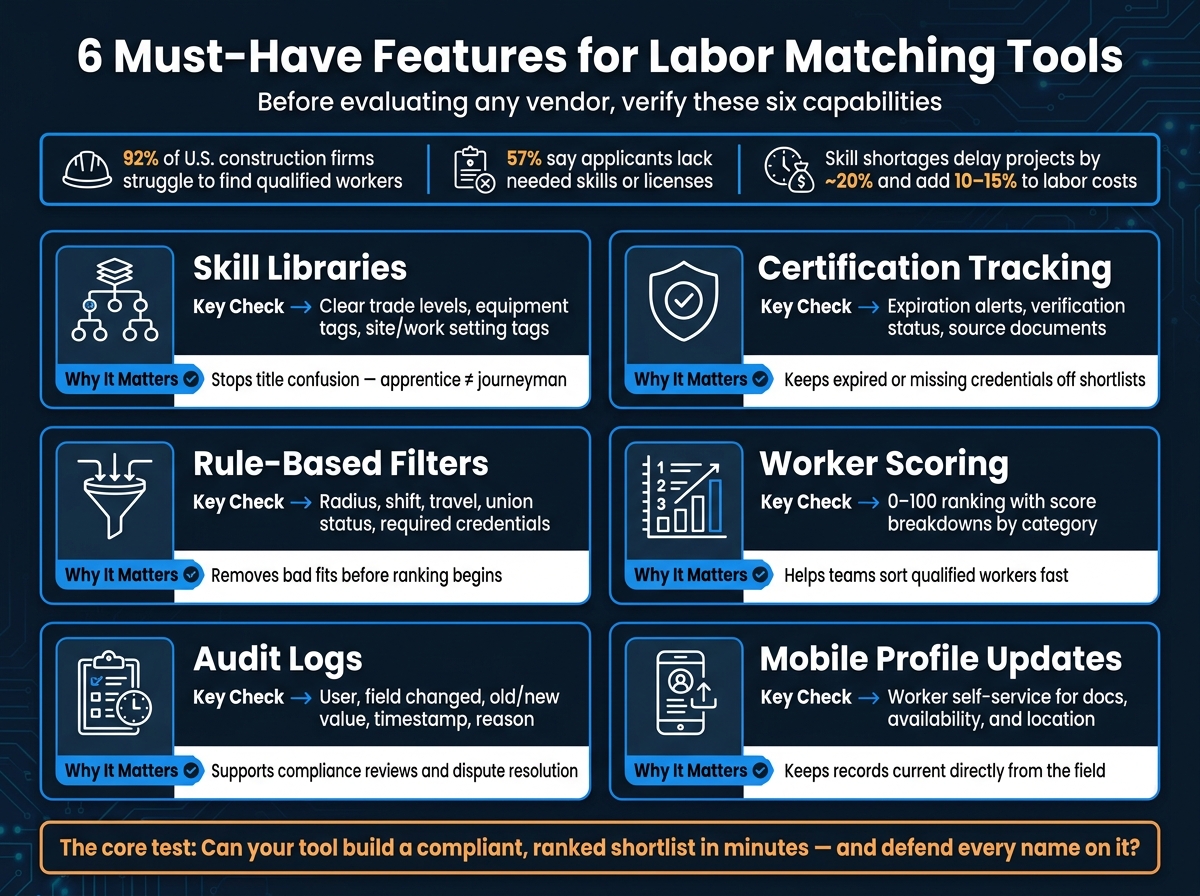
6 Must-Have Features for Labor Matching Tools: A Visual Checklist
Quick Comparison
| Feature | What I’d check first | Why it matters |
|---|---|---|
| Skill library | Clear trade levels, equipment tags, site/work setting tags | Stops title confusion and weak matching |
| Certification tracking | Expiration alerts, verification status, source docs | Keeps expired or missing records out |
| Rule-based filters | Radius, shift, travel, union status, required credentials | Removes bad fits before ranking |
| Worker scoring | 0–100 style ranking with score breakdowns | Helps teams sort qualified workers fast |
| Audit logs | User, field change, old/new value, time stamp, reason | Supports reviews and compliance checks |
| Mobile updates | Worker self-service for docs, availability, location | Keeps records current in the field |
That’s the frame I’d use before looking at any vendor claims or demo screens.
sbb-itb-aa28329
Skill libraries and certification tracking
Structured skill libraries that support job-role matching
A skill library only works when each role has one shared definition across job postings, worker profiles, and matching rules. If those definitions drift, the shortlist starts to drift too.
Map every role to clear skills and proficiency levels, and spell out what each level means in writing. That matters more than it may seem. A junior worker and a senior worker can share the same job title on paper, but they are not the same fit in practice. If a system treats an apprentice pipefitter and a journeyman pipefitter as interchangeable, the shortlist will be shaky from the start.
It also helps to build in related-skill logic. When the main candidate pool is thin, the system should be able to surface backup options instead of leaving teams stuck. Once the library is standardized, the next step is simple: check whether those rules are actually shaping filtering and ranking.
Certification, safety training, and expiration tracking
Certification tracking needs to go beyond listing a credential name. If the record is incomplete, coordinators end up doing manual checks that the system should already cover.
For each record, track:
- Credential type
- Issuer
- Issue date
- Expiration date
- Verification status
- Source document, such as an OSHA 30 card, NCCER completion certificate, MSHA training record, or site-specific safety training
Automated renewal reminders give both the worker and the operations team time to act before a credential expires. That buffer can save a lot of last-minute scrambling.
Placement blocking matters just as much. If a required credential is missing or expired, the system should keep that worker off shortlists for roles that require it. No guessing. No manual cleanup after the fact.
ABLEMKR uses AI-assisted matching workflows, supported by human workforce validation, to identify workers that align with qualifications, certifications, project type, location, availability, and workforce fit. That’s the kind of precision teams should be looking for here. Use automation for credential checks, and let people handle edge cases. After credentials are verified, look closely at how the system filters and ranks workers for each job.
Matching controls: filters, scoring, and ranking
Once credentials are verified, the next step is turning that data into a shortlist a dispatcher can actually use. The best way to do that is simple: start with hard filters, then score the workers who make it through.
Rule-based filters for location, availability, trade, and credentials
Filters come first because they handle the pass/fail checks. In U.S. labor operations, the core non-negotiable categories are location radius, shift schedule and availability, trade and role level, and required credentials. Each one cuts out a different type of mismatch before ranking even starts.
Location filters should use miles. For last-minute work, teams often set the radius at 10–25 miles in metro areas and up to 50 miles in rural areas. For remote projects, that range can stretch to 100–300+ miles for travel-ready or rotational workers. ABLEMKR’s mobile-first platform uses real-time geolocation to match pre-vetted workers to job sites and support rapid crew mobilization in these cases.
Schedule filters need to match the way industrial work is set up in the field. That means checking specific shift times, overtime limits, union dispatch rules, and existing assignment conflicts. If a worker is already booked on a multi-week pipeline job, that person shouldn’t appear as available for another job at the same time. Credential filters do a similar job. They turn verified records into role-based eligibility rules. If a position calls for OSHA 30, TWIC, and confined space entry, only workers with all three should show up.
Once the non-negotiables are cleared, scoring can sort the rest by fit.
Worker scoring and match ranking that make shortlists usable
After filtering, scoring takes over. A solid scoring model pulls several factors into one composite score, usually on a 0–100 scale, so teams get a ranked list instead of a flat batch of qualified profiles.
A practical model might weigh skill proximity, certification fit, past project performance, reliability, and current availability and responsiveness. Two workers may both pass every filter, but they are not equal. Someone who has finished four similar refinery shutdowns with strong attendance should rank above a worker with one similar assignment and a pattern of late arrivals.
What makes scoring useful is transparency. Teams need to know why Worker A scored 92 and Worker B scored 78, not just see the numbers. Category-level breakdowns like Skill Match, Credentials, Reliability, and Availability help coordinators spot patterns, catch edge cases, and change weights when job priorities move. Some platforms also use recruiter feedback over time, adjusting the scoring model based on which candidates were accepted or rejected.
Comparison table: Filters vs. scoring approaches
| Rule-Based Filtering | Worker Scoring & Ranking | |
|---|---|---|
| Logic type | Binary (pass/fail) | Weighted, multi-factor |
| Primary function | Removes unqualified candidates | Ranks qualified candidates |
| Key criteria | Certifications, trade, location, availability | Skill proximity, certification fit, past project performance, reliability, availability |
| Setup effort | Low – define hard job requirements | Higher – requires weighting different variables |
| Transparency | High – clear why a worker was excluded | Moderate – depends on score breakdown visibility |
| Speed | Instant exclusion of mismatched labor | Fast prioritized shortlist for immediate review |
| Best-fit use case | Non-negotiable compliance and safety requirements | Final selection from a pool of already-qualified workers |
The shortlist only works if every filter, score, and roster change can be traced.
Auditability and mobile profile updates
Once filters and scoring trim the candidate pool, audit logs and mobile updates help keep the shortlist accurate – and easier to defend if someone asks, “Why was this person approved?”
Audit logs and change history for compliance and accountability
A useful audit log should show who made the change, which field was edited, the previous value, the new value, the timestamp, and the reason for the update, when relevant. In labor matching, the highest-stakes fields are certification status, expiration dates, safety training completions, availability windows, and site eligibility flags. A single change in any one of those fields can decide whether a worker qualifies.
This kind of detail matters most when something goes sideways. If a worker shows up with an expired OSHA 30 card, the audit history can show whether the record was old, updated too late, or never fixed at all. That matters. It helps teams see whether the issue came from stale data, a slow update, or a broken process.
For internal reviews and compliance reporting, audit logs should also be filterable. Pulling all credential changes for one worker across a date range – or all edits made by one user account – is far more useful than digging through a long, flat activity feed. The Gosa Construction Workforce Management System, for example, implemented an audit trail to track worker hour logging and report generation for compliance and accountability, using Azure SQL Server to record user activities and system changes. That kind of structured history makes an audit trail far more useful during compliance checks and dispute resolution.
And of course, that history only helps if field data can be updated without delay.
Mobile profile updates that keep field data current
Field crews aren’t sitting at desks. When a worker finishes a safety training course, they shouldn’t have to wait for a coordinator to update the system. Mobile self-service closes that gap by letting workers submit certification updates, availability changes, current location, contact information, and supporting documents right from the field.
That cuts down the lag between what’s happening on-site and what the system says. ABLEMKR uses mobile-first updates, real-time worker status, geolocation matching, and embedded compliance tracking to keep profiles current across oil and gas, mining, and heavy infrastructure. For urgent dispatches – like a last-minute shutdown or an unplanned pipeline repair – that kind of accuracy is the difference between a shortlist that works and one that just looks okay on paper.
Still, not every update should change eligibility right away. Sensitive changes – such as certification numbers, expiration dates, and training completions – should go through coordinator review before they affect matching. A strong workflow lets workers self-report, flags those changes for review, and sends reminders when certifications are getting close to expiration.
Conclusion: How to choose the right feature set for labor matching
The best tools bring skill libraries, certification tracking, filters, scoring, audit logs, and mobile updates into one workflow. The goal is simple: move from verified skills to a shortlist your team can use right away. And the order matters. First, check the features that verify who should make the list at all. Then look at how the system ranks the workers who passed those checks.
Start with certification tracking and rule-based filters. If the system can’t keep expired credentials off the shortlist, the rest of the workflow falls apart. Once those checks work the way they should, scoring can turn a list of qualified workers into a shortlist that’s ready for action.
Audit logs and mobile updates matter just as much over time. A placement that can’t be traced back to verified data creates risk, especially in oil and gas, mining, or heavy infrastructure, where regulators and clients often ask for documentation. ABLEMKR tackles this with embedded compliance tracking, real-time worker status, and mobile-first updates. If those records and updates are weak, the shortlist may be fast, but it won’t hold up when someone asks, "Why this worker?"
The test is simple: can your team build a compliant, ranked shortlist in minutes and defend every name on it?
Prioritize speed, traceability, and compliance.
FAQs
How do I audit why a worker was shortlisted?
In ABLEMKR, review the compliance dashboards and audit trails. They show certification uploads, training completions, and status updates, each with automatic timestamps and user IDs.
Then check the match or ranking details to see which skills, certifications, and alignment factors contributed to the worker’s score at the time of the match.
Which data fields should trigger automatic blocking?
Automatically block candidates – or pause matching and contact – when required qualification or compliance data is missing, invalid, or out of date.
That includes:
- certifications or credentials
- required safety training records
- eligibility or verification checkpoints
Also block profiles flagged as incomplete or inconsistent by real-time validation before they move to the next step.
How can mobile updates stay compliant without slowing dispatch?
Use real-time, automated credential and safety checks. Workers can update certifications, availability, and location from the field, while the system tracks expiration dates and flags needed updates before a match is finalized.
ABLEMKR keeps verified worker data in one place, so changes flow into payroll, scheduling, and compliance records. Human review and audit trails help keep records clean without slowing urgent matching.


