
If you can’t tell who is cleared for a site in under a minute, your compliance process is too slow.
I’d sum up this topic like this: a renewable workforce compliance system helps me check who can work, where they can work, and what is missing before dispatch. On U.S. solar, wind, battery, utility, and grid jobs, that means tracking worker training, licenses, drug-test status, contractor insurance, site orientation, and project rules across states and sites.
Here’s what matters most:
- Field eligibility is the core job – not payroll or HR
- Expired records block access fast – even one missing item can stop a crew at the gate
- Rules change by role, site, and state – one checklist usually fails across multiple projects
- Daily use matters more than demos – office staff and supervisors need fast mobile checks
- Good systems should block non-cleared workers automatically – not rely on memory or side notes
- Record retention matters too:
I’d look for a system that does four things well:
- Tracks credentials with expiration dates
- Handles digital onboarding before arrival
- Supports mobile gate checks, even with weak service
- Links compliance status to dispatch and site access
Quick comparison
| Area | What I’d check |
|---|---|
| Worker records | ID, I-9, licenses, OSHA 10/30, HAZWOPER, fit-for-duty, drug/alcohol status |
| Contractor records | Insurance, safety plans, approved scope, crew certifications |
| Site controls | Role-based rules, site induction, task limits, access blocks |
| Field use | Mobile check-in, incident logging, status view, offline or cached access |
| Admin use | Alerts 30–60 days before expiration, audit exports, multi-site rule setup |
| Growth fit | Multi-project support, state-based rules, payroll/timekeeping links |
In short, I’d want one system that turns scattered records into a live pass/fail check for dispatch, gate entry, and audits.
sbb-itb-aa28329
Compliance Requirements Renewable Teams Need to Track
Once worker eligibility is confirmed, the next job is simpler to describe but harder to manage: tracking the records that keep crews cleared for site access.
Renewable projects deal with compliance rules at three levels: worker, contractor, and project. And those rules can shift from one jurisdiction to the next.
Worker Documents, Training, and Safety Records
Before dispatch, every worker needs current, verifiable records for ID, I-9, licenses, certifications, and required safety training. That includes trade licenses and role-based certifications like NCCER or NABCEP, along with OSHA 10/30, HAZWOPER, confined space, and fall protection training. Each one should have a logged completion date and a clear expiration deadline.
It doesn’t stop with training. Teams also need up-to-date drug and alcohol testing status, fit-for-duty clearances, and incident or near-miss logs that include corrective actions. Site-specific orientation has to happen before work starts and should cover site boundaries, emergency response, PPE, incident reporting, environmental compliance, and hazard recognition.
A missed expiration date can stop a crew at the gate. That’s why teams should check OSHA training, drug-test status, licenses, and site induction before every dispatch, with alerts set for 30–60 days before expiration. Keep OSHA injury logs and OSHA 301 reports for five years after the covered calendar year. For electrical work, rescue and resuscitation competency must be current within the last 12 months.
Contractor and Project-Level Compliance Records
Each subcontractor needs to be tracked on its own. That means insurance certificates, signed safety plans, site-specific health and safety plans, and scopes of work that spell out which tasks are allowed.
These records aren’t just paperwork sitting in a folder. They control mobilization and site access. Only contractors with current insurance, approved safety programs, and signed work scopes should mobilize. And only workers whose roles line up with approved tasks should be scheduled for high-risk work like energized electrical work or confined-space entry.
For prevailing wage or federally funded work, teams also need to track certified payroll, job classifications, pay rates, and timesheets. Payroll records must be kept for three years after project completion.
State, Local, and Multi-Site Coordination
Multi-state operators have a tougher road because they’re dealing with more than one compliance standard at the same time. Some states run their own OSHA plans, and those rules can go beyond federal requirements. Overtime, meal breaks, and paid sick leave laws also change by state. Permitting and inspection rules can shift by county and utility territory.
That’s why one generic compliance checklist usually falls apart in the field. Requirements need to be tagged by jurisdiction and by project, so a crew sent to a wind farm in West Texas is checked against a different rule set than a crew heading to a solar site in California. Without that setup, teams end up back in spreadsheets and email threads, which is where missed obligations, conflicting data, and audit or gate delays tend to show up.
Those requirements set the baseline for judging whether a system can enforce compliance in real time.
How to Evaluate a Renewable Workforce Compliance System
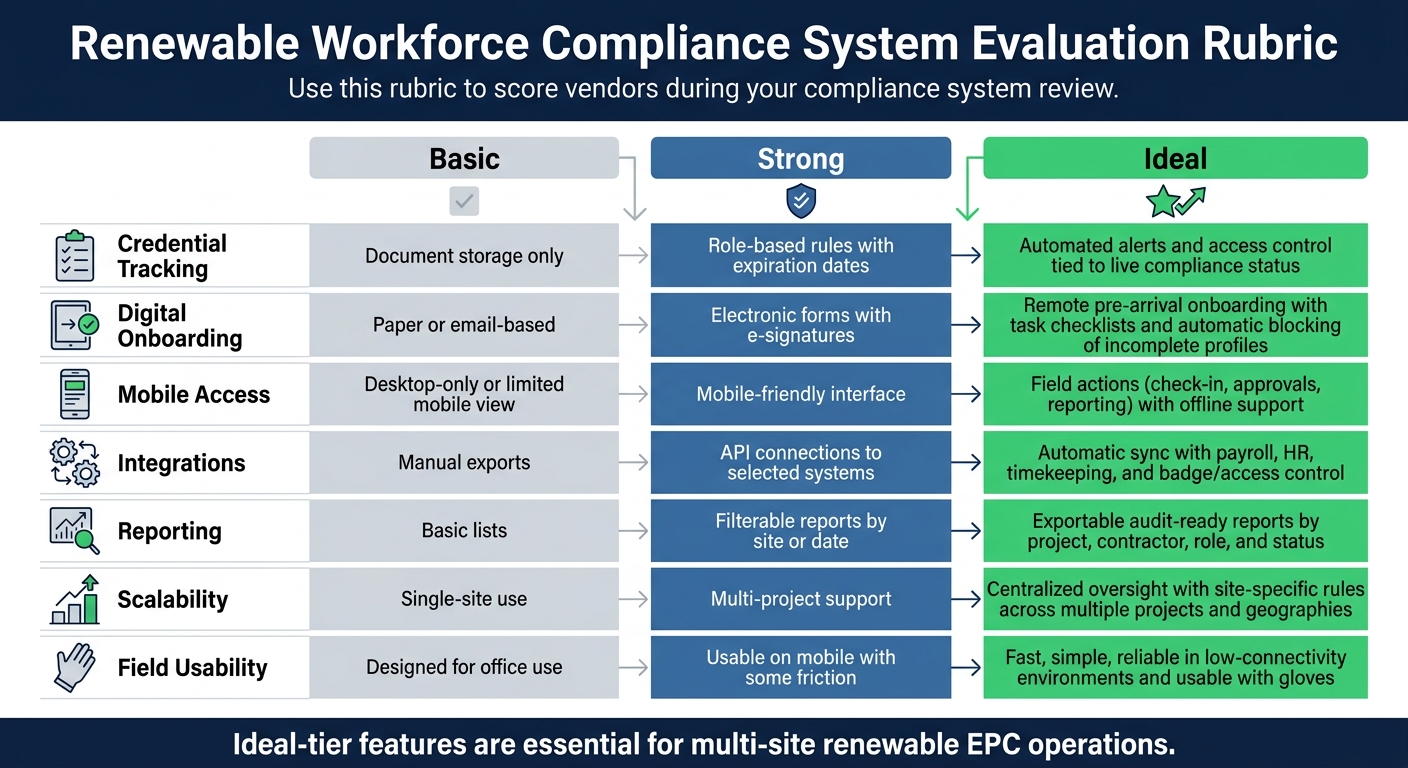
Renewable Workforce Compliance System Evaluation Rubric
The right system should enforce compliance at the gate, in the field, and across rotating renewable crews. When you compare options, use the requirements above as your scoring baseline.
Core Features That Matter on Active Sites
Start with the features that matter most on active job sites: credential tracking, digital onboarding, mobile access, alerts, incident logging, and access control.
Credential tracking should keep worker records in one place and apply role-based rules by job type. Digital onboarding should let workers finish role-specific steps and site induction before they arrive. Mobile check-in should work offline, or at least use cached access that syncs once service comes back. That matters most on low-connectivity sites where crews change fast and access depends on role.
The table below turns those needs into a simple rubric you can use during vendor reviews.
| Evaluation Factor | Basic | Strong | Ideal |
|---|---|---|---|
| Credential Tracking | Document storage only | Role-based rules with expiration dates | Automated alerts and access control tied to live compliance status |
| Digital Onboarding | Paper or email-based | Electronic forms with e-signatures | Remote pre-arrival onboarding with task checklists and automatic blocking of incomplete profiles |
| Mobile Access | Desktop-only or limited mobile view | Mobile-friendly interface | Field actions such as check-in, approvals, and reporting with offline support |
| Integrations | Manual exports | API connections to selected systems | Automatic sync with payroll, HR, timekeeping, and badge/access control |
| Reporting | Basic lists | Filterable reports by site or date | Exportable audit-ready reports by project, contractor, role, and status |
| Scalability | Single-site use | Multi-project support | Centralized oversight with site-specific rules across multiple projects and geographies |
| Field Usability | Designed for office use | Usable on mobile with some friction | Fast, simple, reliable in low-connectivity environments and usable with gloves |
Integration, Scalability, and Reporting
Once the site-level workflows check out, look at how the system moves data into payroll, scheduling, and timekeeping. If it doesn’t connect cleanly with those systems, teams end up typing the same data twice. That leads to re-entry errors and slows payroll, job costing, and audits.
For large multi-site operations, the system also needs to support fast project setup, jurisdiction-specific rules, and centralized oversight without manual workarounds. If your team is running several projects at once, this is where weak systems start to show cracks.
Where ABLEMKR Fits for Renewable and Energy Workforce Operations

For teams that want deployment and compliance in one workflow, ABLEMKR fits this use case.
Its mobile-first platform matches pre-vetted workers to job sites based on certifications, safety training, availability, and job-site location. It also includes verified worker profiles, embedded compliance tracking, real-time visibility into worker status, and payroll workflows. That gives employers a clear view of who is cleared before dispatch decisions are made.
Implementation: From System Setup to Field Adoption
Take the requirements above and turn them into system rules. Then test those rules on one live project. The safest way to get a compliance system into active use – without throwing live work into chaos – is to do it in phases: map current requirements, set up a sandbox, clean and move records, test in parallel, and then roll out project by project. In renewable EPC work, that usually means starting with one active job, checking that the setup works, and then expanding from there.
Set Up Roles, Rules, and Required Workflows
Before anyone uses the system, the setup needs to match how your sites work in the field. Start with role-based profiles for each job type. Each profile should include only the credentials and site training that role needs – nothing extra, nothing missing.
The rules that matter most are the automatic block rules. Set them so a worker with a missing or expired credential can’t be assigned to a shift or cleared for site access. For subcontractors, require uploads for crew certifications, insurance, and safety records. Then send those records through safety review and project approval before dispatch. That keeps approval tied to actual mobilization, not guesswork.
Build orientation templates by asset type too:
- Wind
- Solar
- Substation
- Battery storage
Each site type comes with its own hazards and emergency steps, so one generic orientation usually won’t cut it.
Train Office Staff and Site Supervisors
Training works best when it’s short, role-specific, and tied to real work. Recruiters should know how to build worker profiles, upload documents, and check eligibility status. Safety managers should know how to review expiration alerts, handle incident reports, and approve training records. Coordinators and payroll staff need to see how compliance status affects dispatch and pay runs – especially what happens when a blocked worker changes scheduling or overtime.
Site supervisors need hands-on practice with gate-level work: checking crew compliance status, confirming clearance for tower climbing or energized work, and logging a toolbox talk or incident from a phone. That part matters. If the field team can’t use it in a few taps, people will fall back to texts, calls, and paper notes.
A short parallel run helps a lot. Supervisors keep using the old process while also using the new system, then compare rosters, hours, and eligibility records side by side. It’s a simple gut check. You spot data gaps and setup mistakes before they hit payroll or block someone at the gate. Once users can handle these tasks fast, shift over to daily dispatch and gate checks.
Use the System Daily to Control Dispatch and Site Access
Daily use should follow the same pattern every time, based on live worker status. Dispatchers should start each planning cycle by pulling eligible worker pools filtered by role, certifications, location, and availability. Before locking in a crew, check expiration dates against the full assignment window – not just the first day of the job.
The system should show a clear status for each worker: compliant, near expiration, or blocked. That makes gate decisions fast and plain. If someone is blocked, the system should show why and what needs to happen next, like finishing a remote orientation module or booking a refresher course.
On a high-risk renewable site, supervisors should never manually override a block. That’s where systems earn their keep. When an incident happens, supervisors log it in the field with mobile forms, and the system then restricts the worker from tower climbing or energized work until the post-incident review is done. That live status then feeds back into dispatch, which stops restricted workers from getting scheduled.
Conclusion: What a Good Compliance System Should Deliver
Once setup is done and crews start using the system in the field, the only thing that matters is how it performs day to day. A renewable workforce compliance system earns its keep when it puts records in one place, controls site access, speeds up mobilization, and keeps projects audit-ready.
That matters because gate checks depend on fast record access. Keep worker, contractor, and site records in a single system so supervisors and compliance leads can confirm eligibility without digging through emails, folders, or old spreadsheets.
Speed and compliance don’t have to fight each other. The right system pre-vets workers, automates onboarding steps, and helps dispatchers sort by role, certifications, location, and availability. That way, fully qualified crews can be confirmed and sent out fast, whether it’s a planned project launch or a last-minute outage response. Platforms like ABLEMKR support that model with pre-vetted worker matching, real-time status visibility, and built-in compliance tracking. Audit readiness works the same way: time-stamped training logs, site access logs, and certification records should be searchable and exportable within minutes, not days.
Pick the system that matches your project mix, jurisdictions, and field workflow. A system that office teams and site leaders use every day is worth far more than one that looks good in a demo but slows things down at the gate. The right system helps teams know who can work, where they can work, and prove it fast.
FAQs
How do I know if a worker is site-cleared before dispatch?
Use a centralized, mobile-first compliance platform like ABLEMKR to verify site clearance before dispatch.
With one system in place, you can confirm that certifications, safety training, and site-specific qualifications are current before a worker gets assigned. If a credential is missing or expired, the platform blocks the assignment right away. That means fewer last-minute surprises and less back-and-forth.
Site supervisors can also check worker status on the spot from a mobile-friendly dashboard. In the field, that kind of instant access matters.
What records should a renewable compliance system track?
A renewable workforce compliance system should keep all key records in one place so teams can stay on top of safety, meet rules, and be ready when an audit comes up.
That includes records for:
- worker qualifications and trade certifications
- OSHA and site-specific safety training
- certified payroll, apprenticeship, and wage records
- insurance, workers’ compensation, W-9s, and site-access credentials
- incident, near-miss, testing, and medical surveillance logs
It should also track the details that tend to slip through the cracks, like expiration dates, issuing authorities, completion dates, and geo-tagged deployment records. And it should send alerts before certifications expire, so no one gets caught flat-footed on-site.
How can we enforce different rules across states and sites?
Use a centralized digital platform instead of manual, paper-based tracking. Start with a core compliance framework, then assign tailored requirements by project type, role, or trade.
The system can match state and site rules to worker profiles, verify credentials in real time, and block assignments when required training or qualifications are missing.


