
If your remote maintenance process breaks at one handoff, the whole job slows down. In most energy field work, the same 5 controls decide whether a job moves cleanly from alarm to closeout: clear intake, risk-based triage, skill-based dispatch, permit checks, and clean final records.
Here’s the short answer: I keep remote energy maintenance on track by making sure one work order stays with the job the whole way. That record should include the asset, location, risk, crew needs, permits, labor, parts, readings, and photos. If even one of those pieces is missing, teams often end up with extra drive time, payroll errors, permit gaps, or repeat site visits.
At a glance, the workflow comes down to this:
- Create one complete work order from SCADA alerts, PM schedules, field reports, or mobile forms
- Triage the job early based on risk, urgency, crew skills, parts, and travel time
- Dispatch the right crew using certifications, fatigue limits, and current location
- Do pre-job safety checks before work starts, including JSA, LOTO, and PTW steps
- Update the job live from the field with labor, materials, readings, status changes, and photos
- Close out the record before leaving site so payroll, CMMS, and ERP data match
A few facts make this process hard to ignore:
- Remote crews may travel hours for a single visit, so one missed part can waste a full day
- Many energy operators cap shifts at 12 hours to cut fatigue risk
- Confined space work may require gas testing under OSHA 29 CFR 1910.146
- Mobile tools need offline use because remote wind, pipeline, and mining sites often lose signal
Put simply: remote maintenance is less about paperwork and more about keeping office and field teams on the same record from start to finish.
What follows is a plain-English guide to that workflow, with the steps, roles, and controls that help you move work orders from intake to closeout without gaps.
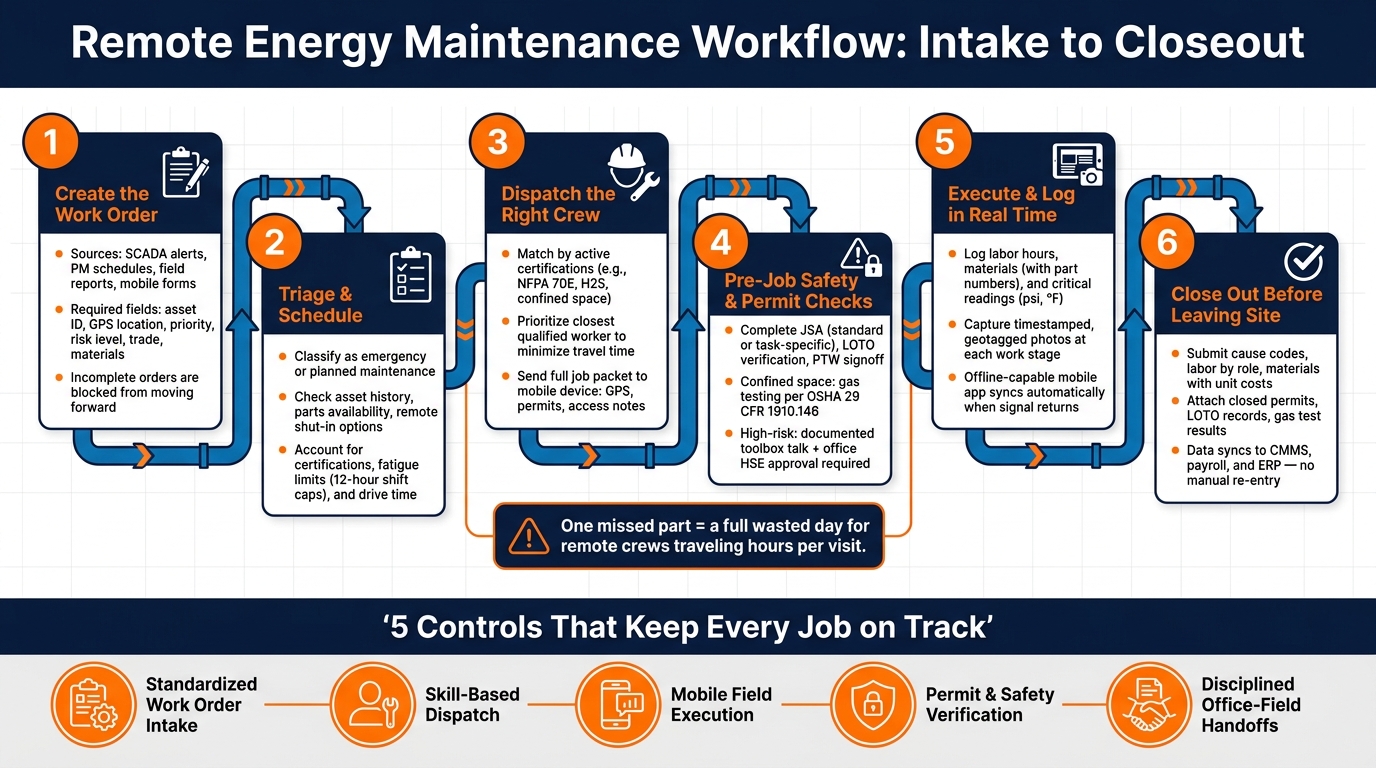
Remote Energy Maintenance Workflow: 6-Step Process from Intake to Closeout
Webinar: Reliable Monitoring for Remote Energy Systems
sbb-itb-aa28329
1. Build a Standard Work Order Flow for Remote Assets
A standard work order flow means every remote job follows the same path: the same intake fields, the same triage rules, and the same scheduling checks. That kind of consistency makes remote work easier to audit.
It starts with a complete work order record.
Create the Work Order With the Right Job Data
Work orders for remote energy assets usually come from four main sources:
- SCADA or IoT alerts
- Scheduled preventive maintenance
- Field reports or customer calls
- Structured mobile forms
SCADA systems can auto-generate a work order when a critical asset trips or starts operating outside set limits. That cuts out manual transcription. Scheduled PMs create recurring orders tied to calendar dates or runtime hours, like quarterly inspections for a gas compressor station.
No matter where the order comes from, each one should include the same core fields at creation: asset ID, exact location, GPS coordinates plus access notes, priority, issue description, risk level, response window, required trade, materials, and labor. When you make these fields mandatory in your CMMS or digital system, incomplete orders can’t move forward. That helps cut repeat trips and wasted drive time at remote sites.
Plan, Triage, and Schedule Based on Risk, Skills, and Travel Time
After the work order is created, the office team reviews it before dispatch sends anyone out. The first call is simple: is this emergency work or planned maintenance?
A confirmed gas leak near a populated area, a suspected pipeline rupture near waterways, or imminent grid instability counts as emergency work. A condition-based issue found through trend analysis, or a minor leak with no escalation risk, is planned work. That can be scheduled without the same urgency.
Triage also includes a few practical checks. The team looks at asset history, confirms whether a remote shut-in can lower urgency, and makes sure the crew will have the right tools and parts before anyone drives out. For remote sites, that step matters a lot. One missed part can turn a long trip into a wasted day.
Scheduling then has to account for certifications, shift and fatigue limits, and drive distance. It also needs realistic buffers for unpaved roads or weather delays. The aim is to line up the right crew, the right route, and the right timing based on risk and travel, so dispatch can move without back-and-forth.
Paper-Based vs. Mobile Work Order Flows: A Side-by-Side Comparison
| Factor | Paper-Based Workflow | Mobile/Digital Workflow |
|---|---|---|
| Response Speed | Slow; manual intake and physical dispatch | Real-time; instant alerts and mobile assignment |
| Data Accuracy | High risk of transcription and handwriting errors | High; automated data logging with verified inputs |
| Permit Visibility | Limited to physical copies kept on-site | Instant; digital access to active permits across the organization |
| Evidence Capture | Delayed; photos and notes filed separately | Real-time; photos, readings, and signatures linked to the work order |
| Closeout Time | Days or weeks for manual reconciliation | Immediate; digital approval and real-time cost capture |
| Supervisor Oversight | Difficult without physical presence | Remote; web-based dashboards showing crew location and job status |
The difference shows up most clearly at remote sites. Digital orders stay tied to the same job record from intake to closeout. Mobile workflows can also block status changes until required approvals are logged.
Once the work order is complete, dispatch can match the right crew without rework.
2. Coordinate Crew Dispatch and Workforce Deployment
After triage and scheduling, dispatch has one job: get the right crew to the right site fast without creating safety or compliance problems. Once the work order is standardized, dispatch turns that record into the day’s crew plan.
Match Crews to Jobs Using Certifications, Availability, and Location
Sending an available worker instead of a qualified one is where trouble starts. It slows the job down and can create compliance issues. Crews should be matched based on active certifications, site access rules, and current location. By this stage, the office should pass along a complete job record with no missing fields.
Take substation work. It may call for a journeyman electrician with a valid NFPA 70E certification. If dispatch sends the wrong person, the crew may be denied site access. Then you’re stuck with a second dispatch, added travel time, and more cost.
Expiration dates matter just as much as the credential itself. A worker with lapsed H2S or confined space training may be turned away at the gate. That leads to delays and can create compliance findings during OSHA audits. Fatigue limits matter too. Many U.S. energy operators cap shifts at 12 hours and limit consecutive night shifts to lower incident risk.
And there’s a practical point here: the closest qualified crew is often the best choice, not the one who has done the job before. For unplanned outages across long energy corridors, travel time alone can make a big difference.
Use Mobile-First Dispatch to Keep Office and Field Teams Aligned
Once a crew is chosen, the job packet should go straight to their phone or tablet. That packet needs to include GPS coordinates, site access notes, permit forms, and any live schedule changes. In short, the crew should have everything they need before they roll out.
For remote pipelines, wind farms, or mining sites, cell service can be spotty or nonexistent. That means offline access isn’t optional. Technicians need to open job specs, complete permit forms, log readings, take photos, and mark work complete even when they have no signal.
Dispatch also needs a live view of job status. Common milestones include:
- Assignment accepted
- En route
- Arrived
- Started
- Paused
- Complete
Each event should carry a time stamp and location. If a crew arrives much later than expected, dispatch can check for an access problem or weather delay right away instead of sitting around waiting for a phone call.
That live assignment record then becomes the basis for pre-job checks and permit control in the field.
Where ABLEMKR Fits in Remote Energy Crew Mobilization

For remote energy operators dealing with last-minute shutdowns, hard-to-find certifications, or sites spread across long energy corridors, internal staffing can run thin. ABLEMKR helps fill that gap with a network of pre-vetted workers, including pipeline integrity techs, industrial electricians, tower climbers, and others. Their active certifications, safety training records, and location are tracked in a mobile-first platform. Payroll workflows and compliance tracking are built in as well, which cuts down on admin work. That lets operators send the closest qualified worker to the site without the usual drag that comes with outside labor deployment.
Once the crew is mobilized, that same mobile record should move with the job into field checks, permits, and live job updates.
3. Execute the Job in the Field With Mobile Updates and Permit Checks
When dispatch hands off the job, the field team turns the work order into work on the ground, under permit control. At that point, the work order isn’t just a task ticket anymore. It becomes a live field record, so permits, readings, photos, and status updates all need to stay tied to that single job.
Complete Pre-Job Safety and Permit-to-Work Checks Before Work Begins
Before anyone picks up a tool, the crew should follow a set pre-job sequence. That means verifying the work order scope, confirming the asset ID, completing a Job Safety Analysis (JSA), checking lockout/tagout (LOTO) status, and walking the site to compare actual conditions with the permit.
Routine work, such as a non-intrusive instrumentation check, can use a standard JSA template. That usually includes predefined controls like PPE requirements, basic LOTO confirmation, and simple access controls.
High-risk work needs more than a template. It calls for a task-specific JSA, formal isolation verification with test instruments, gas testing, a documented toolbox talk, and clear emergency-response confirmation. For confined space entry, that includes checking oxygen levels, flammability, and toxic gases under OSHA 29 CFR 1910.146.
Remote permit review can work for lower-risk jobs if company policy allows digital signoff and the controls are standard. High-risk permits usually need either a live remote review, like a video walkthrough with office HSE staff, or an on-site supervisor with higher approval authority to confirm the site is ready before work starts. Many U.S. operators also require high-risk permits to be re-validated on the day of work, with signoffs from both field supervisors and office HSE staff. Mobile apps should use geotagging to confirm that the technician is physically on site when the permit is marked active. That gives the audit trail more weight.
Log Labor, Materials, Readings, Photos, and Status Changes in Real Time
Once the pre-job checks are done, technicians should log data as they go instead of filling gaps later. Mobile forms should capture:
- Labor hours with start and stop times, role, and activity codes
- Materials used, with part numbers linked to the work order
- Critical readings such as pressure in psi and temperature in °F, with validation rules that flag values outside safe thresholds
For safety-critical work, some fields should be required before the job can be marked complete. That includes isolation confirmation steps, pre- and post-work pressure readings, gas test results for confined spaces, and functional test results for protective devices such as relief valves or shutdown systems.
Photos matter too. Crews should take them before, during, and after the job, covering LOTO devices, valve positions, isolation tags, and repair areas. The mobile system should automatically attach a timestamp, GPS coordinates, technician ID, and work order number to each image.
Technicians also need to complete JSA forms, log readings, capture photos, and update job status while offline. Then, when service comes back, the app should sync on its own. Safety-critical items such as permit activation should be marked as awaiting validation until the server confirms them. If someone changed the work order while the device was offline, that should trigger a supervisor review before closeout.
Safety Roles and Permit Steps Mapped Across the Workflow
One owner per step helps prevent permit gaps. The two tables below work as one field-control system. The first shows how permit logic changes between routine and high-risk work. The second shows who owns each part of the workflow.
| Permit Step | Routine Remote Maintenance | High-Risk Remote Maintenance |
|---|---|---|
| JSA type | Standard template | Task-specific, custom JSA |
| LOTO verification | Basic confirmation | Formal isolation using test instruments |
| Atmospheric monitoring | Only when required by the task | Mandatory for confined space entry |
| Permit approval authority | Field supervisor or dispatcher | Field supervisor plus office HSE staff |
| Pre-job briefing | Standard briefing | Documented toolbox talk, all crew sign off |
| Emergency response confirmation | Standard site plan referenced | Explicit on-site confirmation required |
| Post-work verification | Basic post-work check | Functional tests, readings logged |
| Workflow Stage | Office HSE Staff | Dispatch | Field Supervisor | Technicians |
|---|---|---|---|---|
| Permit creation & scope | Set risk criteria and approval thresholds | Create work order, assign crew | Validate scope against actual site conditions | Flag practical hazards from the field |
| Permit approval | Approve high-risk permits | Confirm scheduling and crew competency | Confirm crew readiness and resource availability | – |
| Pre-job safety checks | Define required controls and mandatory fields | Verify certifications are current | Lead JSA, toolbox talk, and site walkdown | Confirm PPE, isolations, and controls in place |
| Execution oversight | Monitor compliance records remotely | Track job status updates | Supervise work and authorize permit changes | Log readings, materials, photos, and status updates |
| Closeout | Review compliance records | Update schedule and records | Sign off on post-work verification | Complete mandatory fields and submit final data |
4. Close Out the Work Order and Hand Off Complete Records
When the field crew finishes the job, closeout turns all that site activity into a clean office record. Put simply: once the work is done, the record needs to be closed out the right way. If that step is sloppy, problems show up fast – payroll errors, audit issues, muddy cost data, and missing clues that reliability engineers may need months later to spot repeat failures.
Send Field Data Back to the Office in a Standard Format
The lead technician should finish the digital closeout form before leaving the site. That includes:
- completion notes
- the correct cause code
- labor hours by worker and role, with start and end times
- all materials used, including part numbers, quantities, and unit costs
The form should also record the final asset condition using a standard code, along with current readings. Closed permit-to-work forms, LOTO records, and gas test results must be attached before the form can be submitted. And the form itself should block submission until all required fields and attachments are in place.
That last part matters a lot. If the system lets people submit half-finished records, the office ends up chasing missing details later.
Review, Approve, and Reconcile the Job for Compliance and Cost Tracking
Once the submission syncs, the office reviews it against the live job record. The supervisor checks that labor, materials, and permit records line up with the job record. If anything doesn’t match, fix it before approval.
Cost reconciliation works the same way. Labor costs come from approved hours and pay rates. Equipment charges go to the work order – not to a general site budget. Material line items pull unit costs from the inventory system so totals come out right. After approval, the data moves into the CMMS, payroll, and ERP. That cuts out manual re-entry and keeps financial data aligned across systems.
Conclusion: Five Controls That Keep Remote Maintenance Running Smoothly
A remote energy maintenance workflow stays on track when five controls remain consistent across every job:
- standardized work order intake
- skill-based dispatch
- mobile field execution
- permit and safety verification
- disciplined office-field handoffs at closeout
When those five controls stay steady, crews mobilize faster, audit findings drop, job costing stays accurate, and asset history gives teams a much better record to use for future maintenance decisions.
FAQs
What should be mandatory in every remote work order?
Every remote work order should include verified worker credentials, safety training records, qualifications, a clear project scope, and labor requirements.
It should also include mobile documentation, location data for worker presence and site access, and links to project codes and regulatory protocols for real-time tracking from dispatch through handoff and payroll.
How do teams handle permit checks with no cell service?
Teams at remote energy sites use mobile platforms with offline access to handle safety checklists, verify permits, and log inspections even when there’s no cell service.
That matters in the field. Crews can’t put work on hold just because the signal drops.
Once the device reconnects, the app syncs data with the central office so records stay accurate and ready for audits. As a result, teams can confirm safety approvals before work starts, no matter the connection.
Who owns each handoff from dispatch to closeout?
Ownership stays clear when every handoff lives inside one digital workflow. Office staff and dispatchers make the first assignment. They check certifications, safety training, and location, then send work orders straight to mobile devices.
Once dispatch happens, field crews take over day-to-day execution. They handle status updates, along with safety and permit logging, while the job is in motion.
When the work is done, crews submit finish times and final reports. Office managers then verify the work and trigger closeout and payroll.


