
A digital offshore LOTO checklist should do one job well: make sure the right asset is isolated, every energy source is verified at zero, every worker is linked to the same lockout, and no restart happens out of order.
If I were setting this up, I’d keep the process locked to 8 steps: asset ID, job details, energy review, isolation points, zero-energy check, crew sign-off, supervisor approval, and restart closeout. That matters offshore because OSHA 29 CFR 1910.147 requires control of hazardous energy, and one missed backfeed, valve, or crew status can put people at risk.
Here’s the short version of what the checklist needs:
- Asset match: equipment name, asset/tag ID, platform, module, work order, permit ID, date, time, and crew
- Energy review: electrical, hydraulic, pneumatic, pressure, thermal, gravity, mechanical, chemical, plus stored energy
- Isolation record: one device per line with location, device ID, lock/tag number, worker, photo, and timestamp
- Zero-energy proof: meter checks, gauge readings, venting, drain-down, try-start results, and verifier name
- Group LOTO roster: each worker’s name, ID, role, employer, and sign-on/sign-off status
- Approval flow: supervisor review, comments, timestamp, and offline fallback if signal drops
- Restart control: work complete, guards back, tools out, people clear, locks removed by owner, and first-start checks
- Record storage: event ID, permit ID, asset ID, worker list, approval history, restart time, and audit trail
A simple digital form works best when it uses required fields, dropdowns, scans, photos, read-only asset data, and auto timestamps. That cuts entry errors and gives you one clear record from lock application to re-energization.
If you want the checklist to hold up offshore, I’d focus on one thing: every lock, every check, and every person tied to one event record from start to finish.
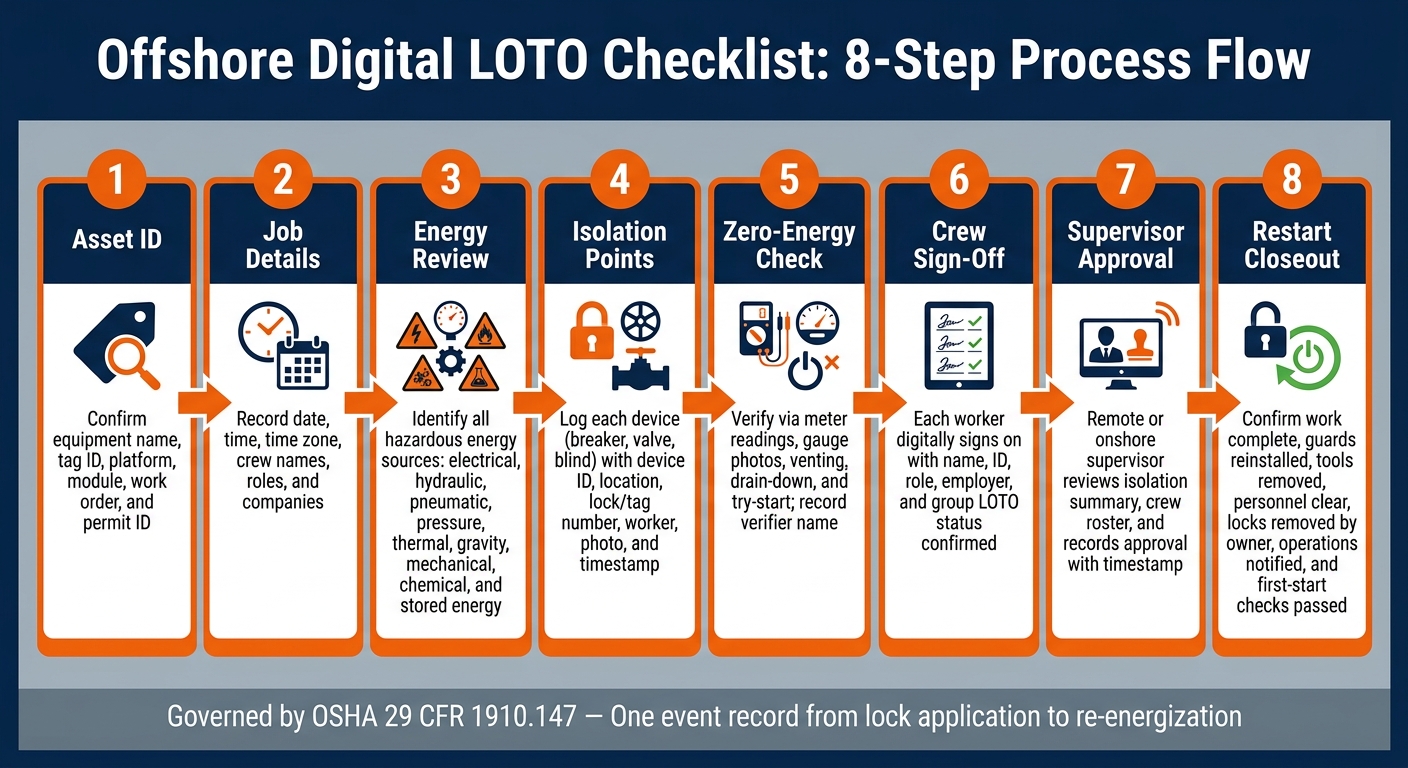
Offshore Digital LOTO Checklist: 8-Step Process Flow
inSis LOTO | Smart Lockout Tagout Management System for Industrial Safety
Section 1: Asset ID and energy source review
Before anyone applies a lock or tag, the crew needs to make sure they’re working on the right equipment. On offshore platforms, pumps, compressors, and valves can look almost identical within the same module. If the wrong asset gets picked, the crew can isolate the wrong equipment. That’s a serious problem.
Asset and job details required
Start with asset fields that leave no room for guesswork or loose free-text entries. At a minimum, capture:
- Equipment name
- Asset ID or tag number
- Offshore installation name
- Module or deck location
- System description
- Work order ID
- Permit-to-work ID
- Date (MM/DD/YYYY)
- Start time and expected completion time with time zone
- Responsible crew names, companies, and roles
Pull asset data from the CMMS using the equipment name or tag number. Then auto-fill the location fields and keep them read-only. That way, the record stays tied to the correct asset instead of relying on manual entry.
Before final confirmation, show an asset summary panel with the photo, location, and last job record. This gives the crew one more clear check before they move ahead. QR or NFC tags on the equipment should confirm that the worker is standing at the correct asset before the form opens. For high-risk equipment, require a second verifier to confirm the asset before the LOTO record becomes active.
Energy source fields
Once the asset is confirmed, the checklist should force a full energy review before any isolation starts. After confirmation, list each hazardous energy source as a yes/no field. If a crew member selects "yes" for any source, the form should immediately expand and require the detail fields for that source.
| Energy Source | Key Fields to Capture |
|---|---|
| Electrical | Voltage (V), AC/DC, MCC panel or UPS source, control circuit location |
| Hydraulic | Operating pressure (psi), fluid type, isolation valve location |
| Pneumatic | Supply pressure (psi), venting point, regulator location |
| Process pressure | Operating and maximum pressure (psi), system (oil/gas/chemical), depressurization steps |
| Thermal | Surface or fluid temperature (°F), cool-down requirement |
| Gravity | Description of elevated load or counterweight, blocking method |
| Mechanical | Rotating parts, stored kinetic energy, restraint method |
| Chemical | Substance, containment plan |
Also add stored-energy fields for capacitor banks, accumulators, trapped pressure, springs, and suspended loads.
The form should also include yes/no fields for PLC, SCADA, ESD, pushbuttons, UPS, generator feeds, and battery backups. If any answer is "yes", the checklist must open the related isolation and verification fields right away.
For hydraulic and pressure systems, include checkboxes for:
- Depressurization reference
- Upstream valve closure
- Venting
- Zero-pressure verification
- Zero-pressure gauge used
- Name and time of the verifier
These confirmed hazards should then carry forward into the isolation-point checks in Section 2.
Section 2: Isolation point checks and lock/tag setup
After Section 1, isolate each energy source in this order: shutdown, isolate, lock/tag, release stored energy, and verify zero energy. Every energy source found earlier should link to one specific isolation device. In plain terms, each isolation point needs one energy source and one verifier tied to it.
Isolation point checklist
Give each breaker, valve, disconnect, blind, and lock box its own checklist line. Don’t bundle several devices into one entry. Verification should connect to the exact energy-isolating device, not just the full job permit.
Each line item should show control of one hazard, one device, and one verification step. For each device, the mobile form should collect:
| Field | What to Enter |
|---|---|
| Device type | MCC breaker, gate valve, ball valve, manual disconnect, line blind, lock box |
| Device ID | Exactly as marked on P&IDs, single-line diagrams, or equipment nameplates (e.g., "MCC-2B-04", "HV-201") |
| Exact location | Deck, module, area, elevation (e.g., "Production Deck – Module P-3 – North Wall – 12 ft above deck") |
| Energy type controlled | Electrical, hydraulic, pneumatic, process fluid, mechanical, gravity |
| Expected position | Expected state from the site procedure |
| Actual position | Dropdown selection plus photo of the handle or indicator |
| Lock number / tag number | Scan or enter the lock/tag number; note group-lock or lock-box use |
| Worker assigned | Name, badge ID, company, role |
| Verification method | Visual check, gauge reading, electrical test, or try-start |
| Time and date | MM/DD/YYYY, hh:mm a.m./p.m., local time zone |
Photos and scans should back up each device in place. Don’t let the step close until the needed photo or scan is attached.
Zero-energy and stored energy checks
A lock on its own does not prove zero energy. Verification means checking isolation from every energy source and making sure stored energy is gone. Each verification entry should tie back to the exact isolation point it covers.
For stored energy, require one action-and-result entry for each hazard. That includes:
- Drain lines and record the final pressure
- Vent pneumatic lines
- Block elevated loads
- Wait the stated discharge time for capacitors and VFDs
- Isolate UPS or generator backfeed sources
This step confirms the asset is safe to work on. For electrical systems, record the meter type, test points, and line-to-line readings. Also confirm the meter was tested on a known live source before and after use.
For pressure systems, require a final gauge photo and a numeric reading field. If the procedure allows a try-start, capture who did it, which control point they used, and what happened. Then require the controls to go back to the off or neutral position before the step can close.
Timestamp and digitally sign each verification entry.
Once zero energy is confirmed, move the record to crew sign-off.
sbb-itb-aa28329
Section 3: Crew sign-off and remote supervisor approval
Once zero energy is confirmed, the checklist moves from control to accountability. At this point, the job is no longer just about what was isolated. It’s about who is covered, who carried out the isolation, and who approved the work. Offshore, digital sign-off helps keep the crew list and approval chain clear. The isolation record should carry straight into crew sign-off so every worker is linked to the same approved shutdown scope.
Crew sign-off fields for group LOTO
OSHA group LOTO requires one lead authorized employee to track each worker covered by the lockout. If more than one crew, craft, department, or contractor group is involved, each group should have a designated lead authorized employee, with a group coordinator making sure no one is missed.
For each crew member, the digital form should capture:
- Full name
- Unique worker ID
- Job role
- Employer or contractor name
- Work group
- Whether the worker performed the isolation or is protected by it
The checklist should also include group-based sign-on and sign-off fields, with separate status, timestamp, and reason for sign-off. To tie the roster to the right job, add the permit number and isolation record ID so the crew list points back to the correct isolation plan. Digital signatures should be linked to authenticated user logins, paired with a confirmation prompt that sums up the isolation scope before final sign-on, and stored in a tamper-evident audit trail.
Offshore work often runs across staggered shifts, so the system should support partial release. That means one group can sign off while others stay protected, and the system updates the overall isolation status automatically, such as "Isolation active – 2 of 3 groups still signed on". A hard rule should block any restart request until all required groups show signed-off status.
The same signed roster then moves to supervisor review without changing the isolation scope.
Remote supervisor approval steps
After the roster is complete, route the record for approval. A solid remote approval workflow should include the supervisor’s name, role/title, department, review status, permit alignment check, comments or conditions, and an approval timestamp. After isolation and crew sign-on, the coordinator submits the record, the onshore supervisor gets a notification, reviews the isolation summary and crew list, and records the decision. Once approved, the system should lock the record against unauthorized changes.
If connectivity drops, the checklist should default to local offshore supervisor authority, with retrospective remote review once the data syncs. ABLEMKR can support offline capture, auto-sync, and certification checks before remote approval.
Section 4: Restart checks and record storage
Once every group has signed off and the approval is logged, move into controlled re-energization and closeout. Use the same event ID and the same isolation scope set earlier.
The restart sequence needs to happen in order. First, confirm the work is finished. Next, verify that tools and materials are out of the area. Then check that guards and safety devices are back in place. After that, make sure all personnel are clear of danger zones. Only then should locks and tags be removed and energy restored.
A digital checklist should enforce that order. In plain terms, no one can skip ahead. Each step stays blocked until the prior one is signed off.
Capture these fields in sequence:
- Work complete: yes/no, with any deviations noted
- Guards and enclosures reinstalled: yes/no, plus an optional photo upload
- Tools removed: yes/no, with a notes field
- Personnel clear: Supervisor confirms all personnel are clear
- Lock/tag removal log: each device listed by owner, location, and type; the owner digitally signs removal with an automatic timestamp. Group locks stay blocked until all personal locks are cleared, and no locks can be removed until every required group is signed off
- Operations notified: dropdown for notified party (control room, production supervisor, marine supervisor), timestamp, and communication method (radio, phone, digital system message)
After re-energization, record the first-start checks before closing the event. These checks are required:
- Alarm status (no alarms / alarms present), with space to list alarm codes
- Vibration (normal / abnormal) for rotating equipment
- Temperature readings in °F on bearings and other critical components
- Leak checks for oil, hydraulic fluid, gas, or produced water
- Pressure stability compared with normal operating ranges
If any first-start check fails, the system should force the crew to shut the equipment down and re-apply LOTO before the record can move forward. That hard stop matters. It keeps a shaky restart from turning into a bigger safety problem.
Digital record storage and compliance tracking
After the restart checks pass, lock the event record for storage and audit use. The final record should show isolation, sign-off, approval, restart, and closeout in a single timeline.
Core fields should include LOTO event ID, asset ID, permit ID, names and employee IDs of all workers involved, isolation points and their status, verification method (try-start test, voltage check, pressure bleed-down) with the name of the person who performed it and when, a full timeline from lock application through re-energization, approval history, restart time, first-start monitoring results, and final closeout status (closed, closed with deviation, or reopened).
Records should live in a secure, centralized system with role-based access, encryption, and immutable logs for changes, approvals, and access. Good indexing makes a big difference here. Teams should be able to pull records fast during an audit or incident review by searching event ID, asset ID, platform or rig name, date, permit ID, and worker ID.
Store annual inspection records for at least 1 year and training records for the full duration of employment. For offshore operators, that makes long-term digital storage less of a nice-to-have and more of a basic operating need.
ABLEMKR can strengthen this part of the process by linking worker certifications and safety training records directly to each LOTO event. The platform can verify current LOTO training and certifications and attach that status to the event record, which helps make sure only properly qualified personnel handle high-risk energy work.
Conclusion: A simple structure for an offshore digital LOTO checklist
Once restart checks pass, the checklist only matters if each step is recorded the same way every time. For offshore teams, that means sticking to one fixed sequence: asset ID, energy review, isolation, verification, sign-off, approval, restart, and record storage.
Keep the form simple. Use short required fields, preset options, and automatic timestamps so crews can fill it out fast and with fewer mistakes offshore. But that setup works only if every site follows the same layout. Use one digital LOTO template across sites, require it for high-risk work, and spot-check recent records for order and completeness. In offshore work, a steady digital checklist cuts down on confusion between shifts, contractors, and remote approvals.
Centralized storage and completeness checks also make records easier to pull during audits and help prevent missing approvals. There’s one more layer worth adding: connect worker qualifications to the checklist before energy isolation starts. ABLEMKR can link worker certifications and current LOTO training to job assignments before lockout begins.
FAQs
Who should approve an offshore digital LOTO?
An offshore digital lockout tagout (LOTO) should be approved by remote supervisors, who review the isolation steps and safety permits before work starts.
That approval does a few important things at once. It creates clear accountability, confirms that the required safety checks are done, and keeps a digital audit trail in place to support OSHA compliance. It also gives teams real-time visibility into site energy isolation.
How do you verify zero energy offshore?
Follow a formal lockout/tagout sequence: isolate all energy sources, release stored energy, and perform a tryout by attempting a normal restart to confirm isolation.
Then use calibrated instruments, such as voltmeters or pressure gauges, to verify zero energy before work begins. ABLEMKR can support this with a digital registry of isolation points and authorized personnel records.
What records should a digital LOTO system keep?
A digital Lockout Tagout (LOTO) system should track records for energy-isolating devices, including their location, current status, and the personnel assigned to them.
It should also log time-stamped isolation activity, such as equipment shutdown, verification that stored energy was released, and individual accountability during group lockouts.
Just as important, the system should document worker LOTO training certifications and expiration dates. It should also keep site access data that helps confirm who authorized, carried out, and checked each isolation step.


