
My starting rule for IRA compliance: assign an owner to every wage check, apprentice requirement, and payroll record before work starts. The taxpayer bears the credit risk – even when contractors or payroll partners handle the records.
For covered projects starting construction in 2024 or later, qualifying apprentices generally must perform 15% of covered labor hours. But that percentage is only one test: daily ratios and employer participation also matter.
In this guide, I cover how to:
- Check project coverage, wage rates, worker classifications, and apprentice eligibility.
- Collect onboarding and subcontractor records, then reconcile hours, wages, and fringes each pay period.
- Document corrections and apprentice requests that may support a good-faith exception.
- Use software, including ABLEMKR workflows, to support – not replace – compliance checks.
- Keep an indexed audit package that you can <u>retrieve after project closeout</u>.
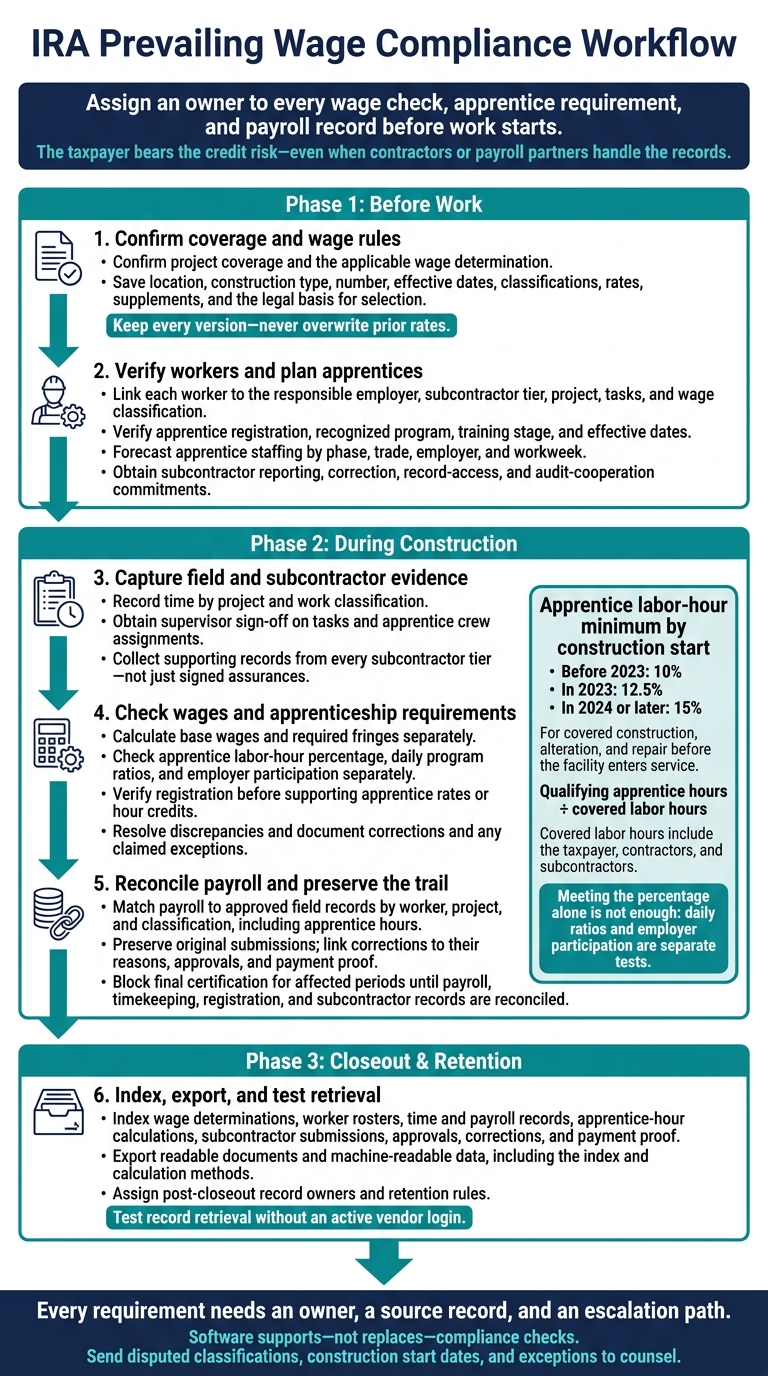
IRA Prevailing Wage Compliance Workflow
10 Questions with Reunion – Episode 6: Navigating IRA Prevailing Wage & Apprenticeship Requirements
sbb-itb-aa28329
Prevailing Wage and Apprenticeship Requirements
Once roles are assigned, set the wage and apprenticeship rules that guide each payroll cycle. Use IRS and DOL guidance to build controls. Software should record determinations and enforce rules. Send disputed classifications, construction start dates, and exceptions to counsel.
Choose Wage Determinations and Calculate Pay
Save the applicable SAM.gov wage determination, including its location, construction type, number, effective dates, classifications, rates, supplements, and legal basis for selection. Keep every version – never overwrite prior rates.
Calculate base wages and required fringes separately. Credit only qualifying benefits or allowed cash equivalents, and split hours by work classification. IRA wage compliance does not replace overtime duties under the Fair Labor Standards Act or state law.
| Requirement | Supporting records | Software control |
|---|---|---|
| Correct wage determination | Source, location, construction type, effective dates, supplements | Preserve versions; flag missing or conflicting selections |
| Classification and split hours | Task-level timecards, classification mapping, supervisor approval | Classify each block of hours; flag blended rates |
| Base wages and fringes | Payroll, benefit contributions, cash-in-lieu records | Calculate separately; flag underpayments |
| Apprentice pay | Registration, program wage schedule, training stage | Apply the stage percentage to the journeyworker rate; default to full fringes unless the agreement says otherwise |
Once rates are set, apply the same care to apprentice eligibility.
Track Apprentice Hours, Ratios, and Participation
For covered construction, alteration, and repair before the facility enters service, apply the apprentice-hour minimum tied to the construction start: 10% before 2023, 12.5% in 2023, and 15% in 2024 or later.
Include covered labor hours from the taxpayer, contractors, and subcontractors in the denominator. Include only qualifying apprentice hours in the numerator. Document exclusions under applicable guidance and have a professional review them. Labor hours, daily ratios, and employer participation are separate tests – meeting the percentage alone is not enough.
| Test | Calculation and supporting records | Alert or action |
|---|---|---|
| Labor-hour percentage | Covered timecards, subcontractor reports, construction-start approval | Forecast qualifying hours against the required percentage |
| Individual registration | Registration, recognized program, classification, stage, effective dates | Flag invalid registration; block unsupported rates or hour credits |
| Daily program ratio | Daily apprentice and journeyworker records, program ratio | Flag excess hours; exclude them from qualifying totals |
| Employer participation | Headcount and apprentice records by covered employer | Flag employers with four or more individuals and no qualified apprentice assigned |
Use these controls to plan staffing before crews mobilize.
Plan Apprentice Staffing and Document Exceptions
Forecast hours by phase, trade, employer, and workweek. Before mobilization and at each payroll close, check registered-program availability, wage schedules, and daily ratio limits. Keep written apprentice requests that specify classifications, numbers needed, location, start dates, and duration. Save responses, dispatches, and follow-ups, too.
A qualifying denial or no response within five business days may support a good-faith exception – not an automatic exemption. Have counsel verify request adequacy, covered work, permitted periods, renewal requirements, exception claims, and remedies, including intentional-disregard concerns. Guidance describes a maximum exception period of 365 days, or 366 days for a leap-year period.
Resolve ratio and participation gaps before payroll closes. Wage failures generally require correction payments plus interest and may trigger penalties. Apprenticeship failures may trigger a penalty of $50 per noncompliant labor hour, increasing to $500 per hour for intentional disregard, unless an applicable exception or other relief applies. Block final certification for affected periods until payroll, timekeeping, registration, and subcontractor records are reconciled.
Worker Onboarding and Subcontractor Oversight
Collect Worker and Subcontractor Records
Prevailing wage compliance starts with clear worker, subcontractor, and payroll ownership records. Before mobilization, link each worker to the employer or staffing entity responsible for payroll, subcontractor tier, project, assigned tasks, wage classification, and applicable wage determination.
Collect proof of apprentice registration, required licenses, and site-safety training. Identify any EOR or PEO and assign payroll responsibility. OSHA 10/30 training does not prove apprentice registration or confirm the correct wage classification.
Require subcontract terms that cover wage and apprenticeship duties, lower-tier reporting, submission deadlines, record access, corrections, and audit cooperation. Get supporting records from every tier – not just signed assurances.
Limit access by role. Supervisors need qualification and assignment status; payroll and authorized compliance staff need pay records. Keep medical clearances and other sensitive information out of general crew files. Use these records as the source file for each pay-period review.
Review Time and Payroll Each Pay Period
Review records each pay period to catch incorrect data before it enters payroll. Track time by project and classification, with supervisor sign-off on tasks and apprentice crew assignments. Require subcontractors to submit payroll backup before the approval deadline.
Approve pay only after hours, classifications, wages, and apprentice ratios match the supporting records.
Put submission and review deadlines in writing. ABLEMKR’s workflow uses a Sunday midnight time-submission deadline, a Tuesday noon approval window, and Friday payment processing. Carry unresolved discrepancies forward before payroll closes.
Use ABLEMKR to Support Workforce Deployment
ABLEMKR supports construction and energy staffing through verified worker profiles, certification visibility, mobile onboarding, workforce-status tracking, integrated payroll workflows, and compliance logs.
Before rollout, confirm which features and access controls are supported. Treat deployment visibility as supporting evidence only. Separately verify wage classifications, registered apprentice status, and apprentice-to-journeyman ratio checks.
Payroll Integration, Record Retention, and Audit Preparation
After each pay run, lock the records that support wage and apprenticeship compliance. This preserves the evidence behind wage, apprentice, and subcontractor claims.
Reconcile Field Records With Payroll
Use one system of record for each record type. Before launch, test field-to-payroll mappings, duplicate prevention, rejected transfers, and batch totals. Log what was accepted, rejected, and corrected.
Before payment, save the reconciliation trail that links payroll to approved field records by worker, project, and classification, including apprentice hours. Keep the original submission and link every correction to its reason, approval, and payment proof.
Once payroll matches field records, assign an owner to each record set and define how long it must remain retrievable.
Set Record Ownership and Retention Rules
Keep compliance records in one central system. Use role-based access so authorized staff can review and retrieve them quickly. If you work with workforce partners such as EOR or PEO services, keep payroll, employment administration, and compliance records organized and accessible.
| Record category | System of record | Owner | Review frequency | Retention control |
|---|---|---|---|---|
| Worker profiles and qualifications | Centralized workforce system | Compliance lead | Before assignment and when status changes | Keep current credentials together |
| Field time and task sign-offs | Time-tracking system | Field supervisor | Each pay period | Retain approvals and task history |
| Payroll and payment records | Payroll system | Payroll manager | Each payroll run | Preserve registers, adjustments, and payment proof |
| Subcontractor compliance records | Project compliance repository | Subcontract administrator | Each reporting cycle | Retain submissions and corrections |
After reconciliation, package the records so staff can retrieve them quickly during an audit.
Build an Indexed Audit Package
Build an internal audit package, not a government filing format. Index wage determinations, worker rosters, time and payroll records, apprentice-hour calculations, subcontractor submissions, approvals, corrections, and payment proof. Use project, worker, employer, and pay-period identifiers to link each original submission to its correction and approval history.
For the pre-audit check, save a dated snapshot and reconcile field hours, payroll, and payments. Check the supporting records for apprentice labor-hour percentages, daily ratios, participation, and documented exceptions. Resolve discrepancies and retain the approval trail.
Export readable documents and machine-readable data, including the index and calculation methods. Test record retrieval without an active vendor login.
Conclusion: IRA Software Readiness Checklist
Treat software readiness as a map of your controls: every requirement needs an owner, a source record, and an escalation path. Uploading a file does not complete a control.
Use this checklist to confirm who owns each control, from onboarding through closeout.
Check Controls Before Work, During Construction, and at Closeout
Use this matrix for the final control check.
| Phase and control | Responsible party | Source record | Review cadence | Escalation path |
|---|---|---|---|---|
| Pre-Work: confirm project coverage and applicable wage determinations | Compliance lead | Coverage assessment and wage determinations | Before work starts | Legal/tax advisor |
| Pre-Work: verify worker qualifications before mobilization | Safety officer | Worker qualification records | Before mobilization | Safety director |
| Pre-Work: approve apprentice staffing and responsibilities | Hiring manager | Staffing plan and registration records | Before mobilization | Project manager |
| Construction: verify apprentice hours, ratios, and subcontractor records | Field supervisor | Documented task sign-offs and subcontractor submissions | Weekly | Superintendent |
| Construction: reconcile payroll and compliance records | Payroll manager | Integrated payroll and time records | Each pay period | Payroll admin |
At closeout, move from checking the work to retrieving and retaining records. Keep post-closeout duties assigned and records retrievable after demobilization.
| Phase and control | Responsible party | Source record | Review cadence | Escalation path |
|---|---|---|---|---|
| Closeout: confirm audit package and retrieval | Compliance officer | Audit package | At project completion | Legal/tax advisor |
| Closeout: retain the audit trail | Contractor | Version-preserving audit trail | Post-construction | Legal/tax advisor |
FAQs
Is my project exempt from IRA wage requirements?
Whether your project is exempt from the Inflation Reduction Act (IRA) prevailing wage requirements depends on which tax credit you claim. The IRA extended Davis-Bacon requirements to clean energy tax credits for solar, wind, and battery storage projects.
Failing to comply can result in penalties, lost tax credits, and project shutdowns. Before assuming your project is exempt, consult legal counsel or review your project documentation to confirm which requirements apply.
How long must I retain IRA compliance records?
Keep all IRA compliance records for at least three years after the project ends. Facilities claiming the Investment Tax Credit must retain records through the five-year recapture period. Those claiming the Production Tax Credit must retain them for the full credit period.
State laws or other agencies may require you to keep records longer. Digital record-keeping is recommended for long-term storage and to help you prepare for audits.
What if a subcontractor withholds payroll records?
Treat withheld payroll records as a compliance and audit risk. Use documented flow-down clauses to promptly obtain Certified Payroll Reports, such as Form WH-347, and supporting wage documentation.
Audit payroll weekly. Store records securely, keep them accessible, and provide them to the U.S. Department of Labor within 72 hours of a request.
If records remain unavailable, escalate immediately. Prime contractors are accountable for subcontractors’ prevailing wage compliance and risk steep penalties and back-wage recovery.


