
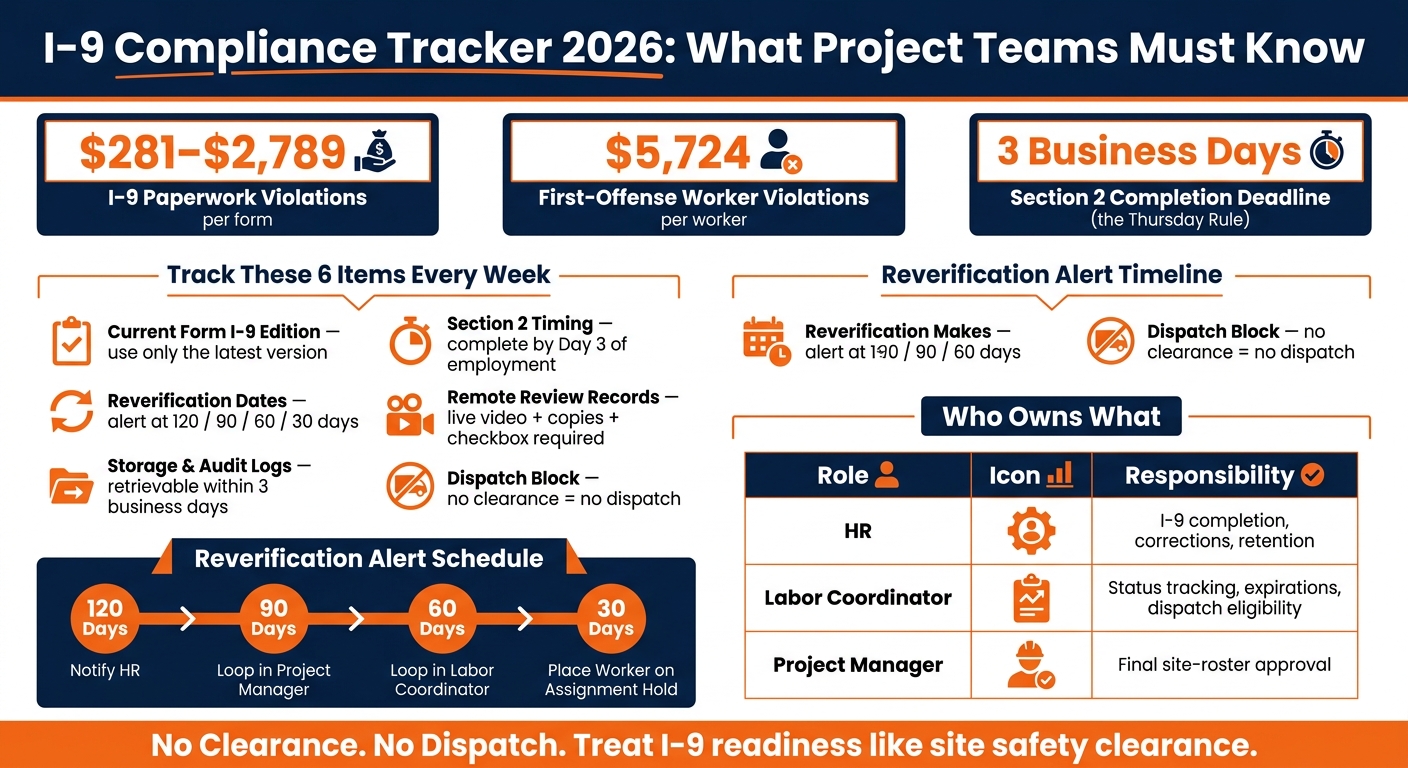
After August 1, 2026, I-9 mistakes can cost you fast. Fines now run from $281 to $2,789 per form, and worker-related violations can reach $5,724 per worker for a first offense. If I were running crews across job sites, I’d track five things every week: the current form edition, Section 2 deadlines, reverification dates, remote-review records, and dispatch blocks.
Here’s the short version:
- Use the current Form I-9 edition for every new hire
- Finish Section 2 within 3 business days
- Track work authorization expiration dates before dispatch
- Follow the DHS remote review steps exactly if using E-Verify
- Store records so they can be produced within 3 business days
- Block site assignment if I-9 status is incomplete
Pandemic-era flex rules are over. If a team uses remote review, it must follow the DHS alternative procedure with live video, document copies, and the right form note. A photo sent by email alone does not meet the rule.
What I take from this article is simple: treat I-9 clearance like site access. If a worker has a missing form, late reverification, or weak audit history, that issue can lead to fines, delays, and roster problems at the jobsite.
I-9 Compliance Checklist 2026: Key Rules, Deadlines & Fines
I-9 Compliance & Worksite Enforcement in 2026: What Employers Need to Know
sbb-itb-aa28329
Quick overview
| What to track | What I’d check | Why it matters |
|---|---|---|
| Form edition | Current version only | Old forms can trigger violations |
| Section 2 timing | Due by day 3 | Late completion creates risk |
| Reverification | 120/90/60/30-day alerts | Stops work authorization lapses |
| Remote review | Live video, copies, checkbox | Email-only review fails the rule |
| Storage and logs | Fast retrieval, user history | Missing records and weak logs create audit trouble |
| Dispatch status | No clearance, no dispatch | Keeps non-ready workers off the roster |
If I had to reduce the whole article to one line, it would be this: track I-9 status by worker, by site, and before mobilization.
1. Track Reverification Dates Before Work Authorization Expires
Work authorization dates are easy to miss when workers bounce between job sites or come back for short-term assignments. Someone can be moved to a new site while an expiring EAD slips past review. The first step is simple: separate workers who need reverification from those who don’t.
Which Workers Require Supplement B Reverification
Supplement B reverification applies only to employees with time-limited work authorization. U.S. citizens, noncitizen nationals, and most lawful permanent residents do not need reverification.
For each worker who does need reverification, track four data points:
- document type
- document number, where permitted
- expiration date
- the name of the person responsible for completing Supplement B
Use the earlier of the Section 1 work-authorization expiration date or the Section 2 document expiration date as the reverification deadline.
How to Prevent Missed Deadlines Across Active Projects
Missed deadlines usually happen when no one has a clear line of sight across active assignments. A worker may be cleared on one project, then dispatched to another without anyone noticing an upcoming expiration. That’s where timed alerts help.
Set alerts at 120, 90, 60, and 30 days. Start with HR, then loop in project managers and labor coordinators. At 30 days, place the worker on assignment hold until reverification is complete.
Those reminders only help if teams can see worker status at the site level. Use a site-level dashboard that shows authorization status, current project, and deployment end date before dispatch. Late reverification is a substantive violation, and there is no 10-day cure window.
How ABLEMKR Supports Worker Status Visibility
This only works when project teams can check status before dispatch. ABLEMKR can show authorization status, expiration dates, and assignment timing in one worker profile, so coordinators can spot expiring authorization before a worker is sent out.
2. Standardize Document Review and Remote Verification Steps
After reverification tracking, the next control is the way each document gets reviewed. Section 2 errors can turn into audit trouble fast, especially when crews are hired across multiple sites, in the field, or from a remote location. The fix is simple: use one review process for every hire. The standard should stay the same whether the team is at headquarters, in a trailer, or on a remote jobsite.
Section 2 Data Points Teams Must Capture Within Three Business Days
Complete Section 2 within three business days of the employee’s first day of work for pay, or by day one for a worker who will work fewer than three business days.
Reviewers must examine original, unexpired documents or acceptable receipts in person – or through the DHS-approved alternative procedure when permitted. Photocopies are not acceptable, except for certified copies of birth certificates. The reviewer must confirm that each document reasonably appears genuine and relates to the person presenting it.
That means the reviewer needs to record:
- document title
- issuing authority
- document number
- expiration date, if any
- first day of work for pay
- Section 2 completion date
- reviewer’s name, title, signature, and attestation date
- employer name and physical address
The document also needs to go in the right List A or List B and List C column, with unused columns left blank. If an employee starts on Monday, Section 2 is due by Thursday. Many teams refer to this as the Thursday rule.
Remote Document Examination Rules Under the Alternative Procedure
Employers enrolled in E-Verify may use the DHS-approved alternative procedure instead of in-person review at a jobsite or temporary field office. The process requires clear document copies, followed by a live video check of the same originals.
There are two extra steps under the alternative procedure. First, document copies must be kept as part of the I-9 record. Second, the form must be marked to show that the alternative procedure was used. On current editions of Form I-9, check the designated box in the Additional Information area. On older editions, write alternative procedure, add the date, and initial.
Skip casual labels like Zoom check or video review in that field. Use the exact term alternative procedure. If you’re using an electronic I-9 system, set it up to insert that phrase automatically when remote review is selected, and tie the record to stored document images and video session metadata.
What to Log When Verification Happens in the Field
When verification happens offsite, the record should show exactly who handled it, when it happened, and how it was done. Teams should keep a supplemental audit log alongside the Form I-9.
At a minimum, the log should include the reviewer’s name and role, the date and time, the review method, the E-Verify case number and result if one applies, and any correction made, including when it was made and who made it. Electronic I-9 systems should also record who accessed each form, what changed, and when. That creates a secure, permanent audit trail.
When errors turn up during an internal review, the way you fix them matters just as much as the fix itself. On paper forms, strike through the error once, write the correction, initial it, and add the date. Never use correction fluid. In electronic systems, the platform should automatically log the prior value, the new value, and the identity of the person who made the change. Missing or incomplete audit trails are treated as substantive violations, not IT problems.
3. Store I-9 Records Correctly and Maintain Audit Logs
Once verification is done, the next risk is storage. Teams still need to find the record fast and stand behind it if asked. Completing Form I-9 is only half the job. You also have to store it so it can be produced within three business days of an inspection request.
Retention Windows Project Teams Must Calculate Correctly
Retain each Form I-9 for three years after hire or one year after employment ends, whichever is later. That timeline has to be tracked for each worker. A project closeout doesn’t control the legal retention clock.
Track retention by worker, not by project. Maintain a central retention register that flags upcoming purge dates and confirms no file is destroyed before its legal window closes.
Once the retention date is set, store the file in a way that protects it until destruction is legally allowed. Think of it like a hold-until date: the record can’t disappear early just because a jobsite wraps up.
Storage Controls for Paper and Electronic Records
USCIS allows paper, electronic, or mixed storage, as long as records remain legible and can be produced on demand. Keep paper I-9s in a locked file separate from personnel records.
For electronic records, the system should:
- Allow search by employee name or ID
- Support role-based access controls
- Limit viewing and editing to HR staff, labor coordinators, and designated compliance leads
That matters when crews move between sites and records need to be pulled without delay. If your team uses the remote verification alternative procedure, retain clear, legible copies of the front and back of the documents examined remotely with the I-9.
Storage by itself isn’t enough. Electronic systems also need to show who touched the record and when.
Why Audit Trails Matter in Electronic I-9 Systems
An electronic I-9 system without a reliable audit trail is a liability. DHS expects these systems to create a secure, permanent record whenever a Form I-9 is created, completed, updated, modified, altered, or corrected, including the date of access, the identity of the user, and the specific action taken.
A complete audit trail must show who changed the record, when, and what changed. Without that history, a correction is hard to defend.
For project-based employers managing crews across multiple sites, ABLEMKR can support audit readiness through centralized dashboards that show I-9 status across active sites and traceable worker-status updates that tie mobilization and termination events directly to each worker’s compliance record.
4. Run Site-Level Readiness Checks Before Mobilizing Workers
The tracking covered earlier – reverification dates, Section 2 deadlines, remote verification records, and audit logs – only matters if it ties straight to dispatch. The rule is simple: no clearance, no dispatch.
A worker should not be added to the site roster until every compliance checkpoint is current. Make I-9 status a hard stop before dispatch. Your last control point is dispatch, so that’s where the decision has to hold.
Pre-Dispatch Checks for Each Worker and Each Site
Before dispatch, confirm that the worker’s I-9 record is complete and easy to access. Check Section 2 timing, reverification status, and remote-review records before the worker is sent out. If anything is missing, keep the assignment pending until it’s fixed.
Watch workers whose work authorization will expire during a project. Flag that before dispatch, not after they’re already on site. A worker may be compliant today and still become non-compliant in the middle of a job if the Supplement B reverification deadline is missed.
Who Owns Each Tracking Duty: Project Manager, HR, and Labor Coordinator
Clear ownership stops things from slipping through the cracks. If everyone assumes someone else handled the check, no one handled it. Give each checkpoint one owner.
| Role | Owns |
|---|---|
| HR | I-9 completion, corrections, retention |
| Labor Coordinator | Status tracking, expirations, dispatch eligibility |
| Project Manager | Final site-roster approval |
In practice, an assignment should not move to confirmed status unless all three layers have signed off. ABLEMKR gives labor coordinators and project managers a shared view of worker readiness before crews move.
Conclusion: Five Items Teams Should Track Every Week
Track site-level readiness every week. One weekly review can catch expiring work authorization, incomplete records, and blocked dispatches before they turn into a scramble.
Focus on these five items:
- Workers missing a completed I-9 or using an outdated edition
- Reverification deadlines in the next 30 days
- Assignments still pending Section 2 completion
- Remote verification records missing required documentation
- Workers blocked from dispatch until I-9 and credential checks are current
Teams that run this review each week catch problems before they turn into staffing delays or audit risk. Treat I-9 readiness the same way you treat safety clearance or equipment availability. It keeps field execution predictable and easier to defend.
FAQs
Who needs I-9 reverification?
Employees whose work authorization – or the document that proves it – has an expiration date need to be reverified. Employers have to complete Form I-9 reverification on or before that expiration date to confirm the employee is still allowed to work in the United States.
E-Verify can confirm work authorization at the start of employment. But it can’t be used for Form I-9 reverification.
What counts as valid remote I-9 review?
A valid remote I-9 review only works if the employer is actively enrolled in E-Verify at the time they use that process.
There’s also a second part that trips people up: the employer has to follow Department of Homeland Security rules for the remote check. In most cases, that means doing a live video call to confirm the person matches the photo ID and that the documents appear genuine.
And there’s one more detail that matters a lot. The employer must check the alternative procedure box on Form I-9. If they skip that step, it counts as a substantive violation and can lead to immediate penalties.
How long must I-9 records be kept?
Employers must keep Form I-9 for 3 years after the hire date or 1 year after employment ends – whichever is longer.
That rule matters because Form I-9 contains sensitive personal information. Store these records securely, whether that means locked physical files or encrypted digital systems. The goal is simple: protect employee data and be ready if a compliance check comes up.


