
If I had to boil this down to one idea, it’s this: I turn the build schedule into a month-by-month labor plan by role, then I update it every time dates or scope move. That means I map each phase, assign crews, convert labor hours into headcount, add ramp-up and overtime rules, and then check the plan weekly.
Here’s the short version:
- Start with the schedule, not guesswork
- Break the job into phases and milestone dates
- Assign each phase the people it needs
- Convert labor hours into monthly headcount
- Add ramp-up, shift, buffer, and overtime rules
- Track peak months and hiring risk early
- Refresh the forecast when scope changes by about ±5% or when critical-path work slips
The numbers in the article make the point fast: 439,000 net new workers were needed in 2025, 92% of firms hiring craft workers had trouble finding people, and 45% tied delays to labor shortages. So if I wait until a crew is already needed, I’m late.
A few points stand out:
- A phase with 16,000 labor hours over 4 months can need about 19 workers at 50 hours/week, but about 23 to 24 workers at 40 hours/week
- A 10% to 15% buffer helps cover weather, absences, meetings, and rework
- Planned hours should usually stay near 50 to 55 hours/week
- If actual hours run 5 hours/week above plan for 4 straight weeks, I should add people instead of pushing more overtime
- Forecast accuracy should be checked monthly, with a target around 85% to 95%
In plain terms: the article says labor forecasting is not a one-time spreadsheet. It’s a live staffing plan tied to the schedule, phase by phase, month by month, so HR, field teams, finance, and subs are all working from the same headcount view, often supported by modern construction staffing solutions.
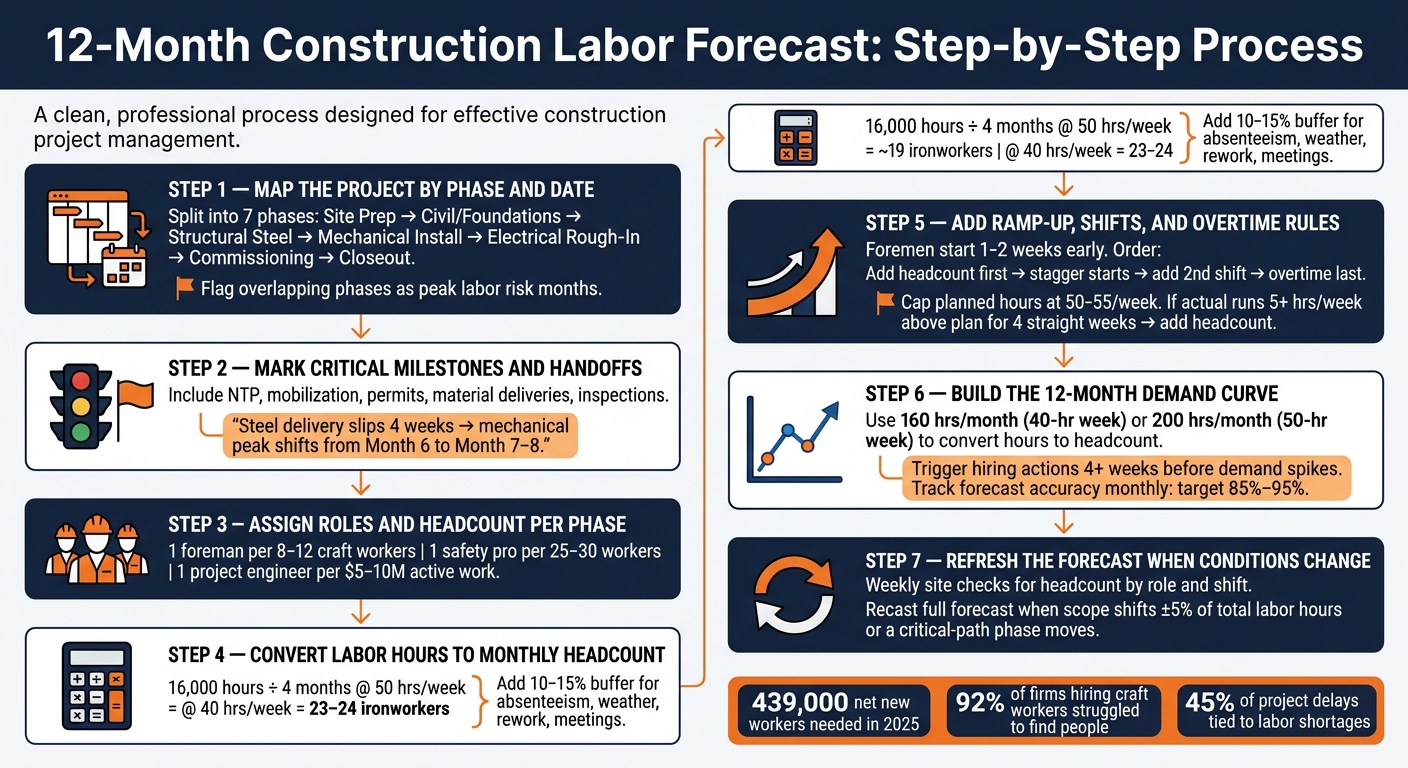
12-Month Construction Labor Forecast: Step-by-Step Process
The Art and Integrity of Construction Labor Forecasting.
sbb-itb-aa28329
1. Map the Project by Phase and Date
Start by placing each major phase on a 12-month calendar with clear start and finish dates. This phase map becomes the timing layer for your labor forecast.
Build a Phase-Based Timeline
Split the project into its main work blocks: site prep, civil/foundations, structural, mechanical, electrical, commissioning, and closeout. Pull the start and finish dates for each phase from the master schedule, then place them across the 12-month window.
| Phase | Key Labor Groups | Start Date | Finish Date | Duration |
|---|---|---|---|---|
| Site Prep | Operators, laborers, surveyors | [From schedule] | [From schedule] | [Calculate from schedule] |
| Civil / Foundations | Concrete crews, form carpenters, inspectors | [From schedule] | [From schedule] | [Calculate from schedule] |
| Structural Steel | Ironworkers, crane operators, safety supervision | [From schedule] | [From schedule] | [Calculate from schedule] |
| Mechanical Install | Pipefitters, welders, riggers | [From schedule] | [From schedule] | [Calculate from schedule] |
| Electrical Rough-In | Electricians, controls technicians | [From schedule] | [From schedule] | [Calculate from schedule] |
| Commissioning | Controls engineers, OEM technicians, operations staff | [From schedule] | [From schedule] | [Calculate from schedule] |
| Closeout | Punch-list trades, QA/QC, document control | [From schedule] | [From schedule] | [Calculate from schedule] |
Some phases will overlap. That matters. Any month with several phases running at the same time should be flagged as a peak labor month. When multiple crews are fighting for the same space, lifts, and access points, crowded workfront risk goes up fast.
Mark Critical Dates and Handoffs
Once the phase dates are in place, mark the gates that control when each crew can begin. This usually includes notice to proceed (NTP), mobilization, permit approvals, major material deliveries, required inspections, and handoffs. Each one works like a stoplight: if it turns red, the phase behind it gets pushed, and labor demand moves with it.
Here’s the practical side of it. If structural steel delivery slips by four weeks, mechanical install may not be able to start safely in those areas when planned. A mechanical peak first expected in Month 6 can slide into Month 7 or 8, and crews booked for that earlier window may end up sitting idle unless the work is resequenced. The reverse can happen too. If the owner pushes acceleration, the schedule can tighten, several areas can open at once, and daily headcount can jump well past the first forecast.
Add these milestones to the timeline as vertical markers with short notes. For example:
"No mechanical install before equipment delivery."
That phase map is what you’ll use next to turn dates into role counts and monthly headcount.
2. Convert Each Phase Into Roles and Headcount
Use the phase map to pin down the exact roles and headcount for each date range. That’s how a phase plan turns into monthly staffing targets you can actually use.
Assign Trades, Support Roles, and Crew Sizes
Start with the main craft roles for each phase: laborers, equipment operators, carpenters, ironworkers, welders, electricians, and pipefitters. Then add the people who keep the job moving day to day, like field supervision, safety, plus technical and admin support.
Support roles don’t scale the same way craft labor does. You don’t just apply a simple ratio and call it done. These roles usually kick in at certain headcount or coverage thresholds. Use trigger points for foremen, safety, QA/QC, and project engineers:
- 1 foreman per 8–12 craft workers
- 1 full-time safety professional once site headcount goes above 25–30 workers
- 1 project engineer per $5–10 million of active work
Treat these as threshold-based roles in the forecast. Once they’re added, keep them in the plan until the workload drops below the trigger.
Choose a Forecasting Method
Your method should fit how complete the schedule is.
| Method | Best Use Case | Data Required | Limitations |
|---|---|---|---|
| Bottom-Up | Locked 12-month project | Work breakdown, quantities, productivity rates, resource calendars | Time-intensive; can create fake precision if productivity rates are off |
| Historical-Baseline | Early-stage planning | Comparable past projects and their labor curves | Can mislead if site conditions, delivery model, or labor market differ from past jobs |
| Pipeline-Weighted | Multi-project hiring | Project pipeline with probabilities, crew templates, start dates | Vulnerable to project delays or cancellations leading to over- or under-hiring |
Use bottom-up when the schedule is locked. Use historical or pipeline methods to fill gaps. A hybrid makes sense only when the schedule is still moving.
Turn Labor Hours Into Monthly Headcount
Here’s the basic math: divide total phase hours by the number of months, then divide that number by available hours per worker per month.
For example, 16,000 ironworker hours spread across 4 months at 5×10 comes out to about 19 ironworkers. At 40 hours per week, that jumps to 23–24. Small change in weekly hours, big change in staffing. That’s why overtime assumptions need to be stated plainly, not hidden in a footnote.
Then add a 10–15% buffer on top of the calculated headcount to cover absenteeism, safety meetings, weather delays, and rework. Also record the shift pattern, weekly hours, and buffer in the model. If dates slip – and they often do – you can rerun the numbers fast without starting from scratch.
Once you layer in ramp-up, shifts, and overtime, these role counts become your monthly labor curve.
3. Add Ramp-Up, Shifts, and Overtime Assumptions
Set Ramp-Up and Ramp-Down Periods
Treat headcount as phased, not as a simple on/off switch. Each role in the forecast should follow a ramp pattern tied to how work starts and finishes.
Foremen usually start 1–2 weeks before a phase begins so they can handle layout and coordination. Punch-list carpenters often start 2–3 weeks before closeout. Project managers and superintendents come on 4–6 months before field mobilization, core team members 2–3 months before, and field labor 3–4 weeks before site work starts.
Phase transitions also need overlap. Instead of shutting one crew down and firing the next one up all at once, let one team taper off while the next ramps in. That overlap makes the handoff smoother and gives you a cleaner staffing curve. Use each role’s planned start and finish window to assign its ramp profile.
Plan Shift Coverage and Overtime
Start with one 8-hour weekday shift as the baseline. Only add coverage when monthly output can’t be met with the planned headcount and expected productivity.
The order matters:
- Add headcount first
- Then stagger start times
- Then add a second shift
- Use overtime last
Staggered starts like 6:00 a.m., 8:00 a.m., and 10:00 a.m. can ease congestion around shared equipment without adding total headcount. A second shift can work too, but only if site access and permit limits allow it. Once you choose the coverage plan, plug it straight into the timeline table.
Overtime looks like an easy fix, but it comes with a cost. Jobs with overtime schedules carry a 61% higher occupational injury hazard rate, and working 60 or more hours per week is tied to a 23% increased injury hazard. After 3–6 weeks of sustained overtime, hourly output drops and the extra hours add little net gain.
A good planning rule: cap average planned hours at 50–55 per week. If actual hours run 5 hours per week above plan for 4 straight weeks, add headcount instead of pushing overtime further.
Document Assumptions in a Timeline Table
Put ramp-up, shift, overtime, and buffer assumptions in one timeline table. If it isn’t written down, it tends to drift.
The table below shows one way to set this up for a 12-month industrial build. Use actual dates in your model. This format is just an example.
| Phase | Role | Start Date | Ramp Period | Peak Headcount | Shift Pattern | Overtime Assumption | Buffer Notes |
|---|---|---|---|---|---|---|---|
| Structural Steel | Ironworkers | Feb 1, 2026 | Months 1–2: ramp 4→12 | 12 | 1×8h weekdays | Months 3–4: +8 OT hrs/worker/week | 5% weather, 3% absenteeism |
| Structural Steel | Ironworker Foreman | Jan 15, 2026 | From Month 1 | 1 | 1×8h weekdays | Occasional Saturdays in Month 3 | Included in above scope |
| MEP Rough-In | Electrical Journeymen | Jun 1, 2026 | Months 1–3: ramp 4→14 | 14 | 1×8h weekdays; 2nd shift pilot Month 7 | Months 6–7: +6 OT hrs/worker/week | 5% rework, 4% absenteeism |
| MEP Rough-In | Electrical Foreman | May 15, 2026 | From Month 1 | 1 | 1×8h weekdays | No planned overtime | Overseeing day and second shift |
Keep each buffer as its own line item. Don’t roll weather loss, rework allowance, and absenteeism into one catch-all contingency number. On U.S. construction sites, absenteeism usually runs 3.2%–3.6% per day, and unplanned absences can lead to a 36.6% productivity loss in affected work units.
With ramp, shift, and overtime assumptions in place, the next move is to turn them into a month-by-month demand curve.
4. Build the 12-Month Forecast and Refresh It as Conditions Change
Create a Month-by-Month Demand Curve
Once your ramp, shift, and overtime assumptions are set, turn them into a month-by-month demand curve. For each role, place planned labor hours into the right calendar months based on working days in each phase window. That part matters. If a pipefitter phase runs from March 10 to May 5, you should split the 4,000 hours by working days, not into three equal monthly chunks.
Next, convert those monthly hours into headcount. Divide each role’s monthly hours by the assumed hours per worker:
- 160 hours/month for a standard 40-hour week
- 200 hours/month for a 50-hour week
That gives you the headcount plan. Then apply the ramp profile. If a phase peaks in month 2, the chart shouldn’t show the same headcount from day one. Labor demand rarely shows up flat, and your forecast shouldn’t either.
The output should be a month-by-month table showing headcount by role, along with a total all-roles curve for executive visibility. Use a rolling 8–12 week view for near-term hiring, and trigger action at least 4 weeks before demand spikes. Industry guidance also says to track forecast accuracy monthly, with a target range of 85%–95%.
Update the Forecast When Scope or Schedule Moves
Use weekly site checks to confirm headcount by role and shift. Then use monthly reviews to re-baseline the 12-month curve when the schedule, productivity, or scope changes.
When the schedule moves, the forecast has to move too. If a phase slips, rebuild the ramp instead of just changing dates on a calendar. If the finish date stays fixed and the work gets compressed, add crews or overtime.
Recast the full forecast when scope changes go beyond ±5% of total labor hours or when they shift a critical-path phase. If not, adjust only the weekly plan and log the delta.
Use Real-Time Labor Visibility to Close Gaps
A forecast only helps if you can staff against it in time. ABLEMKR gives you real-time visibility into worker availability, certifications, location, and site status, so forecasted roles can be filled faster and planned vs. actual headcount stays up to date.
Conclusion: Keep the Forecast Tied to the Schedule
A labor forecast for a 12-month build is only as good as its link to the actual project schedule. It works only when it stays connected to the live schedule. The steps in this guide matter only if they match current project dates. And that link matters most after the first draft is done.
The biggest risk isn’t that the forecast starts out wrong. It’s that it gets stale. Update it weekly and any time scope or dates change. If scope moves or a phase slips, labor demand needs to change right away. After that, the next check is simple: does the forecast give each team a staffing target they can actually use?
What turns a forecast into something useful isn’t a big spreadsheet. It’s specificity and timing. Role-by-month headcount gives recruiting, field supervision, and subcontractors a clear target. Generic staffing estimates don’t. But that level of detail only helps when every team is working from the same numbers.
Treat the forecast as a coordination tool, not just a document. Project controls, field supervision, HR, and subcontractors should all use the same role-by-month view, with shared visibility into ramp assumptions and shift plans. When everyone is looking at the same demand curve, surprises get smaller and teams stay in sync.
FAQs
What data do I need before building a 12-month labor forecast?
Start with clean, centralized data. That means pulling in historical workforce trends like turnover, seasonal hiring patterns, and past project performance, along with project details such as scope, work orders, and production benchmarks to estimate crew sizes.
You’ll also want current worker profiles, regional labor and wage data, and any geographic or regulatory limits that could affect staffing. Then layer in live inputs like maintenance schedules, equipment health, and weather. On top of that, make sure payroll and HR records match and stay up to date.
How do I forecast labor if the project schedule is still changing?
When the schedule keeps shifting, don’t rely on a fixed plan. Shift to a dynamic, data-driven model instead. Use real-time project updates and historical labor data to run scenario tests and adjust staffing before small issues turn into bigger ones.
With real-time visibility into worker availability, certifications, and project progress, you can reassign people or update shifts as conditions change. In practice, workforce planning should work like a feedback loop – not a one-and-done exercise.
When should I add workers instead of more overtime?
Prioritize adding workers when overtime keeps filling a long-term labor gap or starts wearing people down and creating safety problems.
If your staffing dashboards keep showing high overtime or steady hour shortfalls, bringing in pre-vetted workers through ABLEMKR can help protect safety, cut burnout, and keep the project on budget and on schedule.


