
Managing workforce scheduling in the energy sector is complex. Projects often occur in remote areas like wind farms or oil fields, where challenges such as travel logistics, weather unpredictability, and compliance with safety standards can disrupt operations. Cloud-based scheduling tools simplify this process by offering real-time updates, automated compliance tracking, and features like route optimization. These platforms ensure the right workers, with the right skills, are deployed efficiently, reducing delays, costs, and safety risks.
Key Highlights:
- Real-Time Adjustments: Update schedules instantly during emergencies or weather changes.
- Skills and Certification Matching: Automatically assign workers based on qualifications and track certifications.
- Geo-Location and Route Optimization: Cut travel time and costs while improving response times.
- Compliance Automation: Ensure adherence to fatigue and safety standards like PHMSA and API RP 755.
Platforms like ABLEMKR are tailored for energy operations, connecting pre-vetted workers to job sites quickly and ensuring compliance. By integrating with payroll and operational systems, these tools reduce administrative burdens and improve efficiency. Whether managing emergency repairs or large-scale projects, cloud tools transform workforce scheduling into a streamlined, effective process.
Service Suite X | Hitachi Energy

sbb-itb-aa28329
Core Features and Benefits of Cloud-Based Scheduling Tools
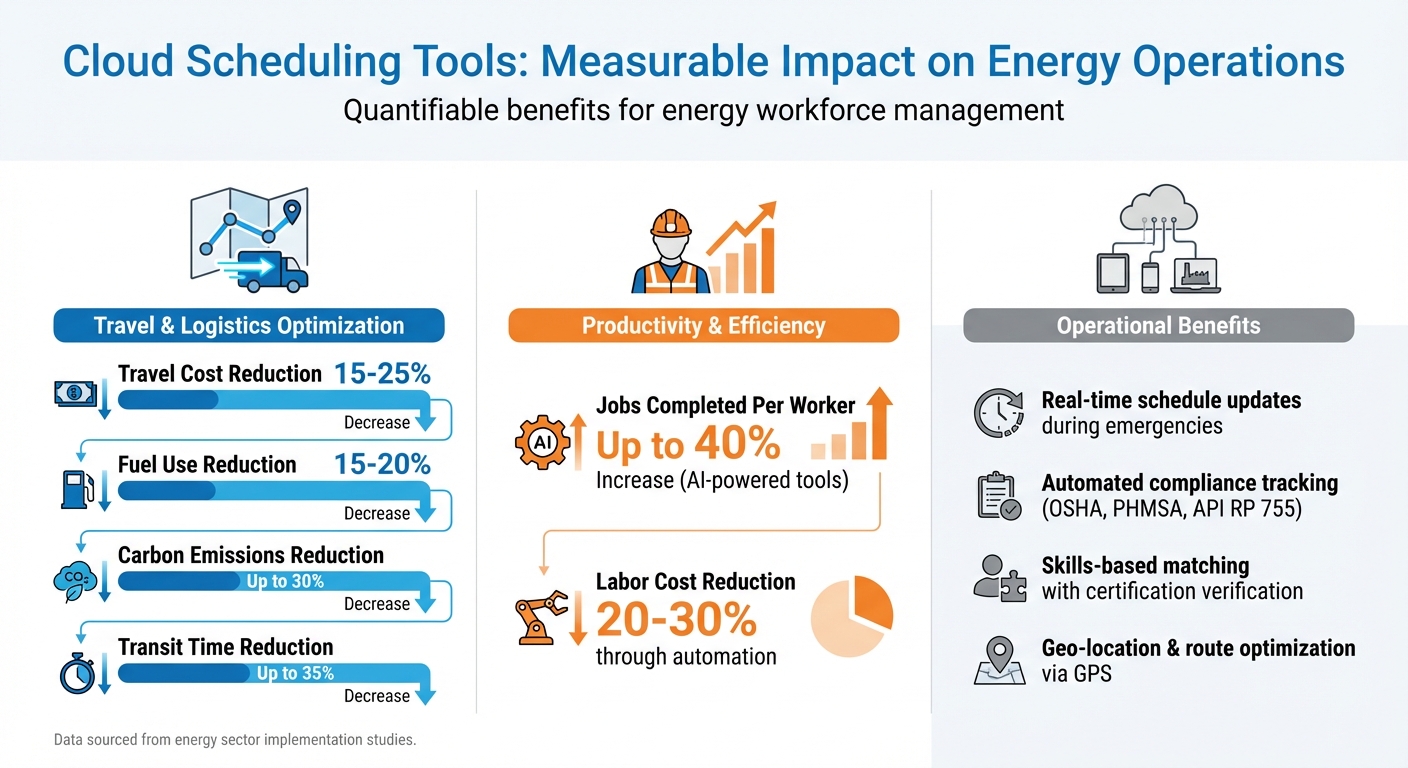
Cloud Scheduling Tools ROI: Cost Savings and Efficiency Gains in Energy Operations
Real-Time Scheduling and Adjustments
With cloud-based platforms, dispatchers can make immediate updates to schedules when unexpected challenges arise. Whether it’s an equipment failure, sudden weather changes, or emergency callouts, there’s no need to scramble with outdated manual processes. Managers can quickly reassign crews, tweak shifts, and notify workers directly through their mobile devices. This kind of instant flexibility is especially valuable during high-pressure situations, helping to minimize downtime and keep projects on track. Plus, this real-time capability integrates smoothly with features like skills verification and location tracking.
Skills-Based Matching and Certification Tracking
Assigning the right worker to the right job isn’t just about availability – it’s about ensuring they have the proper skills and certifications. Cloud scheduling tools automatically verify credentials such as OSHA 30, confined space entry, or high-voltage training, matching workers to tasks that align with their qualifications. These platforms also track certification expiration dates, sending alerts before they lapse. This reduces the risk of compliance issues that can disrupt operations. For energy companies managing large teams across multiple sites, this automation eliminates time-consuming manual checks and ensures every crew member meets the required standards before stepping onto a job site.
Geo-Location and Route Optimization
Cloud tools take logistics to the next level with GPS-enabled features. These systems calculate the most efficient routes, cutting down on travel time and fuel costs while ensuring workers can access job sites quickly. Companies using location-based scheduling report travel cost reductions of 15–25%, while fuel use drops by 15–20%. For utility crews responding to emergencies like power outages, route optimization pinpoints the fastest paths to affected areas, speeding up service restoration. AI-powered tools can boost the number of jobs completed per worker by as much as 40% and cut transit times by up to 35%. Geofencing adds another layer of efficiency by automating clock-ins and confirming that workers are at the correct job site. This real-time tracking also helps dispatchers monitor progress in remote or hazardous locations, ensuring safety protocols are followed. On top of these operational benefits, optimized routes contribute to sustainability efforts, reducing carbon emissions by up to 30%.
How to Implement Cloud Scheduling in Energy Operations
Assessing Your Needs and Selecting the Right Platform
Start by evaluating your specific operational requirements. Consider factors like the size of your workforce – whether it’s deskless employees, contractors, or specialists – and the geographic spread of your sites, such as remote oil fields, wind farms, or utility networks. Compliance needs also play a significant role, especially for utilities companies where tight appointment windows demand careful coordination of worker availability, travel time, and team capacity.
When selecting a platform, match its features to your operational priorities. For example, handling turnarounds or emergency response scenarios will require tools with skills-based matching and real-time adjustment capabilities. Some platforms include advanced map integrations with navigation tools for optimizing routes in hard-to-reach locations. Others focus on configurable protocols to address fatigue compliance or offer weather-adaptive scheduling that adjusts shifts for renewable energy projects based on changing conditions. Additionally, mobile-first platforms with offline functionality are crucial for field teams operating in areas with limited connectivity.
Once you’ve chosen a platform that aligns with these needs, the next step is preparing your team for a smooth implementation.
Onboarding and Training Your Team
To ensure a successful rollout, start by defining user roles. Managers should have different access levels compared to field workers, allowing for a clear hierarchy of permissions. Import existing data, such as schedules, certifications, and employee profiles, and configure rules for shifts, overtime, and compliance standards. Before deploying the system fully, pilot test it on a smaller project, like a pipeline repair, to identify and resolve any issues early.
An intuitive app interface – resembling the simplicity of social media platforms – can significantly boost adoption among field teams. Offer hands-on workshops, mobile app simulations, and vendor-led demos to familiarize your team with features like AI-powered forecasting. A phased rollout, beginning with supervisors, can help ease the transition. Continued engagement through in-app notifications and self-service portals ensures long-term success and keeps teams informed well after the initial training period.
Once your team is onboarded, focus on integrating the scheduling tool with your existing systems to maximize its potential.
Integrating Scheduling Tools with Existing Systems
Integrating your scheduling tool with payroll and operational systems unlocks the full benefits of real-time updates. Most modern cloud platforms use APIs to enable seamless data flow, ensuring that scheduling and compensation functions work hand in hand. For instance, some platforms can automatically capture time data and send it directly to payroll while also tracking compliance. Others streamline overtime equalization, aligning with pre-established agreements and safety training rotations. This level of integration not only eliminates duplicate data entry but also reduces errors that could delay paychecks or cause compliance issues.
Built-in dashboards allow you to track key metrics such as overtime, travel time, compliance, and schedule adherence. Companies that have adopted these integrations report labor cost reductions of 20–30% due to automation alone. In capital projects, connecting planning software with mobile management systems has shown to cut costs during unexpected events. Real-time syncing of field data ensures that everyone, from managers to field workers, operates with the most up-to-date information, minimizing errors and improving efficiency.
How ABLEMKR Supports Energy Workforce Scheduling
ABLEMKR takes the strengths of cloud scheduling and crafts solutions specifically for the energy sector. Its reach extends beyond construction to industries like oil & gas, mining, utilities, and heavy infrastructure. The platform addresses the unique demands of deploying skilled labor across U.S. energy corridors, where speed, compliance, and precision are non-negotiable.
Mobile-First Technology for Workforce Deployment
ABLEMKR uses a mobile-first design to streamline workforce deployment. It connects pre-vetted workers to job sites by factoring in certifications, safety training, availability, and geo-location. This means operators can quickly assemble and dispatch crews for urgent tasks like pipeline repairs, shutdowns, or mine development. The mobile interface simplifies the process by notifying workers, sharing site details, and confirming availability in real time.
Geo-location matching adds another layer of efficiency by assigning workers based on proximity. For energy projects that span multiple states or operate in remote areas, this feature significantly speeds up how fast teams can be deployed to critical sites.
Real-Time Visibility and Compliance Tracking
The platform provides employers with real-time visibility into every stage of workforce management – from job postings to project completion. It tracks deployment, location, and work progress, eliminating uncertainty in field operations. Integrated payroll ensures that work hours are accurately converted into pay without delays.
Compliance tracking is built into the system to meet strict regulatory requirements. Whether it’s managing certifications or adhering to fatigue protocols, ABLEMKR ensures compliance with standards set by OSHA, PHMSA, and API. This real-time oversight not only simplifies regulatory management but also enhances operational flexibility for both managers and workers.
Benefits for Employers and Workers
For employers, ABLEMKR reduces the administrative burden by centralizing hiring, onboarding, and compliance documentation. Real-time updates allow managers to adjust crew sizes or skill sets as project needs evolve, aligning with the platform’s goal of technology-driven efficiency.
Workers also see clear advantages. They gain access to flexible, well-paying opportunities with guaranteed on-time payments. Through the mobile app, they can browse jobs, filter by location or pay rate, and accept assignments that fit their schedules. This eliminates common frustrations like delayed payments or cumbersome hiring processes, making the entire experience smoother and more rewarding for the workforce.
Conclusion
Key Benefits Recap
Cloud-based scheduling tools are transforming how energy companies manage their workforce. These tools simplify operations by optimizing routes and automating repetitive tasks, which reduces downtime and administrative overhead. The result? Faster response times, improved accuracy, and more time for teams to focus on strategic priorities instead of tedious paperwork. Features like built-in rule engines ensure compliance with fatigue standards, PHMSA regulations, and API RP 755 protocols. Additionally, real-time worker status updates remove the guesswork, enabling managers to make quick decisions in the field while maintaining detailed audit trails for regulatory purposes.
Employees also gain significant advantages. Self-service options allow workers to manage their schedules, swap shifts, and explore new opportunities from any location, which contributes to higher job satisfaction and retention rates. On the financial side, companies see reduced overtime costs thanks to accurate forecasting, lower administrative expenses through integrated payroll systems, and savings from cutting unnecessary travel – benefiting both budgets and environmental goals. Over time, these efficiency improvements add up, turning cloud scheduling into more than just a tool – it becomes a strategic asset for energy operations.
Next Steps for Implementing Cloud Scheduling Tools
To integrate cloud scheduling into your energy operations effectively, start by evaluating your specific needs. Consider areas like emergency response, remote pipeline repairs, or managing crews for mine development. Identify current bottlenecks, such as gaps in compliance tracking or delays in crew mobilization, where these tools can make the biggest impact.
When choosing a platform, focus on features tailored to the energy sector. Look for tools offering skills-based matching, certification tracking, and geo-location capabilities to meet industry requirements. For example, ABLEMKR delivers mobile-first technology designed for demanding energy operations. It includes pre-vetted worker networks across U.S. energy corridors and built-in compliance features to meet regulatory standards. With real-time visibility and integrated payroll workflows, ABLEMKR reduces friction in workforce deployment, making it easier to mobilize teams for both planned and urgent projects.
FAQs
How do cloud scheduling tools work with spotty cell service in remote sites?
Cloud scheduling tools tackle unreliable cell service by enabling offline access and automatic data syncing. Take ABLEMKR, for instance – it lets workers update tasks even without an internet connection. Once the connection is back, all changes are synced seamlessly with the cloud. This keeps schedules, compliance records, and updates accurate, reducing interruptions at remote energy sites.
What data should be cleaned up before migrating schedules and certifications?
Before moving schedules and certifications to a new system, it’s crucial to tidy up your data. This means addressing issues like manual entry mistakes, outdated records, mismatched information across systems, and incomplete certification or safety details. Take the time to verify that worker profiles, certifications, safety records, and payroll data are accurate, up-to-date, and organized in one unified system. Doing so ensures smoother compliance management and scheduling once the migration is complete.
Which KPIs demonstrate ROI after implementing ABLEMKR?
ABLEMKR delivers measurable results through several key performance indicators. For instance, businesses can see cost savings of up to $14,000 per project, thanks to more efficient processes. The platform also cuts time-to-fill roles dramatically, reducing it from weeks to just hours or days. Additionally, users experience efficiency gains of over 70%, driven by features like automated scheduling, faster hiring workflows, and real-time cost tracking. These tools make workforce management smoother and more effective, leading to tangible improvements.


