
I plan crews around work that’s ready – not dates alone. For each phase, I match qualified workers to the scope, confirm site access, and check that materials, equipment, permits, and prior work are ready.
Here’s the approach I use:
- Plan demand: Map crew sizes, hours, and costs by trade with a rolling 4–6-week look-ahead.
- Clear arrivals: Verify worker records, task qualifications, and site-entry approval before dispatch.
- Control handoffs: Assign supervisors and document when each work area is ready for the next crew.
- Track changes: Review staffing weekly, approve reassignments, and confirm duties, schedules, pay, and hours with workers.
My rule: <u>matching a worker is not permission to deploy them</u>. Tools such as ABLEMKR can help coordinate assignments and records, but site leaders still approve access, supervision, and task assignments. Cross-trade staffing means coordinating crews – not asking people to work outside their qualifications.
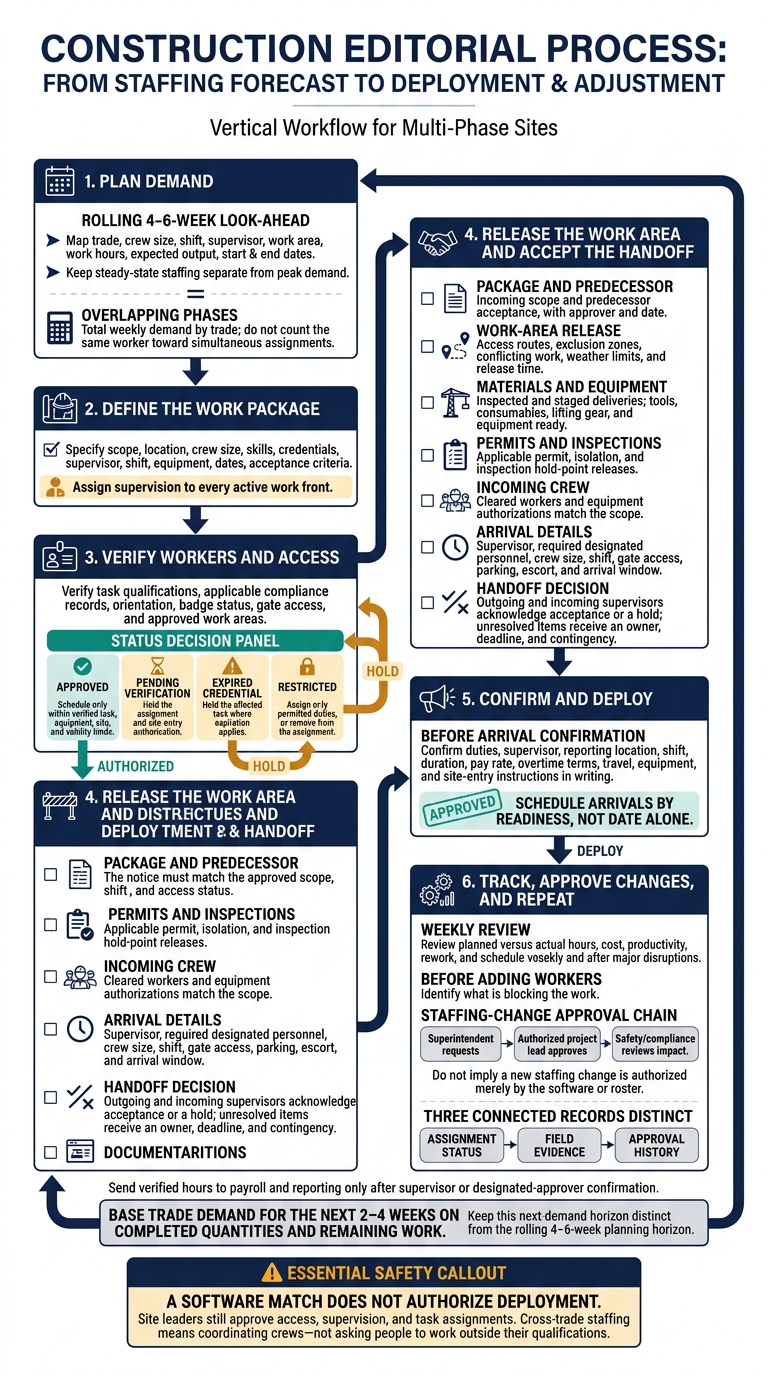
Cross-Trade Staffing: Plan, Clear, Deploy, Review
1. Plan Staffing by Phase and Trade
Map Crew Sizes and Hours to Each Phase
Break the master schedule into work packages, then create a weekly staffing sheet. Record each package’s trade, crew size, shift, supervisor, work area, work hours, expected output, and start and end dates. Maintain a rolling four- to six-week look-ahead, keeping steady-state staffing separate from peak demand.
Hypothetical phase-planning example: Planning figures only. Hours are total budgeted labor hours, not full-time assignments.
| Phase | Staffing needed | Crew size | Labor hours | Start | End | Peak-demand focus |
|---|---|---|---|---|---|---|
| Planning and engineering support | Foreperson, safety staff, quality inspector, administrative support | 4 | 160 | Jan. 5, 2026 | Jan. 23, 2026 | Increase administrative and quality support before field mobilization |
| Site preparation | Equipment operators, laborers, riggers, foreperson, safety staff | 10 | 1,600 | Feb. 2, 2026 | Feb. 20, 2026 | Peak equipment and earthwork demand |
| Structural work | Welders, operators, laborers, riggers, foreperson, safety staff, quality inspector | 15 | 3,600 | Mar. 2, 2026 | Apr. 3, 2026 | Peak welding, lifting, inspection, and supervision |
| Installation | Welders, operators, laborers, riggers, quality inspector | 12 | 2,880 | Apr. 6, 2026 | May 1, 2026 | Coordinate trades around lifts and equipment access |
| Testing | Welders as needed, operators, laborers, safety staff, quality inspector | 7 | 840 | May 4, 2026 | May 15, 2026 | Shift from production labor to testing and documentation |
| Commissioning | Operators, laborers, foreperson, safety staff, administrative support | 6 | 720 | May 18, 2026 | May 29, 2026 | Maintain coverage for punch-list and startup work |
| Handover | Foreperson, quality inspector, administrative support | 3 | 240 | June 1, 2026 | June 5, 2026 | Prioritize records, closeout, training, and acceptance |
Assign supervision to every active work front, including installation and testing. If phases overlap, total the weekly demand for each trade. Don’t count the same operator, inspector, or rigger toward two simultaneous assignments.
Use the phase totals to set weekly labor demand before assigning named workers.
Forecast Weekly Labor Needs and Costs
Estimate labor hours using quantity, unit labor rate, productivity, and schedule risk. Divide forecast paid hours by the expected weekly hours per worker, adjust for attendance, and round headcount up to the next whole worker. Track hours by phase and trade, then total them for the project.
The labor budget should cover straight-time wages, overtime premiums, payroll taxes, workers’ compensation, and benefits. Include per diem, lodging, mileage, travel time, and mobilization where applicable. Use project-specific rates, including prevailing-wage or union requirements.
Update the dashboard at least weekly. Use the same reporting periods for planned and actual figures so the comparison holds up.
Hypothetical cumulative dashboard: These supplied figures represent a multiweek reporting period, not one week. Costs are illustrative budget totals.
| Trade | Hours: planned / actual | Headcount: planned / actual | Cost: planned / actual | Variance: hours / cost | Corrective action |
|---|---|---|---|---|---|
| Welders | 1,280 / 1,360 | 4 / 4 | $57,600 / $61,200 | +80 / +$3,600 | Foreperson: review rework, weld access, and overtime |
| Equipment operators | 640 / 600 | 2 / 2 | $36,800 / $34,500 | −40 / −$2,300 | Superintendent: rebalance equipment time with the next work front |
| Laborers | 960 / 1,040 | 4 / 5 | $28,800 / $32,500 | +80 / +$3,700 | Foreperson: confirm material staging and reduce waiting time |
| Riggers | 480 / 520 | 2 / 2 | $26,400 / $28,600 | +40 / +$2,200 | Lift supervisor: recheck lift sequencing and crane availability |
Before mobilization, turn the forecast into named work packages with assigned owners.
Define Work Packages and Assign Responsibilities
Before recruiting, define each package’s scope, location, crew size, skills, credentials, supervisor, shift, equipment, dates, and acceptance criteria. Link every package to a trade, a supervisor, and a start date. For each trade, spell out the exact qualifications, equipment, and inspection requirements.
Be specific about laborer duties: material handling, housekeeping, spotter work, or installation support. Certification alone isn’t enough for rigging work; confirm that the rigger is qualified for the specific hoisting task.
Next, assign responsibility for each control point. Set up a RACI matrix before mobilization: Responsible performs, Accountable decides, Consulted advises, and Informed receives updates.
| Activity | Trade supervisor | Project manager | Safety lead | Quality inspector | Site access/admin | Workers |
|---|---|---|---|---|---|---|
| Confirm crew scope and daily work plan | R | A | C | C | I | I |
| Approve work-package changes | C | A/R | C | C | I | I |
| Verify qualifications and compliance records | C | A | C | I | R | C |
| Control site access and badging | I | A | C | I | R | C |
| Approve lift plan and rigging controls | R | A | C | I | I | C |
| Release welding or installation work after inspection | R | A | C | R | I | I |
| Conduct safety orientation and task briefing | R | A | R | I | C | R |
| Record hours, attendance, travel, and pay inputs | C | A | I | I | R | C |
| Close punch-list and handover records | R | A | C | R | R | C |
Add project-specific designated roles where the work and applicable regulations require them. These may include competent persons, qualified riggers, signal persons, confined-space attendants, or permit authorities. The matrix does not replace qualification or recordkeeping duties.
sbb-itb-aa28329
Weekly Work Planning Explained (How to Increase PPC and Reliability)
2. Clear Site Access and Schedule Crew Arrivals
Once crews are assigned by phase, clear site access before scheduling their arrival. A crew is ready to mobilize only when its work package, access, and compliance records match.
Verify Worker Qualifications and Access Records
Hold release until onboarding and site clearance are complete. Check identity, work authorization, payroll status, insurance, workers’ compensation, emergency contacts, and any owner- or project-specific screening. For U.S. employees, Form I-9 Section 1 is due no later than the first day of employment. Section 2 is generally due within three business days.
Keep orientation records, badge status, gate access, approved work areas, and lawful fit-for-duty restrictions in a controlled worker record. Apply role-based access and retention rules, with separate access controls for sensitive identity and medical records. Don’t store these details in group chats or open spreadsheets.
Check Compliance Status Before Scheduling
Check federal, state, local, owner, and project requirements separately before release. Safety/compliance approves eligibility, operations confirms work-area readiness, and workforce administration confirms clearance. For each decision, record the reviewer, time, scope, and supporting evidence.
| Status | Scheduling rule | Required action |
|---|---|---|
| Approved | Schedule only within verified task, equipment, site, and validity limits. | Confirm supervisor, shift, orientation, gate access, and arrival window. |
| Pending verification | Hold the assignment and site-entry authorization. | Obtain missing records and document authorized approval. |
| Expired credential | Hold the affected task where expiration applies. | Verify renewal, scope, and limitations before reapproval. |
| Restricted | Assign only permitted duties, or remove from the assignment. | Document limits and obtain supervisor acknowledgment. |
A renewal application or verbal assurance does not count as authorization unless the governing requirement allows it. If clearance won’t be complete before mobilization, substitute an approved worker and notify the supervisor. Follow applicable Form I-9 reverification rules when employment authorization requires reverification.
Use these approval rules to set each trade’s arrival window.
Use a Checklist for Trade Handoffs
Schedule arrivals by readiness, not date alone. Let clearance status guide which trade enters next, and adjust the sequence to fit the project. Laborers and operators prepare access and laydown areas. Riggers follow when lifting plans, crane access, and approved rigging are ready. Welders follow released fit-up and hot-work approvals.
Bring electrical and mechanical crews into released areas. Then align testing, inspection, commissioning, and closeout staff with completed systems and records. Work backward from the start time to allow for gate processing, orientation, and equipment checks. Add buffers for permits, inspections, deliveries, access changes, and rework.
After clearance, sequence handoffs as work areas become available.
- [ ] Package and predecessor: Record the project, area, incoming scope, planned start, and predecessor acceptance, including the approver and date.
- [ ] Work-area release: Confirm access routes, exclusion zones, conflicting work, weather limits, and release time.
- [ ] Materials and equipment: Check that deliveries are inspected and staged, and that tools, consumables, lifting gear, and equipment are ready.
- [ ] Permits and inspections: Schedule affected work after permit, isolation, and inspection hold-point releases.
- [ ] Incoming crew: Match cleared workers and equipment authorizations to the incoming scope.
- [ ] Arrival details: Communicate the supervisor, required designated personnel, crew size, shift, gate access, parking, escort, and arrival window.
- [ ] Handoff decision: Have outgoing and incoming supervisors acknowledge acceptance or a hold. Assign unresolved items an owner, deadline, and contingency.
3. Adjust Staffing and Track Assignments
Review Staffing Results and Approve Changes
Once crews mobilize, use actual results to adjust staffing by trade and phase. Review planned vs. actual staffing weekly and after major disruptions, including weather, inspection holds, shutdown acceleration, remote-equipment failure, or safety events. Compare hours, cost, productivity, rework, and schedule variance by phase, trade, and work package.
Set triggers before problems arise, such as a critical-path task slipping more than one shift. Then check what’s blocking the work before adding people. More welders won’t resolve an inspection hold.
Add qualified workers when shutdowns, critical-path delays, absenteeism, or remote equipment repairs call for more capacity. Reduce or redeploy crews when work packages finish, inspection holds block productive work, or materials or equipment aren’t available.
The superintendent must request each change, the authorized project lead must approve it, and safety or compliance must review its impact. Record the reason, affected workers, work package, effective dates, cost impact, and approver. Keep required supervision, safety roles, transportation, lodging, communications, first aid, and emergency-response coverage in place.
Match Workers and Track Deployment With ABLEMKR
Use worker matching tools to fill approved gaps faster. ABLEMKR supports verified worker profiles; matching by certifications, safety training, availability, and location; compliance tracking; and payroll workflows. A software match does not authorize deployment. Employers and site leaders must still verify project-specific qualifications, access, and supervisory approval.
Use real-time worker status to coordinate approved phase changes. Keep three records separate but connected:
- Assignment status: Where a worker is scheduled.
- Field evidence: Arrival, hours, and tasks.
- Approval history: Who authorized changes and cleared requirements.
Link each assignment to its supervisor, shift, work package, and cost code. Update reassignment, stand-down, completion, and payroll-approval status so an outdated roster doesn’t guide new dispatch decisions.
Confirm Duties, Schedules, and Pay With Workers
After approval, confirm the assignment in writing before the worker arrives. Include duties, supervisor, reporting location, shift, duration, pay rate, overtime terms, travel, equipment, and site-entry instructions. The notice must match the scope, shift, and access status approved for dispatch.
State who supplies tools and PPE, and confirm the worker’s availability before changing a location or shift. Communicate cancellations promptly, including how pay will be handled and instructions about availability.
Reconcile scheduled vs. actual start and end times, breaks, location, trade, supervisor approval, overtime, travel time, and any applicable per diem or equipment charges. Send verified hours to payroll and project reporting only after the supervisor or designated approver confirms them.
Conclusion: Keep Staffing Plans and Records Current
Use the weekly review to prepare for the next staffing cycle. End each week with an up-to-date phase-by-trade staffing plan, a controlled worker-status/access record, and a staffing change log. Base trade demand for the next 2–4 weeks on completed quantities and remaining work – not the original schedule.
Before the next phase starts, close out the current one with a clear, documented handoff. Confirm the approved work package, current qualifications, and cleared access. Record unfinished work, inspection results, open hazards, and the receiving supervisor’s responsibilities. Link every staffing change to actual progress and documented approval.
ABLEMKR can help with worker coordination, compliance tracking, and payroll workflows. Site leaders still control deployment safety: field conditions, permits, supervision, and task authorization remain their responsibility.
FAQs
How do I prioritize shared crews when phases overlap?
Start with a rolling 2–4-week look-ahead schedule that maps tasks, crew sizes, and trade dependencies. Use Gantt charts or a central digital platform to spot peak labor demand and scheduling conflicts across phases.
When critical tasks overlap, use automated workforce platforms to prioritize assignments and flag conflicts. Favor multiskilled workers who can move between tasks. Keep a reliable, pre-vetted core crew you can rebook across phases to maintain consistency and keep work moving.
When should I add workers instead of approving overtime?
Add workers when faster-than-expected ramp-ups, unexpected absences, or turnover threaten your timelines. Expanding your crew helps cover peak workloads, seasonal spikes, and shutdown windows without relying on excessive overtime, which can lead to fatigue and lower efficiency.
A mobile-first platform can deploy pre-vetted, qualified workers within 24–48 hours, helping keep work on track without long-term staffing commitments or the cost of excessive, unplanned overtime.
Can I reassign workers while awaiting an inspection?
Yes. Modern workforce management platforms let you move workers between sites with drag-and-drop tools in a central scheduling dashboard.
If an inspection passes early or staffing needs change, you can instantly notify workers of schedule updates or bring in more labor as needed. That keeps projects moving with less manual coordination.


