
OSHA has no single construction robotics standard. I start with 29 CFR Part 1926 and applicable State Plan rules, then match each robot’s tasks and hazards to the requirements that apply.
Before putting a robot to work, I check six things:
- Duties: Who controls the robot, work zone, maintenance, and restart?
- Hazards: Where could motion, loads, terrain, or stored energy hurt someone?
- Safeguards: Do guards, sensors, interlocks, and emergency stops work under site conditions?
- Training: Can each worker safely perform the tasks they’re assigned?
- Energy control: Are power and stored energy isolated and checked before servicing?
- Inspections and records: Have defects been fixed, repairs tested, and approvals documented?
My rule is simple: <u>paperwork alone does not make a robot safe</u>. I verify the equipment and site controls before startup – and stop work when a safety-critical check fails. An emergency stop is not energy isolation.
Robotic Safety Guarding: Protecting People & Productivity
sbb-itb-aa28329
Review Site Hazards and Machine Safeguards
Review the actual task and site before deployment. Build on the assigned project robotics safety owner’s duties by documenting the review and getting that owner’s approval. Include setup, teaching, fault recovery, cleaning, and maintenance. Repeat the review after relocation, programming or attachment changes, payload changes, equipment modifications, near misses, or major site changes.
Map Work Areas and Energy Hazards
Create a written JHA that lists each task, hazard, control, owner, verification method, and review date. Cover crushing, caught-between, struck-by, shear, cut, projectile, unexpected motion, blind spots, communication failures, and runaway motion hazards.
Identify batteries, electrical power, hydraulics, compressed systems, gravity, suspended loads, and other stored energy. Link each energy source to its isolation and verification steps. Use the JHA to set access limits, shutdown conditions, and verification steps.
Mark travel paths, reach radius, turning areas, pedestrian crossings, charging points, and recovery access. Check slopes, excavation edges, overhead lines, traffic, dust, weather, lighting, and signal-loss areas. Keep the JHA, map, test results, and change log up to date.
Choose Controls Before Deployment
Use the hierarchy of controls before relying on warnings, worker behavior, or PPE. Set separation distances and identify authorized personnel. Keep emergency stops visible and within reach. Prepare recovery procedures for communication loss, trapped workers, tipped or disabled equipment, battery incidents, and hydraulic failures.
Control level Construction robotics example Limitation Elimination Use remote operation to keep workers out of a trench during material placement. Recovery and maintenance can expose workers. Substitution Use a smaller, slower carrier in confined areas. Contact hazards remain. Engineering controls Install barriers, interlocked gates, and automatic stopping. Design and stopping performance need verification. Administrative controls Schedule robot operation separately from pedestrian work. Depends on compliance. PPE Select eye, hearing, head, and foot protection. Does not prevent crushing or unexpected motion.
Check Guards, Interlocks, and Sensors
Exclusion zones and emergency stops do not replace required guards. Prohibit bypassing safeguards. Reject guards that create sharp edges, pinch points, reach-through openings, or blocked escape routes.
Test safeguards under controlled conditions at commissioning, after relevant changes, and during scheduled inspections. Verify stopping performance at the actual speed, payload, slope, and surface. Treat collaborative operation as mode-specific: review tooling, force, reach, presence sensing, and every operating mode – not just autonomous production.
| Safeguard | Use case | Limitation | Verification check |
|---|---|---|---|
| Fixed guard | Prevent access to drives, cutting heads, or moving mechanisms. | Can complicate maintenance access. | Check mounting, coverage, reach-around gaps, and new hazards. |
| Interlocked gate | Control entry into a restricted area. | Misalignment or bypass can defeat protection. | Confirm that opening stops hazardous motion; closing must not restart motion. |
| Presence-sensing device | Detect approach where suitable. | Dust, glare, vibration, or blind spots can impair detection. | Check sensors and every entry direction; verify stopping before contact. |
| Pedestrian separation | Separate workers from robot travel. | Rerouted traffic or stored materials can break separation. | Inspect barriers, crossings, sight lines, and access before each shift and after layout changes. |
| Emergency stop | Stop hazardous motion during an emergency. | May leave stored energy and allow entry. | Test accessibility, stopping, deliberate reset, and restart prevention; isolate energy before servicing. |
Use these hazard and safeguard checks to set task-specific training before anyone enters the work zone. Record operator training and skills checks against the assigned tasks.
Train Workers and Keep Training Records
Turn the completed hazard review into task-specific training and written authorization. Prior credentials, trade experience, and general OSHA training do not replace equipment-specific and site-specific instruction. Under 29 CFR 1926.21, employers must teach workers to recognize and avoid unsafe conditions. Base each worker’s task permissions on the hazard review.
Match Training to Assigned Tasks
Set permissions by role – not a blanket “robotics trained” label. Installation crews handle assembly, anchoring, lifting, and startup. Integrators handle interfaces and safeguarding, while programmers handle operating modes and access controls. Operators handle controls, exclusion zones, alarms, and emergency stops. Inspectors check guards and sensors, and maintenance workers handle energy isolation and verification.
Require workers to demonstrate their assigned tasks, including safe shutdown and fault reporting. Authorization to operate does not grant permission to program, clear jams, or service equipment.
Reassess training before new assignments or changes to software, attachments, equipment, or site conditions. Address failed skills checks before allowing independent work. Retrain workers after assignment changes, when equipment or process changes introduce hazards, or when inspections reveal gaps in understanding or unsafe departures from procedures. Use these task limits to determine who may operate, program, inspect, or service the machine.
Record Training and Skills Checks
Keep required certification records separate from the robotics file. Lockout/tagout training certification must include the employee’s name and training dates. Fall-protection certification must include the worker’s identity, training dates, and the trainer’s or employer’s signature.
In the robotics file, record the employer, system/model, task, trainer, procedure version, practical-check result, restrictions, corrective actions, and retraining triggers. Attendance alone does not show that a worker can perform the task safely.
Give workers written task limits and reporting instructions that identify the supervisor, emergency contact, and stop-work process. Keep current authorization information accessible before assignments, and check it before any servicing, jam clearing, or energy-isolation work.
Use ABLEMKR to Support Workforce Records
Use ABLEMKR to track certifications, safety training, availability, location, and compliance documents. Verify these records before mobilization. Platform data alone does not authorize work or prove OSHA compliance.
Control Hazardous Energy Before Servicing
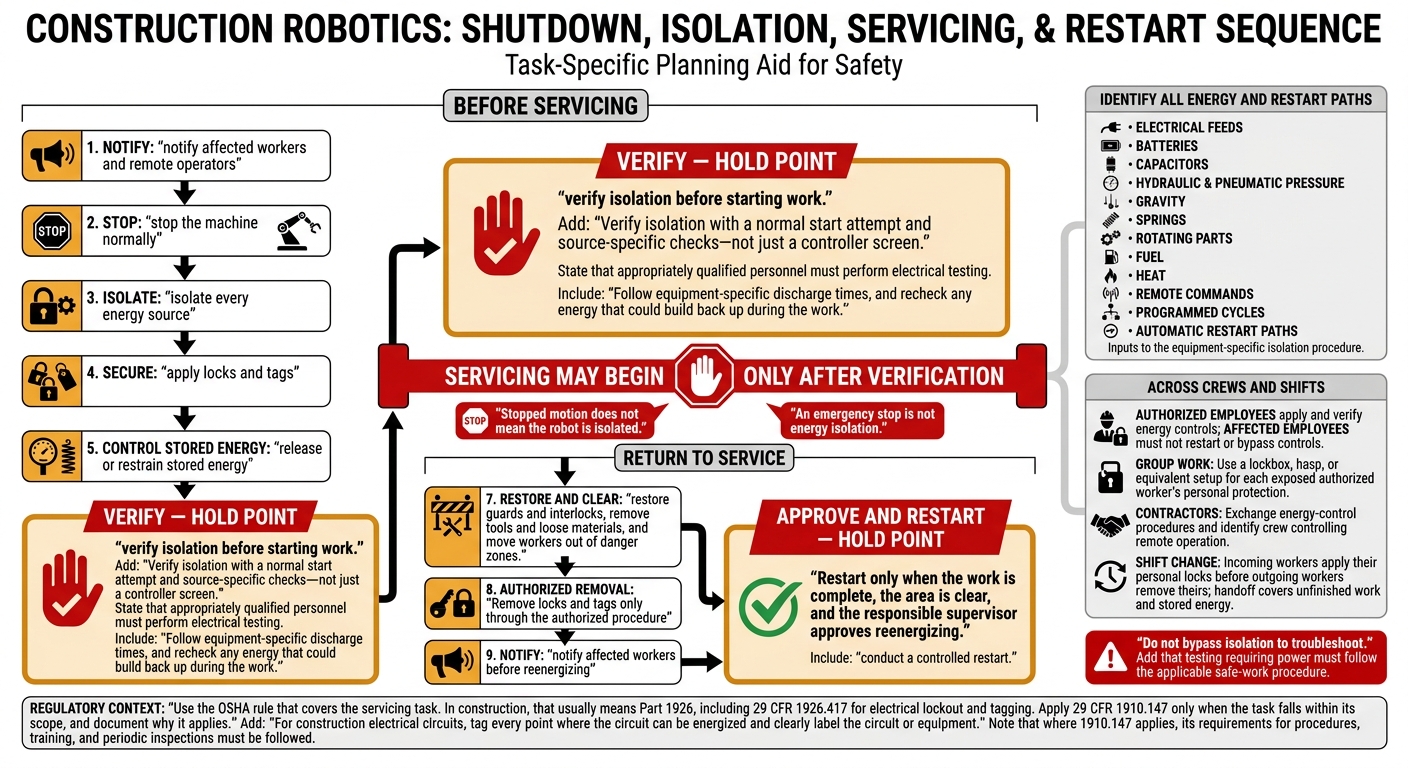
Construction Robotics: Energy Isolation and Safe Restart
Use the OSHA rule that covers the servicing task. In construction, that usually means Part 1926, including 29 CFR 1926.417 for electrical lockout and tagging. Apply 29 CFR 1910.147 only when the task falls within its scope, and document why it applies. Once workers are authorized, control the energy before anyone services the machine.
Identify and Isolate Energy Sources
Map every robot energy source, isolation point, stored-energy control, and verification method. Include electrical feeds, batteries, capacitors, hydraulic and pneumatic pressure, gravity, springs, rotating parts, fuel, and heat. Also identify remote commands, programmed cycles, and automatic restart paths.
Stopped motion does not mean the robot is isolated. It can still drop, move, or restart.
Follow Shutdown, Lockout, and Restart Steps
Put the shutdown sequence in writing: notify affected workers and remote operators, stop the machine normally, isolate every energy source, apply locks and tags, release or restrain stored energy, and verify isolation before starting work. For construction electrical circuits, tag every point where the circuit can be energized and clearly label the circuit or equipment.
Verify isolation with a normal start attempt and source-specific checks – not just a controller screen. Have appropriately qualified personnel perform electrical testing. Follow equipment-specific discharge times, and recheck any energy that could build back up during the work.
After servicing, restore guards and interlocks, remove tools and loose materials, and move workers out of danger zones. Remove locks and tags only through the authorized procedure, notify affected workers before reenergizing, and conduct a controlled restart. Do not bypass isolation to troubleshoot. Identify any testing that requires power and handle it through the applicable safe-work procedure. Restart only when the work is complete, the area is clear, and the responsible supervisor approves reenergizing.
Coordinate Energy Control Across Crews and Shifts
Authorized employees apply and verify energy controls. Affected employees must not restart equipment or bypass those controls. For group work, use a lockbox, hasp, or equivalent setup that gives each exposed authorized worker personal protection.
Exchange energy-control procedures between contractors, and identify which crew controls remote operation. At shift change, incoming workers must apply their personal locks before outgoing workers remove theirs. The handoff must cover unfinished work and stored energy. Where 1910.147 applies, follow its requirements for procedures, training, and periodic inspections.
Conclusion: Verify Safety Before Operation
Once the hazard review, training, and lockout steps are in place, release the robot only after the site passes a final safety check. Confirm that applicable OSHA requirements are met, safeguards are in place, and the energy-control plan is complete. A signed form isn’t enough. Inspect the equipment and test its safety functions.
Inspect Before Startup and After Changes
Perform the checks below before startup and at the start of each shift. Repeat affected checks after relocation, repairs, impact, software or firmware updates, attachment changes, or changes in site conditions.
Follow applicable OSHA rules, State Plan requirements, manufacturer schedules, and employer programs for inspection frequency and inspector qualifications. Run manufacturer-approved tests from outside the hazard zone.
Use this checklist as the final check before startup.
| Inspection point | Frequency or trigger | Responsible role | Acceptance criteria | Corrective action |
|---|---|---|---|---|
| Work-zone boundaries and exclusion areas | Each shift and after layout changes | Competent person or site supervisor | Boundaries are visible, stable, and cover the operating envelope | Stop deployment, reset barriers, and brief affected workers |
| Guards, covers, and physical barriers | Each shift and after damage or adjustment | Operator and qualified maintenance person | Guards are present and secure | Remove equipment from service until repaired |
| Interlocks and presence-sensing devices | Before operation and after maintenance or control changes | Qualified person using the manual | Approved tests confirm that the robot stops or won’t start when protection is interrupted | Lock out the equipment and investigate |
| Emergency stops | Before operation, after relocation, and after control-system work | Authorized operator or qualified tester | Every stop device is accessible, labeled, and stops motion as designed | Stop work and repair before restart |
| Controls and alarms | Each shift and after software or firmware changes | Authorized operator | Controls are labeled, respond correctly, and match the manual; alarms are audible or visible where required | Tag out and obtain qualified service |
| Communications and positioning | Each shift and after visibility, network, GPS, or radio changes | Operator and site supervisor | Required functions work throughout the operating area | Use a verified backup control method or suspend operation |
| Energy systems | Each shift and before servicing | Authorized employee or qualified maintenance person | No leaks, exposed conductors, damaged hoses, abnormal heat, or uncontrolled stored energy | Shut down, isolate energy, and repair |
| Tires, tracks, wheels, and travel components | Each shift and after transport or impact | Operator | Components are intact, properly inflated or tensioned, and suited to the terrain | Remove from service and correct the defect |
| Attachments and loads | Before each task and after a change | Operator and competent person | Attachments are secure, compatible, within rated capacity, and undamaged; lifting points are approved and identified | Lower or secure the load, isolate equipment, and replace or repair components |
| Terrain, excavations, slopes, overhead hazards, and utilities | Before startup and after site changes | Competent person or site supervisor | Surface, clearance, stability, and utility controls meet the task plan | Regrade, barricade, relocate, or prohibit operation |
| Traffic and worker interaction | Each shift and after site-plan changes | Site supervisor | Routes, spotter rules, exclusion zones, and right-of-way controls are understood | Suspend work and revise the traffic plan |
| Weather and visibility | Before operation and as conditions change | Operator and supervisor | Conditions stay within manufacturer and site-plan limits; sensors and visibility remain reliable | Pause work, add controls, or move the operation |
| Signs, markings, and PPE | Each shift and after layout changes | Supervisor | Warning signs are legible and workers use task-specific PPE | Replace signs, correct PPE deficiencies, and brief workers again |
| Worker authorization and access control | Each shift and when crews change | Supervisor or employer representative | Only trained, authorized personnel enter the risk zone or operate, maintain, or supervise the robot | Stop access and verify authorization |
Any failed check takes the robot out of service until the defect is fixed and the correction is verified.
Stop Unsafe Work and Verify Repairs
If a safety-critical item fails, the robot must not operate. Stop work when safeguards fail or are bypassed, the robot moves unexpectedly, someone enters without authorization, or communications or positioning needed for safe control are lost. Uncontrolled energy, unstable loads, and unsafe site conditions also require a stop. Stop the robot, warn nearby workers, restrict access, and notify the supervisor.
Before returning the robot to service, isolate energy and document the defect. Have an authorized person with any required qualifications identify and correct the cause.
Inspect the repaired system and run the manufacturer-approved functional test from outside the hazard zone, following applicable energy-control procedures. Before restart, verify that guards, interlocks, emergency stops, controls, communications, boundaries, and worker authorization are restored. Update the hazard review after unexpected movement or a near miss.
Keep a Project Robotics Safety File
Use the checklist below to confirm that records are current and each has a named owner. Follow applicable OSHA and State Plan requirements, manufacturer instructions, contract terms, and company policy for retention – not one blanket retention period.
Keep these records together for field review:
- [ ] Equipment manager: Manuals, operating limits, maintenance instructions, approved tests, and attachment information.
- [ ] Safety manager: Applicable OSHA and State Plan requirements, consensus standards, and company policies.
- [ ] Site supervisor or competent person: Hazard analyses, risk-zone drawings, traffic plans, utility clearances, and site controls.
- [ ] Project manager or safety lead: Emergency-stop, evacuation, rescue, communication-loss, and incident-response procedures.
- [ ] Employer or training coordinator: Training, skills checks, operator authorization, and refresher training.
- [ ] Controlling employer or equipment owner: Lockout/tagout procedures, authorized-employee lists, periodic inspections, and servicing records.
- [ ] Operator and reviewing supervisor: Pre-start, shift, post-change, and post-repair inspection logs; incidents, near misses, stop-work events, defects, repairs, test results, and verified corrective actions.
- [ ] Controlling site employer: Contractor coordination records showing control of the robot, work zone, isolation, and restart.
Supervisors and affected workers should have access to the file. Records don’t replace direct observation, functional testing, or workers’ authority to stop unsafe work. Do not authorize deployment while a safety-critical defect remains unresolved – even if the paperwork is complete.
FAQs
Who is responsible for robot safety on multi-contractor sites?
Robot safety is a shared responsibility, but construction employers hold overall responsibility for training personnel and managing project-specific hazards under OSHA guidelines.
Supervisors and safety managers assess risks, map robot paths, set exclusion zones, and plan the order of work to reduce risks. On-site robot operators load work instructions, set geofences, and monitor interactions between people and robots to keep them safe.
How do I determine which OSHA rules apply to robot servicing?
OSHA has no single robotics-specific standard. Start by identifying servicing hazards, including electrical, mechanical, and pneumatic energy, to determine which rules apply. Follow the relevant OSHA machinery standards, including 29 CFR 1910.147 (lockout/tagout) where applicable, to isolate hazardous energy sources.
Conduct a task-based risk assessment and use ANSI/RIA R15.06 guidance to build robot cell safety, guarding, and safe human-robot interaction into your maintenance procedures.
What if my robot’s manual lacks site-specific safety guidance?
You’re still responsible for meeting OSHA standards and industry best practices. Assess each task for pinch points, unexpected movements, and energy isolation needs. Update your Job Hazard Analysis (JHA) to reflect site conditions, including surrounding conditions, layout, and areas where people and robots interact.
Train operators on ANSI/RIA R15.06 standards for robot cell safety, including collaborative operating modes and how to avoid hazards.


