
Cloud technology has become a must-have in construction management, transforming how projects are planned, executed, and monitored. With features like real-time data sharing, centralized document control, and advanced collaboration tools, cloud platforms simplify complex workflows and reduce costly inefficiencies. Managers can access updated blueprints on-site, track labor costs instantly, and coordinate across multiple locations – all while ensuring data security and compliance.
Key takeaways:
- Cloud-based project management tools improve scheduling, budget tracking, and file organization.
- Data analysis features help forecast cash flow and prevent design errors.
- Collaboration tools ensure teams work with the latest updates, avoiding miscommunication.
- Workforce management platforms automate hiring, scheduling, and labor tracking.
- Security measures, like encryption and access controls, protect sensitive project data.
Mastering these cloud skills helps construction managers deliver projects efficiently, on time, and within budget.
Cloud Technology Impact on Construction Management: Key Statistics and Benefits
How to Use Autodesk for Construction Project Management
sbb-itb-aa28329
Core Cloud Skills for Construction Managers
Dive into cloud technology to ensure projects stay on schedule and within budget.
Using Cloud-Based Project Management Software
Cloud-based project management software offers tools like Gantt charts and CPM engines to streamline scheduling and optimize timelines. For infrastructure projects, linear planning features help map out work along highways, pipelines, or utility corridors with precision.
Centralized document control is another game-changer. These platforms gather RFIs, submittals, transmittals, and meeting minutes into one accessible location, eliminating the chaos of scattered files. Financial tools, such as automated cost estimation, digital takeoffs, and change order management, provide clarity and keep budgets transparent. With mobile-first interfaces, field crews can access updated drawings, upload photos, and log updates in real time.
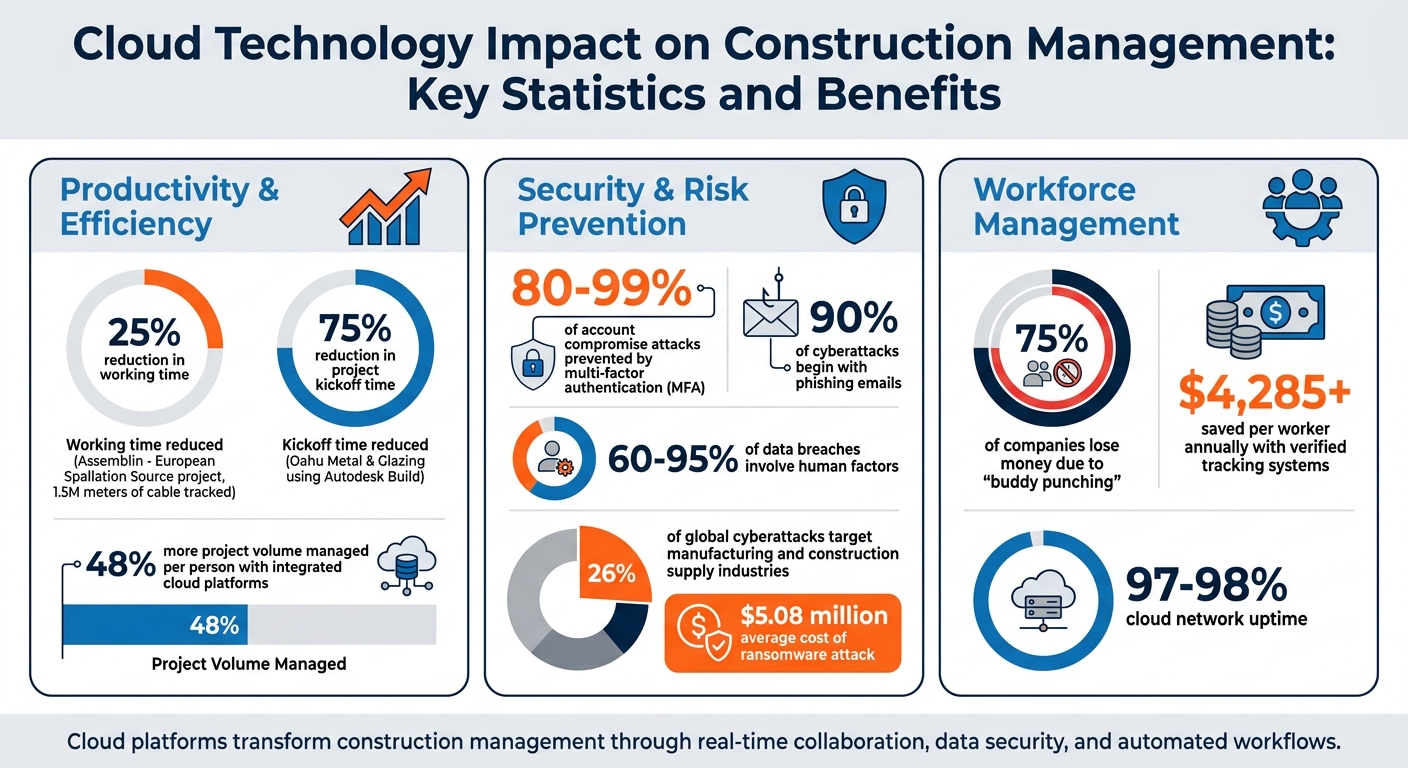
Real-world examples highlight the impact of these tools. In 2025, Assemblin used Fieldwire on the European Spallation Source project in Sweden to track the installation of 1.5 million meters (approximately 4.9 million feet) of cable, cutting working time by 25%. Similarly, Oahu Metal & Glazing achieved a 75% reduction in project kickoff time using Autodesk Build. Teams leveraging integrated cloud platforms can manage 48% more project volume per person.
These advancements lay the groundwork for real-time data analysis, which sharpens decision-making even further.
Analyzing Data for Better Decisions
Cloud platforms transform raw data into actionable insights, enhancing decision-making. When estimators adjust material costs or schedulers tweak timelines, the updates sync across the system instantly. This eliminates guesswork and prevents version control issues.
Pulling schedule data from tools like Primavera P6 or Microsoft Project allows for accurate cash flow forecasting. Meanwhile, field teams can use mobile markups to share immediate site performance updates. AI-powered features, such as Construction IQ, dive deeper by analyzing project data to predict safety risks and spot design clashes before they turn into costly problems.
Collaborating with Teams Using Cloud Platforms
Collaboration thrives when everyone has access to the same, up-to-date information. Cloud tools streamline communication by replacing endless calls and emails with centralized logs and "Ball in Court" tracking, which assigns clear accountability for tasks and approvals.
Cross-platform compatibility ensures all team members – no matter their device – can access project data. Version control features track every document change, so everyone works with the latest updates. As Jim Johnson, Owner of BOOSTurIT, points out:
"Cloud and digital technology often includes features such as version control, which tracks changes to documents and makes sure that everyone is working with the most up-to-date information".
This level of reliability allows construction managers to coordinate across multiple sites without the fear of system failures disrupting critical decisions.
Cloud Security and Compliance Best Practices
As real-time access and collaboration enhance project efficiency, strong security measures are critical to keeping sensitive data protected and compliant. Construction managers rely on cloud platforms to store blueprints, financial records, and client information, making it essential to safeguard this data while keeping projects on schedule.
Protecting Data Privacy and Controlling Access
Data encryption is a key defense mechanism. Cloud providers encrypt files both in storage and during transmission, protecting them from unauthorized access. However, encryption alone isn’t enough – controlling who can access the data is just as important.
Identity and Access Management (IAM) systems help limit access to only the information team members need for their roles. For example, a field supervisor doesn’t need to see contract negotiations, and an estimator has no reason to access daily safety logs. Adding multi-factor authentication (MFA) provides an extra layer of security – requiring a second verification step, like an SMS code or authenticator app. This simple measure can prevent 80% to 99% of account compromise attacks.
Human error remains a major vulnerability in cybersecurity. Around 90% of cyberattacks begin with phishing emails, and human factors contribute to 60% to 95% of data breaches. Lliam Holmes, CEO of MIS Solutions, highlights the importance of proactive measures:
"The top 20 percent of cybersecurity best practices can potentially mitigate 80 percent of risks associated with vulnerabilities and threats".
To reduce these risks, regular training helps teams recognize phishing attempts and social engineering tactics.
The consequences of neglecting cybersecurity are severe. In October 2023, Simpson Manufacturing, a U.S.-based building materials company, had to shut down its IT systems after a cyberattack. Similarly, Builders Mutual faced a class-action lawsuit in 2023 after a data breach exposed sensitive employee and policyholder information. These examples highlight the dangers, especially since the manufacturing and construction supply industries account for 26% of global cyberattacks. With the average ransomware attack costing $5.08 million, it’s clear that cybersecurity is not optional.
Monitoring Compliance Requirements
While controlling data access protects sensitive information, automated compliance monitoring ensures projects meet regulatory standards. Cloud platforms simplify compliance by automating tracking, reducing the need for manual paperwork. Alerts can notify managers of upcoming safety inspections or training deadlines, and digital checklists help track regulatory requirements in real time.
Centralized storage also creates a clear audit trail for every document update, which is invaluable during regulatory reviews or legal disputes. Additionally, cloud systems can generate compliance reports automatically, reducing the risk of errors from manual data entry. These tools are essential for construction managers who use cloud technology to streamline operations and maintain compliance.
Using Cloud Tools to Manage Your Workforce
Cloud platforms bring workforce management into focus by centralizing labor data, offering real-time insights into crew availability, certifications, and assignments. These tools not only streamline project timelines and budgets but also enhance how teams are deployed and held accountable. Gone are the days of juggling phone calls and spreadsheets, especially when managing projects across multiple sites or responding to urgent staffing needs. Let’s dive into how automating hiring processes and tracking labor data can maximize the potential of cloud tools for workforce management.
Automating Hiring and Scheduling
Traditional hiring methods can slow down projects before they even kick off. Platforms like ABLEMKR simplify the process by automating hiring: they match pre-vetted workers to job sites based on their certifications and location, while also handling onboarding and compliance. For managers facing last-minute staffing demands, these tools can mobilize crews within hours instead of days.
Many platforms also integrate seamlessly with scheduling tools like Primavera P6 or Microsoft Project, ensuring schedules are accessible to all stakeholders and minimizing delays. Eric Davenport, CEO of Cert-In Software Systems, highlights how automated communication features can streamline operations:
"The ability to share documents seamlessly among team members speeds up processes like invoicing and change-order management, accelerating project timelines and enhancing efficiency."
Once hiring is automated, the next step is ensuring labor tracking is both accurate and actionable.
Tracking Labor Data in Real Time
Real-time labor tracking isn’t just about knowing who’s on-site – it’s about connecting hours worked to cost codes and productivity metrics. Tools like Raken allow teams to log daily reports, time, and production data directly from the field. Some advanced systems even use AI-powered facial recognition or geofencing to verify worker presence and combat time theft. According to the American Payroll Association, 75% of companies lose money due to "buddy punching". Verified tracking systems can save over $4,285 per worker annually by addressing this issue.
Integrating labor data with payroll workflows eliminates manual errors and provides real-time updates on worker activity. Managers can use cloud dashboards to monitor key metrics like the "Productivity Factor" (Earned Hours ÷ Actual Hours) and the "Burn Rate." For example, if the labor burn rate reaches 60% but production lags at 45%, managers can act immediately to prevent budget overruns. And with most cloud networks boasting uptime of over 97–98%, decisions can be made based on up-to-date, reliable data instead of outdated reports. Mastering these tools is essential for achieving the efficiencies discussed in earlier sections.
Conclusion
Mastering cloud-based project management is key to keeping projects on schedule and within budget. The strategies discussed here – like centralizing data, enabling real-time collaboration, automating workforce management, and tracking labor metrics – are the backbone of modern construction management. Each of these skills works together: secure data management enhances decision-making, mobile accessibility keeps field teams connected, and smoother hiring processes reduce common delays.
The construction industry is changing fast, and staying up-to-date is more important than ever. With new tools and features constantly emerging, managers who adapt quickly gain a significant edge. Whether it’s using version control to avoid miscommunication or updating project drawings directly from the field with mobile tools, staying current ensures you’re ready for the challenges ahead.
As automation simplifies hiring and labor tracking, dedicated platforms become essential. Tools like ABLEMKR make managing the workforce easier by handling complex tasks like matching pre-vetted workers based on certifications and location, integrating payroll systems, and ensuring compliance. When hiring, scheduling, and labor tracking are managed seamlessly in the cloud, project managers can focus on delivering high-quality work safely and efficiently.
The cloud-based skills you invest in today will shape your ability to succeed in the future. Start building your expertise now, and watch as your projects – and your career – reach new heights.
FAQs
Which cloud skills should I learn first as a construction manager?
As a construction manager, it’s smart to prioritize cloud onboarding skills. Begin by analyzing your current workflows to understand where improvements are needed. Next, choose a cloud platform that aligns with your project requirements. Finally, get comfortable using mobile apps that offer offline functionality. These steps can enhance collaboration on-site and streamline project management.
How do I keep project data secure when teams access it from the field?
To keep project data safe while working in the field, it’s important to stick to solid cloud security practices. Start by centralizing all data on a cloud platform and ensure there’s a clear onboarding process in place – this helps with both teamwork and security.
Make use of mobile apps that offer offline access, implement role-based permissions to control who can do what, and require strong authentication methods for added protection. Additionally, keep an eye on access logs on a regular basis. This helps spot any unauthorized activity and ensures your data stays intact.
What workforce metrics should I track in the cloud to control labor costs?
To keep labor costs in check using cloud tools, focus on tracking essential metrics like labor hours worked compared to scheduled hours. This can reveal whether your workforce is being underused or overstretched. Keep an eye on time tracking, attendance, safety compliance, and certifications to ensure payroll accuracy, avoid unnecessary delays, and stay on top of project needs. These insights empower construction managers to make informed decisions, allocate resources more effectively, and boost project profitability.


