
If you track worker certifications in paper files, spreadsheets, and email, you will miss things. And on U.S. energy jobs, one expired card can delay staffing, fail an audit, or put the wrong worker on a high-risk task.
Here’s the short version: I’d treat cloud-based certification tracking as a way to put all records in one system, tie each worker to the right role, site, and task rules, and use automatic alerts, mobile checks, and audit logs to stop lapses before they turn into jobsite problems. The article’s core path is simple: map requirements, clean records, set alert rules, test at one site, then use live status in daily crew decisions.
What stands out most to me:
- Manual tracking fails when rules vary by site and task
- Expired credentials are often missed without 90/60/30-day alerts
- Date errors like
03/07/2026can lead to bad compliance calls - Supervisors need mobile access for field checks during shutdowns and repairs
- Pilot rollouts help fix rule gaps before full deployment
- Live certification status can shape staffing in minutes, not hours
A cloud platform does not fix bad data by itself. I’d first build a role-by-role requirement list, audit every record, standardize names and dates, and only then move files into the system. Once that is done, the platform can support crew assignment, contractor checks, incident response, and audit prep with less manual chasing.
| Area | Manual tracking | Cloud tracking |
|---|---|---|
| Record storage | Split across binders, files, and inboxes | One shared system |
| Expiration control | Easy to miss lapses | Automatic alerts and status flags |
| Field access | Slow or office-bound | Phone-based lookup, sometimes offline |
| Audit prep | Days of searching | Time-stamped logs and exports |
| Staffing decisions | Based on partial info | Based on live clearance status |
If I had to sum up the article in one line, it would be this: cloud platforms turn certification records from static paperwork into a live staffing control for energy and infrastructure work.
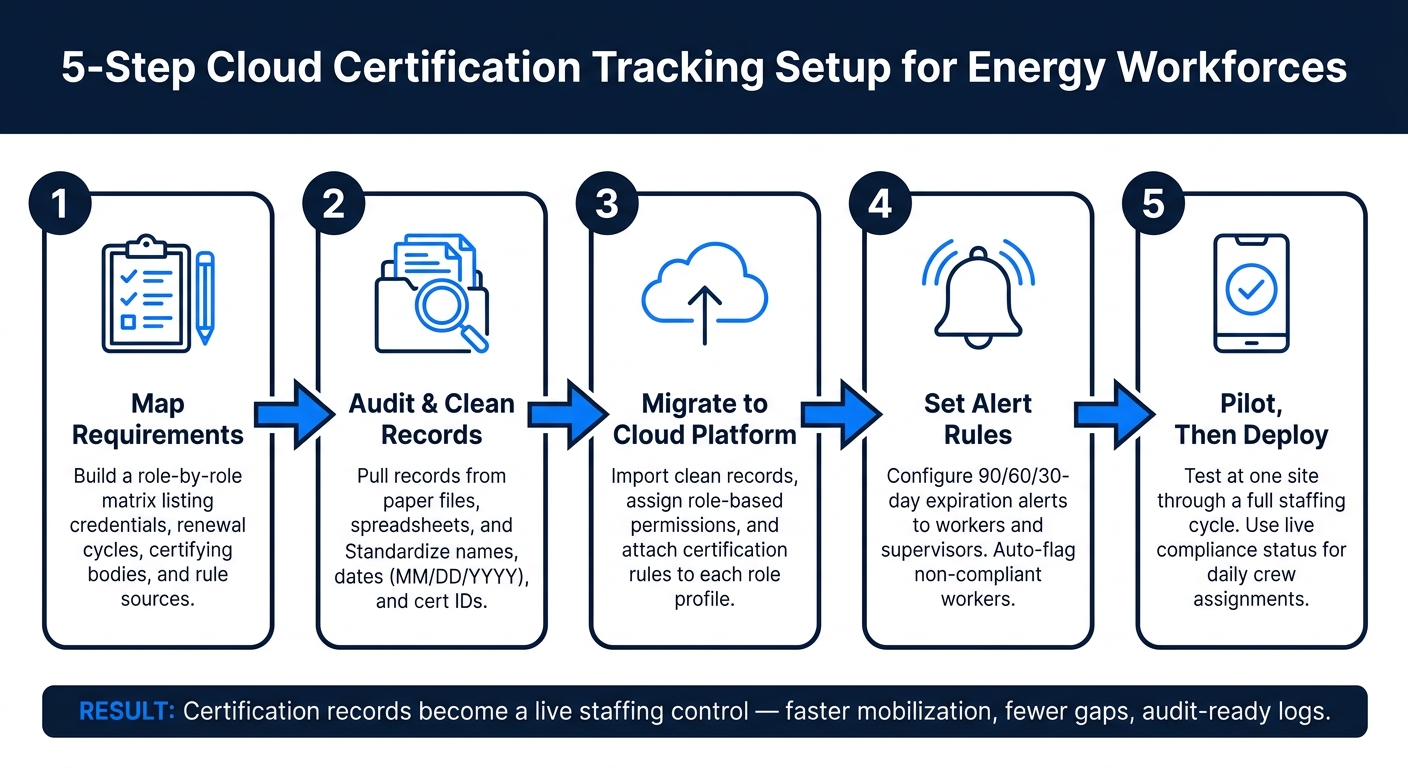
5-Step Cloud Certification Tracking Setup for Energy Workforces
Step 1: Map Certification Requirements Before Setting Up a Cloud Workflow
Before you touch any cloud platform, get clear on which certifications your workforce needs. If you skip that step, the system will just copy messy records into a new place.
List Roles, Required Certifications, Renewal Cycles, and Governing Standards
Start with a simple internal matrix. Use one row per role, then add columns for the credential, renewal cycle, certifying body, and rule source.
That last column matters more than it might seem. A requirement might come from Federal OSHA, a state licensing board, a utility client, or your own internal policy. If you know where the rule comes from, it’s much easier to decide what to update first when standards shift.
The point isn’t just storing certificates. It’s making sure the right worker is cleared for the right job, site, and task. In practice, this matrix becomes the rule set for the cloud workflow you build next.
Here’s what a few rows might look like for a transmission line project:
| Job Title | Required Credential | Renewal Cycle | Certifying Body | Rule Source |
|---|---|---|---|---|
| Journeyman Lineman | Fall protection training | Annual | OSHA-authorized provider | Federal OSHA |
| Refinery Welder | AWS or API qualification test | Recertified when procedures change | American Welding Society or API | Industry standard and client HSE |
| Site Safety Manager | OSHA 30 | Varies by policy | OSHA training provider | Internal policy and site standards |
| Electrical Worker | NFPA 70E training | Every 3 years | NFPA | State licensing requirements |
Audit Current Records Across Paper Files, Spreadsheets, and Shared Drives
Once the matrix is done, the next step is simple: figure out what you actually have on file.
Pull records from every source you use now: paper files, spreadsheets, shared drives, and email. For each worker, collect at least the following details: full name, credential type, provider, certificate ID, issue date, expiration date, current site assignment, and supervisor contact.
This is usually where the mess shows up. The most common issues are:
- Missing expiration dates
- Missing certificate IDs
- Mixed date formats
Date formats are a big one. A spreadsheet copied from an international project might use DD/MM/YYYY in one tab and MM/DD/YYYY in another. That can make someone look expired when they aren’t, or current when they shouldn’t be. Standardize every date to MM/DD/YYYY before migration. For example, 03/07/2026 should clearly mean March 7, 2026, not July 3.
Use the same approach for credential names. Pick one naming format and stick with it. For instance, use OSHA 10 Construction every time instead of swapping between loose labels for the same course. Clean naming makes records easier to sort, check, and trust.
Before you import anything, make sure each file includes a name, credential type, provider, issue date, expiration date, site assignment, and supervisor contact. If a record is incomplete, don’t move it over yet. Bad input leads to bad automation.
Once the records are clean, the cloud platform can handle alerts, permissions, and compliance checks on its own.
sbb-itb-aa28329
Step 2: Use Core Cloud Features to Centralize Records and Automate Compliance
Once records are in the system, the next move is simple: keep every certification current in one place and turn those records into live compliance rules.
Set Up Role-Based Assignments, Expiration Alerts, and Audit Logs
Start by building role profiles inside the platform. Then attach the required certifications to each role. That way, when a pipeline welder is added to a project, the system already knows they need current API qualifications, HAZWOPER training, and site-specific orientation.
If any of those items are missing or expired, the worker is flagged as non-compliant automatically.
For expiration alerts, set reminders for 90, 60, and 30 days before a credential expires. Send those alerts to both the worker and their supervisor. At 30 days out, mark the worker as restricted. If the credential lapses, block assignment. This gives your team time to schedule refresher training without scrambling at the last minute or pulling someone off a job with no warning.
You also want every profile change logged automatically. That includes a new cert upload, an expiration update, or a role reassignment. Each log entry should include a timestamp and user ID. That record becomes your audit trail for OSHA, MSHA, or client audits.
If the platform supports exportable reports in CSV or PDF format, you can pull filtered history by site, date range, or certification type in minutes instead of days.
Use Mobile Access and Dashboards for Field Verification
Supervisors working on remote pipeline spreads, rural substations, or open-pit mine sites usually can’t walk back to a main office just to check a spreadsheet. A mobile platform fixes that. Supervisors can search by name or badge ID and view current, expiring, or lapsed status right from a phone.
Some platforms also support QR code scanning, which lets a worker pull up their own profile at the gate. And when connectivity is spotty, cached data can keep the last sync available offline.
Dashboard views should match the team using them. Safety managers need overdue safety training and site-level compliance scores. HR teams care about onboarding progress and headcount by status. Project managers want to know whether a crew is fully qualified before a scheduled start date.
A well-set dashboard puts that information front and center. No tab-hopping. No waiting on coordinators to send updates.
These tools cut out the delays and blind spots that come with manual tracking.
Cloud Tracking vs. Manual Tracking: A Side-by-Side Comparison
| Category | Cloud Tracking | Manual Tracking |
|---|---|---|
| Accuracy | Standardized records reduce duplicates and errors | Inconsistent formats and outdated spreadsheets create conflicting data |
| Speed | Instant search and updates | Requires phone calls, emails, or physical file checks |
| Scalability | Handles large, multi-site workforces without added admin overhead | Becomes unmanageable as projects and contractors multiply |
| Audit readiness | Exportable, timestamped logs ready on demand | Incomplete trails; often takes days to prepare for audits |
| Visibility | Shared dashboards for safety, HR, and project teams | Fragmented; risk can stay hidden until an incident occurs |
| Admin burden | Alerts and reporting run automatically | Significant manual effort to chase paperwork and update records |
Step 3: Roll Out the Platform and Apply It to Daily Staffing Decisions
Roll out the platform in stages. Import records, assign permissions, and test the workflow at one site before you expand. When centralized records and alerts are already in place, staffing teams can use live compliance data as they make day-to-day decisions. That means compliance data stops sitting on the sidelines and starts shaping who gets assigned, when, and where.
Start with a Pilot Site and Define User Permissions
Start with one controlled site, like a refinery turnaround, a power plant outage, or a single wind farm. Run the pilot through one full staffing cycle. Then compare the results to your baseline: staffing lead times, expired-cert incidents, and audit findings.
Permissions should follow a least-privilege model from day one. Each team needs a clear lane:
- HSE managers manage compliance rules and exceptions.
- HR and compliance teams upload and fix records and approve documentation.
- Site supervisors can view worker clearance status and request assignments, but they should not edit certification dates.
- Workers get mobile access to check their status and upload supporting documents.
That separation matters. It helps prevent unauthorized changes and keeps the audit trail clean.
Set success criteria before the pilot begins. Think in plain terms: faster shift staffing, zero assignments tied to expired credentials, and complete proof on every record. Then use what you learn from the pilot to fine-tune assignment rules before moving to more sites.
Use Real-Time Status to Assign Qualified Workers Faster
Once the platform is live, supervisors can use real-time status to assign qualified workers faster. Schedulers can filter for qualified, available workers in seconds.
This becomes even more important when time is tight. During storm response, dispatch teams can see which lineworkers have current NFPA 70E electrical safety credentials and where those workers are located. That cuts response time and lowers risk. For remote pipeline repairs, supervisors can confirm that traveling crews have current H2S and confined space training before they leave the staging yard.
ABLEMKR brings together live certification status, availability, and geolocation, so operators can mobilize pre-vetted crews for shutdowns and remote repairs.
Common Use Cases and the Cloud Features That Support Them
Some field situations deliver more value than others when live certification data is part of the workflow. The table below connects common use cases to the cloud features that make them work.
| Use Case | Key Objective | Supporting Cloud Features |
|---|---|---|
| Crew assignment | Build fully qualified daily crews | Centralized cert records; role-based filters; real-time status dashboards; mobile worker profiles |
| Shutdown mobilization | Staff large turnarounds quickly | Availability and geolocation matching; automated cert checks; alerting on gaps |
| Contractor verification | Confirm third-party workers meet site requirements | Mobile ID/QR scanning; certification validation rules; entry logs; contractor dashboards |
| Incident response | Dispatch specialized, compliant crews fast | Real-time search by skill/cert; geolocation; mobile access; automated block for expired certs |
| Audit prep | Produce complete, defensible compliance records | Audit logs; version history; centralized documentation; exportable reports and analytics |
From there, the same workflow carries into each shift, mobilization, and emergency callout.
Conclusion: Where ABLEMKR Fits Into Certification-Driven Workforce Deployment

When requirements, records, alerts, and staffing rules are tied together, certification tracking becomes part of day-to-day crew deployment instead of a separate admin job. One step feeds the next. With that setup in place, compliance shifts from reactive to proactive. That is where ABLEMKR fits: it turns certification data into an active staffing rule.
ABLEMKR supports that workflow by keeping worker credentials, training, and availability in one mobile system. Operators can filter by credential type, availability, and geo-location to mobilize pre-vetted crews fast, whether they are planning a scheduled shutdown or dealing with an unplanned emergency repair.
That change matters most in high-risk energy work, where sending an unqualified crew to confined space entry, energized work, or remote pipeline repair creates a safety and compliance problem, not just a paperwork issue.
Key Takeaways for Employers and Workers
For employers, the result is faster crew mobilization, fewer certification gaps, and audit-ready records that are ready for inspection.
For workers, the upside is simple: easier renewal tracking and better visibility into jobs that match their credentials.
FAQs
How do I clean certification data before migration?
Before you move certification data to a cloud platform, clean it up first. Standardize your records. If one file shows a date as 03/15/2024 and another says March 15, 2024, you’re setting yourself up for mix-ups during audits and compliance reviews.
It also helps to pull scattered documents into one digital system. That includes email attachments, scanned paperwork, and physical files sitting in folders or filing cabinets. When records live in five different places, finding the right document can turn into a headache.
Platforms like ABLEMKR help by supporting standardized, verified worker profiles. That makes audit trails more accurate, more consistent, and much easier to access when you need them.
What alerts should I set for expiring certifications?
Set automated alerts for 90, 60, and 30 days before a certification expires. That window gives teams time to book any needed training or testing without a last-minute scramble.
These alerts keep both workers and managers aware of what’s coming up, help maintain continuous compliance, and lower the risk of project delays by making sure only qualified personnel are assigned to mission-critical work.
How can supervisors verify certifications in the field?
Supervisors can check certifications on the spot with mobile-first platforms like ABLEMKR. Instead of flipping through paper records, they get live access to centralized digital worker profiles.
With a mobile app, supervisors can confirm qualifications through QR codes or NFC and see color-coded dashboards that show compliance status. That makes it easier to make sure only workers with current, verified certifications get onto job sites.


