
If a worker’s records are wrong or out of date, that worker may not get on site. In this market, buyers are moving past simple file storage and toward tools that show who is cleared, who is expiring, and who is blocked before a crew is sent out.
I see three main patterns in this study:
- One worker record in one place
- Automatic renewal alerts and follow-up
- Project-specific checks before site access
The pressure is easy to understand. The article points to 3,113 OSHA training-related citations in FY2025 and more than $7.2 million in penalties in U.S. construction. It also notes that 82% of training-related citations in construction involved training that happened but was not documented the right way. So the issue is often not the training itself. It is the record.
For buyers, that means the tool has to do more than hold PDFs. It needs to help teams answer simple questions fast:
- Is this worker cleared today?
- Is anything expiring soon?
- Does this person meet the rules for this site?
- Can a supervisor check and update this from a phone?
- Is there a clean record for audit review?
The article also shows where teams get stuck: missing expiration dates, duplicate worker profiles, files spread across email and spreadsheets, and status that does not match dispatch or scheduling tools. When that happens, crews get delayed, gate access turns into a manual check, and audit prep gets messy.
Here’s the short version:
| What buyers want | What gets in the way |
|---|---|
| Fast clearance checks | Missing or out-of-date renewal data |
| One status view across jobs | Duplicate profiles and split records |
| Audit-ready history | Missing proof or no record trail |
| Fewer crew delays | Alerts sent too late or to one person only |
| Site-level worker matching | Status not tied to scheduling or access |
My takeaway is simple: the market is moving to dispatch-ready compliance. The tools buyers care about most are the ones that keep records current, flag renewal risk early, and show whether a worker can go to a given site before the truck rolls.
That is the core point of the article, and the rest of the piece backs it up with buyer needs, record failures, and renewal workflow trends.
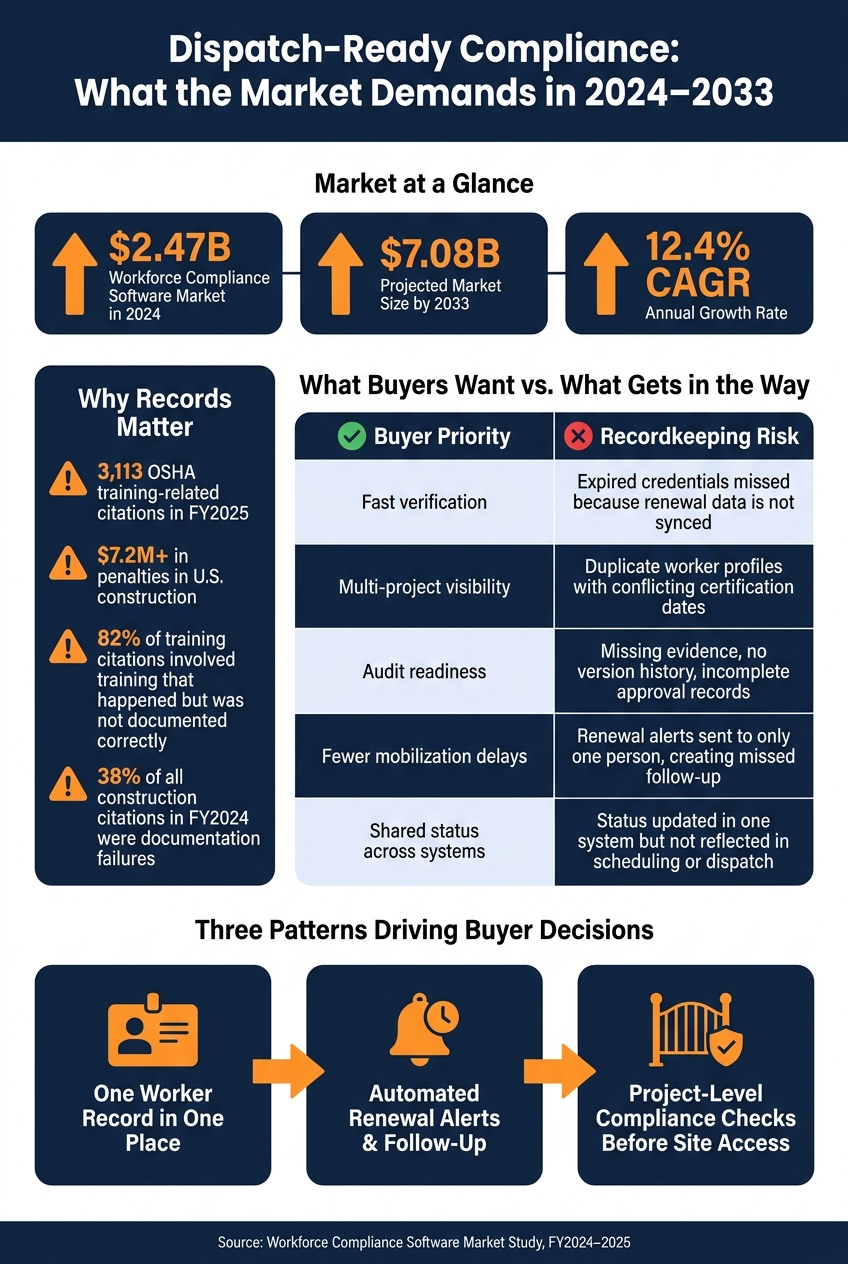
Certification Tracking: What Buyers Want vs. What Gets in the Way
Core Features Buyers Consistently Expect
The workforce compliance software market hit about $2.47 billion in 2024 and is on track to reach $7.08 billion by 2033, with a 12.4% CAGR as rules get harder to manage and companies move from manual tracking to automated systems. That growth points to a clear shift in buyer behavior: teams don’t want a tool that just stores records. They want software that helps them decide, fast, who can go where and when.
Across construction and energy, the pattern is pretty clear: buyers want one record, one readiness view, and one workflow for field deployment.
Centralized Records and Compliance Visibility
The starting point is a single system of record for every worker credential. That includes certifications, licenses, training, expiration dates, and supporting documents, all stored in one searchable place.
Buyers also expect dashboards that let them sort records by worker, trade, project, certification type, or expiration window. In plain terms, they need to see who is:
- fully cleared
- conditionally compliant
- expired
They also want role-based access, so recruiters, safety managers, and site supervisors each see what they need without digging through the same screens.
But storing records in one place is only the first step. Buyers also need to know whether those records meet the rules of a specific jobsite.
Project-Level Readiness and Field Access Controls
One feature buyers put a lot of weight on is project-level readiness checking. The software needs to compare a worker’s current credentials against the exact rules for a given site or client before dispatch.
That matters because a worker can be cleared for one site and blocked from another. If the system can’t make that distinction, operations teams are left guessing. Tools that do surface it give crews a much cleaner go/no-go signal before mobilization.
Some platforms go a step further and connect compliance status to site access controls. If a credential is invalid, the worker can’t check in.
And that check can’t wait until after the crew is already on the road.
Mobile Workflows and Workforce Deployment
Field teams aren’t sitting at desks, so buyers consistently put mobile access near the top of the list. Supervisors and workers need to upload documents, review credential status, and confirm site readiness from a phone at the jobsite.
This becomes even more important during shift changes or last-minute crew swaps, when there’s no time to wait on a back-office update.
Many mobile-first tools now pull together certification status, availability, and location data so supervisors can mobilize qualified crews straight from the field. That kind of visibility only works when records stay current, which is usually where renewal gaps and data-quality issues start to show.
sbb-itb-aa28329
Where Certification Records Commonly Break Down
Even teams that care about compliance run into trouble at the record level. The problem often isn’t that training never happened. It’s that the proof is messy, missing pieces, or stored in the wrong place.
An OSHA enforcement analysis found that 82% of training-related citations in construction involved employers who did conduct training but failed to document it properly. In FY2024, documentation failures made up 38% of all construction citations, including missing training records, incomplete inspection logs, and outdated assessments. That’s the pattern in plain English: the work gets done, but the paperwork falls apart.
Missing Dates, Duplicate Records, and Identity Mismatches
The most common record errors are simple on the surface, but they cause real headaches: missing expiration dates, incomplete fields, duplicate worker profiles, and certifications attached to the wrong person.
If an expiration date is missing, no one can confirm whether the credential is still current. That means someone has to stop and check it by hand. On a jobsite, that small pause can stall a whole crew at the gate.
Duplicate profiles tend to show up when the same worker gets entered more than once under slightly different names, employee IDs, or jobsite records. Then things start going sideways. A manager might mark someone noncompliant even though the right credential exists under another profile. Or an expired certification slips by because the current file is tied to the wrong record.
Research on identity governance shows that duplicate accounts and credentials weaken identity assurance, which leads to fragmented access records and shaky audit trails.
No Single Source of Truth Across Projects
The risk gets bigger across multiple jobsites. Old files, email attachments, and local spreadsheets create clashing versions of the same credential. At that point, there’s no clear source of truth.
And when that happens, project managers can’t answer basic readiness questions fast enough:
- Who is cleared for mobilization this week?
- Whose renewal is due before the shutdown?
That leads to delayed mobilization, badge access problems, and more friction during audits.
Teams in construction and energy are moving scattered spreadsheets and paper files into centralized certification platforms to cut manual follow-up and make audits less painful. The pattern is consistent: decentralized tracking works for a while, then starts to break as headcount and subcontractor volume grow.
Beyond cleanup, buyers want tools that keep records current without all the chasing. That’s why renewal tracking and automated follow-up matter next.
Renewal Workflow Trends and Buyer Priorities
From Spreadsheet Follow-Up to Automated Renewal Queues
Once teams pull records into one place, the next step is keeping them up to date. That’s where renewal queues come in.
Automated renewal queues bring expiring credentials to the surface by date, worker, project, or risk level. Some tools send alerts by email, SMS, and WhatsApp as far as 90 days before expiration. That lead time matters. It gives teams a shot to fix the issue before a worker is pulled off the schedule.
The workflow is usually pretty simple: flag the expiration, notify the worker and supervisor, collect updated proof, verify it, and timestamp the prior record. That last part is easy to overlook, but it matters a lot. Teams don’t just need to know what’s valid today. They also need to show what was valid on a given date.
Instead of checking every record by hand, teams focus on exceptions through status dashboards. That usually means:
- Expiring records
- Expired records
- Incomplete records
- Inconsistent records
That shift keeps daily review tied to the records most likely to affect field readiness.
What Operations, Safety, and HR Teams Are Optimizing For
This workflow only holds up if it serves the pain points each team deals with.
Operations is trying to avoid last-minute labor gaps. Safety is trying to keep unqualified workers out of restricted work areas. HR is trying to spend less time chasing documents in circles.
For that to work, renewal status has to stay visible across all active projects at the same time. A worker may be active across several sites or business units, and different client or site rules can change where that person can work. The same worker might be cleared for one job and blocked from another.
Platforms that connect certification status, safety training, availability, and location to dispatch make this much easier to act on. When teams can see worker status in real time, they can catch readiness problems before those problems turn into delays.
Buyer Needs vs. Recordkeeping Risks
Those team goals line up with a short list of recordkeeping risks that come up again and again:
| Buyer Priority | Recordkeeping Risk That Undermines It |
|---|---|
| Fast verification | Expired credentials missed because renewal data is not synced across systems |
| Multi-project visibility | Duplicate worker profiles with conflicting certification dates |
| Audit readiness | Missing evidence, no version history, or incomplete approval records |
| Fewer last-minute mobilization delays | Renewal alerts sent to only one person, creating a missed follow-up |
| Shared status across systems | Status updated in one system but not reflected in scheduling or dispatch |
Clean, synced records are the starting point for any renewal workflow. If a renewal queue is built on duplicate profiles, missing expiration dates, or messy data, it doesn’t fix the problem. It just moves the mess faster.
Buyers that are further along tend to spend on two things at once: the workflow tools and the data cleanup behind them. Renewal automation works best when the records underneath it are clean and current.
Conclusion: Key Takeaways From the Market
The Clearest Pattern Across the Study
The clearest takeaway from those record and renewal breakdowns is simple: the market is moving from basic document storage to dispatch-ready compliance – knowing who can work on which site, and when.
Three patterns show up again and again: a single worker record, automated renewal workflows, and project-level compliance gating.
That change matters because documentation gaps still create enforcement risk. Paper records fall apart when teams can’t produce them within the 4-hour response window.
One clear example is ABLEMKR. It reflects this shift by matching pre-vetted workers to jobs based on certification, training, availability, and location. In plain terms, compliance becomes part of crew mobilization, not a separate checklist someone reviews later.
The market rewards tools that keep records current, automate renewals, and show project readiness in real time.
FAQs
What makes a compliance tool dispatch-ready?
A compliance tool is dispatch-ready when it pairs real-time verification with workforce deployment. Put simply, it helps make sure only qualified, pre-vetted workers are sent to the right job sites.
In most cases, that means the tool includes:
- Mobile credential checks
- Automated matching based on certifications and location
- Centralized monitoring
- Renewal alerts
- Access controls that block uncertified workers
The payoff is pretty simple: less manual back-and-forth, fewer delays, and faster crew mobilization for urgent jobs or planned work.
How do duplicate worker records create site access problems?
Duplicate worker records make it harder to verify qualifications the right way. When the same person shows up more than once in the system, trained workers can get flagged as non-compliant by mistake.
In manual or split-up systems, that kind of error can block qualified people from entering a jobsite. And once that happens, the problems stack up fast: project delays, labor gaps, and crews standing around with nothing to do. A centralized system cuts down on those issues by giving teams real-time data, so access checks are faster and more accurate.
What should teams automate first in renewal tracking?
Start by moving records out of spreadsheets and paper files and into one digital platform. From there, set up automated expiration tracking with alerts for managers and workers 90, 60, 30, and 7 days before credentials expire.
That simple shift cuts down on manual follow-up and lightens the admin load. It also helps teams avoid project delays by keeping renewals on track instead of scrambling at the last minute. And with mobile document uploads, collecting and updating records in real time becomes a lot easier.


