
When payroll, staffing, and time data stay separate, project costs show up too late. In this case, I’d sum it up like this: one energy company tied worker records, field timecards, payroll, and billing into one flow so managers could see labor cost by project, crew, and location before payroll closed.
For a company serving more than 3 million customers with 4,400+ employees, that change fixed a few basic problems at once: too much hand entry, too many mismatched records, and slow cost reporting. The main lesson is simple: if you want clean labor reporting on energy jobs, you need shared worker IDs, project codes, pay rates, approval steps, and mobile time data from the start.
Here’s the short version:
- The problem: labor data lived in separate tools, so reporting lagged and errors piled up.
- The fix: connect sourcing, onboarding, time entry, payroll, and invoicing with the same record fields.
- What made it work: standard data rules, GPS-based mobile timecards, digital approvals, and record checks before payroll.
- The result: lower exception volume, faster billing, and earlier budget-versus-actual views during the pay cycle.
- The takeaway: project teams should set code structures and worker compliance rules before mobilization, not after.
What stands out to me is that this wasn’t about adding more software. It was about making sure each approved hour moved through the same record path, from worker assignment to payroll to cost reporting. That’s what gave managers a usable view of labor spend while work was still in motion.
Project setup: how staffing, time, and payroll data were connected
The company tied sourcing, onboarding, time capture, payroll, and invoicing into a single workflow. That chain held together because each system used the same core identifiers.
Source systems and handoff points
The process started with sourcing. Job requirements such as trade type, certifications, pay rate, and project timeline were posted and matched against verified worker profiles. After selection, each worker moved into onboarding, where compliance and certification status were checked and logged.
From there, verified profiles moved into mobile time capture. Field crews logged hours and location data straight from job sites, including remote areas with limited connectivity. Supervisors reviewed and approved those entries in real time. After approval, hours moved into payroll and project cost reports without manual re-entry. That gave teams a view of labor costs by project before billing closed.
Shared data fields that made reporting possible
Those handoffs only worked well because every system relied on the same core record fields. Worker ID, project code, job title, pay rate, shift, hours worked, GPS location, and approval status had to line up across sourcing, time capture, and payroll. When those fields didn’t match, cost reports needed manual fixes.
Standardized fields reduced reconciliation work for billing and cost reporting. The table below shows how each process step connected to the key fields that carried cost data through the workflow:
| Process Step | Key Data Fields |
|---|---|
| Sourcing | Worker ID, Job Title, Certifications |
| Onboarding | Worker Profile, Compliance Status |
| Time Capture | Project Code, Hours, GPS Location |
| Payroll/Invoicing | Pay Rate, Shift, Approval Status, Billable Hours |
Where ABLEMKR fit into the workflow
In this setup, ABLEMKR handled sourcing, onboarding, and mobile time capture for mobile field crews. Job postings on the platform listed exact certification requirements, which filtered the worker pool automatically before anyone was assigned to a site. Most postings received qualified applicants within 24–48 hours.
ABLEMKR GPS timecards recorded hours, location, and project code in one step, then sent that data into payroll. By linking worker status, time data, and project cost reporting, the company cut down on manual reconciliation before payroll and billing runs.
sbb-itb-aa28329
Implementation: the process changes that made labor cost data usable
Once the systems were connected, the team still had one big job left: clean up the data before payroll closed. A working data flow is one thing. Data you can trust is another.
Data standardization and validation rules
The team standardized entries at the project budget and cost-center level, then sent one validated record into accounting and payroll. That gave both teams a single version to work from, instead of sorting through mismatched entries later.
A centralized database also made reporting much easier. The company could track usage, not just cost, which helped with deployment decisions. On top of that, automated hours balancing cut reconciliation work and matched paid hours to approved hours worked.
Approval workflow and reporting cadence
Once records were standardized, reports moved straight into accounting and payroll. That removed double entry and made hours-worked versus hours-billed comparisons much simpler.
With cleaner inputs and faster approvals, the company could finally see labor cost impact in the results that followed.
Results: what changed after payroll and staffing were linked
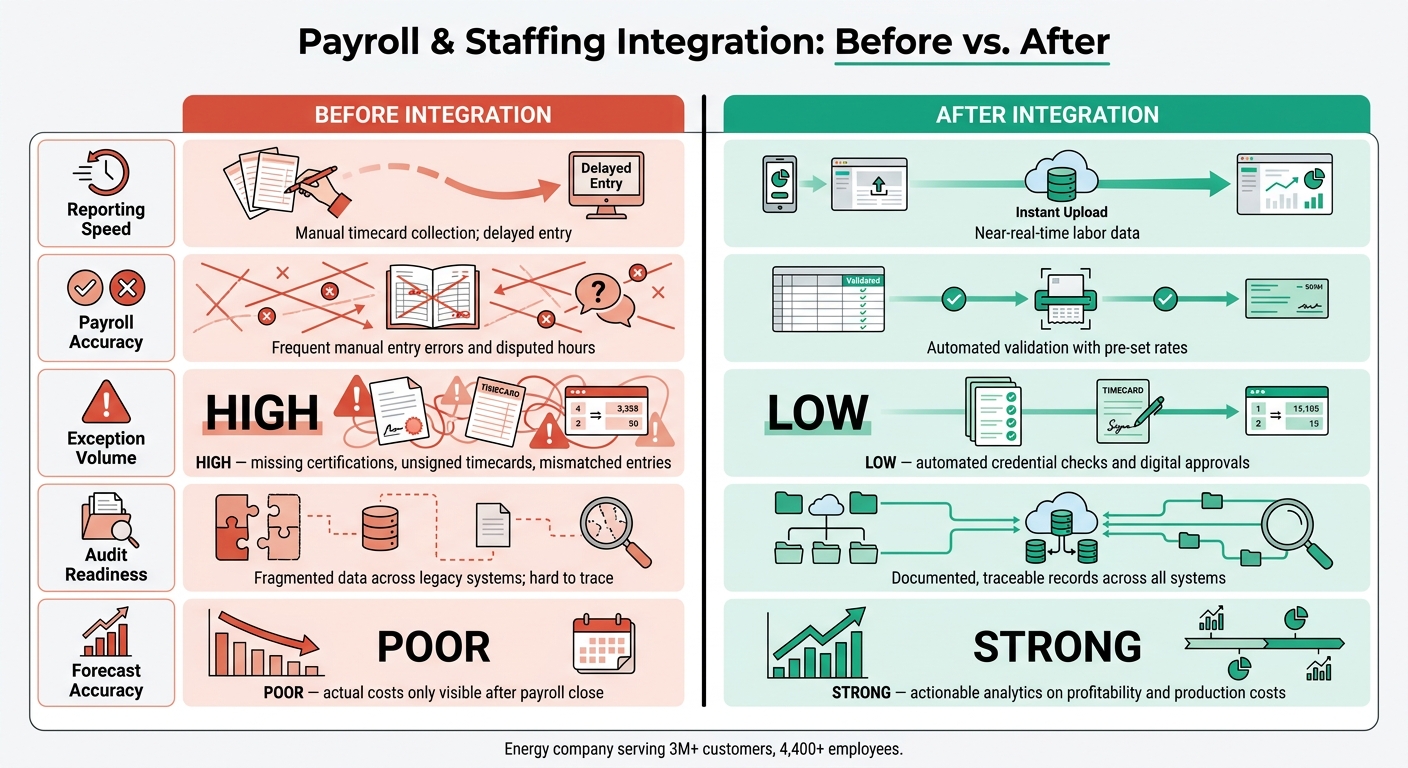
Payroll & Staffing Integration: Before vs. After Workflow Results
Clearer labor cost visibility by project and crew
Once records were checked and synced, the upside showed up fast in reporting. Before integration, project managers often saw labor costs too late to do much with them. After payroll and staffing were linked, teams could track hours, overtime, and loaded labor cost by project, crew, and location. That gave them earlier budget-versus-actual comparisons during the pay cycle instead of waiting until payroll had already closed.
Fewer payroll exceptions and faster billing
Cleaner inputs meant fewer fixes later and a faster payroll close. That also helped invoicing move sooner. When hours are checked against approved records before payroll closes, disputed entries tend to fall. The team spent less time chasing missing signatures or sorting out mismatched timecard entries.
ABLEMKR’s integrated payroll workflows and GPS-verified timecards support the same result for energy project teams. Pre-set rates cut billing confusion and help invoices go out faster.
Before-and-after workflow comparison
The shift was easiest to see in five workflow areas. Here’s where the day-to-day process changed most:
| Workflow Area | Pre-Integration | Post-Integration |
|---|---|---|
| Reporting Speed | Manual timecard collection; delayed entry | Near-real-time labor data |
| Payroll Accuracy | Frequent manual entry errors and disputed hours | Automated validation with pre-set rates |
| Exception Volume | High; missing certifications, unsigned timecards, mismatched entries | Low; automated credential checks and digital approvals |
| Audit Readiness | Fragmented data across legacy systems; hard to trace | Documented, traceable records across systems |
| Forecast Accuracy | Poor; actual costs only visible after payroll close | Strong; actionable analytics on profitability and production costs |
Conclusion: lessons for energy staffing and payroll operations
These results lead to three practical lessons for energy project teams. When staffing, time capture, payroll, and reporting sit in separate systems, projects feel it fast. Billing slows down, payroll mistakes creep in, and labor costs get harder to track. Bring those pieces together early, and you create one clean path from field hours to finance.
What other project teams can apply
Set project codes and credential rules before mobilization. That way, every approved hour begins with a worker record that meets the rules. GPS-verified mobile timecards also help shrink the gap between field work and payroll. The payoff is straightforward: less manual cleanup and faster visibility into labor costs for operations teams.
When those records are clean, payroll can help operations before close instead of fixing problems after the fact. A project manager at an energy services company said ABLEMKR simplified timecards and payroll during a multi-week pipeline shutdown.
Payroll data also shouldn’t sit only in finance. Near-real-time access gives field managers a chance to act while labor costs are still changing. For energy projects, the move is simple: connect staffing, time, and payroll before work starts, not after it ends.
FAQs
Why is shared worker and project data important?
Shared worker and project data cuts manual work and error-prone tasks like duplicate entry. That saves time and lowers admin costs. It also gives teams a single source of truth for real-time visibility into worker status, project costs, and compliance.
It also helps keep certifications current and automatically verified, which can cut delays and reduce safety risks. On top of that, it supports accurate, on-time payroll and better crew scheduling when urgent project needs come up.
How do GPS-based mobile timecards improve payroll accuracy?
GPS-based mobile timecards help clean up payroll by logging hours right at the job site. That cuts down on manual entry mistakes and missed details that often happen with paper logs or typed-in records.
When time data syncs with payroll and accounting systems in real time, teams can avoid errors from handwritten notes and transcription. ABLEMKR uses this setup to calculate worker hours, project-specific pay rates, and overtime with more accuracy. That means fewer disputes and better control over project budgets.
What should teams set up before a project starts?
Before a project starts, teams should take a hard look at the systems they already use. That means auditing current tools, getting rid of isolated data sources, and moving the information they still need into an integrated cloud platform.
They should also digitize credentialing records and confirm that certifications, safety training, and background checks are up to date. From there, it helps to connect HR, payroll, and project management systems through APIs so data can move between them without manual handoffs.
ABLEMKR supports this work by centralizing verified worker profiles and automating compliance tracking.


